Simulationsbedingungen konfigurieren
R2026aNachdem Sie in Simulink® ein Modell erstellt haben, können Sie die Simulation so konfigurieren, dass sie schnell und genau abläuft, ohne strukturelle Änderungen am Modell vornehmen zu müssen.
Der erste Schritt bei der Konfiguration Ihrer Simulation besteht darin, einen Solver auszuwählen. Standardmäßig wird mit Simulink automatisch ein Solver mit variablen Schritten ausgewählt. Im Fensterbereich Solver des Dialogfelds Konfigurationsparameter können Sie eine Feinabstimmung der Solver-Optionen vornehmen oder einen anderen Solver auswählen.
Manchmal kann sich eine Simulation verlangsamen oder ins Stocken geraten. Verwenden Sie den Solver Profiler, um Engpässe in der Simulation zu identifizieren und Empfehlungen zur Verbesserung der Leistung des Solvers zu erhalten.
Einen interaktiven Kurs zur Optimierung der Simulationsleistung, den Sie im Selbststudium absolvieren können, finden Sie unter Optimieren der Simulationsleistung.
Funktionen
Werkzeuge
Modelleinstellungen
Themen
Solver in Simulink
- Choose a Solver
Choose a solver based on the dynamics of the model.
- Compare Solvers
A dynamic system is simulated by computing its states at successive time steps over a specified time span, using information provided by the model. - Zero-Crossing Detection
Learn how zero-crossing events affect simulation. - Choose Jacobian Method for Implicit Solvers
Implicit solvers, such asode15s, compute the solver Jacobian as a step in the solver algorithm. - Use Local Solvers in Referenced Models
Learn how local solvers work and how to configure a local solver. - Zero-Crossing Detection with Fixed-Step Simulation
Learn how zero-crossing detection affects fixed-step simulation.
Zustands-Informationen
- Save Block States and Simulation Operating Points
Learn how you can use state information logged from simulation and decide how to log states and operating points. - Speed Up Simulation Workflows by Using Model Operating Points
Run sets of simulations faster by simulating from initial operating points.
Solver Profiler
- Examine Model Dynamics Using Solver Profiler
Identify factors affecting model simulation using the Solver Profiler. - Solver Resets
The Solver Profiler logs events that cause the solver to reset its parameters because solver resets do incur computational cost. - Zero-Crossing Events
Detect zero-crossing events using Solver Profiler. - Solver Exception Events
This example simulates two identical nonlinear spring-damping systems. - Analyze Jacobian Updates Using Solver Profiler
During simulation, implicit solvers use the Jacobian to compute the continuous state values at each time step.
Algebraische Schleifen
- Algebraic Loop Concepts
Learn how algebraic loops are created during simulation. - Identify Algebraic Loops in Your Model
If Simulink reports an algebraic loop in your model, the algebraic loop solver may be able to solve the loop. - Remove Algebraic Loops
Learn how to break undesired algebraic loops in a model. - Modeling Considerations with Algebraic Loops
Learn modeling techniques to avoid unnecessary algebraic loops.
Verwandte Informationen
Enthaltene Beispiele
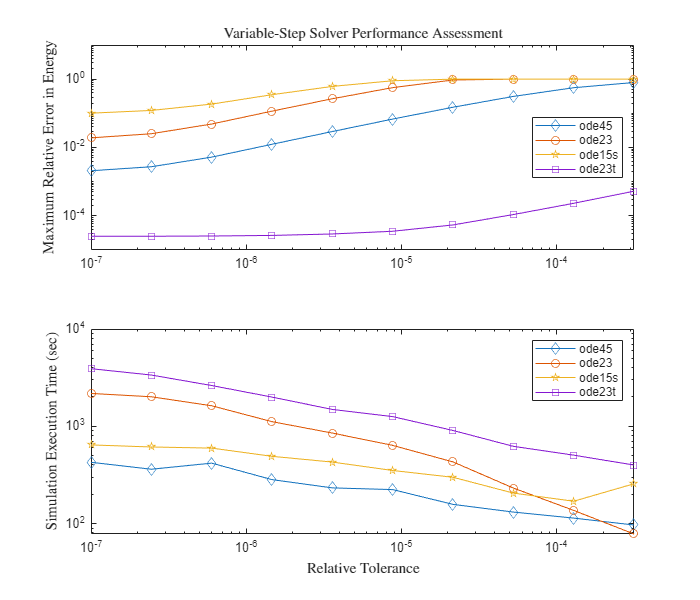
Explore Variable-Step Solvers with Stiff Model
The behavior of variable-step solvers in a Foucault pendulum model. Simulink® solvers ode45, ode15s, ode23, and ode23t are used as test cases. Stiff differential equations are used to solve this problem. There is no exact definition of stiffness for equations. Some numerical methods are unstable when used to solve stiff equations and very small step sizes are required to obtain a numerically stable solution to a stiff problem. A stiff problem may have a fast changing component and a slow changing component.
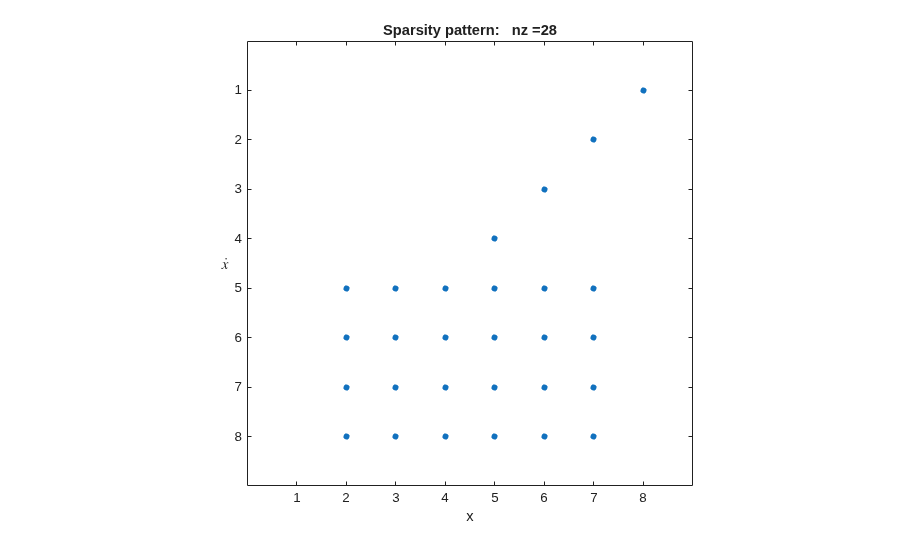
Exploring the Solver Jacobian Structure of a Model
The example shows how to use Simulink® to explore the solver Jacobian sparsity pattern, and the connection between the solver Jacobian sparsity pattern and the dependency between components of a physical system. A Simulink model that models the synchronization of three metronomes placed on a free moving base are used.
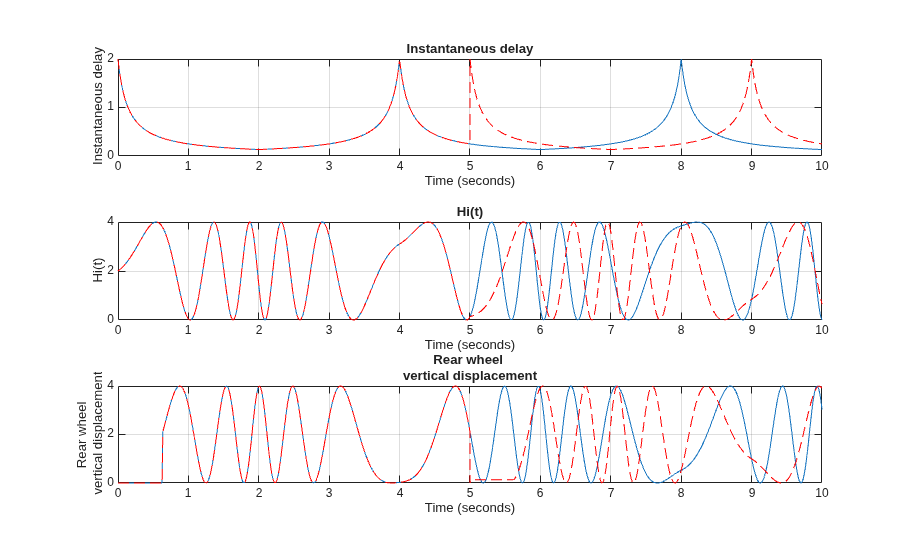
Specify Initial State for Simulation
Simulate a model from an initial state using final states data saved from a prior simulation with and without the operating point.
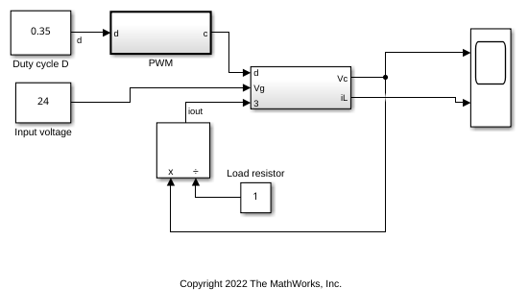
Use Fixed-Step Zero-Crossing Detection for Faster Simulations
Use fixed-step zero-crossing detection to improve simulation performance.
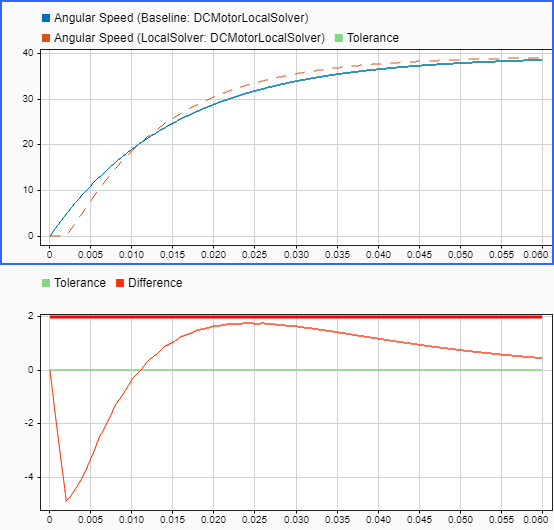
Improve Simulation Performance by Using Local Solvers
Improve simulation performance by using a local solver for a component with much faster dynamics compared to the rest of the system.

