nicholsplot
R2026bPlot Nichols frequency response of dynamic system
Syntax
Description
The nicholsplot function plots the Nichols response of a dynamic
system model. To customize the plot, you can return a NicholsPlot object and
modify it using dot notation. For more information, see Customize Linear Analysis Plots at Command Line.
To obtain frequency response data, use the nichols function.
nicholsplot( plots the frequency Nichols
response of the dynamic system model
sys)sys.
If sys is a multi-input, multi-output (MIMO) model, then the
nicholsplot function creates a grid of Nichols plots with each plot
displaying the frequency response of one input-output pair.
If sys is a model with complex coefficients, then
nicholsplot shows a contour comprised of both positive and negative
frequencies. For models with real coefficients, nicholsplot shows only
positive frequencies.
nicholsplot(___,
plots the Nichols frequency response with the plotting options specified in
plotoptions)plotoptions. Settings you specify in
plotoptions override the plotting preferences for the current
MATLAB® session. This syntax is useful when you want to write a script to generate
multiple plots that look the same regardless of the local preferences.
nicholsplot(___,
specifies response properties using one or more name-value arguments. For example,
Name=Value)nicholsplot(sys,LineWidth=1) sets the plot line width to 1. (since R2026a)
When plotting responses for multiple systems, the specified name-value arguments apply to all responses.
The following name-value arguments override values specified in other input arguments.
nicholsplot( plots
the Nichols response in the specified parent graphics container, such as a
parent,___)Figure or TiledChartLayout, and sets the
Parent property. Use this syntax when you want to create a plot in
a specified open figure or when creating apps in App Designer.
np = nicholsplot(___)
Examples
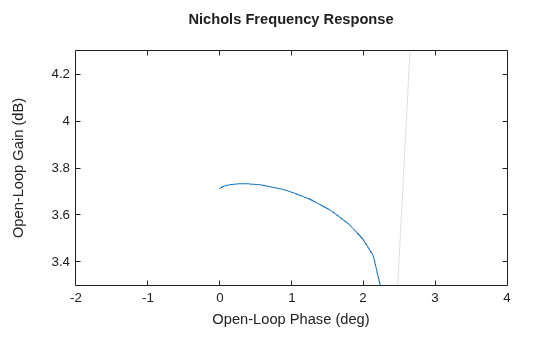
For this example, use the plot handle to change the title, turn on the grid, and set axis limits.
Generate a random state-space model with 5 states and create the Nichols plot with chart object np.
rng("default")
sys = rss(5);
np = nicholsplot(sys);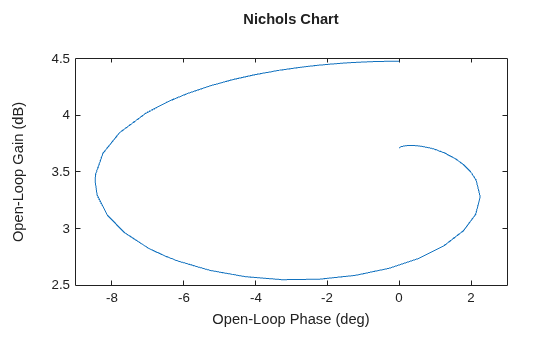
Change the title, enable the grid, and set axis limits.
np.Title.String = "Nichols Frequency Response";
xlim([-2 4])
ylim([3.3 4.3])
grid on
Alternatively, you can also use the nicholsoptions command to specify the required plot options. First, create an options set based on the toolbox preferences.
plotoptions = nicholsoptions('cstprefs');Change the desired properties of the options set.
plotoptions.Title.String = 'Nichols Frequency Response';
plotoptions.Grid = 'on';
plotoptions.XLim = {[-2,4]};
plotoptions.YLim = {[3.3,4.3]};
nicholsplot(sys,plotoptions);
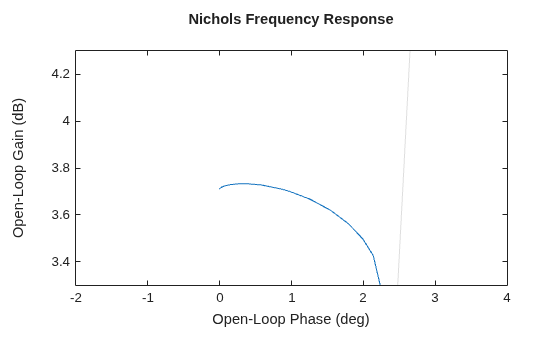
Depending on your own toolbox preferences, the plot you obtain might look different from this plot. Only the properties that you set explicitly, in this example Title, Grid, XLim and YLim, override the toolbox preferences.
For this example, create a Nichols plot that uses 15-point red text for the title. This plot should look the same, regardless of the preferences of the MATLAB session in which it is generated.
First, create a default options set using nicholsoptions.
plotoptions = nicholsoptions;
Next, change the required properties of the options set plotoptions.
plotoptions.Title.FontSize = 15;
plotoptions.Title.Color = [1 0 0];
plotoptions.FreqUnits = 'Hz';
plotoptions.Grid = 'on';
Now, create a Nichols plot using the options set plotoptions.
nicholsplot(tf(1,[1,1]),{0,15},plotoptions);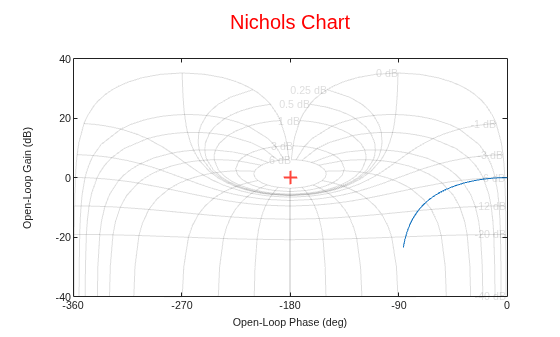
Because plotoptions begins with a fixed set of options, the plot result is independent of the toolbox preferences of the MATLAB session.
For this example, create a Nichols plot of the following continuous-time SISO dynamic system. Then, turn the grid on and rename the plot.
Create the transfer function sys.
sys = tf([1 0.1 7.5],[1 0.12 9 0 0]);
Next, create the options set using nicholsoptions and change the required plot properties.
plotoptions = nicholsoptions;
plotoptions.Grid = 'on';
plotoptions.Title.String = 'Nichols Plot of Transfer Function';
Now, create the Nichols plot with the custom option set plotoptions.
nicholsplot(sys,plotoptions)
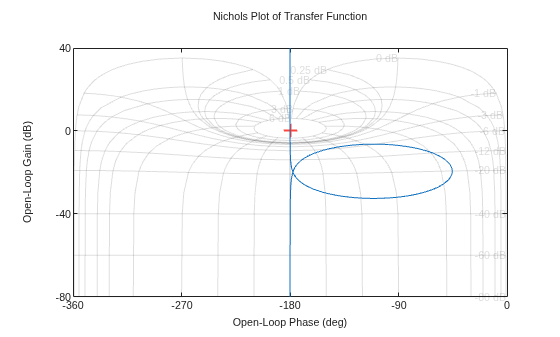
nicholsplot automatically selects the plot range based on the system dynamics.
For this example, consider a MIMO state-space model with 3 inputs, 3 outputs and 3 states. Create a Nichols plot with phase units in radians.
Create the MIMO state-space model sys_mimo.
J = [8 -3 -3; -3 8 -3; -3 -3 8];
F = 0.2*eye(3);
A = -J\F;
B = inv(J);
C = eye(3);
D = 0;
sys_mimo = ss(A,B,C,D);
size(sys_mimo)
State-space model with 3 outputs, 3 inputs, and 3 states.
Create a Nichols plot with chart object np.
np = nicholsplot(sys_mimo);

Set the phase unit ad radians.
np.PhaseUnit = "rad";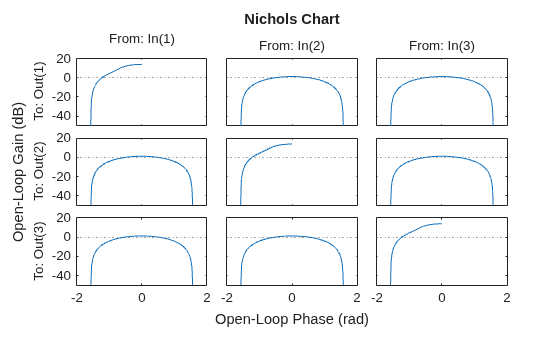
The Nichols plot automatically updates when you modify the chart object. For MIMO models, nicholsplot produces an array of Nichols plots, each plot displaying the frequency response of one I/O pair.
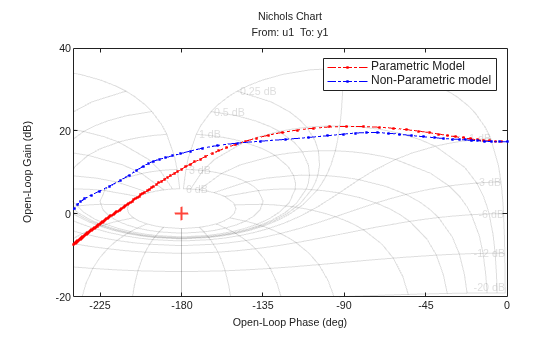
For this example, compare the Nichols response of a parametric model, identified from input/output data, to a non-parametric model identified using the same data. Identify parametric and non-parametric models based on the data.
Load the data and create the parametric and non-parametric models using tfest and spa, respectively.
load iddata2 z2;
w = linspace(0,10*pi,128);
sys_np = spa(z2,[],w);
sys_p = tfest(z2,2);
spa and tfest require System Identification Toolbox™ software. The model sys_np is a non-parametric identified model while, sys_p is a parametric identified model.
Create an options set to turn phase matching and the grid on. Then, create a Nichols plot that includes both systems using this options set.
plotoptions = nicholsoptions;
plotoptions.PhaseMatching = 'on';
plotoptions.Grid = 'on';
plotoptions.XLim = {[-240,0]};
h = nicholsplot(sys_p,'r.-.',sys_np,'b.-.',w,plotoptions);
legend('Parametric Model','Non-Parametric model');
Input Arguments
Name-Value Arguments
Output Arguments
Version History
Introduced before R2006aSee Also
nichols | nicholsoptions | addResponse | showConfidence (System Identification Toolbox)

