David
David
Letzte Aktivitätam 12 Aug. 2025

Share your ideas, suggestions, and wishlists for improving MathWorks products. What would make the software absolutely perfect for you? Discuss your idea(s) with other community users.

Guidelines & Tips

We encourage all ideas, big or small! To help everyone understand and discuss your suggestion, please include as much detail as possible in your post:
  • Product or Feature: Clearly state which product (e.g., MATLAB, Simulink, a toolbox, etc.) or specific feature your idea relates to.
  • The Problem or Opportunity: Briefly describe what challenge you’re facing or what opportunity you see for improvement.
  • Your Idea: Explain your suggestion in detail. What would you like to see added, changed, or improved? How would it help you and other users?
  • Examples or Use Cases (optional): If possible, include an example, scenario, or workflow to illustrate your idea.
  • Related Posts (optional): If you’ve seen similar ideas or discussions, feel free to link to them for context.

Ready to share your idea?

Click here and then "Start a Discussion”, and let the community know how MATLAB could be even better for you!
Thank you for your contributions and for helping make MATLAB Central a vibrant place for sharing and improving ideas.
Currently, the open-source MATLAB Community is accessed via the desktop web interface, and the experience on mobile devices is not very good—especially switching between sections like Discussion, FEX, Answers, and Cody is awkward. Having a dedicated app would make using the community much more convenient on phones.
Similarty,github has Mobile APP, It's convient for me.
Andrew Janke
Andrew Janke
Letzte Aktivitätam 12 Jan. 2026 um 12:48

Let's say MathWorks decides to create a MATLAB X release, which takes a big one-time breaking change that abandons back-compatibility and creates a more modern MATLAB language, ditching the unfortunate stuff that's around for historical reasons. What would you like to see in it?
I'm thinking stuff like syntax and semantics tweaks, changes to function behavior and interfaces in the standard library and Toolboxes, and so on.
(The "X" is for major version 10, like in "OS X". Matlab is still on version 9.x even though we use "R20xxa" release names now.)
What should you post where?
Wishlist threads (#1 #2 #3 #4 #5): bugs and feature requests for Matlab Answers
Frustation threads (#1 #2): frustrations about usage and capabilities of Matlab itself
Missing feature threads (#1 #2): features that you whish Matlab would have had
Next Gen threads (#1): features that would break compatibility with previous versions, but would be nice to have
@anyone posting a new thread when the last one gets too large (about 50 answers seems a reasonable limit per thread), please update this list in all last threads. (if you don't have editing privileges, just post a comment asking someone to do the edit)
Frequently, I find myself doing things like the following,
xyz=rand(100,3);
XYZ=num2cell(xyz,1);
scatter3(XYZ{:,1:3})
But num2cell is time-consuming, not to mention that requiring it means extra lines of code. Is there any reason not to enable this syntax,
scatter3(xyz{:,1:3})
so that I one doesn't have to go through num2cell? Here, I adopt the rule that only dimensions that are not ':' will be comma-expanded.
Duncan Carlsmith
Duncan Carlsmith
Letzte Aktivitätam 7 Jan. 2026 um 5:36

I struggle with animations. I often want a simple scrollable animation and wind up having to export to some external viewer in some supported format. The new Live Script automation of animations fails and sabotages other methods and it is not well documented so even AIs are clueless how to resolve issues. Often an animation works natively but not with MATLAB Online. Animation of results seems to me rather basic and should be easier!
(Requested for newer MATLAB releases (e.g. R2026B), MATLAB Parallel Processing toolbox.)
Lower precision array types have been gaining more popularity over the years for deep learning. The current lowest precision built-in array type offered by MATLAB are 8-bit precision arrays, e.g. int8 and uint8. A good thing is that these 8-bit array types do have gpuArray support, meaning that one is able to design GPU MEX codes that take in these 8-bit arrays and reinterpret them bit-wise as other 8-bit array types, e.g. FP8, which is especially common array type used in modern day deep learning applications. I myself have used this to develop forward pass operations with 8-bit precision that are around twice as fast as 16-bit operations and with output arrays that still agree well with 16-bit outputs (measured with high cosine similarity). So the 8-bit support that MATLAB offers is already quite sufficient.
Recently, 4-bit precision array types have been shown also capable of being very useful in deep learning. These array types can be processed with Tensor Cores of more modern GPUs, such as NVIDIA's Blackwell architecture. However, MATLAB does not yet have a built-in 4-bit precision array type.
Just like MATLAB has int8 and uint8, both also with gpuArray support, it would also be nice to have MATLAB have int4 and uint4, also with gpuArray support.
From my experience, MATLAB's Deep Learning Toolbox is quite user-friendly, but it still falls short of libraries like PyTorch in many respects. Most users tend to choose PyTorch because of its flexibility, efficiency, and rich support for many mathematical operators. In recent years, the number of dlarray-compatible mathematical functions added to the toolbox has been very limited, which makes it difficult to experiment with many custom networks. For example, svd is currently not supported for dlarray inputs.
This link (List of Functions with dlarray Support - MATLAB & Simulink) lists all functions that support dlarray as of R2026a — only around 200 functions (including toolbox-specific ones). I would like to see support for many more fundamental mathematical functions so that users have greater freedom when building and researching custom models. For context, the core MATLAB mathematics module contains roughly 600 functions, and many application domains build on that foundation.
I hope MathWorks will prioritize and accelerate expanding dlarray support for basic math functions. Doing so would significantly increase the Deep Learning Toolbox's utility and appeal for researchers and practitioners.
Thank you.
I'm working on training neural networks without backpropagation / automatic differentiation, using locally derived analytic forms of update rules. Given that this allows a direct formula to be derived for the update rule, it removes alot of the overhead that is otherwise required from automatic differentiation.
However, matlab's functionalities for neural networks are currently solely based around backpropagation and automatic differentiation, such as the dlgradient function and requiring everything to be dlarrays during training.
I have two main requests, specifically for functions that perform a single operation within a single layer of a neural network, such as "dlconv", "fullyconnect", "maxpool", "avgpool", "relu", etc:
  • these functions should also allow normal gpuArray data instead of requiring everything to be dlarrays.
  • these functions are currently designed to only perform the forward pass. I request that these also be designed to perform the backward pass if user requests. There can be another input user flag that can be "forward" (default) or "backward", and then the function should have all the necessary inputs to perform that operation (e.g. for "avgpool" forward pass it only needs the avgpool input data and the avgpool parameters, but for the "avgpool" backward pass it needs the deriviative w.r.t. the avgpool output data, the avgpool parameters, and the original data dimensions). I know that there is a maxunpool function that achieves this for maxpool, but it has significant issues when trying to use it this way instead of by backpropagation in a dlgradient type layer, see (https://www.mathworks.com/matlabcentral/answers/2179587-making-a-custom-way-to-train-cnns-and-i-am-noticing-that-avgpool-is-significantly-faster-than-maxpo?s_tid=srchtitle).
I don't know how many people would benefit from this feature, and someone could always spend their time creating these functionalities themselves by matlab scripts, cuDNN mex, etc., but regardless it would be nice for matlab to have this allowable for more customizable neural net training.
Edit 15 Oct 2025: Removed incorrect code. Replaced symmatrix2sym and symfunmatrix2symfun with sym and symfun respectively (latter supported as of 2024b).
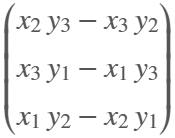
The Symbolic Math Toolbox does not have its own dot and and cross functions. That's o.k. (maybe) for garden variety vectors of sym objects where those operations get shipped off to the base Matlab functions
x = sym('x',[3,1]); y = sym('y',[3,1]);
which dot(x,y)
/MATLAB/toolbox/matlab/specfun/dot.m
dot(x,y)
ans = 
which cross(x,y)
/MATLAB/toolbox/matlab/specfun/cross.m
cross(x,y)
ans = 
But now we have symmatrix et. al., and things don't work as nicely
clearvars
x = symmatrix('x',[3,1]); y = symmatrix('y',[3,1]);
z = symmatrix('z',[1,1]);
sympref('AbbreviateOutput',false);
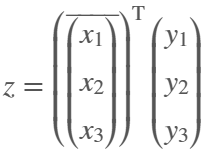
dot() expands the result, which isn't really desirable for exposition.
eqn = z == dot(x,y)
eqn = 
Also, dot() returns the the result in terms of the conjugate of x, which can't be simplifed away at the symmatrix level
assumeAlso(sym(x),'real')
class(eqn)
ans = 'symmatrix'
try
eqn = z == simplify(dot(x,y))
catch ME
ME.message
end
ans = 'Undefined function 'simplify' for input arguments of type 'symmatrix'.'
To get rid of the conjugate, we have to resort to sym
eqn = simplify(sym(eqn))
eqn = 
but again we are in expanded form, which defeats the purpose of symmatrix (et. al.)
But at least we can do this to get a nice equation
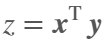
eqn = z == x.'*y
eqn = 
dot errors with symfunmatrix inputs
clearvars
syms t real
x = symfunmatrix('x(t)',t,[3,1]); y = symfunmatrix('y(t)',t,[3,1]);
try
dot(x,y)
catch ME
ME.message
end
ans = 'Invalid argument at position 2. Symbolic function is evaluated at the input arguments and does not accept colon indexing. Instead, use FORMULA on the function and perform colon indexing on the returned output.'
Cross works (accidentally IMO) with symmatrix, but expands the result, which isn't really desirable for exposition
clearvars
x = symmatrix('x',[3,1]); y = symmatrix('y',[3,1]);
z = symmatrix('z',[3,1]);
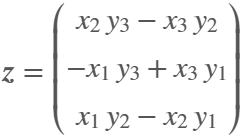
eqn = z == cross(x,y)
eqn = 
And it doesn't work at all if an input is a symfunmatrix
syms t
w = symfunmatrix('w(t)',t,[3,1]);
try
eqn = z == cross(x,w);
catch ME
ME.message
end
ans = 'A and B must be of length 3 in the dimension in which the cross product is taken.'
In the latter case we can expand with
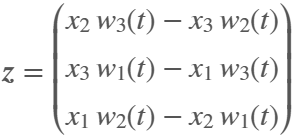
eqn = z == cross(sym(x),symfun(w)) % x has to be converted
eqn(t) = 
But we can't do the same with dot (as shown above, dot doesn't like symfun inputs)
try
eqn = z == dot(sym(x),symfun(w))
catch ME
ME.message
end
ans = 'Invalid argument at position 2. Symbolic function is evaluated at the input arguments and does not accept colon indexing. Instead, use FORMULA on the function and perform colon indexing on the returned output.'
Looks like the only choice for dot with symfunmatrix is to write it by hand at the matrix level
x.'*w
ans(t) = 
or at the sym/symfun level
sym(x).'*symfun(w) % assuming x is real
ans(t) = 
Ideally, I'd like to see dot and cross implemented for symmatrix and symfunmatrix types where neither function would evaluate, i.e., expand, until both arguments are subs-ed with sym or symfun objects of appropriate dimension.
Also, it would be nice if symmatrix could be assumed to be real. Is there a reason why being able to do so wouldn't make sense?
try
assume(x,'real')
catch ME
ME.message
end
ans = 'Undefined function 'assume' for input arguments of type 'symmatrix'.'
Gregory Vernon
Gregory Vernon
Letzte Aktivitätam 8 Okt. 2025

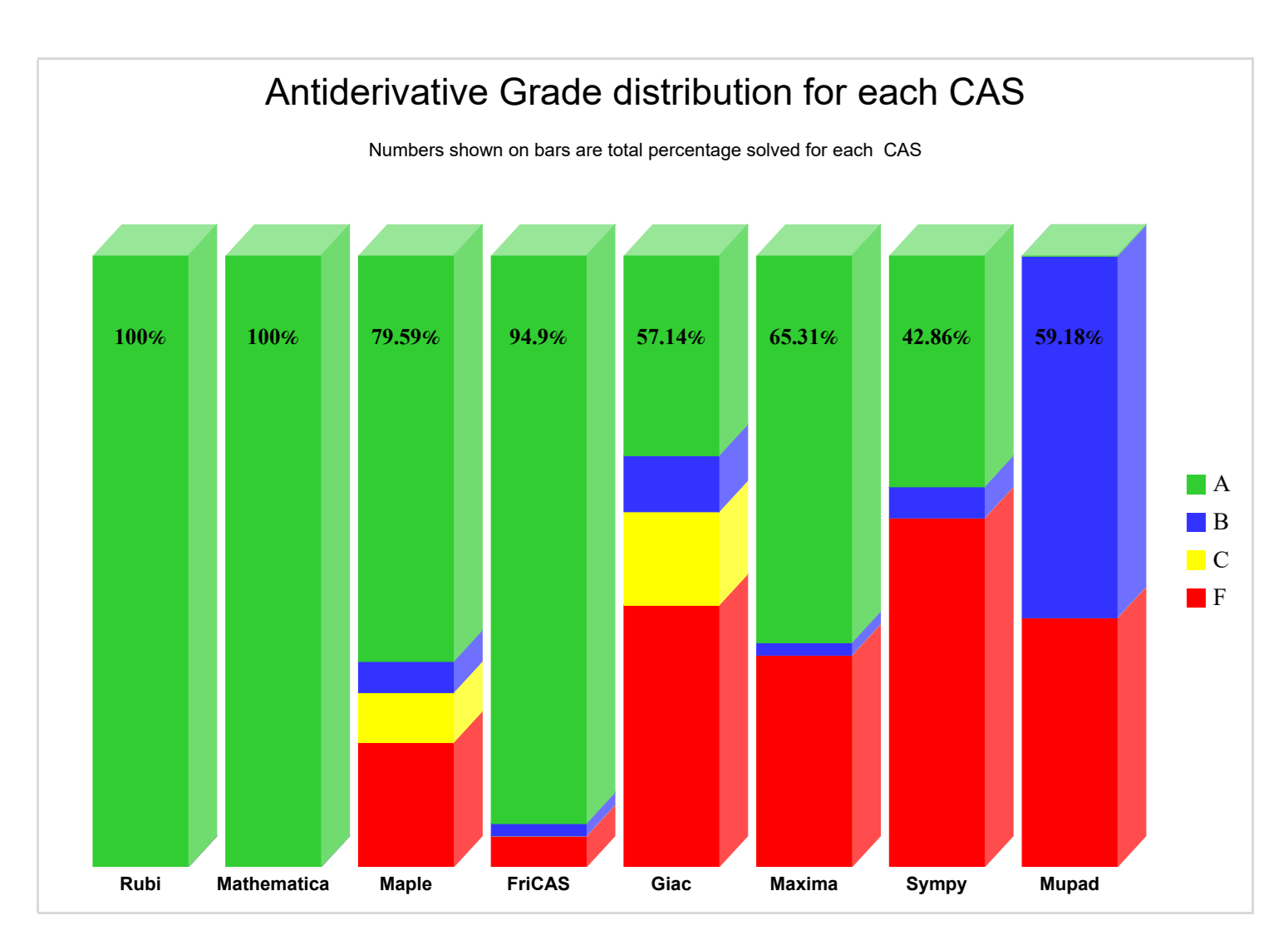
Something that I periodically wonder about is whether an integration with the Rubi integration rules package would improve symbolic integration in Matlab's Symbolic Toolbox. The project is open-source with an MIT-licensed, has a Mathematica implementation, and supposedly SymPy is working on an implementation. Much of my intrigue comes from this 2022 report that compared the previous version of Rubi (4.16.1) against various CAS systems, including Matlab 2021a (Mupad):
While not really an official metric for Rubi, this does "feel" similar to my experience computing symbolic integrals in Matlab Symbolic Toolbox vs Maple/Mathematica. What do y'all think?
Have you ever been enrolled in a course that uses an LMS and there is an assignment that invovles posting a question to, or answering a question in, a discussion group? This discussion group is meant to simulate that experience.

The functionality would allow report generation straight from live scripts that could be shared without exposing the code. This could be useful for cases where the recipient of the report only cares about the results and not the code details, or when the methodology is part of a company know how, e.g. Engineering services companies.

In order for it to be practical for use it would also require that variable values could be inserted into the text blocks, e.g. #var_name# would insert the value of the variable "var_name" and possibly selecting which code blocks to be hidden.

Rizwan Khan
Rizwan Khan
Letzte Aktivitätam 12 Sep. 2025

With AI agents dev coding on other languages has become so easy.
Im waiting for matlab to build something like warp but for matlab.
I know they have the current ai but with all respect it's rubbish compared to vibe coding tools in others sectors.
Matlab leads AI so it really should be leading this space.
Modern engineering requires both robust hardware and powerful simulation tools. MATLAB and Simulink are widely used for data analysis, control design, and embedded system development. At the same time, Kasuo offers a wide range of components—from sensors and connectors to circuit protection devices—that engineers rely on to build real-world systems.
By combining these tools, developers can bridge the gap between simulation and implementation, ensuring their designs are reliable and ready for deployment.
Example Use Case: Sensor Data Acquisition and Processing
  1. Kasuo Hardware Setup
  • Select a Kasuo sensor (e.g., temperature, microphone, or motion sensor).
  • Connect it to a DAQ or microcontroller board for data collection.
  1. Data Acquisition in MATLAB
  • Use MATLAB’s Data Acquisition Toolbox to stream sensor data directly.
  • Example snippet:
s = daq("ni");
addinput(s,
"Dev1", "ai0", "Voltage");
data = read(s, seconds(
5), "OutputFormat", "Matrix");
plot(data);
  1. Signal Processing with Simulink
  • Build a Simulink model to filter noise, detect anomalies, or design control logic.
  • Simulink enables real-time visualization and iterative tuning.
  1. Validation & Protection Simulation
  • Add Kasuo’s circuit protection components (e.g., TVS diodes, surge suppressors) in the physical design.
  • Use Simulink to simulate stress conditions, validating system robustness before hardware testing.
Benefits of the Workflow
  • Faster prototyping with MATLAB & Simulink.
  • Greater reliability by incorporating Kasuo protection devices.
  • Seamless transition from model to hardware implementation.
Conclusion
Kasuo’s electronic components provide the hardware foundation for many embedded and signal processing applications. When combined with MATLAB and Simulink, engineers can design, simulate, and validate systems more efficiently—reducing risks and development time.
When you compare MATLAB Plot Gallery with matplotlib gallery, you can see that matplotlib gallery contains a lot of nice graphs which are easy to create in MATLAB but not listed in MATLAB Plot Gallery.
For example, "Data Distribution Plots" section in the MATLAB Plot Gallery includes example for pie function instead of examples for piechart and donutchart functions, etc.
Vivek
Vivek
Letzte Aktivitätam 17 Aug. 2025

Hello,
Now that the "Copilot+PC" (Windows ARM) laptops are rapidly increasing in market share (Microsoft Surface Laptop, Dell XPS 13, HP OmniBook X 14, and more), are there any plans to provide builds for Matlab on Windows arm64?
Since there are already Windows builds of Matlab, it shouldn't be too hard to compile for Windows arm64, as far as I know. But I am not famaliar with Matlab's codebase.
Please try to publish Windows arm64 builds soon so that Matlab can be much more usable on Windows on ARM as it will run natively instead of in emulation.
Thank you very much.
Ian
Ian
Letzte Aktivitätam 14 Aug. 2025

mlapp being a binary is a pain point for source control. It means that you either have to:
  1. have hooks in your source control system to zip/unzip a mlapp. However, The Mathworks have informed users not to rely on this as the mlapp format may change.
  2. do all your source control in MATLAB. This is non standard behaviour. Source code and source control should be independent of each other. Web front-ends to source control systems, 3rd party source control apps, CI/CD systems and much more are extremely limited in what they can do with mlapps.
I wish an mlapp could just be a directory full of the required text/other files.
Requested to post this here from reddit.
There is no call to rescan audio devices in audioPlayerRecorder, even though PortAudio has such a call. I have a measurement environment that takes a long time to initialise. If I forget to plug in my audio device, I have to do it all over again...
This is a feature which doesn't apear to currently exist, but I think alot of matlab users would like, particularly ones who write alot of custom classes.
Imagine i have a custom class with some properties:
classdef CustomClass < handle
properties
name (1,1) string = "default name"
varOne (1,1) double = 0
end
methods
function obj = CustomClass(name,varOne)
obj.name = name;
obj.VarOne = varOne;
end
end
end
Then imagine I have a function which returns one of these custom class objects:
function [obj] = Calculation(Var1,Var2,name)
arguments (Input)
Var1 (1,1) double
Var2 (1,1) double
end
arguments (Output)
obj (1,1) CustomClass
end
results = Var1 + Var2;
obj = CustomClass(name,result);
end
With this class and this function which returns one of these class objects, I would like the fact that I provided "(1,1) CustomClass" in the output arguemnts block of function "Calculation(Var1,Var2,name)" to trigger code assist automaticaly show me, when writing code that the retuned value from this funciton has properties "name" and "varOne" in the object.
For istance, if I write the following code with this function and the class in the Matlab search path
testObj = Calculation(1,1,"test");
testObj.varOne = 10; %the property "varOne" doesn't apear in code assist when writing this line of code
I would like that the fact function "Calcuation(Var1,Var2,name) has the output arguments block enforcing that this function must return an object of "CustomClass" to make code assist recognise that "testObj" is a "CustomClass" object, just as if testObj was an input argument to another function which had an input argument requiring that "testObj" was a "CustomClass" object.
Maybe this is a feature that may be added to matlab in future releases? (please and thank you LOL)
Nice to have - function output argument provide code assist when said function is called
This is a feature which doesn't apear to currently exist, but I think alot of matlab users would like, particularly ones who write alot of custom classes.
Imagine i have a custom class with some properties:
classdef CustomClass < handle
properties
name (1,1) string = "default name"
varOne (1,1) double = 0
end
methods
function obj = CustomClass(name,varOne)
obj.name = name;
obj.VarOne = varOne;
end
end
end
Then imagine I have a function which returns one of these custom class objects:
function [obj] = Calculation(Var1,Var2,name)
arguments (Input)
Var1 (1,1) double
Var2 (1,1) double
end
arguments (Output)
obj (1,1) CustomClass
end
results = Var1 + Var2;
obj = CustomClass(name,result);
end
With this class and this function which returns one of these class objects, I would like the fact that I provided "(1,1) CustomClass" in the output arguemnts block of function "Calculation(Var1,Var2,name)" to trigger code assist automaticaly show me, when writing code that the retuned value from this funciton has properties "name" and "varOne" in the object.
For istance, if I write the following code with this function and the class in the Matlab search path
testObj = Calculation(1,1,"test");
testObj.varOne = 10; %the property "varOne" doesn't apear in code assist when writing this line of code
I would like that the fact function "Calcuation(Var1,Var2,name) has the output arguments block enforcing that this function must return an object of "CustomClass" to make code assist recognise that "testObj" is a "CustomClass" object, just as if testObj was an input argument to another function which had an input argument requiring that "testObj" was a "CustomClass" object.
Maybe this is a feature that may be added to matlab in future releases? (please and thank you LOL)

Info zu Ideas

Share your ideas, suggestions, and wishlists for improving MATLAB. What would make this software absolutely perfect for you? Discuss with other community users.

Note that while MathWorks staff might participate in some discussions, this is not an official channel for MathWorks to collect or respond to ideas.

Mitwirkende mit den besten Beiträgen

Moderatoren