sort
Sort array elements
Description
sorts the elements
of B = sort(A)A. By default, sort uses ascending sorted
order.
If
Ais a vector, thensort(A)sorts the vector elements.If
Ais a matrix, thensort(A)treats the columns ofAas vectors and sorts each column.If
Ais a multidimensional array, thensort(A)operates along the first array dimension whose size does not equal 1, treating the elements as vectors.
specifies
additional parameters for sorting. For example, B = sort(___,Name,Value)sort(A,'ComparisonMethod','abs') sorts
the elements of A by magnitude.
Examples
Create a row vector and sort its elements in ascending order.
A = [9 0 -7 5 3 8 -10 4 2]; B = sort(A)
B = 1×9
-10 -7 0 2 3 4 5 8 9
Create a matrix and sort each of its rows in ascending order.
A = [3 6 5; 7 -2 4; 1 0 -9]
A = 3×3
3 6 5
7 -2 4
1 0 -9
B = sort(A,2)
B = 3×3
3 5 6
-2 4 7
-9 0 1
Create a matrix and sort its columns in descending order.
A = [10 -12 4 8; 6 -9 8 0; 2 3 11 -2; 1 1 9 3]
A = 4×4
10 -12 4 8
6 -9 8 0
2 3 11 -2
1 1 9 3
B = sort(A,'descend')B = 4×4
10 3 11 8
6 1 9 3
2 -9 8 0
1 -12 4 -2
Starting in R2017a, you can create string arrays using double quotes, and sort them using the sort function. Sort strings in each column of a string array according to Unicode® dictionary order.
A = ["Santos","Burns"; ... "Jones","Morita"; ... "Petrov","Adams"]; B = sort(A)
B = 3×2 string
"Jones" "Adams"
"Petrov" "Burns"
"Santos" "Morita"
Sort the strings in each row.
B = sort(A,2)
B = 3×2 string
"Burns" "Santos"
"Jones" "Morita"
"Adams" "Petrov"
Create an array of datetime values and sort them in ascending order, that is, from the earliest to the latest calendar date.
ds = {'2012-12-22';'2063-04-05';'1992-01-12'};
A = datetime(ds,'Format','yyyy-MM-dd')A = 3×1 datetime
2012-12-22
2063-04-05
1992-01-12
[B,I] = sort(A)
B = 3×1 datetime
1992-01-12
2012-12-22
2063-04-05
I = 3×1
3
1
2
B lists the sorted dates and I contains the corresponding indices of A.
Access the sorted elements from the original array directly by using the index array I.
A(I)
ans = 3×1 datetime
1992-01-12
2012-12-22
2063-04-05
Create two row vectors that contain related data in the corresponding elements.
X = [3 6 4 2 1 5]; Y = ["yellow" "purple" "green" "orange" "red" "blue"];
First sort the vector X, then sort the vector Y in the same order as X.
[Xsorted,I] = sort(X)
Xsorted = 1×6
1 2 3 4 5 6
I = 1×6
5 4 1 3 6 2
Ysorted = Y(I)
Ysorted = 1×6 string
"red" "orange" "yellow" "green" "blue" "purple"
Create a 2-by-2-by-2 array and sort its elements in ascending order along the third dimension.
A(:,:,1) = [2 3; 1 6]; A(:,:,2) = [-1 9; 0 12]; A
A =
A(:,:,1) =
2 3
1 6
A(:,:,2) =
-1 9
0 12
B = sort(A,3)
B =
B(:,:,1) =
-1 3
0 6
B(:,:,2) =
2 9
1 12
Use A(:), the column representation of A, to sort all of the elements of A.
B = sort(A(:))
B = 8×1
-1
0
1
2
3
6
9
12
Sort the elements of a complex vector by their real parts. By default, the sort function sorts complex values by their magnitude, and breaks ties using phase angles. Specify the value of 'ComparisonMethod' as 'real' to instead sort complex values by their real parts. For elements with equal real parts, sort breaks the tie based on their imaginary parts.
A = [1+2i 3+1i 1i 0 -1i]; B = sort(A,'ComparisonMethod','real')
B = 1×5 complex
0.0000 - 1.0000i 0.0000 + 0.0000i 0.0000 + 1.0000i 1.0000 + 2.0000i 3.0000 + 1.0000i
Input Arguments
Input array, specified as a vector, matrix, or multidimensional array.
If
Ais a scalar, thensort(A)returnsA.If
Ais complex, then by default,sortsorts the elements by magnitude. If more than one element has equal magnitude, then the elements are sorted by phase angle on the interval (−π, π].If
Ais a cell array of character vectors or a string array, thensort(A)sorts the elements according to the code order for the UTF-16 character encoding scheme. The sort is case-sensitive. For more information on sorting character and string arrays, see Sort Order for Character and String Arrays.If
Ais a string array, thensortreorders the elements of the array, but does not reorder characters within the strings.If
Ais a categorical array, then the sorting order is based on the category order returned bycategories(A).
Data Types: double | single | int8 | int16 | int32 | int64 | uint8 | uint16 | uint32 | uint64 | logical | char | string | cell | categorical | datetime | duration
Complex Number Support: Yes
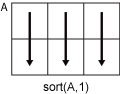
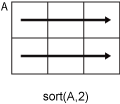
Dimension to operate along, specified as a positive integer scalar. If no value is specified, then the default is the first array dimension whose size does not equal 1.
Consider a matrix
A.sort(A,1)sorts the elements in the columns ofA.
sort(A,2)sorts the elements in the rows ofA.
sort returns A if dim is
greater than ndims(A). dim is
not supported when A is a cell array, that is, sort only
operates along the first array dimension whose size does not equal
1.
Data Types: double | single | int8 | int16 | int32 | int64 | uint8 | uint16 | uint32 | uint64
Sorting direction, specified as 'ascend' or 'descend'. direction is
not supported when A is a cell array, that is, sort only
sorts in ascending order.
Name-Value Arguments
Specify optional pairs of arguments as
Name1=Value1,...,NameN=ValueN, where Name is
the argument name and Value is the corresponding value.
Name-value arguments must appear after other arguments, but the order of the
pairs does not matter.
Before R2021a, use commas to separate each name and value, and enclose
Name in quotes.
Example: sort(A,'MissingPlacement','last')
Placement of missing values (NaN, NaT, <undefined>,
and missing) specified as the comma-separated pair
consisting of 'MissingPlacement' and one of the
following:
'auto'— Missing elements are placed last for ascending order and first for descending order.'first'— Missing elements are placed first.'last'— Missing elements are placed last.
Element comparison method for numeric input, specified as the comma-separated pair consisting
of 'ComparisonMethod' and one of the following:
'auto'— SortAbyreal(A)whenAis real, and sort byabs(A)whenAis complex.'real'— SortAbyreal(A)whenAis real or complex. IfAhas elements with equal real parts, then useimag(A)to break ties.'abs'— SortAbyabs(A)whenAis real or complex. IfAhas elements with equal magnitude, then useangle(A)in the interval (-π,π] to break ties.
Output Arguments
Sorted array, returned as a vector, matrix, or multidimensional array. B is
the same size and type as A.
Data Types: double | single | int8 | int16 | int32 | int64 | uint8 | uint16 | uint32 | uint64 | logical | char | string | cell | categorical | datetime | duration
Sort index, returned as a vector, matrix, or multidimensional
array. I is the same size as A.
The index vectors are oriented along the same dimension that sort operates
on. For example, if A is a 2-by-3 matrix, then [B,I]
= sort(A,2) sorts the elements in each row of A.
The output I is a collection of 1-by-3 row index
vectors describing the rearrangement of each row of A.
The sort function uses a stable sorting algorithm. So,
when the input contains repeated values, the sort index preserves the
original order from the input, regardless of sorting direction. For example,
if A = [1 2 1 2], then [Ba,Ia] =
sort(A,'ascend') returns the sort index Ia = [1 3 2
4] and [Bd,Id] = sort(A,'descend') returns
the sort index Id = [2 4 1 3].
More About
MATLAB® stores characters as Unicode® using the UTF-16 character encoding scheme. Character and string arrays are sorted according to the UTF-16 code point order. For the characters that are also the ASCII characters, this order means that uppercase letters come before lowercase letters. Digits and some punctuation also come before letters.
Tips
The
sortrowsfunction provides additional flexibility for subsorting over multiple columns of matrix or table inputs.The
sortfunction and the relational operators use different orderings for complex numbers. For more information, see Relational Operations.
Extended Capabilities
This function supports tall arrays with the limitations:
You must specify the dimension to sort, as in
sort(X,dim).Sorting the tall dimension, as in
sort(X,1), is only supported for column vectors.
For more information, see Tall Arrays.
Usage notes and limitations:
For input argument
A:String input array is not supported.
If the input array is a cell array of character vectors and variable sizing is disabled, all character vector elements must be the same length.
In the generated code, the input array remains complex, even if all of its elements have zero-valued imaginary parts. Under these circumstances, the results produced by the generated code might differ from those produced by MATLAB. See Code Generation for Complex Data with Zero-Valued Imaginary Parts (MATLAB Coder).
If used, the
directionargument must be constant at code generation time.
Refer to the usage notes and limitations in the C/C++ Code Generation section. The same usage notes and limitations apply to GPU code generation.
The sort function fully supports
thread-based environments. For more information, see Run MATLAB Functions in Thread-Based Environment.
The sort function
fully supports GPU arrays. To run the function on a GPU, specify the input data as a gpuArray (Parallel Computing Toolbox). For more information, see Run MATLAB Functions on a GPU (Parallel Computing Toolbox).
The sort function
supports distributed arrays with these usage notes and limitations:
Table, timetable, and datetime inputs are not supported.
For more information, see Run MATLAB Functions with Distributed Arrays (Parallel Computing Toolbox).
Version History
Introduced before R2006aThe sort function shows improved performance when
sorting the elements in an array of type int8,
uint8, int16, or
uint16. The improvement is most noticeable when the number of
elements to sort is large.
For example, this code sorts a 100,000,000-element column vector of type
int8. The code is about 5.0x faster than in the previous
release.
function timingTest A = randi(intmax("int8"),[1e8 1],"int8"); S = @() sort(A); t = timeit(S) end
The approximate execution times are:
R2025b: 1.06 s
R2026a: 0.21 s
The code was timed on a Windows® 11, AMD EPYC™ 74F3 24-Core Processor @ 3.19 GHz test system by calling the
timingTest function.
MATLAB Command
You clicked a link that corresponds to this MATLAB command:
Run the command by entering it in the MATLAB Command Window. Web browsers do not support MATLAB commands.
Website auswählen
Wählen Sie eine Website aus, um übersetzte Inhalte (sofern verfügbar) sowie lokale Veranstaltungen und Angebote anzuzeigen. Auf der Grundlage Ihres Standorts empfehlen wir Ihnen die folgende Auswahl: .
Sie können auch eine Website aus der folgenden Liste auswählen:
So erhalten Sie die bestmögliche Leistung auf der Website
Wählen Sie für die bestmögliche Website-Leistung die Website für China (auf Chinesisch oder Englisch). Andere landesspezifische Websites von MathWorks sind für Besuche von Ihrem Standort aus nicht optimiert.
Amerika
- América Latina (Español)
- Canada (English)
- United States (English)
Europa
- Belgium (English)
- Denmark (English)
- Deutschland (Deutsch)
- España (Español)
- Finland (English)
- France (Français)
- Ireland (English)
- Italia (Italiano)
- Luxembourg (English)
- Netherlands (English)
- Norway (English)
- Österreich (Deutsch)
- Portugal (English)
- Sweden (English)
- Switzerland
- United Kingdom (English)