Nichtlinearität
R2026aWenn Sie reale wissenschaftliche und technische Probleme lösen, müssen Sie oft Nichtlinearitäten modellieren. Simulink® bietet einen umfassenden Satz von Lookup-Tabellen-Blöcken, -Objekten und -Werkzeugen, die Sie zur effizienten Modellierung von Nichtlinearitäten verwenden können. Lookup-Tabellen ordnen Eingabewerte eines Systems seinen Ausgabewerten zu und speichern die zugeordneten Daten in einer Tabelle. Bei Echtzeitberechnungen verwenden die Lookup-Tabellen die gespeicherten Daten, um die Ausgaben zu ermitteln, die den verschiedenen Eingaben eines Systems entsprechen.
Mithilfe von Lookup-Tabellen-Blöcken, -Objekten und -Werkzeugen können Sie:
Zustandslose nichtlineare Systeme modellieren, indem Sie mathematische Funktionen oder experimentelle Daten mithilfe von Lookup-Tabellen approximieren.
Lookup-Tabellen innerhalb eines Workflows für Model-Based Design simulieren, analysieren und optimieren.
Lookup-Tabellen optimieren, um ein Gleichgewicht zwischen Speichernutzung, Ausführungsleistung und numerischer Genauigkeit herzustellen.
Für unterstützte Zielsprachen produktionsreifen Code mit industrieweit standardisierten Schnittstellen generieren.
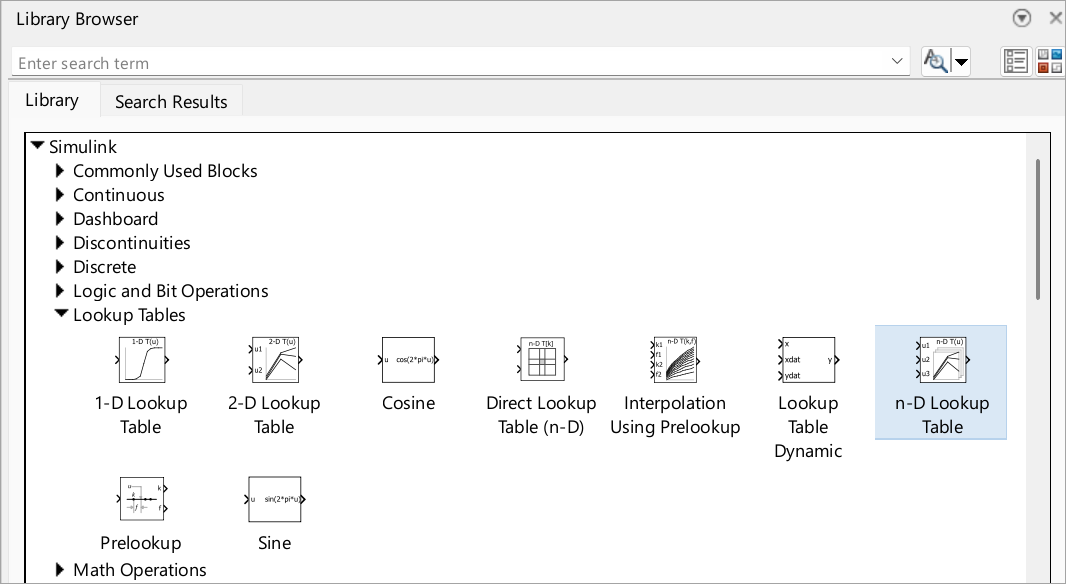
Blöcke
 | 1-D Lookup Table | Approximate one-dimensional function |
 | 2-D Lookup Table | Approximate two-dimensional function |
 | Direct Lookup Table (n-D) | Index into n-dimensional table to retrieve element, vector, or 2-D matrix |
 | Interpolation Using Prelookup | Use precalculated index and fraction values to accelerate approximation of N-dimensional function |
| Lookup Table Dynamic | ||
 | n-D Lookup Table | Approximate n-dimensional function |
 | Prelookup | Compute index and fraction for Interpolation Using Prelookup block |
 | Sine, Cosine | Implement fixed-point sine or cosine wave using lookup table approach that exploits quarter wave symmetry |
Objekte
Simulink.LookupTable | Store and share lookup table and breakpoint data, and configure data for ASAP2 and AUTOSAR code generation |
Simulink.Breakpoint | Store and share data for breakpoint set, and configure the data for ASAP2 and AUTOSAR code generation |
Simulink.lookuptable.Evenspacing | Configure evenly spaced breakpoint set for lookup table object |
Simulink.lookuptable.Table | Configure table data for lookup table object |
Simulink.lookuptable.Breakpoint | Configure breakpoint set data for lookup table object |
Simulink.lookuptable.StructTypeInfo | Configure settings for structure type that lookup table object uses in generated code |
Tools
| Lookup TableEditor | Create, edit, and manage lookup tables in models (Seit R2022a) |
Themen
Arbeiten mit Lookup-Tabellen
- Edit and Visualize Lookup Table Data
View, add, delete, or update lookup table data. - Enter Breakpoints and Table Data
Specify breakpoint vectors and table data for a lookup table. - Import Data to Lookup Table
Import table and breakpoint data from MATLAB® workspace and Excel® spreadsheets. - Visualize Lookup Table Data Using Lookup Table Control
Visualize lookup table data. - Configure Lookup Table Block for Logarithmic Operation
Configure an n-D Lookup Table block for logarithmic operation with the common logarithmic base (base 10). - Optimize Generated Code for Lookup Table Blocks
Optimize code for Lookup Table blocks. - Use Row-Major Algorithms for Lookup Table Blocks
Use row-major algorithms for C/C++ code generation from models containing Lookup Table blocks. - Optimize Lookup Tables for Memory-Efficiency (Fixed-Point Designer)
Optimize Lookup Tables using the Lookup Table Optimizer.
Informationen über Lookup-Tabellen
- Specify Breakpoint and Table Data with Variable Size and Symbolic Dimensions
Specify breakpoint and table data that changes size during model simulation or represented by symbolic dimensions. - Choose Lookup Table Blocks Based on Input, Breakpoint and Output Data
Select the Lookup Table block best suited for your application. - Common Uses of Prelookup and Interpolation Using Prelookup Blocks
Common use cases of the Prelookup and Interpolation Using Prelookup blocks. - Choose Numerical Methods to Approximate Function Values
Set the method by which Lookup Table blocks approximate function values.
Aktualisierung von Lookup-Tabellen aus älteren Versionen
- Update Lookup Table Blocks to New Versions
Update existing models to use current versions of lookup table blocks.
Enthaltene Beispiele
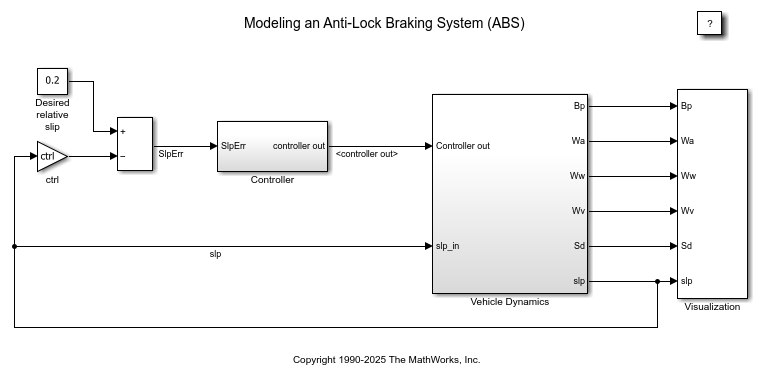
Modellieren eines Anti-Blockier-Bremssystems
Dieses Beispiel zeigt, wie Sie ein einfaches Anti-Blockier-Bremssystem (ABS) modellieren können. Das Modell simuliert das dynamische Verhalten eines Fahrzeugs bei starkem Bremsen. Das Modell stellt ein einzelnes Rad dar, das mehrfach nachgebildet werden kann, um ein Modell für ein mehrrädriges Fahrzeug zu erstellen.
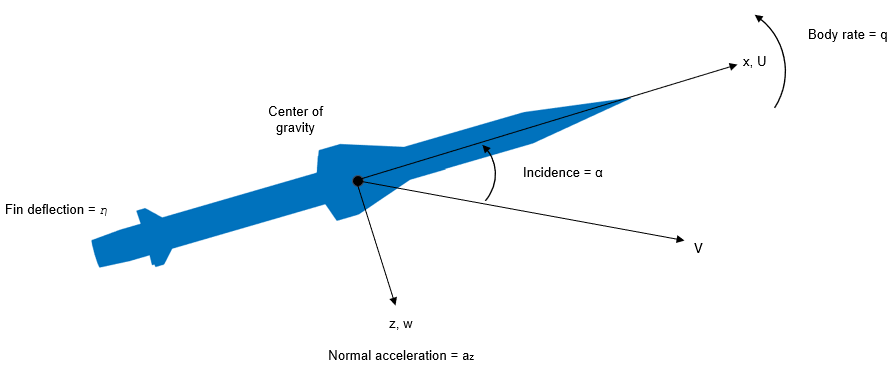
Design a Guidance System in MATLAB and Simulink
Use the model of the missile airframe presented in a number of published papers on the use of advanced control methods applied to missile autopilot design. See [1], [2], and [3]. The model represents a tail-controlled missile traveling between Mach 2 and Mach 4, at altitudes ranging between 10,000 ft (3,050 m) and 60,000 ft (18,290 m), with typical angles of attack ranging between +/- 20 degrees.
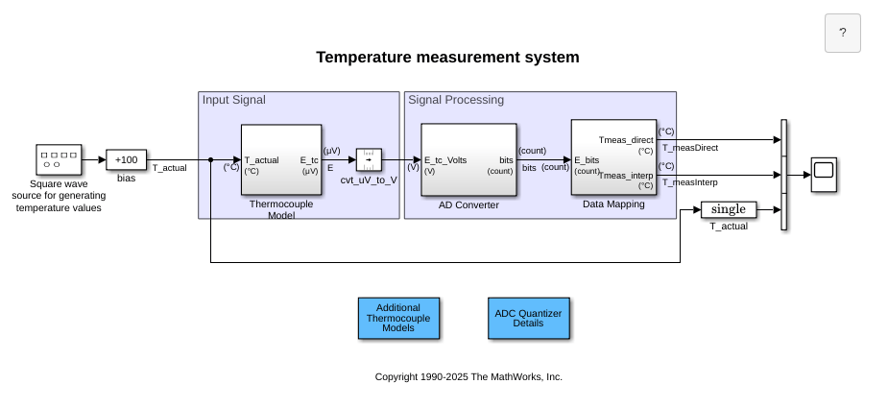
Temperature Measurement System Using Nonlinear Behavioral Data of Type S Thermocouple
Build and simulate a temperature measurement system that uses a nonlinear dataset describing the behavior of a type S thermocouple.
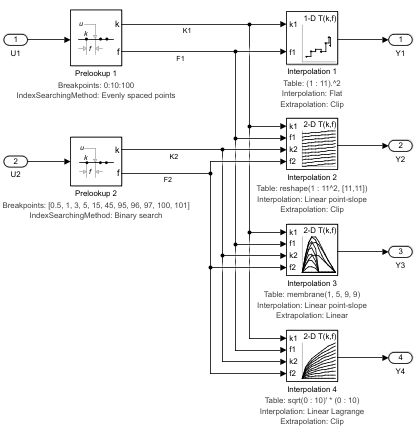
Using the Prelookup and Interpolation Using Prelookup Blocks
Use the Prelookup and Interpolation Using Prelookup blocks.
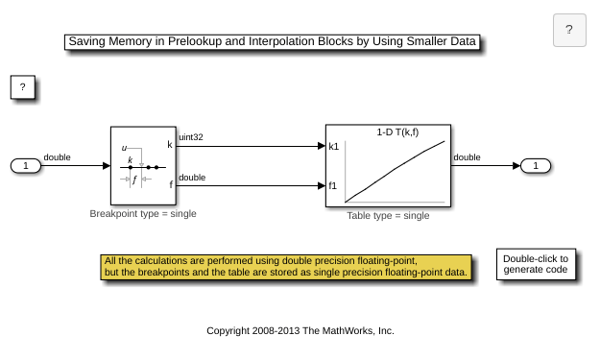
Saving Memory in Prelookup and Interpolation Using Prelookup Blocks by Using Smaller Data
Save memory in Prelookup and Interpolation Using Prelookup blocks. The Prelookup and Interpolation Using Prelookup blocks allow you to explicitly set data type for storing breakpoints and table data, respectively. The Prelookup block allows the breakpoint data to differ from the input data type, and the Interpolation Using Prelookup block allows the table data to differ from the output data type.

