rlContinuousGaussianTransitionFunction
R2026bStochastic Gaussian transition function approximator object for neural network-based environment
Since R2022a
Description
When creating a neural network-based environment using rlNeuralNetworkEnvironment, you can specify stochastic transition function
approximators using rlContinuousDeterministicTransitionFunction
objects.
A transition function approximator object uses a deep neural network as internal approximation model to predict the next observations based on the current observations and actions.
To specify deterministic transition function approximators, use rlContinuousGaussianTransitionFunction objects.
Creation
Syntax
Description
creates the stochastic transition function approximator object
tsnFcnAppx = rlContinuousGaussianTransitionFunction(net,observationInfo,actionInfo,Name=Value)tsnFcnAppx using the deep neural network
net.
When creating a stochastic transition function approximator, you must specify the
names of the deep neural network inputs and outputs using the
ObservationInputNames, ActionInputNames,
NextObservationMeanOutputNames, and
NextObservationStandardDeviationOutputNames name-value pair
arguments.
You can also specify the PredictDiff and
UseDevice properties using optional name-value pair arguments. For
example, to use a GPU for prediction, specify UseDevice="gpu".
Input Arguments
Deep neural network, specified as a dlnetwork object.
The input layer names for this network must match the input names specified using
ObservationInputNames and
ActionInputNames. The dimensions of the input layers must match
the dimensions of the corresponding observation and action specifications in
observationInfo and actionInfo,
respectively.
The output layer names for this network must match the output names specified
using NextObservationMeanOutputNames and
NextObservationStandardDeviationOutputNames. The dimensions of
the output layers must match the dimensions of the corresponding observation
specifications in observationInfo.
Observation specifications, specified as an rlNumericSpec
object or an array of such objects. Each element in the array defines the properties
of an environment observation channel, such as its dimensions, data type, and
name.
This argument sets the ObservationInfo property.
Example: observationInfo=[rlNumericSpec([2 1]) rlNumericSpec([4
1])]
Action specifications, specified as an rlFiniteSetSpec
(for discrete action spaces) or rlNumericSpec
(for continuous action spaces) object. This object defines the properties of the
environment action channel, such as its dimensions, data type, and name.
This argument sets the ActionInfo property.
Example: actionInfo=rlNumericSpec([1 1])
Name-Value Arguments
Specify optional pairs of arguments as
Name1=Value1,...,NameN=ValueN, where Name is
the argument name and Value is the corresponding value.
Name-value arguments must appear after other arguments, but the order of the
pairs does not matter.
Example: ObservationInputNames="velocity"
Observation input layer names, specified as a string or string array.
The number of observation input names must match the length of
ObservationInfo and the order of the names must match the
order of the specifications in ObservationInfo.
Example: ObservationInputNames={"obsInLyr1_airspeed","obsInLyr2_altitude"}
Action input layer names, specified as a string or string array.
The number of action input names must match the length of
ActionInfo and the order of the names must match the order of
the specifications in ActionInfo.
Example: ActionInputNames="actInLyr_Force"
Next observation mean output layer names, specified as a string or string array.
The number of next observation mean output names must match the length of
ObservationInfo and the order of the names must match the
order of the specifications in ObservationInfo.
Example: NextObservationMeanOutputNames={"nextObsOutLyr1_airspeed_mean","nextObsOutLyr2_altitude_mean"}
Next observation standard deviation output layer names, specified as a string or string array.
The number of next observation standard deviation output names must match the
length of ObservationInfo and the order of the names must match
the order of the specifications in ObservationInfo.
Example: NextObservationStandardDeviationOutputNames={"nextObsOutLyr1_airspeed_std","nextObsOutLyr2_altitude_std"}
Computation device used for training and simulation, specified as
"cpu" or "gpu". By default, the approximator
uses "cpu" for training and simulation. This argument sets the
UseDevice property.
Example: UseDevice="gpu"
Properties
Option to predict the difference between the current observation and the next observation, specified as one of the following logical values.
false— Select this option ifnetoutputs the value of the next observation.true— Select this option ifnetoutputs the difference between the next observation and the current observation. In this case, thepredictfunction computes the next observation by adding the current observation to the output ofnet.
Example: PredictDiff=true
This property is read-only.
Observation specifications, specified as an rlNumericSpec
object or an array of such objects. Each element in the array defines the properties of
an environment observation channel, such as its dimensions, data type, and name.
When you create the approximator object, the constructor function sets the
ObservationInfo property to the input argument
observationInfo.
You can extract observationInfo from an existing environment,
function approximator, or agent using getObservationInfo. You can also construct the specifications manually
using rlNumericSpec.
This property is read-only.
Action specifications, specified either as an rlFiniteSetSpec
(for discrete action spaces) or rlNumericSpec
(for continuous action spaces) object. This object defines the properties of the
environment action channel, such as its dimensions, data type, and name.
Note
For this approximator object, only one action channel is allowed.
When you create the approximator object, the constructor function sets the
ActionInfo property to the input argument
actionInfo.
You can extract ActionInfo from an existing environment or agent
using getActionInfo. You can also construct the specifications manually using
rlFiniteSetSpec
or rlNumericSpec.
Normalization method, returned as an array in which each element (one for each input
channel defined in the observationInfo and
actionInfo properties, in that order) is one of the following
values:
"none"— Do not normalize the input."rescale-zero-one"— Normalize the input by rescaling it to the interval between 0 and 1. The normalized input Y is (U–Min)./(UpperLimit–LowerLimit), where U is the nonnormalized input. Note that nonnormalized input values lower thanLowerLimitresult in normalized values lower than 0. Similarly, nonnormalized input values higher thanUpperLimitresult in normalized values higher than 1. Here,UpperLimitandLowerLimitare the corresponding properties defined in the specification object of the input channel."rescale-symmetric"— Normalize the input by rescaling it to the interval between –1 and 1. The normalized input Y is 2(U–LowerLimit)./(UpperLimit–LowerLimit) – 1, where U is the nonnormalized input. Note that nonnormalized input values lower thanLowerLimitresult in normalized values lower than –1. Similarly, nonnormalized input values higher thanUpperLimitresult in normalized values higher than 1. Here,UpperLimitandLowerLimitare the corresponding properties defined in the specification object of the input channel.
Note
When you specify the Normalization property of
rlAgentInitializationOptions, normalization is applied only to
the approximator input channels corresponding to rlNumericSpec specification objects in which both the
UpperLimit and LowerLimit properties
are defined. After you create the agent, you can use the setNormalizer function to assign normalizers that use any
normalization method. For more information on normalizer objects, see rlNormalizer.
Example: myActor.Normalization = "rescale-symmetric" sets to
"rescale-symmetric" the Normalization
property of the function approximator myActor.
Computation device used to perform operations such as gradient computation, parameter
update and prediction during training and simulation, specified as either
"cpu" or "gpu".
The "gpu" option requires both Parallel Computing Toolbox™ software and a CUDA® enabled NVIDIA® GPU. For more information on supported GPUs see GPU Computing Requirements (Parallel Computing Toolbox).
You can use gpuDevice (Parallel Computing Toolbox) to query or select a local GPU device to be
used with MATLAB®.
Note
Training or simulating an agent on a GPU involves device-specific numerical round-off errors. Because of these errors, you can get different results on a GPU and on a CPU for the same operation.
To scale up the number of environment simulations by using parallel processing over
multiple cores, you do not need to use this property. Instead, set the
UseParallel training option to "on" or
"auto". For more information about training using multicore
processors and GPUs for training, see Train Agents Using Parallel Computing and GPUs.
Example: myCritic.UseDevice = "gpu" sets to "gpu"
the UseDevice property of the function approximator
myCritic.
Learnable parameters of the approximator object, specified as a cell array of
dlarray objects. This property contains the learnable parameters of
the approximation model used by the approximator object.
Example: myActor.Learnables =
{dlarray(rand(256,4)),dlarray(rand(256,1))} sets the learnable parameters
of the function approximator myActor.
State of the approximator object, specified as a cell array of
dlarray objects. For dlnetwork-based models, this
property contains the Value column of the
State property table of the dlnetwork model.
The elements of the cell array are the state of the recurrent neural network used in the
approximator (if any), as well as the state for the batch normalization layer (if
used).
For model types that are not based on a dlnetwork object, this
property is an empty cell array, since these model types do not support states.
Example: myCritic.State={dlarray(rand(256,1)),dlarray(rand(256,1))}
sets the state of the function approximator myCritic.
Object Functions
rlNeuralNetworkEnvironment | Environment model with deep neural network transition models |
Examples
Create an environment object and extract observation and action specifications. Alternatively, you can create specifications using rlNumericSpec and rlFiniteSetSpec.
env = rlPredefinedEnv("CartPole-Continuous");
obsInfo = getObservationInfo(env);
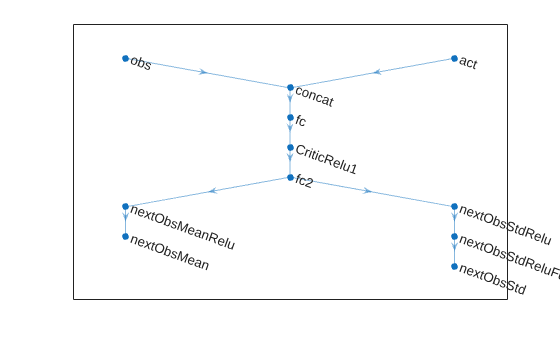
actInfo = getActionInfo(env);Define the layers for the deep neural network. The network has two input channels, one for the current observations and one for the current actions. The output of the network is the predicted Gaussian distribution for each next observation. The two output channels correspond to the means and standard deviations of these distribution.
% Define paths. statePath = featureInputLayer(obsInfo.Dimension(1),Name="obs"); actionPath = featureInputLayer(actInfo.Dimension(1),Name="act"); commonPath = [ concatenationLayer(1,2,Name="concat") fullyConnectedLayer(32,Name="fc") reluLayer(Name="CriticRelu1") fullyConnectedLayer(32,Name="fc2") ]; meanPath = [ reluLayer(Name="nextObsMeanRelu") fullyConnectedLayer(obsInfo.Dimension(1),Name="nextObsMean") ]; stdPath = [ reluLayer(Name="nextObsStdRelu") fullyConnectedLayer(obsInfo.Dimension(1),Name="nextObsStdReluFull") softplusLayer(Name="nextObsStd") ]; % Create dlnetwork object and add layers. tsnNet = dlnetwork; tsnNet = addLayers(tsnNet,statePath); tsnNet = addLayers(tsnNet,actionPath); tsnNet = addLayers(tsnNet,commonPath); tsnNet = addLayers(tsnNet,meanPath); tsnNet = addLayers(tsnNet,stdPath); % Connect paths. tsnNet = connectLayers(tsnNet,"obs","concat/in1"); tsnNet = connectLayers(tsnNet,"act","concat/in2"); tsnNet = connectLayers(tsnNet,"fc2","nextObsMeanRelu"); tsnNet = connectLayers(tsnNet,"fc2","nextObsStdRelu"); % Plot network. plot(tsnNet)
Initialize network and display the number of weights.
tsnNet = initialize(tsnNet); summary(tsnNet)
Initialized: true
Number of learnables: 1.5k
Inputs:
1 'obs' 4 features
2 'act' 1 features
Create a stochastic transition function object.
tsnFcnAppx = rlContinuousGaussianTransitionFunction(tsnNet, ... obsInfo,actInfo, ... ObservationInputNames="obs", ... ActionInputNames="act", ... NextObservationMeanOutputNames="nextObsMean", ... NextObservationStandardDeviationOutputNames="nextObsStd");
Using this transition function object, you can predict the next observation based on the current observation and action. For example, predict the next observation for a random observation and action. The next observation values are sampled from Gaussian distributions with the means and standard deviations output by the transition network.
observation = rand(obsInfo.Dimension);
action = rand(actInfo.Dimension);
nextObs = predict(tsnFcnAppx,{observation},{action})nextObs = 1×1 cell array
{4×1 single}
nextObs{1}ans = 4×1 single column vector
1.2414
0.7307
-0.5588
-0.9567
You can also obtain the mean value and standard deviation of the Gaussian distribution of the predicted next observation using evaluate.
nextObsDist = evaluate(tsnFcnAppx,{observation,action})nextObsDist = 1×2 cell array
{4×1 single} {4×1 single}
Extended Capabilities
GPU Arrays
Accelerate code by running on a graphics processing unit (GPU) using Parallel Computing Toolbox™.
Version History
Introduced in R2022a
See Also
Functions
Objects
MATLAB Command
You clicked a link that corresponds to this MATLAB command:
Run the command by entering it in the MATLAB Command Window. Web browsers do not support MATLAB commands.
Website auswählen
Wählen Sie eine Website aus, um übersetzte Inhalte (sofern verfügbar) sowie lokale Veranstaltungen und Angebote anzuzeigen. Auf der Grundlage Ihres Standorts empfehlen wir Ihnen die folgende Auswahl: .
Sie können auch eine Website aus der folgenden Liste auswählen:
So erhalten Sie die bestmögliche Leistung auf der Website
Wählen Sie für die bestmögliche Website-Leistung die Website für China (auf Chinesisch oder Englisch). Andere landesspezifische Websites von MathWorks sind für Besuche von Ihrem Standort aus nicht optimiert.
Amerika
- América Latina (Español)
- Canada (English)
- United States (English)
Europa
- Belgium (English)
- Denmark (English)
- Deutschland (Deutsch)
- España (Español)
- Finland (English)
- France (Français)
- Ireland (English)
- Italia (Italiano)
- Luxembourg (English)
- Netherlands (English)
- Norway (English)
- Österreich (Deutsch)
- Portugal (English)
- Sweden (English)
- Switzerland
- United Kingdom (English)