Hauptinhalt

selectBlockLocations

R2026b

Select blocks from blocked images

Description

blset = selectBlockLocations(bims) selects a set of nonoverlapping unique blocks from one or more blocked images bims at the finest resolution available in each image. The function returns the locations of the blocks, blset.

blset = selectBlockLocations(bims,Name=Value) specifies additional options about the blocks to select, such as the overlap and spacing between blocks, using one or more name-value arguments.

example

Examples

collapse all

Create a blocked image.

bim = blockedImage("tumor_091R.tif");

Create a block location set excluding incomplete blocks.

 bls = selectBlockLocations(bim,ExcludeIncompleteBlocks=true);

Create a blockedImageDatastore from this set of blocks.

bimds = blockedImageDatastore(bim,BlockLocationSet=bls);

Visualize the block locations.

bigimageshow(bim)
% Block size is in row-col (height-width) order.
blockedWH = fliplr(bls.BlockSize(1,1:2));
for ind = 1:size(bls.BlockOrigin,1)
    % BlockOrigin is already in x,y order.
    drawrectangle(Position=[bls.BlockOrigin(ind,1:2) blockedWH]);
end
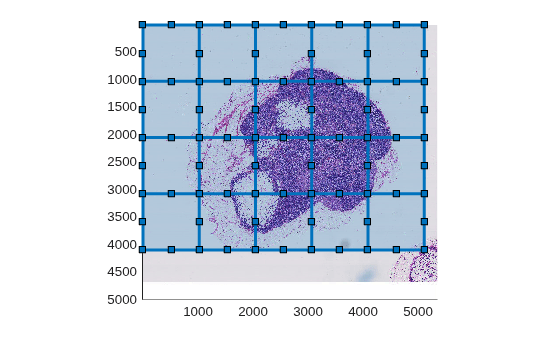
Figure contains an axes object. The axes object contains 21 objects of type bigimageshow, images.roi.rectangle.

Create a blocked image.

bim = blockedImage("tumor_091R.tif");

Create a blockLocationSet object.

blockSize = [2048 3072];
overlapPct = 0.5;
blockOffsets = round(blockSize.*overlapPct);
bls = selectBlockLocations(bim,BlockSize=blockSize, ...
    BlockOffSets=blockOffsets,ExcludeIncompleteBlocks=true);

Create a blockedImageDatastore from this set of blocks.

bimds = blockedImageDatastore(bim,BlockLocationSet=bls);

Visualize the blocked locations.

bigimageshow(bim)
% Block size is in row-col (height-width) order
blockedWH = fliplr(bls.BlockSize(1,1:2));
colors = prism(size(bls.BlockOrigin,1));
for ind = 1:size(bls.BlockOrigin,1)
     blockedColor = colors(ind,:);
     % BlockOrigin is already in x-y order
     drawrectangle(Position=[bls.BlockOrigin(ind,1:2) blockedWH], ...
         Color=blockedColor);
end
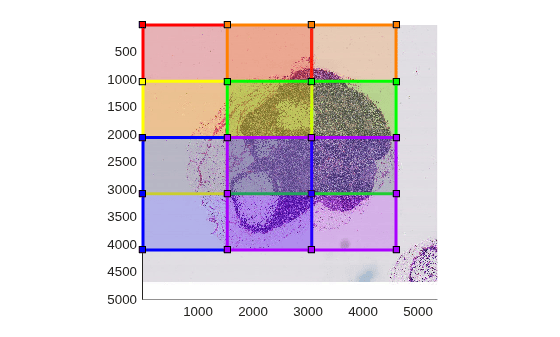
Figure contains an axes object. The axes object contains 7 objects of type bigimageshow, images.roi.rectangle.

Create a blocked image.

bim = blockedImage("tumor_091R.tif");

Create a blockLocationSet object.

blockedSize = [1024 512];
spacePct = 0.5;
blockedOffsets = blockedSize + blockedSize.*spacePct;
bls = selectBlockLocations(bim,BlockSize=blockedSize, ...
    BlockOffSets=blockedOffsets,ExcludeIncompleteBlocks=true);

Create a blockedImageDatastore object from this set of blocks.

bimds = blockedImageDatastore(bim,BlockLocationSet=bls);

Visualize the block locations.

bigimageshow(bim)
% Block size is in row-col (height-width) order
blockedWH = fliplr(bls.BlockSize(1,1:2));
for ind = 1:size(bls.BlockOrigin,1)
     % BlockOrigin is already in x-y order
     drawrectangle(Position=[bls.BlockOrigin(ind,1:2) blockedWH]);
end
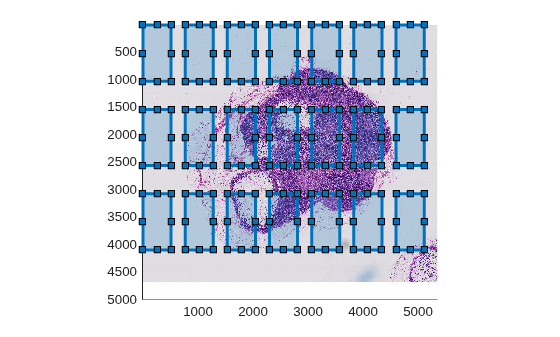
Figure contains an axes object. The axes object contains 22 objects of type bigimageshow, images.roi.rectangle.

Create a blocked image.

bim = blockedImage("tumor_091R.tif");

Display the blocked image.

h = bigimageshow(bim);
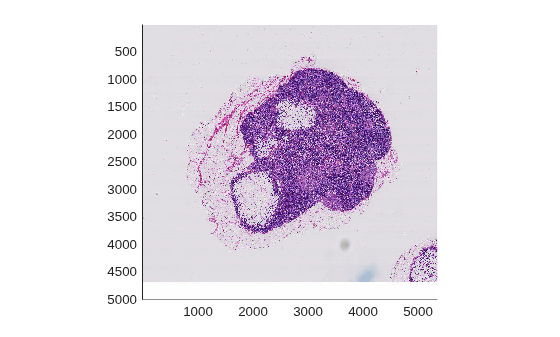
Figure contains an axes object. The axes object contains an object of type bigimageshow.

Create a mask at the coarsest level.

clevel = bim.NumLevels;
bmask = apply(bim,@(b)~imbinarize(im2gray(b.Data)),Level=clevel);

Use showMask to estimate an InclusionThreshold value.

showmask(h,bmask,BlockSize=[256 256],InclusionThreshold=0.9)
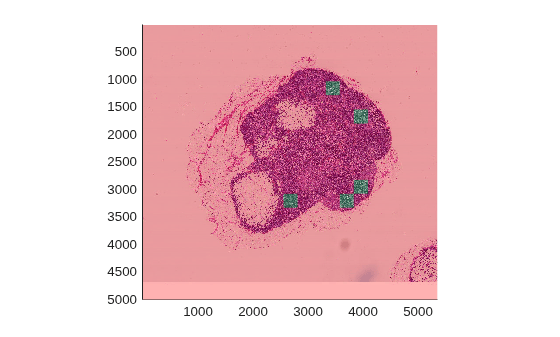
Figure contains an axes object. The axes object contains an object of type bigimageshow.

Create a blockedImagedatastore for blocks in which at least 90% of pixels are true in the stained region as defined by the mask.

mbls = selectBlockLocations(bim,Levels=1,BlockSize=[256 256], ...
    Masks=bmask,InclusionThreshold=0.90);

Create a blockedImageDatastore from this set of blocks.

bimds = blockedImageDatastore(bim,BlockLocationSet=mbls);

Read the blocks from the datastore.

bimds.ReadSize = 10;
blocks = read(bimds);

To verify that the datastore reads the correct blocks, display the blocks in a montage.

figure
montage(blocks,BorderSize=5,BackgroundColor="b"); 
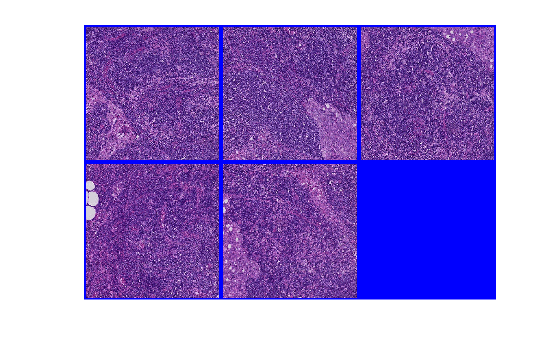
Figure contains an axes object. The hidden axes object contains an object of type image.

Input Arguments

collapse all

Blocked images, specified as a blockedImage object or b-element vector of blockedImage objects. All blocked images must have the same number of dimensions at the resolution levels from which blocks are selected.

Name-Value Arguments

collapse all

Specify optional pairs of arguments as Name1=Value1,...,NameN=ValueN, where Name is the argument name and Value is the corresponding value. Name-value arguments must appear after other arguments, but the order of the pairs does not matter.

Example: bls = selectBlockLocations(bim,BlockSize=[224 224]) selects blocks of size 224-by-224 pixels.

Offset of adjacent blocks, in pixels, specified as a vector of positive integers. The length of BlockOffsets is less than or equal to the number of dimensions of the input blocked images. The first two elements specify the offset in the order (rows, columns).

The default value is equal to BlockSize, which results in non-overlapping blocks that completely sample the image. To overlap blocks, specify a smaller value. To add a gap between blocks, specify a larger value. If you specify block offsets of lower dimensionality than the input blocked image, then the selectBlockLocations function sets the block offset in the remaining dimensions equal to the image size in those dimensions.

Example: BlockOffsets=[100 200] specifies a block offset of 100 pixels vertically and 200 pixels horizontally

Block size, in pixels, specified as a vector of positive integers. The length of BlockSize is less than or equal to the number of dimensions of the input blocked images.

If you do not specify the BlockSize argument, the default value is equal to the BlockSize property of the first blocked image in bims at the finest resolution level. If you specify a block size of lower dimensionality, then the selectBlockLocations function sets the block size in the remaining dimensions equal to the image size in those dimensions.

Example: BlockSize=[1024 512] specifies blocks with a height of 1024 pixels and a width of 512 pixels

Exclude incomplete blocks that are smaller than BlockSize, specified as a numeric or logical 0 (false) or 1 (true).

Inclusion threshold for mask blocks, specified as a numeric scalar or a b-element numeric vector with values in the range [0, 1]. The InclusionThreshold argument must have the same number of elements as the Masks argument. The selectBlockLocations function selects blocks that overlap the foreground of the corresponding mask block by a percentage greater than or equal to the value specified by InclusionThreshold.

  • When the inclusion threshold is 0, the selectBlockLocations function selects a block when at least one pixel in the corresponding mask block is nonzero.

  • When the inclusion threshold is 1, the selectBlockLocations function selects a block only when all pixels in the mask block are nonzero.

Resolution level of blocks from each blocked image in bims, specified as a positive integer or b-element vector of positive integers. If you specify a scalar value, the selectBlockLocations function selects blocks from all blocked images at the same resolution level. The default value is a b-element vector of 1s, which selects blocks from the finest resolution level of each image in bims.

Data Types: double

Mask images, specified as an array the same size as bims. The underlying data type of the mask images is logical. The selectBlockLocations function selects blocks that overlap the foreground of the corresponding mask block by an amount specified by InclusionThreshold. Masks are expected to be in the same world coordinate system as the corresponding blockedImage in the bims array.

When the masks do not fit in memory, it is recommended to perform computations in parallel by specifying the UseParallel name-value argument.

Option to perform computations in parallel using a parallel pool of workers, specified as one of these values:

  • "off" — Run in serial on the MATLAB® client.

  • "auto" — Use a parallel pool if one is open or if MATLAB can automatically create one. If a parallel pool is not available, then run in serial on the MATLAB client.

  • "on" — Use a parallel pool if one is open or if MATLAB can automatically create one. If a parallel pool is not available, then throw an error.

Before R2026b: To run in parallel, set UseParallel to true (1).

If you do not have a parallel pool open and automatic pool creation is enabled, then MATLAB opens a pool using the default cluster profile. To use a parallel pool to run computations in MATLAB, you must have Parallel Computing Toolbox™. For more information, see Run MATLAB Functions with Automatic Parallel Support (Parallel Computing Toolbox).

To use a parallel pool, you must also specify the Masks name-value argument. The Source property of each blocked image in bims must be a valid path on all of the parallel workers.

Output Arguments

collapse all

Block locations, returned as a blockLocationSet object.

References

[1] Bejnordi, Babak Ehteshami, Mitko Veta, Paul Johannes van Diest, Bram van Ginneken, Nico Karssemeijer, Geert Litjens, Jeroen A. W. M. van der Laak, et al. “Diagnostic Assessment of Deep Learning Algorithms for Detection of Lymph Node Metastases in Women With Breast Cancer.” JAMA 318, no. 22 (December 12, 2017): 2199–2210. https://doi.org/10.1001/jama.2017.14585.

Extended Capabilities

expand all

Version History

Introduced in R2020b

expand all