circularArray
R2026bCreate circular antenna array
Description
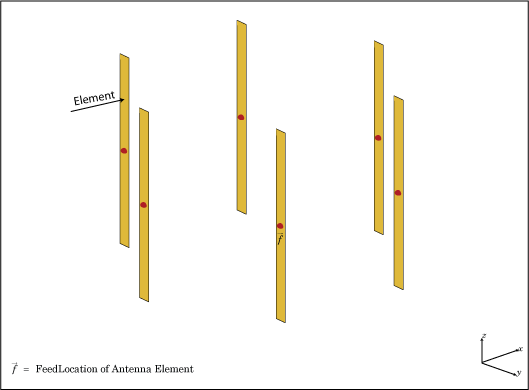
The circularArray object creates a circular antenna array.
Circular array finds application in direction of arrival (DoA) systems. You can use
circular arrays to perform 2-D scanning, while lowering element counts. These arrays
also have the ability for 360-degree scanning. The individual elements in the circular
array are part of the same array environment. This property reduces the impact of edge
effects and other coupling variation.
Creation
Description
array = circularArray
array = circularArray(PropertyName=Value)PropertyName is the property name
and Value is the corresponding value. You can specify
several name-value arguments in any order as
PropertyName1=Value1,...,PropertyNameN=ValueN.
Properties that you do not specify, retain their default values.
For example, array =
circularArray(Element=monopole,NumElements=8) creates a
circular array of 8 monopole antennas.
Properties
Object Functions
arrayFactor | Array factor in dB |
axialRatio | Calculate and plot axial ratio of antenna or array |
beamwidth | Beamwidth of antenna |
charge | Charge distribution on antenna or array surface |
correlation | Correlation coefficient between two antennas in array |
current | Current distribution on antenna or array surface |
design | Create antenna, array, or AI-based antenna resonating at specified frequency |
efficiency | Calculate and plot radiation efficiency of antenna or array |
EHfields | Electric and magnetic fields of antennas or embedded electric and magnetic fields of antenna element in arrays |
feedCurrent | Calculate current at feed for antenna or array |
impedance | Calculate and plot input impedance of antenna or scan impedance of array |
info | Display information about antenna, array, or platform |
layout | Display array or PCB stack layout |
memoryEstimate | Estimate memory required to solve antenna or array mesh |
mesh | Generate and view mesh for antennas, arrays, and custom shapes |
meshconfig | Change meshing mode of antenna, array, custom antenna, custom array, or custom geometry |
msiwrite | Write antenna or array analysis data to MSI planet file |
optimize | Optimize antenna and array catalog elements using SADEA or TR-SADEA algorithm |
pattern | Plot radiation pattern of antenna, array, or embedded element of array |
patternAzimuth | Azimuth plane radiation pattern of antenna or array |
patternElevation | Elevation plane radiation pattern of antenna or array |
patternMultiply | Radiation pattern of array using pattern multiplication |
peakRadiation | Calculate and mark maximum radiation points of antenna or array on radiation pattern |
phaseShift | Calculate phase shift values for arrays or multi-feed PCB stack |
rcs | Calculate and plot monostatic and bistatic radar cross section (RCS) of platform, antenna, or array |
returnLoss | Calculate and plot return loss of antenna or scan return loss of array |
show | Display antenna, array, AI-based antenna, platform, or shape |
sparameters | S-parameters for antenna or array |
stlwrite | Write mesh information to STL file |
vswr | Calculate and plot voltage standing wave ratio (VSWR) of antenna or array element |
Examples
Create a circular antenna array using 10 antenna elements. View the layout of the antenna elements in the array.
ca = circularArray(NumElements=10)
ca =
  circularArray with properties:

           Element: [1×1 dipole]
       NumElements: 10
            Radius: 1
       AngleOffset: 0
    AmplitudeTaper: 1
        PhaseShift: 0
              Tilt: 0
          TiltAxis: [1 0 0]
figure
layout(ca)
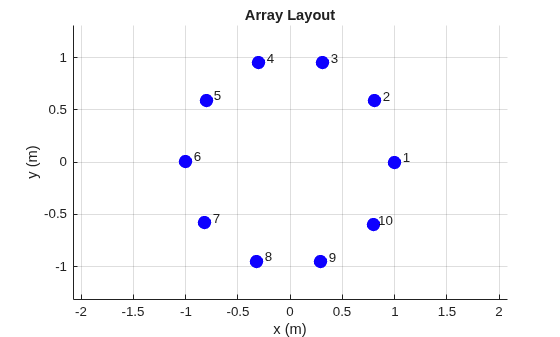
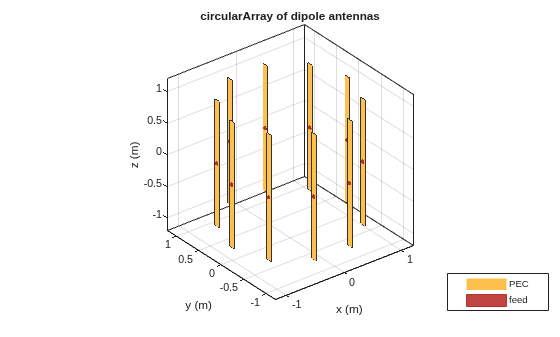
View the array.
figure
show(ca)
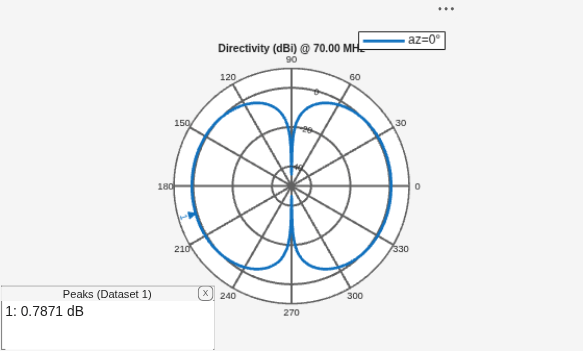
Plot the elevation pattern of the circular array at a frequency of 70 MHz.
figure
patternElevation(ca,70e6)
Load the measured E-field data. Define the field frequency, azimuth and elevation angles.
load("mesAnt_circ_array.mat")
freq = 3e9;
az = -180:5:180;
el = -90:5:90;
Create measuredAntenna object and set its properties using the defined parameters.
mesAnt = measuredAntenna(E=Efield,Direction=Dir,NumPorts=1, ...
    Azimuth=az,Elevation=el,FieldCoordinate="rectangular", ...
    FieldFrequency=freq)
mesAnt =
  measuredAntenna with properties:

                  E: [2701×3 double]
        Directivity: []
          Direction: [2701×3 double]
        PhaseCenter: [0 0 0.0750]
           NumPorts: 1
     FieldFrequency: 3.0000e+09
    FieldCoordinate: "rectangular"
            Azimuth: [-180 -175 -170 -165 -160 -155 -150 -145 -140 -135 -130 -125 -120 -115 -110 -105 -100 -95 -90 -85 -80 -75 -70 -65 -60 -55 -50 -45 -40 -35 -30 -25 -20 -15 -10 -5 0 5 10 15 20 25 30 35 40 45 50 55 60 65 70 75 80 85 90 … ] (1×73 double)
          Elevation: [-90 -85 -80 -75 -70 -65 -60 -55 -50 -45 -40 -35 -30 -25 -20 -15 -10 -5 0 5 10 15 20 25 30 35 40 45 50 55 60 65 70 75 80 85 90]
        Sparameters: []
Create a six-element circular array with 0.0732 m radius and use the measuredAntenna object as its element.
circArr = circularArray(Element=mesAnt,Radius=0.0732)
circArr =
  circularArray with properties:

           Element: [1×1 measuredAntenna]
       NumElements: 6
            Radius: 0.0732
       AngleOffset: 0
    AmplitudeTaper: 1
        PhaseShift: 0
              Tilt: 0
          TiltAxis: [1 0 0]
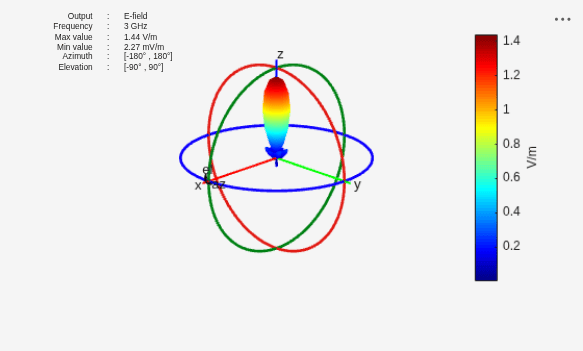
Perform pattern multiplication and plot the resultant array E-field pattern.
figure
patternMultiply(circArr,freq,Type="efield")