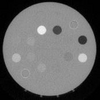
why I fully lose dicom image after adding noise to it?

2 Ansichten (letzte 30 Tage)
Dear all,
I am trying to add both Gaussian and salt & pepper noise to a dicom image using imnoise() but in any densities I completely lose the image it becomes fully black with white spots in it.
I would be glad if someone could help me.
The below is my image and my code.
img = dicomread('1.dcm');
density = 0.01;
%img = imnoise(img,'gaussian',density);
img = imnoise(img,'salt & pepper',density);

Akzeptierte Antwort

Simon Chan
Simon Chan am 1 Mär. 2022
imnoise expects pixel values of data type double and single to be in the range [0, 1]. You can use the rescale function to adjust pixel values to the expected range. If your image is type double or single with values outside the range [0,1], then imnoise clips input pixel values to the range [0, 1] before adding noise.
J = rescale(img);
img_noise = imnoise(J,'salt & pepper',0.01);
  5 Kommentare
ABIRAMI RAMALINGAM
ABIRAMI RAMALINGAM am 6 Jun. 2023
thank you, i m also have this doubt.
suja rani
suja rani am 17 Jan. 2025
Thank you so much for indicating the scale function, for past 2 days I have this error and could not complete the scheduled task. Now its clear thank you very much simon chan

Melden Sie sich an, um zu kommentieren.

Weitere Antworten (2)

Walter Roberson
Walter Roberson am 1 Mär. 2022
class() has probably changed.
im2double(img) and imnoise() the results and im2uint8 or as appropriate to return to the original type.
There is a possibility that your image is int16 with signed data, especially if it is CT, and it might take a slight bit more work to get back to signed
  5 Kommentare
Image Analyst
Image Analyst am 1 Mär. 2022
Since your images are in the range 0-256, I'd just immediately cast them to uint8 right after you read them in
img = dicomread('1.dcm');
img = uint8(img);
After that, everything should be fine.
khwaja mustafa siddiqi
khwaja mustafa siddiqi am 1 Mär. 2022
Bearbeitet: khwaja mustafa siddiqi am 1 Mär. 2022
Thank you, It worked just fine

Melden Sie sich an, um zu kommentieren.


Image Analyst
Image Analyst am 1 Mär. 2022
Try this:
img = dicomread('1.dcm');
subplot(2, 2, 1);
imshow(img, []);
subplot(2, 2, 2);
imhist(img);
% Show min and max are 0 and 256,
% nowhere close to the uint16 range of 0 to 65,535.
min(img(:))
max(img(:))
density = 0.01;
%img = imnoise(img,'gaussian',density);
noisyImage = imnoise(img,'salt & pepper',density);
whos noisyImage
subplot(2, 2, 3);
imshow(noisyImage, [])
% Now rescale
noisyImage = imnoise(mat2gray(img),'salt & pepper',density);
subplot(2, 2, 4);
imshow(noisyImage, [])

Kategorien

Mehr zu DICOM Format finden Sie in Help Center und File Exchange

Community Treasure Hunt

Find the treasures in MATLAB Central and discover how the community can help you!

Start Hunting!

Translated by


