releaseGPUMemory
R2026bSyntax
Description
Add-On Required: This feature requires the Computer Vision Toolbox Model for MapAnything Network add-on.
Examples
Download and extract the tum_rgbd_data.zip file. This file includes an images subfolder that contains a sequence of indoor images from the TUM RGB-D data set [1].
if ~exist("tum_rgbd_data.zip","file")
    websave("tum_rgbd_data.zip","https://ssd.mathworks.com/supportfiles/3DReconstruction/tum_rgbd_data.zip");
    unzip(fullfile("tum_rgbd_data.zip"), pwd);
end
Create an image datastore by specifying the path to the folder containing the image files, and subsample every 5th frame to reduce processing time when you perform 3-D reconstruction.
imds = imageDatastore("sfmTrainingDataTUMRGBD\images");
numFiles = numel(imds.Files);
imds = subset(imds,1:5:numFiles);
Load the camera intrinsics and camera poses. Subsample the poses using the same indices as the images so that the number of poses matches the number of images in the datastore.
camInfo = load(fullfile("sfmTrainingDataTUMRGBD","cameraInfo.mat"));
camIntrinsics = camInfo.intrinsics;
camPoses = camInfo.cameraPoses;
camPoses = transpose(camPoses(1:5:numFiles));
Create a mapanything object using the image datastore, camera intrinsics, and camera poses, and reconstruct the 3-D scene from the images.
maObj = mapanything(imds,Intrinsics=camIntrinsics,CameraPoses=camPoses);
maOutputs = reconstruct(maObj);
Processing Individual blocks
---------------------------------------------
Processing Block 1/1

Processing point clouds
---------------------------------------------
Processing point cloud 21/21
Extract the generated point cloud. Then, visualize the point cloud by using the pcviewer (Point Cloud Toolbox) function, and set the vertical axis and vertical axis direction to match the coordinate system of the TUM RGB-D data set. Modify the view of the point cloud visualization to focus on a region of interest by specifying the low-level camera properties of the axes object.
pcArray = readall(maOutputs.PointClouds);
pcMerged = pccat(pcArray);
ax = pcviewer(pcMerged);
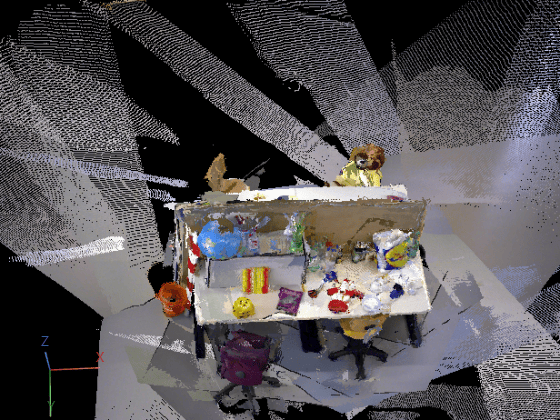
ax.CameraPosition = [-1.5185 -6.5178 -11.9106];
ax.CameraUpVector = [0.0520 -0.8878 0.4572];
ax.CameraViewAngle = 15;
If you are using a GPU resource to run the model, you can release the GPU memory allocated to the model after processing to enable additional models to run on the GPU.
releaseGPUMemory(maObj);
References
[1] Sturm, Jürgen, Nikolas Engelhard, Felix Endres, Wolfram Burgard, and Daniel Cremers. “A Benchmark for the Evaluation of RGB-D SLAM Systems.” 2012 IEEE/RSJ International Conference on Intelligent Robots and Systems, October 2012, 573–80. https://doi.org/10.1109/IROS.2012.6385773.
Input Arguments
Version History
Introduced in R2026b

