Digital Clock
R2026bOutput simulation time at specified sampling interval
Digital Clock block

To add a block to a model, double-click the canvas and start typing the block name. Then, select the block from the list.
Libraries:
Simulink /
Sources
Description
The Digital Clock block outputs the simulation time only at the specified sampling interval. At other times, the block holds the output at the previous value. To control the precision of this block, use the Sample time parameter in the block dialog box.
Use this block rather than the Clock block, which outputs continuous time, when you need the current simulation time within a discrete system.
Examples
This example shows how to view the simulation sample time at a specified sampling interval using the Digital Clock block. In this model, the Scope shows the output of a Digital Clock block with the Sample time set to 0.2.
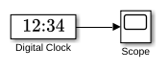
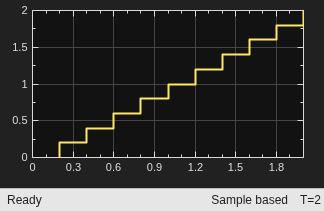
In this configuration, the Digital Clock block outputs the simulation time every 0.2 seconds. Otherwise, the block holds the output at the previous value.
Ports
Output
Parameters
Block Characteristics
Data Types |
|
Direct Feedthrough |
|
Multidimensional Signals |
|
Variable-Size Signals |
|
Zero-Crossing Detection |
|
Programmatic Use: Add Block
To add the block programmatically, use the add_block function with one of these library block paths as the source.
"simulink/Sources/Digital Clock"
Example: add_block("simulink/Sources/Digital Clock","myModel/myBlock",MakeNameUnique="on")
Extended Capabilities
Version History
Introduced before R2006a

