Lineare Regression mit einer Prädiktorvariable
R2026bEine einfache lineare Regression beschreibt die Beziehung zwischen einer einzelnen Prädiktorvariable und einer Reaktionsvariable. Ein lineares Regressionsmodell ist nützlich, um zu verstehen, wie Änderungen des Prädiktors sich auf die Reaktion auswirken.
Dieses Beispiel demonstriert die Anpassung, Visualisierung und Validierung einfacher linearer Regressionsmodelle verschiedener Grade mithilfe der Funktionen polyfit und polyval. Informationen zur Anpassung und Visualisierung eines Modells mit dem Basic Fitting Tool finden Sie unter Interactively Fit Data and Visualize Model.
Verwenden Sie eine einfache lineare Regression, wenn:
Sie eine Prädiktorvariable haben.
Die Beziehung zwischen Prädiktor und Reaktion in den Koeffizienten linear ist.
Sie die Auswirkung des Prädiktors auf die Reaktion quantifizieren möchten.
Plotten von Daten
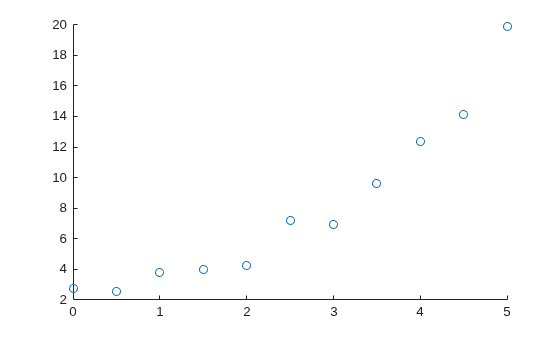
Beginnen Sie, indem Sie Ihre Daten plotten, um mögliche Grade für Ihre Polynomanpassung zu ermitteln.
Erstellen und visualisieren Sie beispielsweise eine Beispiel-Prädiktorvariable x und eine Beispiel-Reaktionsvariable y. Diese Visualisierung deutet darauf hin, dass eine lineare oder quadratische Anpassung die Beziehung zwischen Prädikator- und Reaktionsvariable gut beschreiben könnte.
x = [0:0.5:5]';
y = [2.73 2.50 3.79 3.98 4.21 7.18 6.95 9.63 12.39 14.10 19.93]';
scatter(x,y)
Anpassen eines Modells ersten Grades
Passen Sie ein (lineares) Modell ersten Grades an die Daten an, indem Sie die Funktion polyfit verwenden. Geben Sie zwei Ausgabeargumente an, um die polynomialen Koeffizienten sowie die Fehlerschätzstruktur zurückzugeben.
[pLinear,SLinear] = polyfit(x,y,1)
pLinear = 1×2

    3.1316    0.1155
SLinear = struct with fields:
           R: [2×2 double]
          df: 9
       normr: 6.3071
    rsquared: 0.8715
Zeigen Sie das angepasste Modell an.
eqLinear = "Linear: " + pLinear(1) + "x + " + pLinear(2)
eqLinear =
"Linear: 3.1316x + 0.11545"
Anpassen eines höhergradigen Modells
Wenn ein Modell ersten Grades die Beziehung zwischen der Prädiktor- und der Reaktionsvariable nicht angemessen beschreiben kann, können Sie ein höhergradiges Modell anpassen. Passen Sie beispielsweise ein (quadratisches) Modell zweiten Grades an die Daten an, indem Sie die Funktion polyfit verwenden. Geben Sie zwei Ausgabeargumente an, um die polynomialen Koeffizienten sowie die Fehlerschätzstruktur zurückzugeben.
[pQuad,SQuad] = polyfit(x,y,2)
pQuad = 1×3

    0.7898   -0.8175    3.0773
SQuad = struct with fields:
           R: [3×3 double]
          df: 8
       normr: 2.5152
    rsquared: 0.9796
Zeigen Sie das angepasste Modell an.
eqQuad = "Quadratic: " + pQuad(1) + "x^2 + " + pQuad(2) + "x + " + pQuad(3)
eqQuad =
"Quadratic: 0.78984x^2 + -0.81755x + 3.0773"
Vergleichen von Modellen
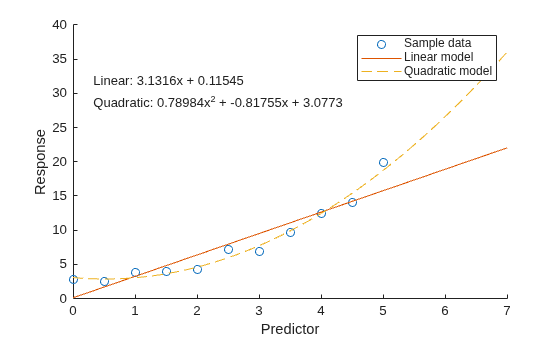
Um Modelle mithilfe eines Diagramms zu vergleichen, werten Sie zunächst jedes Modell bei den Abfragepunkten aus und geben Sie die prognostizierten Reaktionswerte mithilfe der Funktion polyval zurück. Visualisieren Sie daraufhin die Daten und beide Modelle.
Berechnen Sie beispielsweise die Reaktionswerte für das lineare Modell und das quadratische Modell über einen feineren Bereich von x-Werten.
xQuery = [0:0.05:7]';
yLinear = polyval(pLinear,xQuery);
yQuad = polyval(pQuad,xQuery);
Wenn das höhergradige Modell die Reaktionswerte nicht gut prognostizieren kann, könnte dies auf eine Überanpassung hinweisen. Informationen zur Validierung Ihres Modells und zur Auswahl der angemessenen Modellkomplexität finden Sie im Abschnitt Validieren von Modellen.
Plotten Sie daraufhin die Stichprobendaten und die Modelldaten.
scatter(x,y)
hold on
plot(xQuery,yLinear,"-")
plot(xQuery,yQuad,"--")
hold off

xlabel("Predictor")
ylabel("Response")
legend(["Sample data" "Linear model" "Quadratic model"])
text(0.3,30,[eqLinear eqQuad])
Validieren von Modellen
Um ein Modell zu validieren, berechnen Sie den Bestimmtheitskoeffizienten (R-Quadrat) oder den angepassten Bestimmtheitskoeffizienten (angepasstes R-Quadrat). Ein Wert, der nahe an 1 liegt, weist auf eine gute Anpassung hin.
Validieren eines linearen Modells mit R-Quadrat
Bei einem Modell ersten Grades können Sie mithilfe der von der polyfit-Funktion zurückgegebenen Fehlerschätzstruktur auf den R-Quadrat-Wert zugreifen. Fragen Sie beispielsweise das Feld rsquared in SLinear ab.
linearR2 = SLinear.rsquared
linearR2 =
0.8715
Validieren höhergradiger Modelle mit angepasstem R-Quadrat
Bei höhergradigen Modellen mit mehr Elementen steigt der R-Quadrat-Wert üblicherweise an und weist auf eine engere Anpassung an die Beobachtungsdaten hin. Diese Modelle unterliegen jedoch einem höheren Risiko einer Überanpassung.
Überanpassung tritt auf, wenn ein Modell die Ursprungsdaten (einschließlich Rauschen) zu eng beschreibt und kein guter Prädiktor mit neuen Daten ist.
Um die Prognosequalität und Modellkomplexität zu balancieren, können Sie das Modell mithilfe des angepassten R-Quadrat-Werts validieren, der einen Punktabzug für die Anzahl Prädiktoren umfasst. Sie berechnen den angepassten R-Quadrat-Wert mithilfe dieser Gleichung, wobei für den Wert des Felds rsquared in der Fehlerschätzstruktur steht, für die Anzahl Beobachtungen in Ihren Daten steht und für den Grad Ihres Modells steht.
Berechnen Sie beispielsweise den angepassten R-Quadrat-Wert des quadratischen Modells.
quadAdjRsq = 1 - (1 - SQuad.rsquared) * (numel(y) - 1) / (numel(y) - 2 - 1)
quadAdjRsq =
0.9744
Berechnen des maximalen Prognosefehlers jedes Modells
Zudem können Sie ein Modell validieren, indem Sie den größten Fehler zwischen den Modellprognosen und den Stichprobendaten berechnen. Ein kleiner Maximalfehler relativ zu den Datenwerten weist auf eine gute Anpassung hin.
Berechnen Sie beispielsweise den Maximalfehler des linearen Modells und des quadratischen Modells.
Lia = ismember(xQuery,x);
linearMaxError = max(abs(yLinear(Lia) - y))
linearMaxError =
4.1564
quadMaxError = max(abs(yQuad(Lia) - y))
quadMaxError =
1.2926
Siehe auch
Funktionen
Themen
- Interactively Fit Data and Visualize Model
- Linear Regression with Nonpolynomial Terms
- Linear Regression with Multiple Predictor Variables
- Erstellen und Auswerten von Polynomen
- Linear Regression Workflow (Statistics and Machine Learning Toolbox)
- Fit Polynomial Models (Curve Fitting Toolbox)

