Hauptinhalt

replaceFilters

Replace existing filters with new filters in Filter Analyzer app

Since R2024a

Description

replaceFilters(fa,filt1,...,filtn) replaces all the filters in the Filter Analyzer app fa with new filters. The number of specified filters must be equal to the total number of filters currently in the app. If you want to replace only a subset of the filters, use the FilterNames argument to specify which ones.

example

replaceFilters(___,Name=Value) specifies options using name-value arguments in addition to the input arguments from the previous syntax.

example

Examples

collapse all

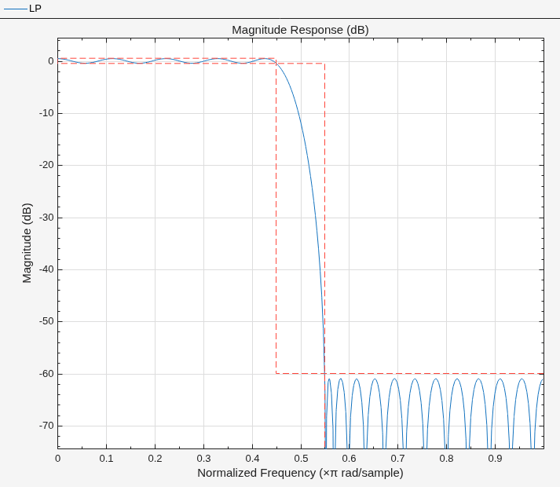
Start the Filter Analyzer app with one lowpass filter.

d1 = designfilt("lowpassfir", ...
    PassbandFrequency=0.45,StopbandFrequency=0.55);
fa = filterAnalyzer(d1,FilterNames="LP");
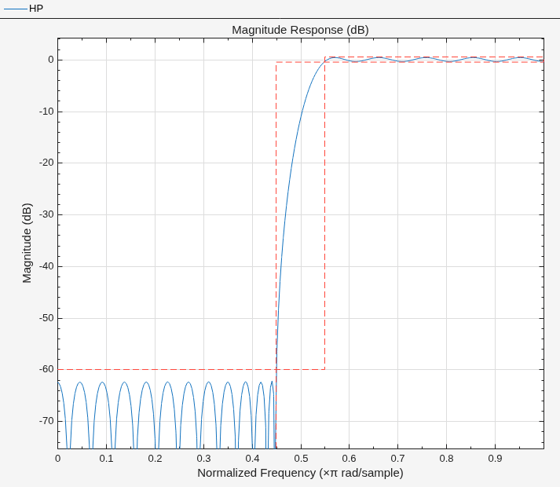
Replace the lowpass filter with a highpass filter.

d2 = designfilt("highpassfir", ...
    PassbandFrequency=0.55,StopbandFrequency=0.45);
replaceFilters(fa,d2,FilterNames="LP")
renameFilters(fa,"LP","HP")
Input Arguments

collapse all

Filter Analyzer app handle, specified as a filterAnalyzer object.

Input filter, specified as one of these:

  • A pair of coefficient matrices — Specify filt as two arguments B,A, where B and A are the numerator and denominator coefficients, respectively. For more information, see Import Filter Coefficients.

  • A cell array — Specify filt as a cell array with the form {B,A,g}, where B and A are the numerator and denominator coefficients, respectively, and g represents the scaling gain of the filter. For more information, see Import Filter Coefficients.

  • A digitalFilter object — Specify filt as a digitalFilter object. To generate or edit digital filters based on frequency-response specifications at the command line, use designfilt.

  • A filter System object— Specify filt as a System object. For more information, see Supported Filter System Objects.

Example: B = [1 3 3 1]/6 and A = [3 0 1 0]/3 together specify a third-order lowpass Butterworth filter with a normalized 3 dB frequency of 0.5π rad/sample.

Example: [B,A] = sos2ctf([2 4 2 6 0 2; 3 3 0 6 0 0]) and g = [1;1;1] specify a third-order lowpass Butterworth filter with a normalized 3 dB frequency of 0.5π rad/sample and with scaling gains.

Example: d = designfilt("lowpassiir",FilterOrder=3,HalfPowerFrequency=0.5) specifies a third-order lowpass Butterworth filter with a normalized 3 dB frequency of 0.5π rad/sample.

Example: hd = design(fdesign.lowpass,"butter",SystemObject=true) specifies a lowpass Butterworth filter System object.

Data Types: single | double | int8 | int16 | int32 | int64 | uint8 | uint16 | uint32 | uint64 | cell
Complex Number Support: Yes

Name-Value Arguments

collapse all

Specify optional pairs of arguments as Name1=Value1,...,NameN=ValueN, where Name is the argument name and Value is the corresponding value. Name-value arguments must appear after other arguments, but the order of the pairs does not matter.

Example: FilterNames=["LP" "HP"],SampleRates=[150 3e3]

Arithmetic type of filter System objects, specified as one of "double", "single", or "fixed". If you do not specify this argument, and the filter System objects are in an unlocked state, Filter Analyzer assumes the filters are double precision.

Data Types: char | string

Names of filters to replace, specified as a string vector. Filter names are the names that identify the different filters in the app Filters table.

Example: ["LPbutter" "LPelliptic"]

Data Types: char | string

Filter sample rates, specified as a scalar or vector of values specified in Hz.

  • If you specify SampleRates as a scalar, the value you specify applies to all filters.

  • If you specify SampleRates as a vector, the vector must have the same number of elements as the number of filters.

When you specify SampleRates, the Filters table shows the specified sample rate.

Example: [150 3e3]

Data Types: single | double | int8 | int16 | int32 | int64 | uint8 | uint16 | uint32 | uint64

Version History

Introduced in R2024a