ctf2sysobj
R2026bSyntax
Description
ctfFiltObj = ctf2sysobj(Num,Den)Num and denominator coefficients Den.
ctfFiltObj = ctf2sysobj(Num,Den,g)g of a digital filter.
ctfFiltObj = ctf2sysobj(___,Name=Value)
Examples
Since R2026b
Consider a second-order FIR filter with the numerator coefficients [1 2 1]. Convert this filter to a filter System object™ using the ctf2sysobj function.
You can implement the filter as an FIR filter, second-order section (SOS) filter, fourth-order section (FOS) filter, or as an arbitrary-order IIR filter. By default, the ctf2sysobj function creates a dsp.FIRFilter System object.
filtObjFIR = ctf2sysobj([1 2 1],1)
filtObjFIR =
  dsp.FIRFilter with properties:

            Structure: 'Direct form'
      NumeratorSource: 'Property'
            Numerator: [1 2 1]
    InitialConditions: 0

  Show all properties
To create other filters, specify the filter type in the FilterTypes argument.
Create an SOS filter by setting the FilterTypes argument to "sos".
filtObjSOS = ctf2sysobj([1 2 1],1,FilterTypes="sos")filtObjSOS =
dsp.SOSFilter with properties:
Structure: 'Direct form II transposed'
CoefficientSource: 'Property'
Numerator: [1 2 1]
Denominator: [1 0 0]
HasScaleValues: false
Show all properties
Create an IIR filter by setting the FilterTypes argument to "iir".
filtObjIIR = ctf2sysobj([1 2 1],1,FilterTypes="iir")filtObjIIR =
dsp.IIRFilter with properties:
Structure: 'Direct form II transposed'
Numerator: [1 2 1]
Denominator: 1
InitialConditions: 0
Show all properties
Since R2026b
Consider a set of CTF coefficients with mixed orders.
First row is an FIR filter of order 4.
Second row is a scalar value.
Third row is a SOS filter.
Last row is an allpole filter of order 4.
Num = [1 2 1 3 4;
    17 0 0 0 0
    1 2 1 0 0;
    1 0 0 0 0];
Den = [1 0 0 0 0;
    12 0 0 0 0
    1 0 2 0 0;
    1 -3 2 -1 0];
Convert these CTF coefficients to a filter System object using the ctf2sysobj function.
Allow all filter types by setting the FilterTypes argument to "all". The function opts to use a dsp.FIRFilter object for the first row, a scalar for the second row, and the dsp.FourthOrderSectionFilter object for the last two rows. The function cascades these filter objects as individual stages of the dsp.FilterCascade object.
filtObjCasc = ctf2sysobj(Num,Den,FilterTypes="all")filtObjCasc =
dsp.FilterCascade with properties:
Stage1: [1×1 dsp.FIRFilter]
Stage2: 1.4167
Stage3: [1×1 dsp.FourthOrderSectionFilter]
CloneStages: true
Implement this filter as a single fourth-order section filter by setting the FilterTypes argument to "fos".
filtObjFOS = ctf2sysobj(Num,Den,FilterTypes="fos")filtObjFOS =
FourthOrderSectionFilter with properties:
Numerator: [4×5 double]
Denominator: [4×5 double]
RoundingMethod: 'Floor'
OverflowAction: 'Wrap'
CoefficientsDataType: [1×1 embedded.numerictype]
AccumulatorDataType: 'Inherit: Inherit via internal rule'
OutputDataType: 'Inherit: Same as input'
You can also avoid the fourth-order section filter implementation and specify other types explicitly. The function then creates a dsp.FilterCascade object with the other filter types.
filtObj = ctf2sysobj(Num,Den,FilterTypes=["fir","scalar","allpole","sos"])
filtObj =
  dsp.FilterCascade with properties:

         Stage1: [1×1 dsp.FIRFilter]
         Stage2: 1.4167
         Stage3: [1×1 dsp.SOSFilter]
         Stage4: [1×1 dsp.AllpoleFilter]
    CloneStages: true
To omit the scalar, remove the "scalar" option from the FilterTypes argument list. The function then implements the scalar stage with a dsp.FIRFilter object.
filtObjNoScalar = ctf2sysobj(Num,Den,FilterTypes=["fir","allpole","sos"])
filtObjNoScalar =
  dsp.FilterCascade with properties:

         Stage1: [1×1 dsp.FIRFilter]
         Stage2: [1×1 dsp.FIRFilter]
         Stage3: [1×1 dsp.SOSFilter]
         Stage4: [1×1 dsp.AllpoleFilter]
    CloneStages: true
Since R2026b
When more than one filter implementation is possible for a given set of coefficients, the ctf2sysobj function implements the filter based on the hierarchy discussed in the Filter Implementation Hierarchy section.
Consider a 3-tap FIR filter with the coefficients [1 2 1]. This filter can be implemented as an FIR filter, second-order section filter, fourth-order section filter, or an IIR filter.
Allow all filter types. The function opts for the FIR implementation as its first choice.
filtObj = ctf2sysobj([1 2 1],1,FilterTypes="all")filtObj =
dsp.FIRFilter with properties:
Structure: 'Direct form'
NumeratorSource: 'Property'
Numerator: [1 2 1]
InitialConditions: 0
Show all properties
Exclude "fir" from the filter types list. The function chooses the second-order section filter implementation.
filtObjNoFIR = ctf2sysobj([1 2 1],1,FilterTypes=["sos","fos","iir"])
filtObjNoFIR =
  dsp.SOSFilter with properties:

            Structure: 'Direct form II transposed'
    CoefficientSource: 'Property'
            Numerator: [1 2 1]
          Denominator: [1 0 0]
       HasScaleValues: false

  Show all properties
Exclude the "sos" implementation. The function chooses "fos" and implements a dsp.FourthOrderSectionFilter object.
filtObjNoSOS = ctf2sysobj([1 2 1],1,FilterTypes=["fos","iir"])
filtObjNoSOS =
  FourthOrderSectionFilter with properties:

               Numerator: [1 2 1 0 0]
             Denominator: [1 0 0 0 0]
          RoundingMethod: 'Floor'
          OverflowAction: 'Wrap'
    CoefficientsDataType: [1×1 embedded.numerictype]
     AccumulatorDataType: 'Inherit: Inherit via internal rule'
          OutputDataType: 'Inherit: Same as input'
Exclude "fos". The function implements an IIR filter.
filtObjIIR = ctf2sysobj([1 2 1],1,FilterTypes="iir")filtObjIIR =
dsp.IIRFilter with properties:
Structure: 'Direct form II transposed'
Numerator: [1 2 1]
Denominator: 1
InitialConditions: 0
Show all properties
If you specify "allpole" or "scalar" instead of the other filter types, the function errors out because these two options do not work for the CTF coefficients [1 2 1].
Design a sixth-order bandpass elliptic filter. Obtain the numerator and denominator coefficients in CTF format. The size of the filter coefficients matrices indicate three fourth-order sections.
[Num,Den] = ellip(6,3,50,[0.3 0.6],"bandpass","ctf")
Num = 3×5

    0.2275   -0.0435   -0.1999   -0.0435    0.2275
    0.2275   -0.1070    0.1733   -0.1070    0.2275
    0.2275   -0.1188    0.2423   -0.1188    0.2275
Den = 3×5

    1.0000   -0.6236    1.6521   -0.5161    0.6936
    1.0000   -0.5779    1.3890   -0.5327    0.8714
    1.0000   -0.5568    1.2684   -0.5468    0.9715
Convert the filter in the CTF format to a System object. The ctf2sysobj function returns a dsp.FourthOrderSectionFilter object.
ctfObj = ctf2sysobj(Num,Den)
ctfObj =
  FourthOrderSectionFilter with properties:

               Numerator: [3×5 double]
             Denominator: [3×5 double]
          RoundingMethod: 'Floor'
          OverflowAction: 'Wrap'
    CoefficientsDataType: [1×1 embedded.numerictype]
     AccumulatorDataType: 'Inherit: Inherit via internal rule'
          OutputDataType: 'Inherit: Same as input'
Visualize the magnitude response of the System object and of the filter representation in numerator and denominator coefficients. Both filter representations give the same magnitude response. The filter is in normalized frequency units.
fa = filterAnalyzer(ctfObj);
addFilters(fa,Num,Den)
Specify an absolute sample rate for the filter using the SampleRate argument.
ctfObjAbsSampleRate = ctf2sysobj(Num,Den,SampleRate=22050)
ctfObjAbsSampleRate =
  FourthOrderSectionFilter with properties:

               Numerator: [3×5 double]
             Denominator: [3×5 double]
          RoundingMethod: 'Floor'
          OverflowAction: 'Wrap'
    CoefficientsDataType: [1×1 embedded.numerictype]
     AccumulatorDataType: 'Inherit: Inherit via internal rule'
          OutputDataType: 'Inherit: Same as input'
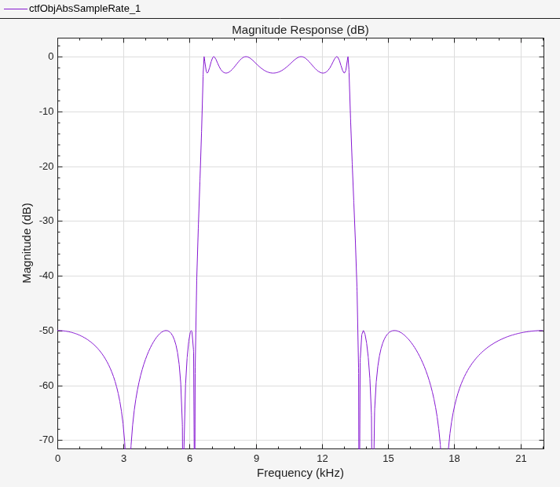
Visualize the magnitude response of the filter in absolute frequency units.
filterAnalyzer(ctfObjAbsSampleRate)
To change the sample rate after constructing the object, use the setInputSampleRate function.
setInputSampleRate(ctfObjAbsSampleRate,44100)
filterAnalyzer(ctfObjAbsSampleRate)
Define a CTF numerator array for a cascade of two FIR filters of order 100. Convert the cascade of filters to a System object.
Num = [designLowpassFIR(FilterOrder=100); ...
       designHighpassFIR(FilterOrder=100)];

Hsys = ctf2sysobj(Num)
Hsys =
dsp.FilterCascade with properties:
Stage1: [1×1 dsp.FIRFilter]
Stage2: [1×1 dsp.FIRFilter]
CloneStages: true
Customize the conversion from CTF to System object and add filter cascade stages.
Design an eight-order Butterworth peak IIR filter. The number of columns in the filter coefficients, B and A, indicate that the peak filter is divided in second-order sections. The vector of scale values, g, contains the gain for the four stages and the overall system gain.
[B,A,g] = designNotchPeakIIR(FilterOrder=8, ...
     QualityFactor=5,HasScaleValues=true)
B = 4×3
1.0000 2.0000 1.0000
1.0000 -2.0000 1.0000
1.0000 2.0000 1.0000
1.0000 -2.0000 1.0000
A = 4×3

    1.0000    0.2738    0.8880
    1.0000   -0.2738    0.8880
    1.0000    0.1067    0.7455
    1.0000   -0.1067    0.7455
g = 5×1

    0.1479
    0.1479
    0.1380
    0.1380
    1.0000
Convert the filter coefficients to a System object.
sosSys = ctf2sysobj(B,A,g)
sosSys =
  dsp.SOSFilter with properties:

            Structure: 'Direct form II transposed'
    CoefficientSource: 'Property'
            Numerator: [4×3 double]
          Denominator: [4×3 double]
       HasScaleValues: true
          ScaleValues: [5×1 double]

  Show all properties
By default, the ctf2sysobj function generates a dsp.SOSFilter System object for IIR filters of the order 2 or less. To generate a dsp.FilterCascade System object, specify the ForceCascade name-value argument as true. You can add filter stages in the next step.
Convert the filter coefficients to a dsp.FilterCascade System object.
ctfSys = ctf2sysobj(B,A,g,ForceCascade=true)
ctfSys =
  dsp.FilterCascade with properties:

         Stage1: [1×1 dsp.SOSFilter]
    CloneStages: true
Add two stages to the dsp.FilterCascade System object. The stages comprise an allpass filter and a polyphase FIR sample-rate conversion filter. Display the System object. The resulting dsp.FilterCascade System object has three stages.
addStage(ctfSys, dsp.AllpassFilter)
addStage(ctfSys, dsp.FIRRateConverter(3,2,triang(9)))
ctfSys
ctfSys =
  dsp.FilterCascade with properties:

         Stage1: [1×1 dsp.SOSFilter]
         Stage2: [1×1 dsp.AllpassFilter]
         Stage3: [1×1 dsp.FIRRateConverter]
    CloneStages: true
Plot the impulse response discrete-time Fourier transform (DTFT) of the three-stage dsp.FilterCascade System object.
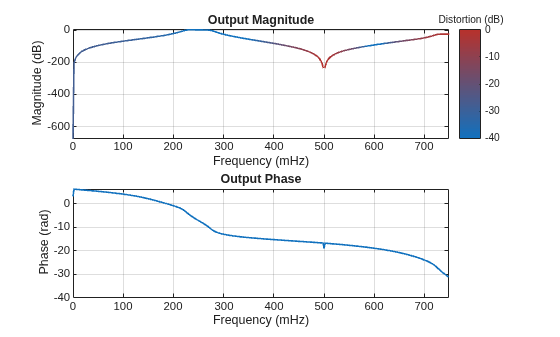
freqzmr(ctfSys)