livescript2markdown​: MATLAB's live scripts to markdown

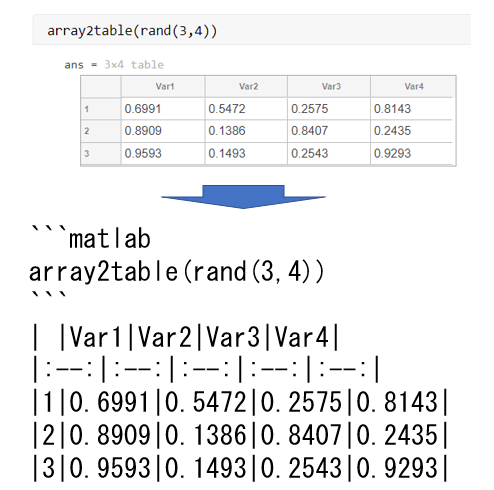
MATLAB's live scripts to markdown. The provided function converts your latex (generated from a live script) to markdown so that it could eas

https://github.com/minoue-xx/livescript2markdown

Sie verfolgen jetzt diese Einreichung

Anmerkung des Herausgebers: This file was selected as MATLAB Central Pick of the Week

Converting MATLAB Live Script to Markdown

Copyright 2020 The MathWorks, Inc. View livescript2markdown: MATLAB's live scripts to markdown.  on File Exchange

Imporant Note (2023/9/14)

As of R2023b, you can use export function of MATLAB to export markdown from livescript.

Here's a small document (in Japanese) on how to use export to convert livescripts to markdown.

NOTE (2020/02/10)

When exporting to LaTeX right after running the livescript, it's observed that the figures will be exported as eps files or not at all if the livescript contains more than 20 figures.

I suggest that you close the script and reopen and then export to latex.

Introduction

This repository provides a functions to convert your live scripts to markdown file. I hope this function makes your life easy to document your repository.

English instruction

日本語はこちら

I've checked the function with multiple live scripts but please note that it's not perfect. It's expected that you need some manual editing.


Feedback

Hope it accelerates your MATLAB life. Any comment and suggestions are always appreciated.

Zitieren als

michio (2026). livescript2markdown: MATLAB's live scripts to markdown (https://github.com/minoue-xx/livescript2markdown/releases/tag/v2.1.0), GitHub. Abgerufen .

Allgemeine Informationen

Kompatibilität der MATLAB-Version

  • Kompatibel mit R2019b und späteren Versionen

Plattform-Kompatibilität

  • Windows
  • macOS
  • Linux

Versionen, die den GitHub-Standardzweig verwenden, können nicht heruntergeladen werden

Version Veröffentlicht Versionshinweise Action
2.1.0.0

See release notes for this release on GitHub: https://github.com/minoue-xx/livescript2markdown/releases/tag/v2.1.0

2.0.1.0

See release notes for this release on GitHub: https://github.com/minoue-xx/livescript2markdown/releases/tag/v2.0.1

2.0.0

See release notes for this release on GitHub: https://github.com/minoue-xx/livescript2markdown/releases/tag/v2.0.0

1.5.0

See release notes for this release on GitHub: https://github.com/minoue-xx/livescript2markdown/releases/tag/v1.5.0

1.4.2

See release notes for this release on GitHub: https://github.com/minoue-xx/livescript2markdown/releases/tag/v1.4.2

1.4.1

See release notes for this release on GitHub: https://github.com/minoue-xx/livescript2markdown/releases/tag/v1.4.1

1.4

See release notes for this release on GitHub: https://github.com/minoue-xx/livescript2markdown/releases/tag/v1.4

1.3.4

See release notes for this release on GitHub: https://github.com/minoue-xx/livescript2markdown/releases/tag/1.3.4

1.3.3

See release notes for this release on GitHub: https://github.com/minoue-xx/livescript2markdown/releases/tag/v1.3.3

1.3.2

bug fix in processincludegraphics.m

1.3.1

Changed file encoding from Shift-JIS to UTF8

1.3.0

Fixed a bug in processing table outputs. Added tableMaxWidth option to specify the maximum length of string display within the table output.

1.2.0

Add 'png2jpeg' option to enable to convert PNG images to JPEG images to compress.

1.1.1

For Qiita user: added "Code(Display)", "Code", "Output" at the top of code and output display segments.

1.1.0

Bug fix on processing verbatim

1.0.5

Update Description

1.0.4

Change the compatibility to "R2019b to Any" since it's using "arguments".

1.0.3

Modified description.

1.0.2

Add link to readme in github

1.0.1

Added comments to Description.

1.0.0

Um Probleme in diesem GitHub Add-On anzuzeigen oder zu melden, besuchen Sie das GitHub Repository.