Honeycomb
[Installation]
Put all files somewhere on your MATLAB path. At least, honeycomb.m and the private directory (with contents) should be in the same directory on the MATLAB path.
[Documentation]
Run help honeycomb or doc honeycomb for instructions.
[Example]
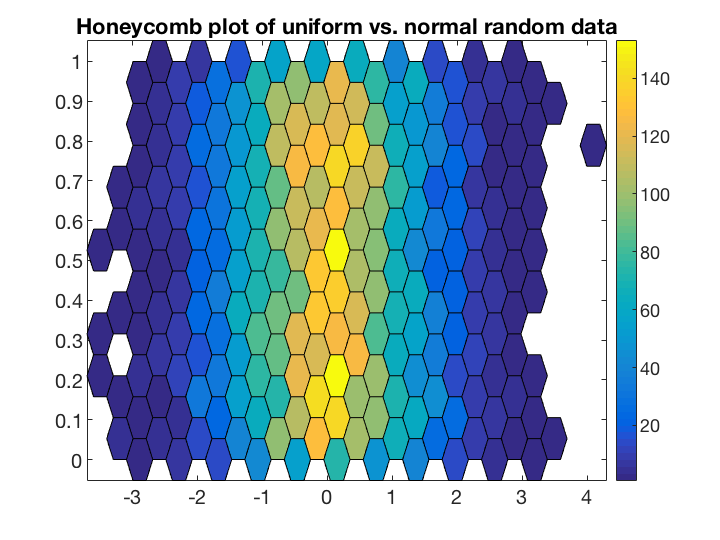
The following code produces the image seen on this page.
x = randn(100);
y = rand(size(x));
figure
honeycomb(x, y)
colorbar
title 'Honeycomb plot of uniform vs. normal random data'
[Credits]
The files that inspired this file are listed on this page, but do not contain the same functionality due to different use cases or bugs. Therefore I developed my own implementation of the hexagonal scatter plot. Other sources include:
http://bioconductor.org/packages/2.0/bioc/html/hexbin.html (hexbin for R)
http://dx.doi.org/10.1213/ane.0000000000001665 (scientific article using honeycomb plots, you may not have access to the journal)
[Version]
The true version of this release is 0.1 (as per GitHub), but the File Exchange does not allow version numbers lower than 1.x. Therefore, I've set the version to 1.0.0.1. Future updates will bump the number to be identical on both File Exchange and GitHub.
Zitieren als
Erik (2026). Honeycomb (https://github.com/erikhuizinga/honeycomb), GitHub. Abgerufen.
Kompatibilität der MATLAB-Version
Plattform-Kompatibilität
Windows macOS LinuxKategorien
- AI and Statistics > Deep Learning Toolbox > Train Deep Neural Networks > Function Approximation, Clustering, and Control > Function Approximation and Clustering > Clustering >
Tags
Quellenangaben
Inspiriert von: Hexagonal Scatter Plot, hexscatter.m
Community Treasure Hunt
Find the treasures in MATLAB Central and discover how the community can help you!
Start Hunting!Live Editor erkunden
Erstellen Sie Skripte mit Code, Ausgabe und formatiertem Text in einem einzigen ausführbaren Dokument.
.test
private
Versionen, die den GitHub-Standardzweig verwenden, können nicht heruntergeladen werden
| Version | Veröffentlicht | Versionshinweise | |
|---|---|---|---|
| 1.0.0.1 |
|