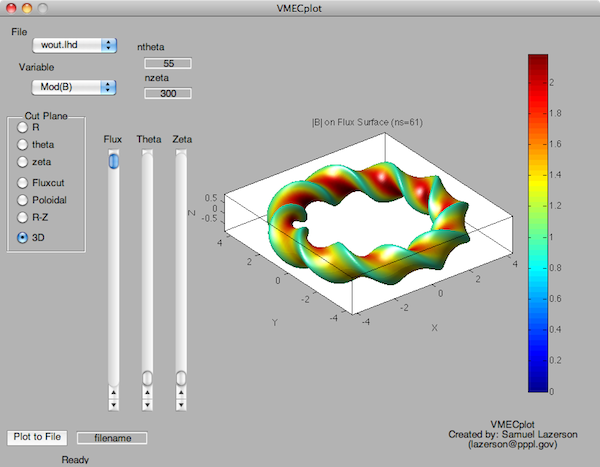
VMEC MATLAB
MATLAB interface to aid in plotting of VMEC output.

Sie verfolgen jetzt diese Einreichung
- Aktualisierungen können Sie in Ihrem Feed verfolgter Inhalte sehen.
- Je nach Ihren Kommunikationseinstellungen können Sie auch E-Mails erhalten.
Zitieren als
Samuel Lazerson (2026). VMEC MATLAB (https://github.com/lazersos/matlabVMEC/releases/tag/v3.1.0), GitHub. Abgerufen .
Quellenangaben
Inspiriert: matlabDIAGNO_VMEC, matlabEXTENDER
Allgemeine Informationen
- Version (740 KB)
-
 Lizenz auf GitHub anzeigen
Kompatibilität der MATLAB-Version
- Kompatibel mit allen Versionen
Plattform-Kompatibilität
- Windows
- macOS
- Linux
| Version | Veröffentlicht | Versionshinweise | Action |
|---|---|---|---|
| 3.1.0 | See release notes for this release on GitHub: https://github.com/lazersos/matlabVMEC/releases/tag/v3.1.0 |
||
| 3.0.0 | Updated to latest changes. |
||
| 2.92.0 | Fixes bug when reading text WOUT files associated with new current density calculation and extrapolation near magnetic axis. |
||
| 2.91.0 | Bug addressed in how the xm and xn arrays were being handled for 8.47 text files (credit G. Weir). |
||
| 2.9.0 | Various bug-fixes and improvements. Issue with Nyquist arrays should now be fixed. |
||
| 1.6.0 | Updated to fix various bugs in current density plots, VMECedit updated, VMECcomp added. |
||
| 1.5.0 | Various improvements, including a substantial speedup for the cfunct and sfunct routines. VMECplot now loads equilibria in a couple seconds. |
||
| 1.4.0 | read_netcdf and read_fortran_namelist were not in the package in v2.1, they were added. |
||
| 1.3.0 | Added vector plotting capability. The speed for the transforms has also greatly been increased. Included routine for plotting vessel profile. |
||
| 1.2.0 | Latest version resolves issues with Tokamak (ntor=0) configurations, adds full support for netCDF, and includes routines for creating input namelists. |
||
| 1.1.0 | Removed unnecessary OSX hidden files from zip file. |
||
| 1.0.0 |

