Clean and automate indents in scripts an live scripts
Ältere Kommentare anzeigen
Hi everyone,
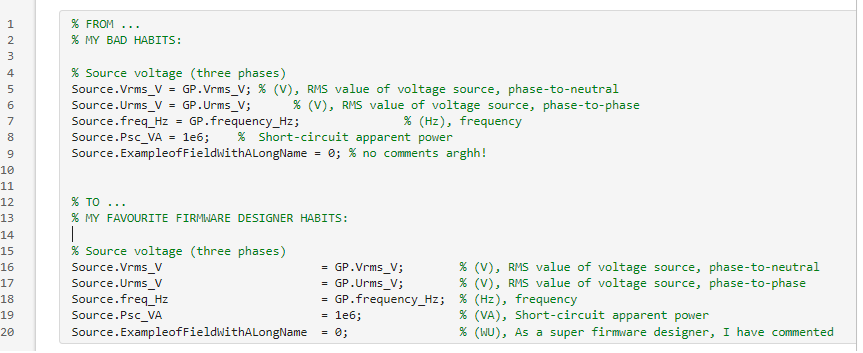
Please, do you have any tips to automate indentation in scripts?
Example by the picture below:
1 Kommentar

Catalytic
am 19 Jun. 2025
Please do not insert screenshots of code when text will suffice. It prevents us from copy/pasting the example.
Akzeptierte Antwort

Download my editorExtract and editorReplace tools,
Then add the function below as a Quick Access Toolbar button. You can then highlight the text you want to modify and apply the button to obtain text with all the "=" signs lined up.
function favoriteAlignEqualSigns()
[txt,info]=editorExtract(1);
before= char(extractBefore(txt,"="));
after = char(extractAfter(txt,"="));
newtxt=before+" = "+after;
editorReplace(newtxt,info);
end
Note that this function assumes one assignment statement per line of code (like in your example), and does no error checking to that effect.
1 Kommentar

Silvio Rizzuto
am 19 Jun. 2025
Weitere Antworten (1)

Les Beckham
am 19 Jun. 2025
I think that Matt's answer is a bit more elegant, although I think it (at least as first posted) just adds spaces before and after each equals sign rather than lining them up. I don't see anything that detects which column they should be aligned on. Here is a function which does do that.
% alignEquals.m
%
% Lines up the equals signs in the selected text in the active Matlab editor document.
function alignEquals()
ed = matlab.desktop.editor.getActive;
selected_lines = matlab.desktop.editor.textToLines(ed.SelectedText); % cell array containing the selected lines
eqIdx = strfind(selected_lines, '='); % find the index for all of the equals signs
maxeqIdx = max([eqIdx{:}]); % index of the farthest right equals sign
% align all of the equals signs with the farthest right equals sign
for iLine = 1:numel(selected_lines)
if isempty(selected_lines{iLine}), continue, end % skip empty lines
if isempty(eqIdx{iLine}), continue, end % skip lines with no equals sign
selected_lines{iLine} = strrep(selected_lines{iLine}, '=', [repelem(' ', maxeqIdx - eqIdx{iLine}) '=']);
end
newText = matlab.desktop.editor.linesToText(selected_lines); % selected text with the equals signs lined up
ed.Text = strrep(ed.Text, ed.SelectedText, newText); % replace the text in the editor document
end
4 Kommentare
I don't see anything that detects which column they should be aligned on.
Let's try it:
txt=[
"s.a=1;"
"s.bbbbbb=2;"
]
favoriteAlignEqualSigns(txt)
function newtxt = favoriteAlignEqualSigns(txt)
before= char(extractBefore(txt,"="));
after = char(extractAfter(txt,"="));
newtxt=before+" = "+after;
end
Les Beckham
am 19 Jun. 2025
Bearbeitet: Les Beckham
am 19 Jun. 2025
Clever! Thanks.
So the conversion of a string array to char magically pads the strings so that each row of chars is the same length. Cool.
As I said, much more elegant than my brute force approach.
Silvio Rizzuto
am 23 Jun. 2025
Silvio Rizzuto
am 23 Jun. 2025
Bearbeitet: Silvio Rizzuto
am 23 Jun. 2025
Kategorien
Mehr zu Environment and Settings finden Sie in Hilfe-Center und File Exchange
am 19 Jun. 2025
am 23 Jun. 2025
Community Treasure Hunt
Find the treasures in MATLAB Central and discover how the community can help you!
Start Hunting!
Translated by 

