cameraMatrix
(Not recommended) Camera projection matrix
cameraMatrix is not recommended. Use the cameraProjection function instead. For more information, see Version History.
Syntax
Description
returns a 4-by-3 camera projection matrix camMatrix = cameraMatrix(cameraParams,tform)camMatrix, which can
be used to project a 3-D world point in homogeneous coordinates into an image.
cameraParams can be a cameraParameters object or a cameraIntrinsics object.
returns a 4-by-3 camera projection matrix. You can use this matrix to project 3-D
world points in homogeneous coordinates into an image.camMatrix = cameraMatrix(cameraParams,rotationMatrix,translationVector)
Examples
Create a set of calibration images.
images = imageDatastore(fullfile(toolboxdir("vision"),"visiondata", ... "calibration","slr"));
Detect the checkerboard corners in the images.
[imagePoints,patternDims] = detectCheckerboardPoints(images.Files);
Generate the world coordinates of the checkerboard corners in the pattern-centric coordinate system, with the upper-left corner at (0,0). The square size is in millimeters.
squareSize = 29; % millimeters worldPoints = patternWorldPoints("checkerboard",patternDims,squareSize);
Calibrate the camera.
I = readimage(images,1); imageSize = [size(I,1),size(I,2)]; cameraParams = estimateCameraParameters(imagePoints,worldPoints,ImageSize=imageSize);
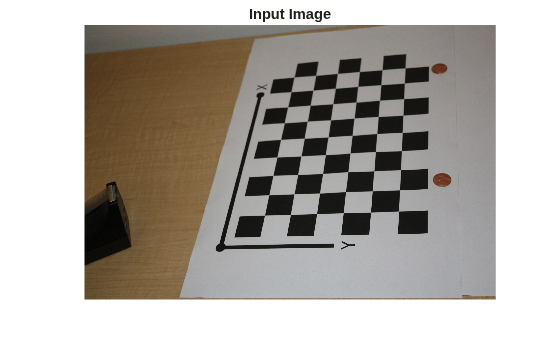
Load image at new location.
imOrig = imread(fullfile(toolboxdir("vision"),"visiondata", ... "calibration","slr","image9.jpg")); figure; imshow(imOrig); title("Input Image");
Undistort image.
im = undistortImage(imOrig,cameraParams);
Find reference object in new image.
[imagePoints,patternDims] = detectCheckerboardPoints(im);
Compute new extrinsics.
[rotationMatrix,translationVector] = extrinsics(...
imagePoints,worldPoints,cameraParams);Calculate camera matrix.
P = cameraMatrix(cameraParams,rotationMatrix,translationVector)
P = 4×3
105 ×
0.0157 -0.0271 0.0000
0.0404 -0.0046 -0.0000
0.0199 0.0387 0.0000
8.9399 9.4399 0.0072
Input Arguments
Camera parameters, specified as a cameraParameters or cameraIntrinsics object. You
can return the cameraParameters object using the estimateCameraParameters
function. The cameraParameters object contains the intrinsic, extrinsic, and
lens distortion parameters of a camera.
Transformation from world coordinates to camera coordinates, specified as
a rigid3d object. You can use the extrinsics function to
obtain the rotation and translation to create the tform
object.
Rotation of camera, specified as a 3-by-3 matrix. You can obtain this
matrix using the extrinsics function. You
can also obtain the matrix using the relativeCameraPose function
by transposing its orientation output. The
rotationMatrix and
translationVector inputs must be real, nonsparse,
and of the same class.
Translation of camera, specified as a 1-by-3 vector. The translation
vector describes the transformation from the world coordinates to the camera
coordinates. You can obtain this vector using the extrinsics function. You
can also obtain the vector using the location and
orientation outputs of the relativeCameraPose function:
translationVector= -relativeLocation*relativeOrientation'
The translationVector inputs must be real, nonsparse,
and of the same class.
Output Arguments
Camera projection matrix, returned as a 4-by-3 matrix. The matrix contains
the 3-D world points in homogenous coordinates that are projected into the
image. When you set rotationMatrix and
translationVector to double, the
function returns camMatrix as
double. Otherwise it returns
camMatrix as single.
The function computes camMatrix as follows:
camMatrix =
[rotationMatrix;
translationVector] ×
K.
K: the
intrinsic matrix
w ×
[x,y,1] =
[X,Y,Z,1]
×
camMatrix.
| (X,Y,Z): world coordinates of a point |
| (x,y): coordinates of the corresponding image point |
| w: arbitrary scale factor |
Data Types: single | double
Extended Capabilities
Usage notes and limitations:
Use in a MATLAB Function block is not supported.
Refer to the usage notes and limitations in the C/C++ Code Generation section. The same usage notes and limitations apply to GPU code generation.
Version History
Introduced in R2014bStarting in R2022b, most Computer Vision Toolbox™ functions create and perform geometric transformations using the
premultiply convention. However, the cameraMatrix function uses
the postmultiply convention. Although there are no plans to remove
cameraMatrix at this time, you can streamline your
geometric transformation workflows by switching to the cameraProjection function, which supports the premultiply
convention. For more information, see
Migrate Geometric Transformations to Premultiply Convention.
To update your code:
Change instances of the function name
cameraMatrixtocameraProjection.Specify the
cameraParamsargument as acameraIntrinsicsobject. If you have acameraParametersobject, then you can get acameraIntrinsicsobject by querying theIntrinsicsproperty. If theIntrinsicsproperty is empty according to theisemptyfunction, then set theImageSizeproperty of thecameraParametersobject to an arbitrary vector before querying theIntrinsicsproperty. For example:load worldToImageCorrespondences.mat if(isempty(cameraParams.Intrinsics)) cameraParams.ImageSize = [128 128]; end intrinsics = cameraParams.Intrinsics;
Specify the transformation as a
rigidtform3dobject using thetformargument.cameraProjectiondoes not support therotationMatrixandtranslationVectorinput arguments. Note that you create therigidtform3dobject using the transpose ofrotationMatrixor the transpose of the transformation matrix in theTproperty oftform.
| Discouraged Usage | Recommended Replacement |
|---|---|
This example specifies the transformation as a rotation
matrix and a translation vector, then calculates the camera
projection matrix using the
camMatrix = cameraMatrix(cameraParams,rotationMatrix,translationVector) | This example specifies the transformation as a
intrinsics = cameraParams.Intrinsics; tform = rigidtform3d(rotationMatrix',translationVector); camMatrix = cameraProjection(intrinsics,tform); |
This example specifies the transformation as a
camMatrix = cameraMatrix(cameraParams,tformOld); | This example starts with an existing
intrinsics = cameraParams.Intrinsics; tform = rigidtform3d(tformOld.T'); camMatrix = cameraProjection(intrinsics,tform); |
See Also
Apps
Functions
cameraProjection|estimateCameraProjection|estimateExtrinsics|triangulate|estimateCameraParameters|estrelpose
Topics
- Evaluating the Accuracy of Single Camera Calibration
- Structure from Motion from Two Views
- Structure from Motion from Multiple Views
- Depth Estimation from Stereo Video
- Code Generation for Depth Estimation from Stereo Video
- What Is Camera Calibration?
- Using the Single Camera Calibrator App
- Using the Stereo Camera Calibrator App
MATLAB Command
You clicked a link that corresponds to this MATLAB command:
Run the command by entering it in the MATLAB Command Window. Web browsers do not support MATLAB commands.
Website auswählen
Wählen Sie eine Website aus, um übersetzte Inhalte (sofern verfügbar) sowie lokale Veranstaltungen und Angebote anzuzeigen. Auf der Grundlage Ihres Standorts empfehlen wir Ihnen die folgende Auswahl: .
Sie können auch eine Website aus der folgenden Liste auswählen:
So erhalten Sie die bestmögliche Leistung auf der Website
Wählen Sie für die bestmögliche Website-Leistung die Website für China (auf Chinesisch oder Englisch). Andere landesspezifische Websites von MathWorks sind für Besuche von Ihrem Standort aus nicht optimiert.
Amerika
- América Latina (Español)
- Canada (English)
- United States (English)
Europa
- Belgium (English)
- Denmark (English)
- Deutschland (Deutsch)
- España (Español)
- Finland (English)
- France (Français)
- Ireland (English)
- Italia (Italiano)
- Luxembourg (English)
- Netherlands (English)
- Norway (English)
- Österreich (Deutsch)
- Portugal (English)
- Sweden (English)
- Switzerland
- United Kingdom (English)