PX4 Read Position Setpoint
R2026bRead the position setpoints published by the PX4 Navigator module in the uORB topic
position_setpoint_triplet
PX4 Read Position Setpoint block
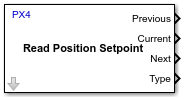
To add a block to a model, double-click the canvas and start typing the block name. Then, select the block from the list.
Libraries:
UAV Toolbox Support Package for PX4 Autopilots / PX4 Utility Blocks
Description
Add-On Required: This feature requires the UAV Toolbox Support Package for PX4 Autopilots add-on.
The PX4 Read Position Setpoint block outputs the position setpoints
published by the PX4® navigator module in the position_setpoint_triplet uORB topic.
The block outputs the coordinates of three position setpoints: the most recently traversed
setpoint (Previous), the current destination setpoint
(Current), and the upcoming setpoint (Next).The block outputs the Previous, Current and Next position
setpoints as coordinates in either the World Geodetic System of 1984 (WGS 84), local
north-east-down (NED), or local east-north-up (ENU) coordinate systems.
You can create an autonomous mission in the plan view of the QGroundControl (QGC) and
upload the mission to the PX4 Autopilot over MAVLink. For information on creating missions, see Plan View. The mission consists of waypoints such as TakeOff, Position (also known
as Waypoint), Land and so on. The MAVLink module on the PX4 Autopilot decodes the mission data and stores it in the memory. The navigator
module in PX4 retrieves the waypoints from the onboard memory and publishes them in the
position_setpoint_triplet uORB topic. The Previous, Current, and Next
setpoints are automatically updated by the navigator module when the vehicle reaches those
waypoints.
The block also outputs the waypoint mode for the current position setpoint which indicates the corresponding waypoint type that has been set in the mission uploaded from QGroundControl (QGC). This helps in distinguishing the Current Waypoint types (TakeOff, Waypoint, Land) in Simulink®.
Feed the coordinates that the block outputs directly to the controller algorithm designed in Simulink as input commands. Use the Type output to distinguish between waypoints and take corresponding appropriate action in the controller.
This block also reads the setpoint data for missions created in the QGC, for which the mission type is Flight plan. However, you cannot use this block to read setpoint data for geofencing and rally missions.
Among the flight plan missions, the supported mission commands whose waypoint data can be retrieved by the block are Takeoff, Land and Waypoint. Return to Launch (RTL) is not supported.
Note
The PX4 Read Position Setpoint block is supported only when you select Use default startup script (rcS) as the startup script option for the PX4 Autopilot during the Select System Startup Script in PX4 step of the Hardware Setup process. For more information, see Selecting Startup Script for PX4 Autopilot.
Note
The PX4 Read Position Setpoint block requires you to connect an SD card
to the PX4 Autopilot. Ensure that the connected SD card does not contain any custom
startup script (rc.txt) in the etc folder.
Note
The PX4 Read Position Setpoint block cannot determine if the ongoing mission in QGroundControl is paused. You need to find a separate logic to determine if the mission is paused in QGroundControl.
During Normal mode simulation, the block outputs zeroes.
During Connected I/O simulation, this block reads data from the peripherals of the hardware.
Ports
Output
Parameters
Version History
Introduced in R2021b

