Nonlinear Regression Fitting Tool
R2026bInteractive nonlinear regression fitting
Description
The Nonlinear Regression Fitting tool allows you to perform simple interactive
nonlinear fitting with the nlinfit function.
For more complex workflows, you can use plotSlice with the fitnlm function (see Nonlinear Regression Workflow). The interface displays plots of the
fitted response against each predictor, with the other predictors held fixed. Dashed red
curves show 95% simultaneous confidence bounds for the function. The fixed values are
displayed in the text boxes below each predictor axis. Change the fixed values by entering new
values or by dragging the vertical lines in the plots to new positions. When you change the
value of a predictor, the tool updates all plots to display the model at the new point in the
predictor space. Use the Export button to export specified variables to the workspace.
Required Products
MATLAB®
Statistics and Machine Learning Toolbox™

Open the Nonlinear Regression Fitting Tool
At the MATLAB command prompt, enter
nlintool.
Examples
Perform nonlinear regression and display fitted model responses for different predictor values using the Nonlinear Regression Fitting tool.
Load the reaction kinetics data set. The observations in reactants are partial pressures of the three chemical reactants listed in xn. The corresponding reaction rates (responses) are stored in rate.
load reactionFit the Hougen-Watson model to the data using the initial model coefficient values in beta. Specify to show 99% confidence bounds and to label the plot axes.
nlintool(reactants,rate,@hougen,beta,Alpha=0.01,XName=xn,YName=yn)
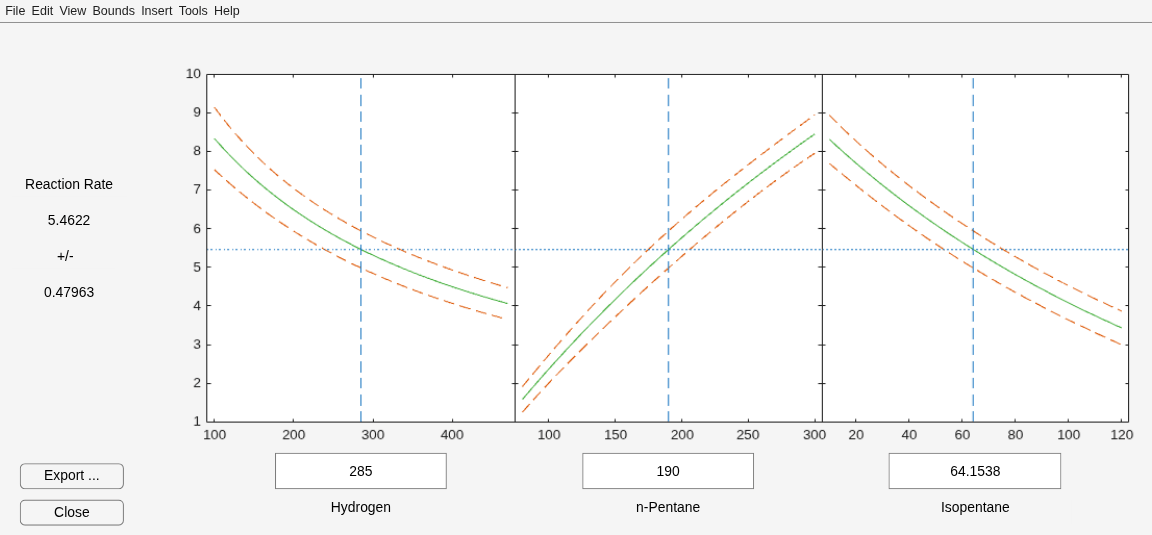
The tool displays plots of the fitted response against each predictor. The solid green curve shows the predicted response for that predictor when the other predictor values are fixed. You can change the fixed values by entering new values in the text boxes, or by dragging the vertical lines in the plots to new positions. When you change the value of a predictor, the tool updates all plots to display the model at the new point in the predictor space. The dashed red lines indicate the 99% confidence bounds.
Related Examples
Parameters
Programmatic Use
Tips
Click the Export button to export the fitted parameters and confidence intervals, the root mean squared error (RSME) of the fit, and the fit residuals to the workspace. Adjust the variable names and clear any check boxes in the Export to Workspace dialog box, if necessary, and click OK.
Version History
Introduced before R2006a

