disconnect
Description
removes the connections listed in newPipeline = disconnect(pipeline,connections)connections from the pipeline
pipeline.
Examples
Create a pipeline with two components and display the connections.
featureSelector = featureSelectionClassificationMRMRComponent; knnClassifier = classificationKNNComponent; pipeline = series(featureSelector,knnClassifier); pipeline.Connections
ans =
7×2 table
Source Destination
______________________________________________ ______________________________________
"X" "FeatureSelectionClassificationMRMR/X"
"Y" "FeatureSelectionClassificationMRMR/Y"
"FeatureSelectionClassificationMRMR/XSelected" "ClassificationKNN/Predictors"
"Y" "ClassificationKNN/Response"
"ClassificationKNN/Predictions" "Predictions"
"ClassificationKNN/Scores" "Scores"
"ClassificationKNN/Loss" "Loss"
The XSelected output of the
FeatureSelectionClassificationMRMR component is connected to the
Predictors input of the ClassificationKNN
component.
Disconnect the two ports. View the pipeline.
newPipeline = disconnect(pipeline, ... ["FeatureSelectionClassificationMRMR/XSelected", ... "ClassificationKNN/Predictors"]); view(newPipeline)
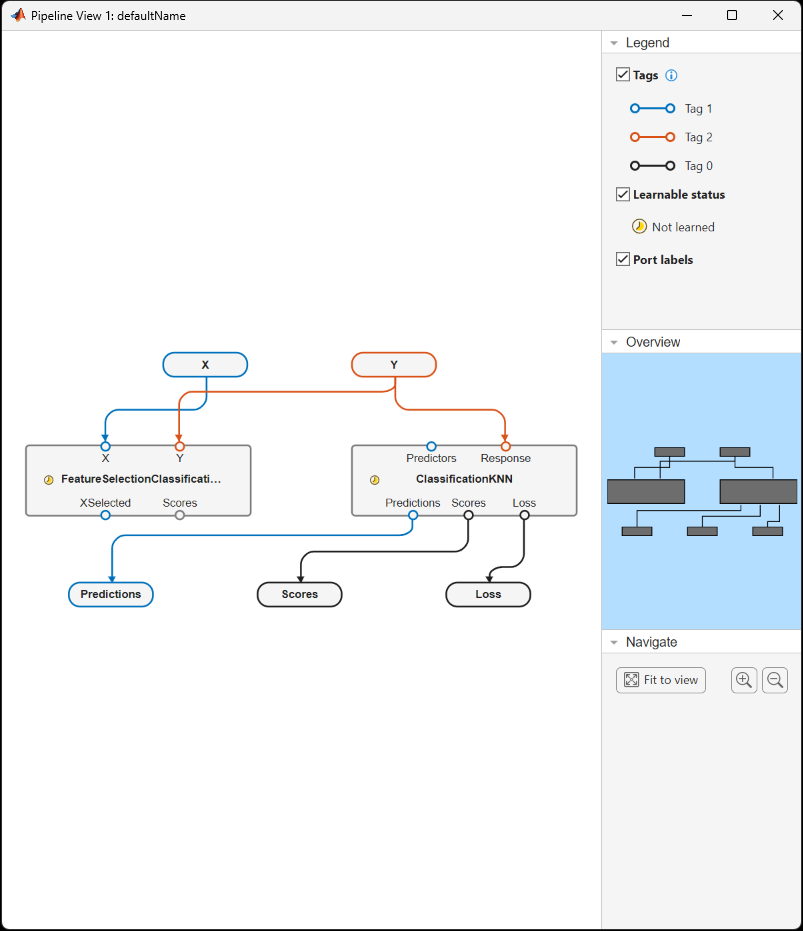
XSelected is disconnected from the Predictors
input of the KNN component.
Input Arguments
Existing pipeline, specified as a LearningPipeline object.
Names of the connections to remove, specified as a string array or cell array of
character vectors, indicating ordered pairs of sources and destinations, or a table with
two columns (Source and Destination). The format
of connections must be the same as the format of the
Connections property of the pipeline. You can find the name of a
component in a pipeline by using the describe
object function (for example, describe(pipeline)).
describe also displays the component input and output port
names.
Data Types: string | cell | table
Output Arguments
Pipeline with connections removed, returned as a LearningPipeline
object.
More About
You can specify component ports as string scalars or character vectors of the form
componentName/portName, where componentName is the
name of the component, and portName is the name of the port.
When specifying ports of the existing pipeline (pipeline), specify
the port name only.
Version History
Introduced in R2026a
See Also
MATLAB Command
You clicked a link that corresponds to this MATLAB command:
Run the command by entering it in the MATLAB Command Window. Web browsers do not support MATLAB commands.
Website auswählen
Wählen Sie eine Website aus, um übersetzte Inhalte (sofern verfügbar) sowie lokale Veranstaltungen und Angebote anzuzeigen. Auf der Grundlage Ihres Standorts empfehlen wir Ihnen die folgende Auswahl: .
Sie können auch eine Website aus der folgenden Liste auswählen:
So erhalten Sie die bestmögliche Leistung auf der Website
Wählen Sie für die bestmögliche Website-Leistung die Website für China (auf Chinesisch oder Englisch). Andere landesspezifische Websites von MathWorks sind für Besuche von Ihrem Standort aus nicht optimiert.
Amerika
- América Latina (Español)
- Canada (English)
- United States (English)
Europa
- Belgium (English)
- Denmark (English)
- Deutschland (Deutsch)
- España (Español)
- Finland (English)
- France (Français)
- Ireland (English)
- Italia (Italiano)
- Luxembourg (English)
- Netherlands (English)
- Norway (English)
- Österreich (Deutsch)
- Portugal (English)
- Sweden (English)
- Switzerland
- United Kingdom (English)