Tune PID Controller for Mass-Spring-Damper System Using VRFT at Command Line
R2026bThis example shows how to use the VRFT command-line API to tune a PID controller for a mass-spring-damper system. The input-output data is extracted directly from the simulation results of a Simulink® model.
Mass-Spring-Damper Plant Model
The mass-spring-damper system consists of two carts with masses and , connected to each other and to the ground by springs and dampers. The springs have stiffness coefficients and , and the dampers have damping coefficients and .
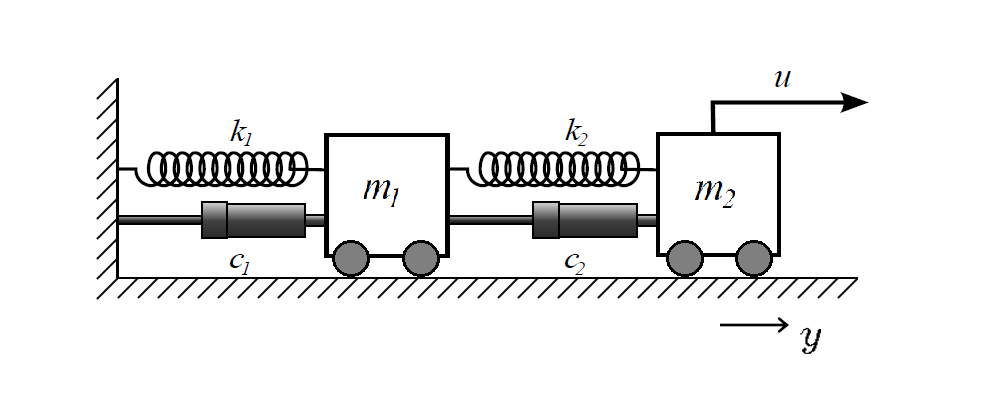
Define the parameters.
m1 = 1;
m2 = 0.5;
c1 = 0.2;
c2 = 0.5;
k1 = 1;
k2 = 0.5;
Define an LTI plant model for the mass-spring-damper system based on the given parameters.
sys_tf = tf([m1 c1+c2 k1+k2],[m1*m2 m2*(c1+c2)+m1*c2 m2*(k1+k2)+m1*k2+c1*c2 c1*k2+k1*c2 k1*k2])
sys_tf =
               s^2 + 0.7 s + 1.5
  -------------------------------------------
  0.5 s^4 + 0.85 s^3 + 1.35 s^2 + 0.6 s + 0.5

Continuous-time transfer function.
Model Properties
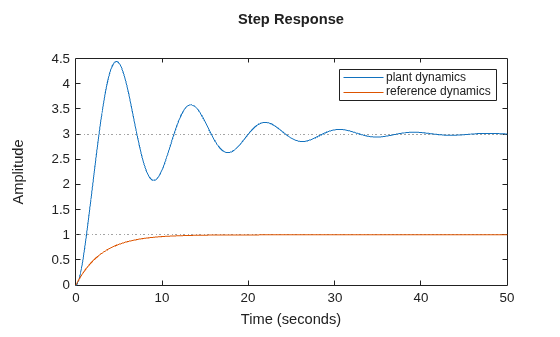
As part of the VRFT settings, the reference model defines the desired closed-loop behavior for the tuned PID controllers. In this example, the reference model is a continuous-time first-order system represented by the transfer function tf(1,[3 1]). The following plot compares the step responses of the open-loop plant and the desired closed-loop behavior.
figure;
step(sys_tf,tf(1,[3 1]))
legend('plant dynamics','reference dynamics')
Log Data from Closed-Loop Simulink Model
Open the Simulink® model that includes an LTI plant object. This model contains an initial PID controller that regulates the output and a Virtual Reference Feedback Tuning block to tune the PID parameters so the closed-loop response closely matches the reference system tf(1,[3 1]). After tuning, you compare the PID gains obtained in Simulink with those computed at the command line.
mdl = 'TuningOfPIDControllerUsingVRFTAPI.slx';Simulate the model to log data. Extract the full input and output from the Simulink.SimulationData.Dataset object.
Ts = 0.1;
SimOut = sim(mdl);
TT = extractTimetable(SimOut.ScopeData);
Prepare Logged Data for Tuning
The tuning interval in the Simulink® model is from 1 s to 400 s, and the sample time is 0.1 s.
Ts = 0.1;
t = 1:Ts:400;
TT_simulink = retime(TT,seconds(t),'nearest');
Provide Reference Model and Weight Function
Provide a reference model as an LTI object to define the desired closed-loop performance. Optionally, provide a weighting function as an LTI object to emphasize specific frequency ranges. If the LTI objects are continuous-time, vrfttune discretizes them during tuning.
MrefS = tf(1,[3 1]);
WeightS = tf(1,[0.3 1]);
Define Controller Structure
This example uses the "parallel-pid" option to define the PID controller for tuning.
optionsParallelPID = vrfttuneOptions('parallel-pid');
optionsParallelPID.PIDType = 'PID';
optionsParallelPID.IntegratorMethod = 'Trapezoidal';
optionsParallelPID
optionsParallelPID =
  ParallelPID with properties:

                 PIDType: 'PID'
        IntegratorMethod: 'Trapezoidal'
    DiscretizationMethod: 'tustin'
Tune PID Controller Parameters
To tune the PID controller parameters, use the vrfttune function.
[thetaParam_parallel_pid,tunedblk_parallel_pid,info_parallel_pid]...
    = vrfttune(TT_simulink,MrefS,WeightingFunction = WeightS,VRFTOptions=optionsParallelPID);
Compare the tuned PID controller parameters from vrfttune with the tuning results from the Simulink model using the Virtual Reference Feedback Tuning block.
thetaParam_simulink = SimOut.theta.signals.values';
T = table(thetaParam_simulink, thetaParam_parallel_pid);
T.Properties.RowNames = {'Kp','Ki','Kd'}
T = 3×2 table
thetaParam_simulink thetaParam_parallel_pid
___________________ _______________________
Kp 0.062357 0.062355
Ki 0.11191 0.11191
Kd 0.22526 0.22526
As demonstrated, you can directly convert logged data from a Simulink model into a timetable object. This enables a smooth offline VRFT workflow for tuning linear controllers. The tuning results are consistent with those obtained using the VRFT block.

