removeStartingPoint
R2026bClass: SLSlicerAPI.SLSlicer
Namespace: SLSlicerAPI
Remove starting point for model slice
Description
removeStartingPoint(
removes the starting point in obj,StartingPoint)StartingPoint from the model
slice in obj for dependency analysis.
removeStartingPoint(
removes the starting point defined using the port handle in
obj,PortHandle,busElementPath)PortHandle and the bus element path in
busElementPath. Removing a bus element also removes all its
children added as starting points.
Input Arguments
Examples
Remove Starting Point Using Blocks Handles
Open the model.
open_system('sldvSliceClimateControlExample');
obj = slslicer('sldvSliceClimateControlExample');
Remove a block handle as the starting point. To get the block handle, you can use the getSimulinkBlockHandle function.
blkH = get_param('sldvSliceClimateControlExample/Out1','Handle');
addStartingPoint(obj,blkH);
removeStartingPoint(obj,blkH);
To remove multiple block handles as the starting point, use a cell array.
blkH = {get_param('sldvSliceClimateControlExample/Out1','Handle'),...
    get_param('sldvSliceClimateControlExample/Out2','Handle')};
addStartingPoint(obj,blkH);
removeStartingPoint(obj,blkH);
Remove Bus Elements from Starting Points
Remove the bus element UpperSaturationLimit from the
bus Limits as the starting point. This example shows how
to first add
UpperSaturationLimit.
openExample('simulink/ComponentInterfaceSpecificationUsingBusesExample')
obj = slslicer('CounterSystem');
ph = get_param('CounterSystem/Bus Creator2', 'PortHandles');
obj.addStartingPoint(ph.Outport, "Limits.UpperSaturationLimit");
obj.highlight;
Once you have added the bus element
UpperSaturationLimit as a starting point, you can
remove this bus element from the starting point by entering this
command.
obj.removeStartingPoint(ph.Outport, "Limits.UpperSaturationLimit");Limits from the starting point also removes its
child UpperSaturationLimit from the starting
point.Remove Starting Point Using Block Paths
Remove a block path as the starting point.
bPath = {'sldvSliceClimateControlExample/Out1'};
removeStartingPoint(obj, bPath);
To remove multiple block paths from the starting point, use a cell array.
bPath = {'sldvSliceClimateControlExample/Out1',...
'sldvSliceClimateControlExample/Heater/HeaterAct'};
removeStartingPoint(obj, bPath);
Remove Starting Point Using Simulink Identifier
Remove a Simulink® Identifier (SID) as the starting point. To get the SID, use
the Simulink.ID.getSID function.
removeStartingPoint(obj, 'sldvSliceClimateControlExample:39')Remove Starting Point Using Line Handles
For the line that connects an Inport block to an
Outport block, remove the line handle as the starting
point. To get the line handle, use the get_param function.
 lh1 = get_param('sldvSliceClimateControlExample/Heater/Heat','LineHandles');
 lh2 = get_param('sldvSliceClimateControlExample/Heater','LineHandles');
 LineHs = [lh1.Inport(1), lh2.Outport(2)];
removeStartingPoint(obj,LineHs);
Alternatives
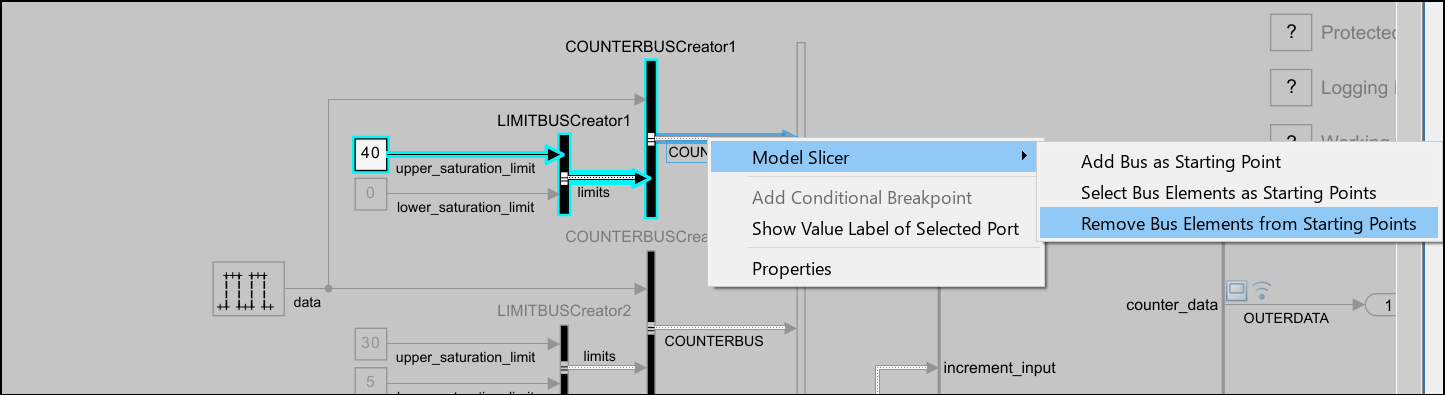
In the Simulink Editor, on the Apps tab, click Model
Slicer. To remove a block, signal, or bus elements as the starting
point, right-click the block, signal, or bus elements and in the Model Slicer app
section  , select the Remove Starting Points button
 .
.
Remove Bus Elements from Starting Points
Version History
Introduced in R2015b

