Simulink.sdi.Parquet.getHierarchyDataset
R2026bDescription
busHierarchy = Simulink.sdi.Parquet.getHierarchyDataset(Filename)Simulink.SimulationData.Dataset object. Use this function to understand the bus
hierarchy before selectively importing data into the Simulation Data Inspector.
Examples
Suppose a Parquet file contains data from three runs of a model with a
bus hierarchy. To view the bus hierarchy before importing data into the Simulation Data
Inspector, use
Simulink.sdi.Parquet.getHierarchyDataset.
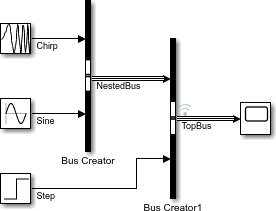
When the Parquet file contains data associated with one or more runs, the first level of the returned hierarchy lists the runs.
runLevel = Simulink.sdi.Parquet.getHierarchyDataset("myNestedBus.parquet")runLevel =
Simulink.SimulationData.Dataset '' with 3 elements
Name BlockPath
___________________ _________
1 [1x1 Dataset] Run 1: BusHierarchy ''
2 [1x1 Dataset] Run 2: BusHierarchy ''
3 [1x1 Dataset] Run 3: BusHierarchy ''
- Use braces { } to access, modify, or add elements using index.To view the contents of the first run, use braces to access
Run 1: BusHierarchy.
topLevel = runLevel{1}topLevel =
Simulink.SimulationData.Dataset 'Run 1: BusHierarchy' with 1 element
Name BlockPath
______ _________
1 [1x1 Dataset] TopBus ''
- Use braces { } to access, modify, or add elements using index.The top-level bus contains a nested bus and a signal. View the contents of the top-level bus.
nestedLevel = topLevel{1}nestedLevel =
Simulink.SimulationData.Dataset 'TopBus' with 2 elements
Name BlockPath
_________ _________
1 [1x1 Dataset ] NestedBus ''
2 [1x1 timeseries] Step ''
- Use braces { } to access, modify, or add elements using index.
To view the elements within the nested bus, use braces to access
NestedBus, which is the first element in
nestedLevel.
leafLevel = nestedLevel{1}leafLevel =
Simulink.SimulationData.Dataset 'NestedBus' with 2 elements
Name BlockPath
_____ _________
1 [1x1 timeseries] Chirp ''
2 [1x1 timeseries] Sine ''
- Use braces { } to access, modify, or add elements using index.
Input Arguments
Output Arguments
Version History
Introduced in R2026b

