Integrieren von Python-Code in Simulink
Simulink ermöglicht Ihnen die Implementierung von Algorithmen, die mithilfe von Python-Code entwickelt wurden. Sie können Python-Module mithilfe des MATLAB Function-Blocks, des MATLAB System-Blocks oder des Python-Importers in Simulink implementieren. Zur Implementierung einfacher Algorithmen verwenden Sie den MATLAB Function-Block. Für Algorithmen, die eine Verarbeitung von Zustandsdynamik, Streaming-Daten und zusätzliche Blockanpassungen erfordern, verwenden Sie den MATLAB System-Block. Mit dem Python Importer können Sie Python-Module in Simulink importieren, indem Sie benutzerdefinierte Blöcke für bestimmte Funktionen erzeugen.
Weitere Informationen zur Verwendung von Python in MATLAB® finden Sie unter Aufrufen von Python aus MATLAB heraus.
Blöcke
| Python Code | Integrate native Python code into a Simulink model (Seit R2025a) |
Objekte
SymbolSpec | Query and configure Python Code block data symbols (Seit R2025a) |
Funktionen
addSymbol | Add a symbol object definition to a Python Code block (Seit R2025a) |
getSymbol | Get a symbol object definition of a Python Code block (Seit R2025a) |
deleteSymbol | Delete a symbol object definition from a Python Code block (Seit R2025a) |
Themen
- Overview of Integrating Python Code with Simulink
Integrate Python code with Simulink Using MATLAB Function block or MATLAB System block.
- Integrate Python Code into Simulink Using Python Code Block
Integrate native Python code, define interfaces and block algorithm, and run simulations in Simulink.
- Import Python Code to Simulink Using Python Importer Wizard
Use the Python Importer to Import Python Modules and Packages to Simulink.
Enthaltene Beispiele
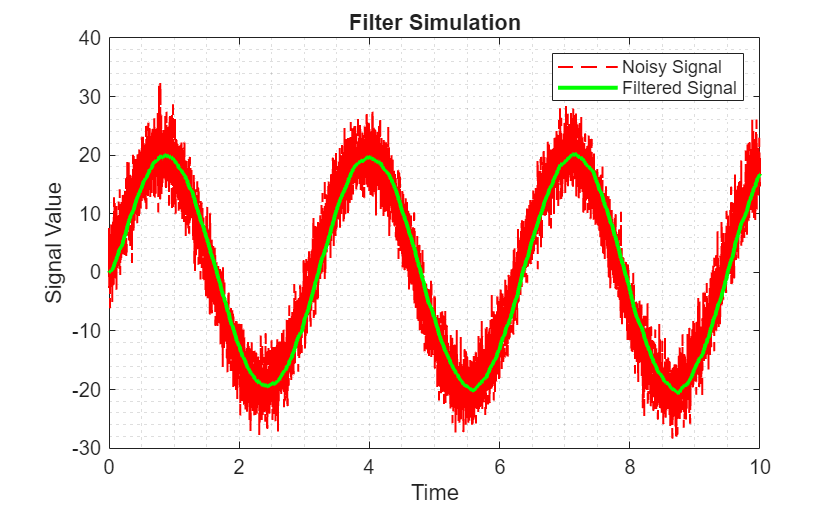
Integrate Low Pass Filter Python Code into Simulink Using Python Code Block
Integrate Python Code into Simulink Using Python Code Block.
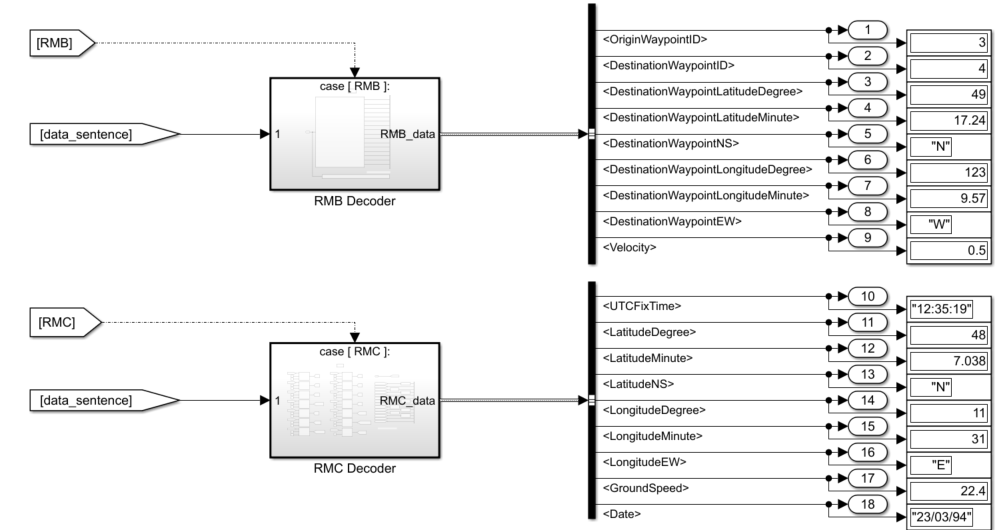
Integrate Python GPS Text Message Parsing Algorithms in Simulink
Parse text messages in NMEA GPS format using Simulink® string blocks and Python®. NMEA sentences are used for communication between marine devices, and the model in the example decodes RMB and RMC sentences in NMEA. RMB is the sentence for the recommended navigation data for GPS. RMC is the sentence for the recommended minimum data for GPS sentences.

Integrate Python Packages to Parse NMEA GPS Messages Using Python Importer
Use Python® Importer to import a Python package containing algorithms to parse NMEA GPS messages into Simulink®.
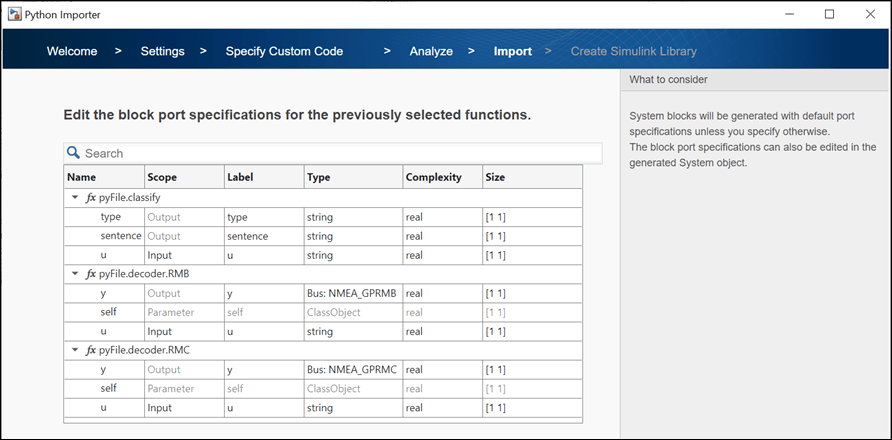
Integrate Python Functions Specified Within Classes Using Python Importer
Use Python® Importer to import Python functions specified within modules that contain class and function definitions that parse NMEA GPS messages into Simulink®.

