Bicycle MPPI Controller
R2026bControl motion planning of bicycle vehicle model using Model Predictive Path Integral (MPPI)
Since R2025a
Bicycle MPPI Controller block

To add a block to a model, double-click the canvas and start typing the block name. Then, select the block from the list.
Libraries:
Offroad Autonomy Library /
Vehicle Controllers
Description
Add-On Required: This feature requires the Robotics System Toolbox Offroad Autonomy Library add-on.
The Bicycle MPPI Controller block enables you to plan a local path for a Bicycle Kinematic Model, following a reference path typically generated by a global path planner such as RRT* or Hybrid A*, using the model predictive path integral (MPPI) algorithm.
The bicycle kinematic model represents a vehicle with two axles defined by the length
between the axles you specify in the Wheel Base
parameter. The front wheel can be turned with steering angle psi. The
vehicle heading theta is defined at the center of the rear axle.

At each state of the vehicle along the reference path, the MPPI controller samples potential trajectories for a short segment along the reference path, based on the current state and control of the vehicle. The controller evaluates these trajectories using a cost function to smooth the path and chooses an optimal trajectory and optimal control for the vehicle.
Examples
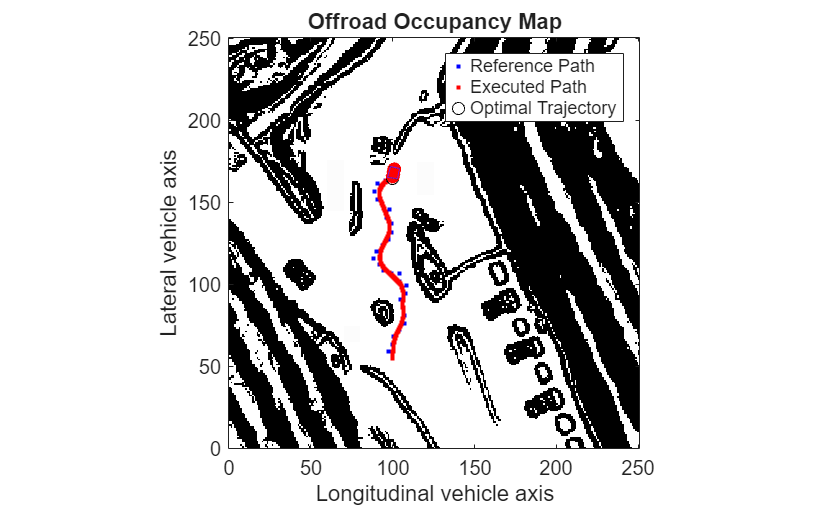
Plan Path Using Bicycle MPPI Controller in Simulink
Follow an obstacle-free path with a bicycle vehicle model between two locations on a given map in Simulink®.
Ports
Input
Current xy-position and orientation of the vehicle, specified as a [x y theta] vector, in meters and radians.
Data Types: double
Current control commands of the vehicle, specified as a two-element numeric vector, where the form depends on the motion model specified in the Vehicle Input Type parameter on the General tab.
For bicycle vehicle model motion, these values specified in the Vehicle Input Type parameter determine the format of the control command:
Vehicle Speed & Steering Angle— [v psi]Vehicle Speed & Heading Rate— [v omegaDot]
v is the vehicle velocity in the direction of motion in meters per second. psi is the steering angle rate in radians per second. omegaDot is the angular velocity at the rear axle in radians per second.
Data Types: double
Reference path to follow, specified as an N-by-3 matrix in which, each row represents a pose on the path.
Data Types: double
The vehicle speed range is a two-element vector that provides the minimum and maximum vehicle speeds, [MinSpeed MaxSpeed], specified in meters per second.
Dependencies
To enable this port, select the Specify Vehicle Speed (m/s) Range from input port parameter on the Vehicle tab.
Data Types: double
The maximum steering angle is the maximum amount the vehicle can be steered to the right or left, specified in radians. This port validates user-provided state input.
If Maximum Steering Angle is set to pi/2, then the
minimum turning radius is zero meters.
Dependencies
To enable this port, select the Specify Maximum Steering Angle (rad) from input port parameter on the Vehicle tab.
Data Types: double
Output
Optimal control command of the vehicle, returned as an 1-by-2 row matrix. The row of the matrix corresponds to the optimal control of the vehicle for a state along the trajectory. Each column depends on the motion model specified in the Vehicle Input Type parameter on the Vehicle tab.
For bicycle vehicle model motion, these values specified in the Vehicle Input Type parameter determine the format of the control command:
Vehicle Speed & Steering Angle— [v psi]Vehicle Speed & Heading Rate— [v omegaDot]
v is the vehicle velocity in the direction of motion in meters per second. psi is the steering angle rate in radians per second. omegaDot is the angular velocity at the rear axle in radians per second.
Data Types: double
Optimal path of the bicycle vehicle model, returned as an N-by-3 matrix, where each row is in the form [x y θ].
N is the number of states along the trajectory. x is the current x-coordinate in meters. y is the current y-coordinate in meters. θ is the current heading angle of the vehicle in radians. Each row of the matrix represents vehicle state along the optimal trajectory.
Data Types: double
Extra information, returned as a scalar (bus) with these fields.
| Field | Description |
|---|---|
HasReachedGoal | Indicates whether the vehicle has successfully reached the last pose of
the reference path within the goal tolerance, returned as
true if successful. Otherwise, this value is
false. |
ExitFlag | Scalar value indicating the exit condition.
|
Data Types: bus
Parameters
To edit block parameters interactively, use the Property Inspector. From the Simulink Toolstrip, on the Simulation tab, in the Prepare gallery, select Property Inspector.
General
Configure various path-following parameters that guide the controller to make sure the vehicle accurately follow the desired path.
Path Following Parameters
Tolerance around the goal pose, specified as a three-element vector of the form [x y θ]. x and y denote the position of the robot in the x- and y-directions, respectively. Units are in meters. θ is the heading angle of the robot in radians. This value specifies the maximum distance from the goal pose at which the planner can consider the robot to have reached the goal pose.
Lookahead time for trajectory planning in seconds, specified as a positive numeric scalar.
The vehicle model determines the maximum forward velocity of the vehicle. The lookahead time of the controller multiplied by the maximum forward velocity of the vehicle determines the lookahead distance of the controller.
The lookahead distance of the controller is the distance from the current pose of the vehicle for which the controller must optimize the local path. The lookahead distance determines the segment of the global reference path from the current pose that the controller considers for an iteration of local path planning. The reference path pose at a lookahead distance from the current pose is the lookahead point, and all reference path poses between the current pose and the lookahead point are lookahead poses.
Increasing the value of lookahead time causes the controller to generate controls further into the future, enabling the vehicle to react earlier to unseen obstacles at the cost of increased computation time. Conversely, a smaller lookahead time reduces the available time to react to new unknown obstacles, but enables the controller to run at a faster rate.
Block Parameters
Time interval at which the block updates during simulation in seconds, specified as a numeric value. Use a positive scalar for discrete execution, or -1 to inherit from upstream blocks. You must ensure consistency with other model components for optimal performance.
Specify the type of simulation to run.
Code generation–– Simulate model using generated C code. The first time you run a simulation, Simulink generates C code for the block. The C code is reused for subsequent simulations, as long as the model does not change.Interpreted execution–– Simulate model using the MATLAB® interpreter. For more information, see Interpreted Execution vs. Code Generation (Simulink).
Tunable: No
Vehicle
Specify the vehicle specifications, limits, and other properties for a Bicycle Kinematic Model.
Vehicle Specifications
Type of speed and directional inputs for vehicle, specified as one of these options:
Vehicle Speed & Steering Angle— Vehicle speed in meters per second with a steering angle in radians.Vehicle Speed & Heading Rate— Vehicle speed in meters per second with a heading rate in radians per second.
The wheel base is the distance between the front and rear vehicle axles, specified in meters.
Vehicle Limits
The vehicle speed range is a two-element vector that provides the minimum and maximum vehicle speeds, [MinSpeed MaxSpeed], specified in meters per second.
The maximum steering angle, refers to the maximum amount the vehicle can be steered to the right or left, specified in radians. This parameter validates the user-provided state input.
If Maximum Steering Angle is set to
pi/2, it results in a minimum turning radius of zero meters.
Specify Vehicle Properties from Input Ports
Select this parameter to specify the speed range of the bicycle vehicle model at the Vehicle Speed Range input port. Enabling this option removes the Vehicle Speed (m/s) Range parameter from the block mask.
Select this parameter to specify the maximum turning radius of the bicycle vehicle model at the Maximum Steering Angle input port. Enabling this option removes the Maximum Steering Angle (rad) parameter from the block mask.
Controller
Specify various parameters for the MPPI controller, which is used for motion planning of the bicycle vehicle model in the Bicycle MPPI Controller block.
Cost Weights
Weight for aligning with the lookahead poses of the reference path, specified as a nonnegative scalar.
Weight for closely following lookahead point, specified as a nonnegative scalar.
Weight for smooth control actions, avoiding abrupt changes, specified as a nonnegative scalar.
Trajectory Generation Parameters
Number of sampled trajectories, specified as a positive integer.
The controller calculates the optimal trajectory by averaging the controls of candidate trajectories, with weights determined by their associated costs.
A larger number of trajectories can lead to a more thorough search of the trajectory space and a potentially better solution, at the cost of increased computation time.
Time between consecutive states of the trajectory in seconds, specified as a positive scalar. Smaller values lead to more precise trajectory predictions, but increased computation time.
Standard deviation for vehicle inputs, specified as a two-element numeric vector
with nonnegative values. For the bicycle vehicle model, the default value is
[2 0.5].
Each element of the vector specifies the standard deviation for a control input of the vehicle model, such as steering or velocity. Each model has two control inputs. By introducing such variability into the control inputs during trajectory sampling, the controller can better explore different possible trajectories. Larger standard deviations enable the controller to account for uncertainties in the control input and achieve more realistic trajectory predictions.
Selectiveness of the optimal trajectory, specified as a positive scalar.
Specify a value close to 0 to favor the trajectory with the
lowest cost as the optimal trajectory. Specify a larger value to favor the average of
all sampled trajectories as the optimal trajectory.
This parameter adjusts the sensitivity of the MPPI algorithm to the cost differences, acting as a scaling factor that influences the weighting of candidate trajectories.
Extended Capabilities
C/C++ Code Generation
Generate C and C++ code using Simulink® Coder™.
Version History
Introduced in R2025a
MATLAB Command
You clicked a link that corresponds to this MATLAB command:
Run the command by entering it in the MATLAB Command Window. Web browsers do not support MATLAB commands.


Website auswählen
Wählen Sie eine Website aus, um übersetzte Inhalte (sofern verfügbar) sowie lokale Veranstaltungen und Angebote anzuzeigen. Auf der Grundlage Ihres Standorts empfehlen wir Ihnen die folgende Auswahl: .
Sie können auch eine Website aus der folgenden Liste auswählen:
So erhalten Sie die bestmögliche Leistung auf der Website
Wählen Sie für die bestmögliche Website-Leistung die Website für China (auf Chinesisch oder Englisch). Andere landesspezifische Websites von MathWorks sind für Besuche von Ihrem Standort aus nicht optimiert.
Amerika
- América Latina (Español)
- Canada (English)
- United States (English)
Europa
- Belgium (English)
- Denmark (English)
- Deutschland (Deutsch)
- España (Español)
- Finland (English)
- France (Français)
- Ireland (English)
- Italia (Italiano)
- Luxembourg (English)
- Netherlands (English)
- Norway (English)
- Österreich (Deutsch)
- Portugal (English)
- Sweden (English)
- Switzerland
- United Kingdom (English)