RF Budget Analyzer
R2026bAnalyze gain, noise figure, IP2, and IP3 of cascaded RF elements and export to RF Blockset
Description
The RF Budget Analyzer app analyzes the gain, noise figure, and nonlinearity of proposed RF system architecture.
Using this app, you can:
Build a cascade of RF elements.
Calculate the per-stage and cascade output power, gain, noise figure, SNR, and IP3 of the chain.
Compute nonlinear effects such as output power, IP2, NF, and SNR using harmonic balance analysis.
Compare Friis and harmonic balance budget results.
Design an amplifier using the cubic polynomial model, AM/AM-AM/PM data, or S-parameter data. (since R2025a)
Plot:
rfbudgetresults across bandwidths and over stages.S-parameters of the RF System on a Smith® Chart and a polar plot.
Magnitude, phase and real, and imaginary parts of S-parameters of the RF System and over stages.
Export:
Per-stage and cascade values to the MATLAB® workspace.
RF budget chain to RF Blockset™ for Circuit Envelope simulation.
RF budget chain to the RF Blockset Testbench as a device under test (DUT) subsystem and verify the results using simulation.
RF budget chain to
rfsystemSystem object™.RF budget results to create a
phased.Transmitter(Phased Array System Toolbox) System object or aphased.Receiver(Phased Array System Toolbox) System object from the exported data. (since R2025a)RF budget chain to RF Blockset Idealized baseband. (since R2026b)
Visualize:
Budget results, S-parameters over stages and frequencies.
Amplifier power characteristics. (since R2023a)
One- and two-tone harmonic balance results of the RF budget chain. (since R2023b)
Mixer spurs and spur-free zones of the IMT Mixer. (since R2024a)
Browse the RF Part Catalog to select amplifier, IMT mixer, and modulator components from the Analog DevicesAnalog Devices™ component database and add them to the budget chain for analysis. (since R2026b)
Treat an N-port element with multiple ports as a 2-port element. (since R2024b)
Increase the number of harmonics for higher fidelity harmonic balance (HB) simulation and reduce the number of harmonics for faster harmonic balance simulation. (since R2024b)
Note
The RF Budget Analyzer app assumes a reference temperature of 290 K when calculating the SNR of an RF chain.
When exporting RF budget chain to RF Blockset for simulation, this app sets the sample time to 1/(8*bandwidth) to maximize accuracy at the envelope edges.
If you use:
A stripline element in your system, then the app does not support exporting your system to RF Blockset.
An antenna element, the app does not support exporting to a testbench in the RF Blockset using the Measurement Testbench option.
Available Elements
The app toolstrip contains these nonlinear elements that you can use to create an RF budget chain:
Amplifier
Modulator
Demodulator
Generic
Mixer IMT
The app toolstrip contains these linear elements that you can use to create an RF budget chain:
S-Parameters
Filter
Transmission Line
Series RLC
Shunt RLC
Attenuator
Transmitter Antenna
Receiver Antenna
Transmit-Receive Antenna
LC Ladder
Phase Shift
Mutual Inductor
Available Templates
The app toolstrip contains these templates that you can use to design a transmitter or a receiver system:
Receiver
Transmitter

Open the RF Budget Analyzer App
MATLAB Toolstrip: On the Apps tab, under RF and Mixed-Signal, click the app icon.
MATLAB command prompt: Enter
rfBudgetAnalyzer.
Examples
Design and analyze an RF transmitter using the RF Budget Analyzer app.
Enter rfBudgetAnalyzer to open the app.
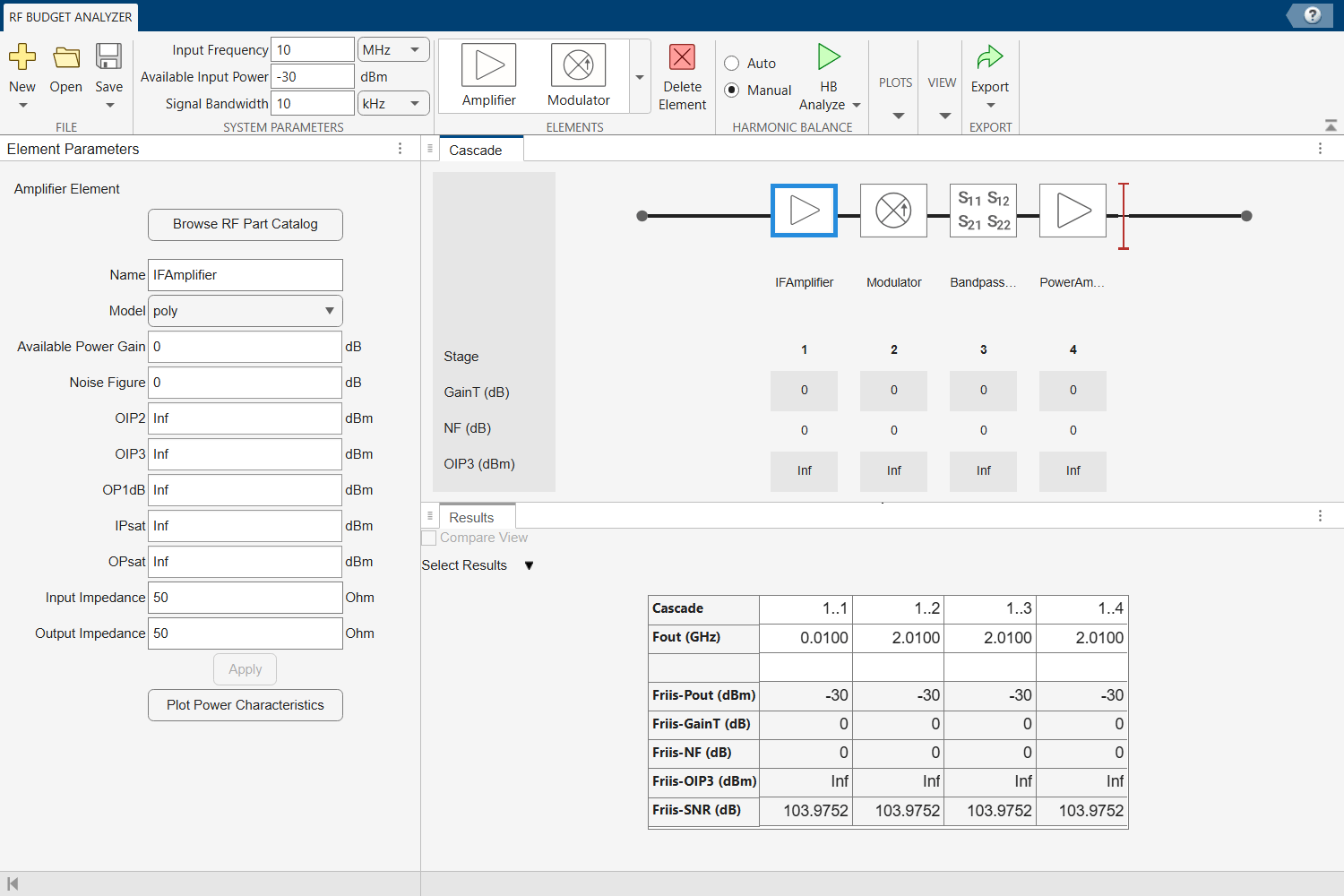
Select New and then select Transmitter to use the transmitter template to create a basic transmitter.
The transmitter template is displayed as follows.
In System Parameters, specify the RF transmitter requirements:
Input Frequency —
815MHzAvailable Input Power —
0dBmSignal Bandwidth —
100MHz
Click the IFAmplifier in the design canvas and delete the element using the Delete Element button on the toolstrip.
Add a Generic element in the place of the IFAmplifier using the toolstrip. In the Element Parameters pane, specify:
Name —
IFFilterAvailable Power Gain — –
3.6dBSelect Apply.
Click the Modulator element. In the Element Parameters pane, specify:
Name —
MixerAvailable Power Gain — –
6.5dBOIP3 —
11.5dBmLO Frequency —
4.97GHzConverter Type —
UpSelect Apply.
Delete the S-Parameters element named BandpassFilter. Add a Generic element. In the Element Parameters pane, specify:
Name —
RFFilter1Available Power Gain — –
1.4dBSelect Apply.
Select the PowerAmplifier element and in the Element Parameters pane, specify:
Name —
PowerAmplifier1Available Power Gain —
20dBOIP3 —
43dBmSelect Apply.
Add another Amplifier element using the toolstrip. In the Element Parameters pane, specify:
Name —
PowerAmplifier2Available Power Gain —
20dBOIP3 —
43dBmSelect Apply.
Add another Generic element. In the Element Parameters pane, specify:
Name —
RFFilter2Available Power Gain — –
1.4dBSelect Apply.
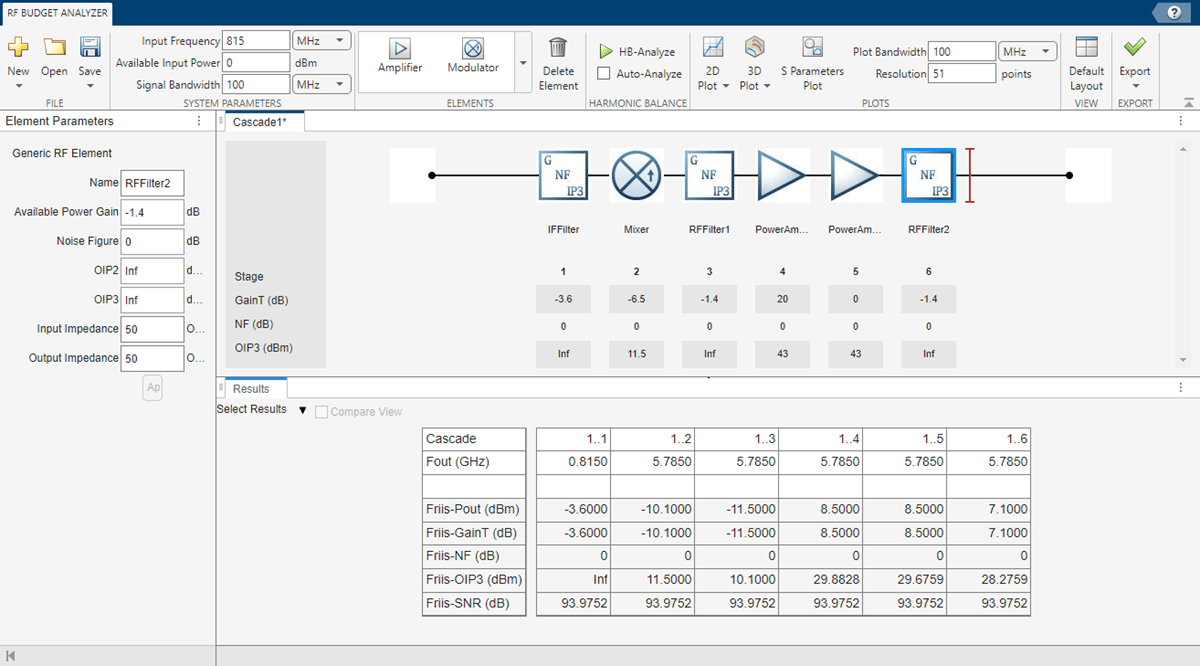
Save the system. The app saves the system in a MAT file.
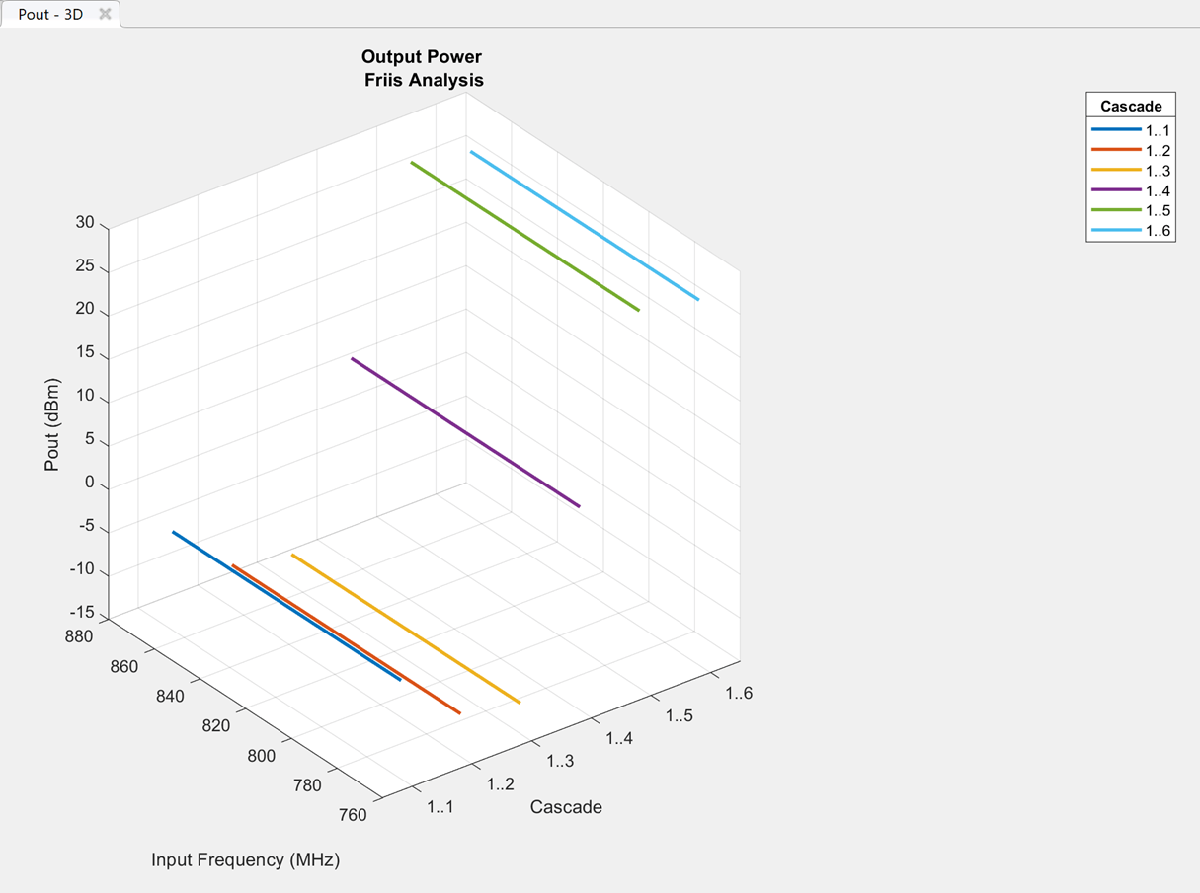
Plot the output power of the transmitter using the 3D Plot button. Select 3D Plot and choose Output Power - Pout.
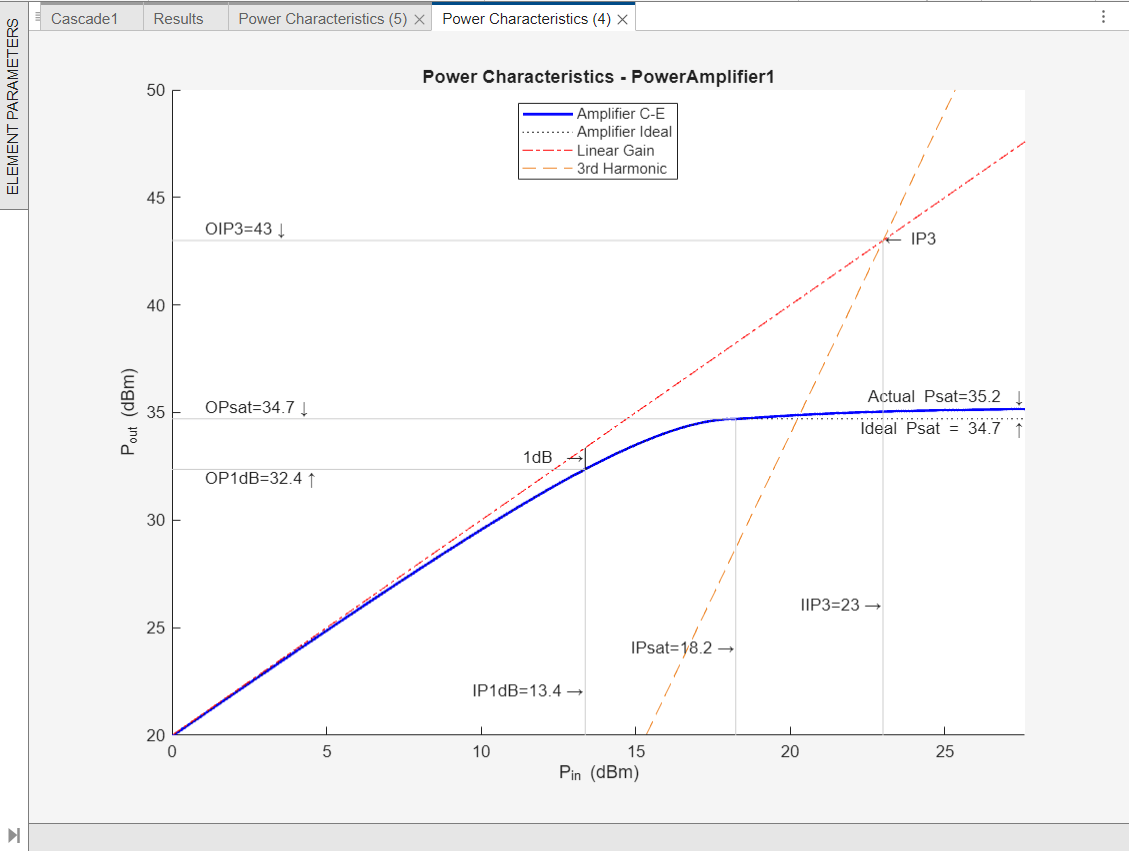
Select the PowerAmplifer1 element and from the Element Parameters pane, and then click the Plot Power Characteristics button to plot amplifier power characteristics of the PowerAmplifer1 element. Alternatively, to plot the amplifier power characteristics of the PowerAmplifer1 element, select the PowerAmplifer1 element and using the 2-D Plot button, choose Plot Power Characteristics. (Since 2023a)
This example uses an RF transmitter design from the RF Transmitter System Analysis example.
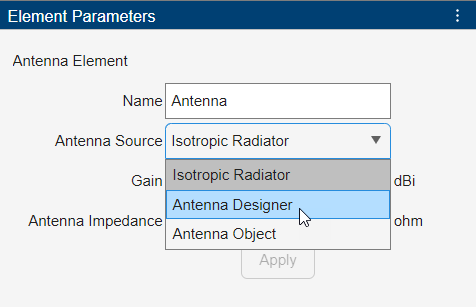
Follow the RF Transmitter System Analysis example to design an RF transmitter. Select the antenna element from the Elements section and add the element at end of this RF transmitter. In the Element Parameters pane, select Antenna Designer from the Antenna Source drop-down list.
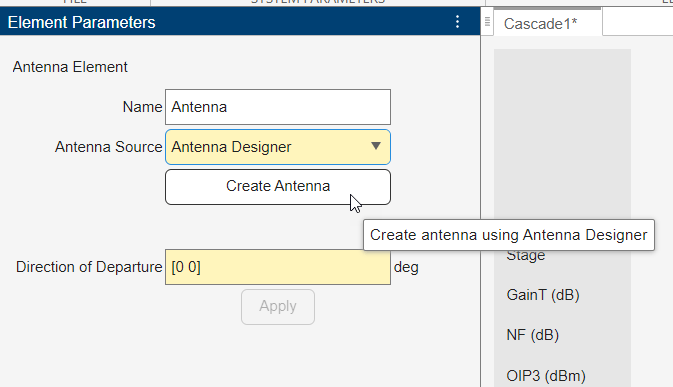
Click Create Antenna in the Element Parameters pane.
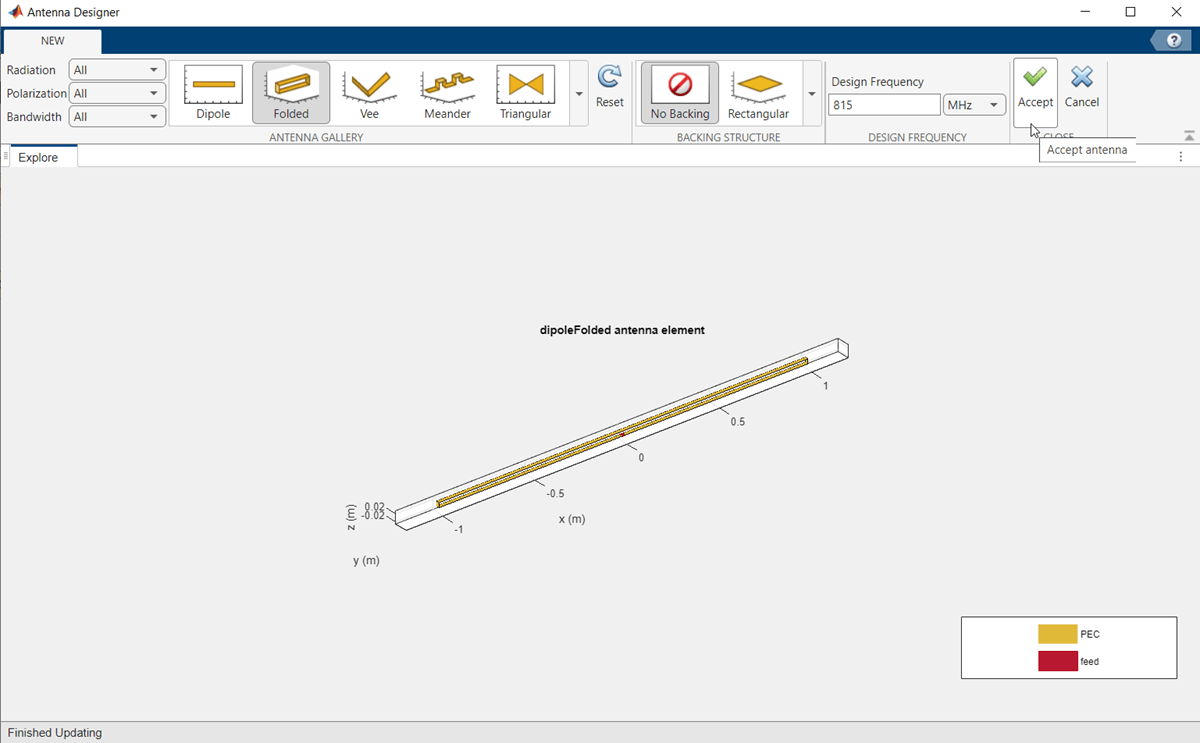
The Antenna Designer app opens. Click New to explore the antenna library. This example uses a dipoleFolded antenna element with a center frequency of 815 MHz. To do this, select Folded element from the Antenna Gallery, set Design Frequency to 815 MHz, and click Accept.
The updated antenna shows in the window.
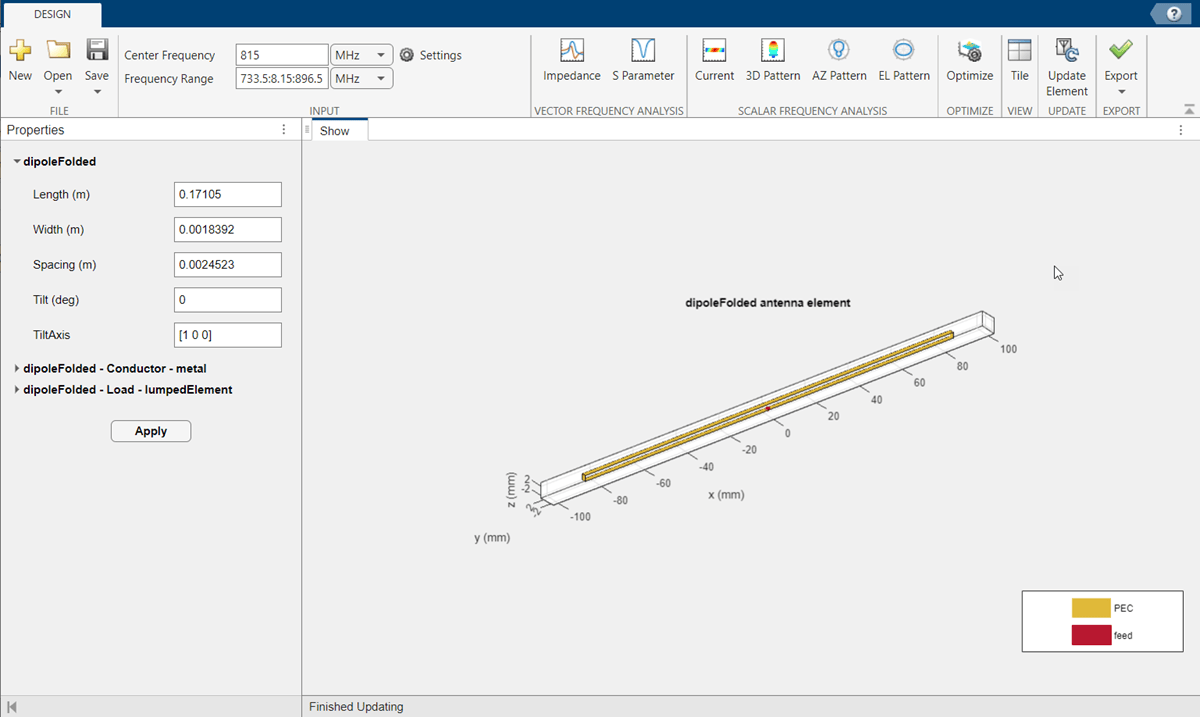
Click Update Element to update the Antenna element in the RF Budget Analyzer app. Click OK in the Confirm Update dialog box.
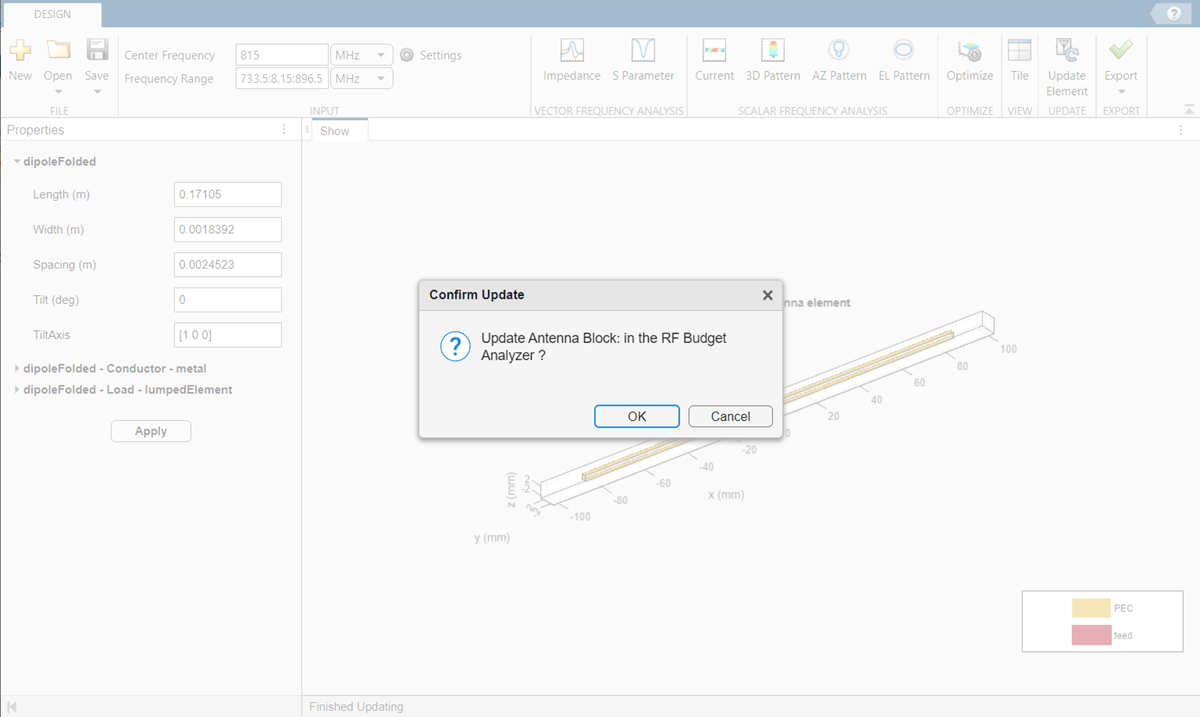
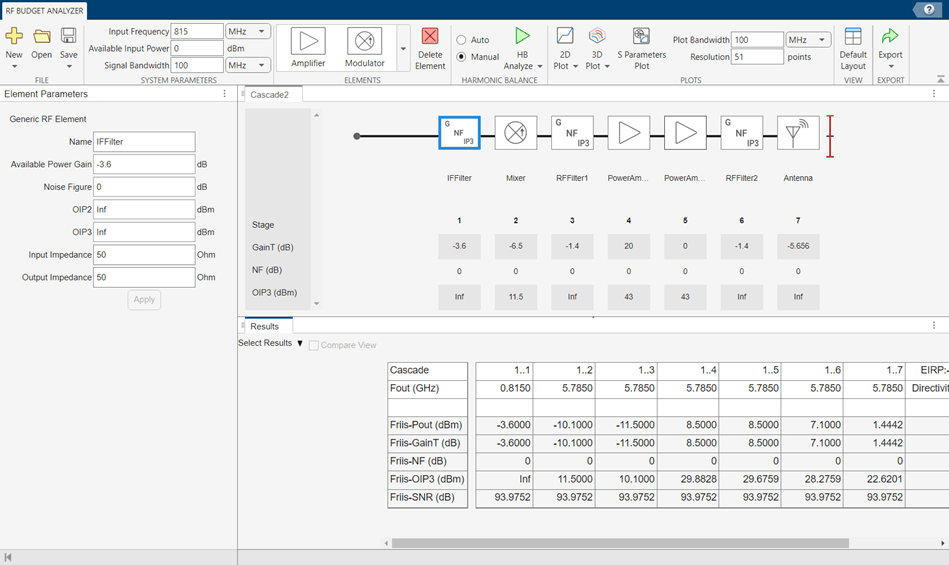
The Antenna Designer app window closes and the Antenna element is updated in the RF Budget Analyzer app. The Results pane is automatically updated for Friis analysis with EIRP and Directivity of the Antenna element.
Design and analyze an RF receiver using the RF Budget Analyzer app.
Enter rfBudgetAnalyzer to open the app.
Click the New button and select Receiver to use the receiver template option to create a basic receiver.
The receiver template is displayed as follows:
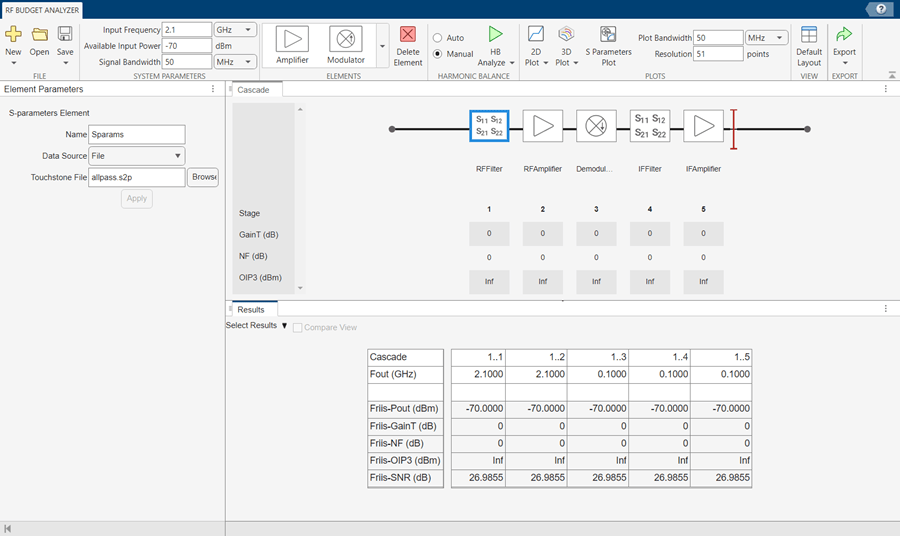
In System Parameters, specify the RF receiver requirements:
Input Frequency —
5.745MHzAvailable Input Power — –
65dBmSignal Bandwidth —
100MHz
Click RFFilter in the design canvas. This RFFilter is an S-parameters element. It accepts a Touchstone file in the S2P file type. Update the Element parameters pane as follows:
Name:
BandpassFilterS2P file: Choose an S2P file by clicking the Browse button.
Select Apply.
Click the RFAmplifier element. In the Element Parameters pane, specify the element requirements:
Name —
LNA1Available Power Gain —
12dBOIP3 —
20dBmSelect Apply.
Add another Amplifier element using the toolstrip. In the Element Parameters pane, specify the element requirements:
Name —
LNA2Available Power Gain —
12dBOIP3 —
20dBmSelect Apply.
Add a Generic element. In the Element Parameters pane, specify the element requirements:
Name —
IRFilterAvailable Power Gain — –
4.05dBSelect Apply.
Click the Demodulator element. In the Element Parameters pane, specify the element requirements:
Name —
MixerAvailable Power Gain — –
6.5dBOIP3 —
11.5dBmLO Frequency —
4.93GHzConverter Type —
DownSelect Apply.
Delete the IFFilter, S-parameters element. Add a Generic element in its place. In the Element Parameters pane, specify the element requirements:
Name —
CSFilterAvailable Power Gain — –
9.55dBSelect Apply.
Click the IFAmplifier element. In the Element Parameters pane, specify the element requirements:
Name —
PowerAmp1Available Power Gain —
16dBOIP3 —
26dBmSelect Apply.
Add two more Amplifier elements. For each element, in the Element Parameters panes specify the element requirements:
Name —
PowerAmp2|PowerAmp3Available Power Gain —
16dB |20dBOIP3 —
26dBm |33dBmSelect Apply.
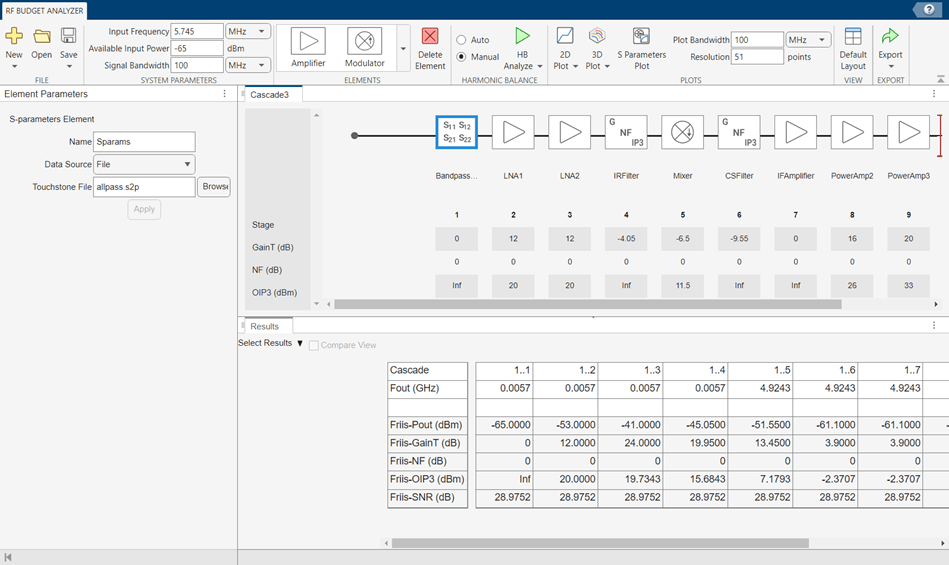
Save the system. The app saves the system in a MAT file.
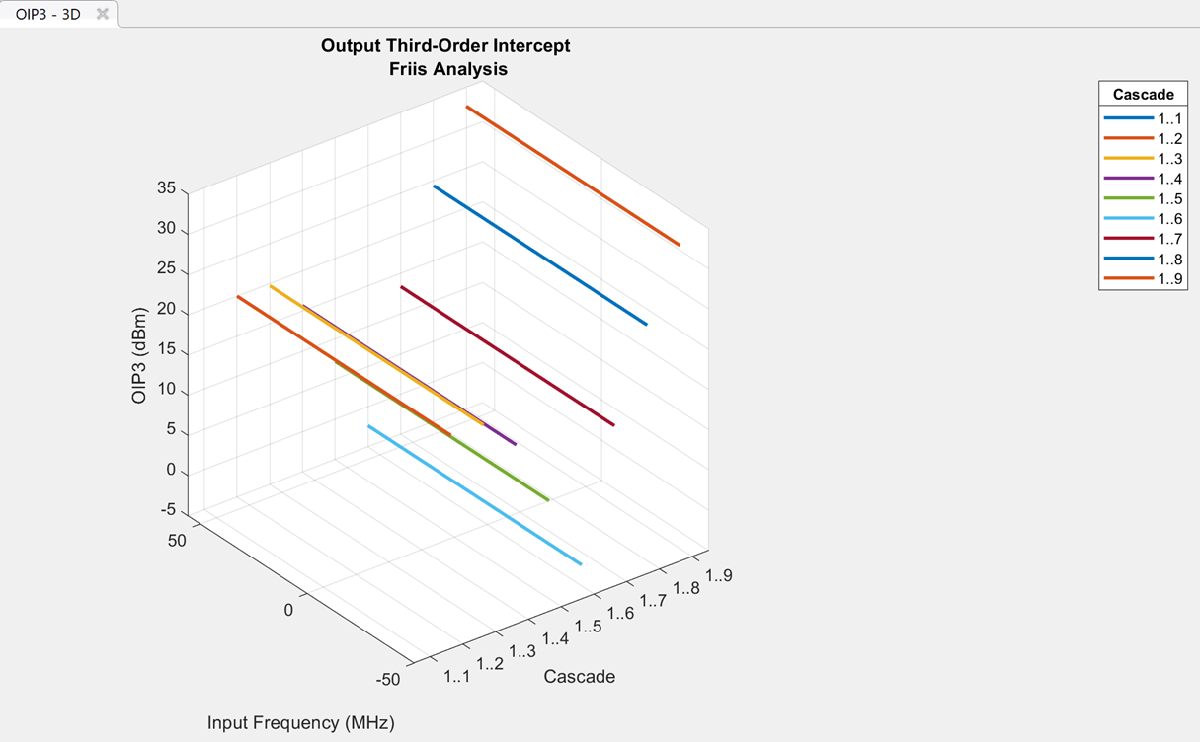
Plot the output OIP3 of the receiver using the 3D Plot button. Select the 3D Plot button and choose Output Third-Order Intercept Point - OIP3.
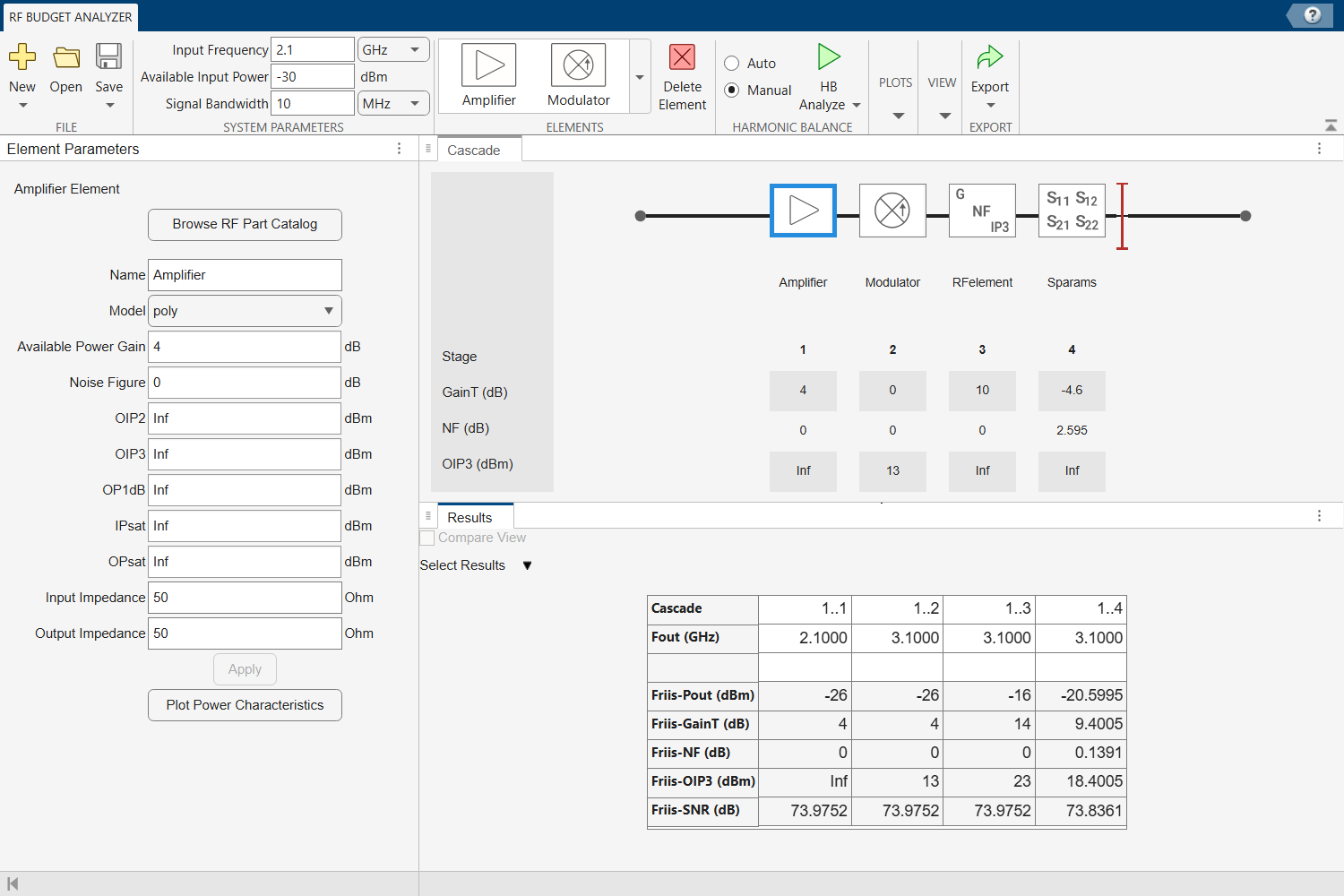
Create an amplifier with a gain of 4 dB.
a = amplifier(Gain=4);
Create a modulator with an OIP3 of 13 dBm.
m = modulator(OIP3=13);
Create an nport using passive.s2p.
n = nport("passive.s2p");Create an RF element with a gain of 10 dB.
r = rfelement(Gain=10);
Calculate the rfbudget of a series of RF elements at an input frequency of 2.1 GHz, an available input power of -30 dBm, and a bandwidth of 10 MHz.
b = rfbudget([a m r n],2.1e9,-30,10e6);
Run this command in the command window, to open the system in RF Budget Analyzer app.
show(b)
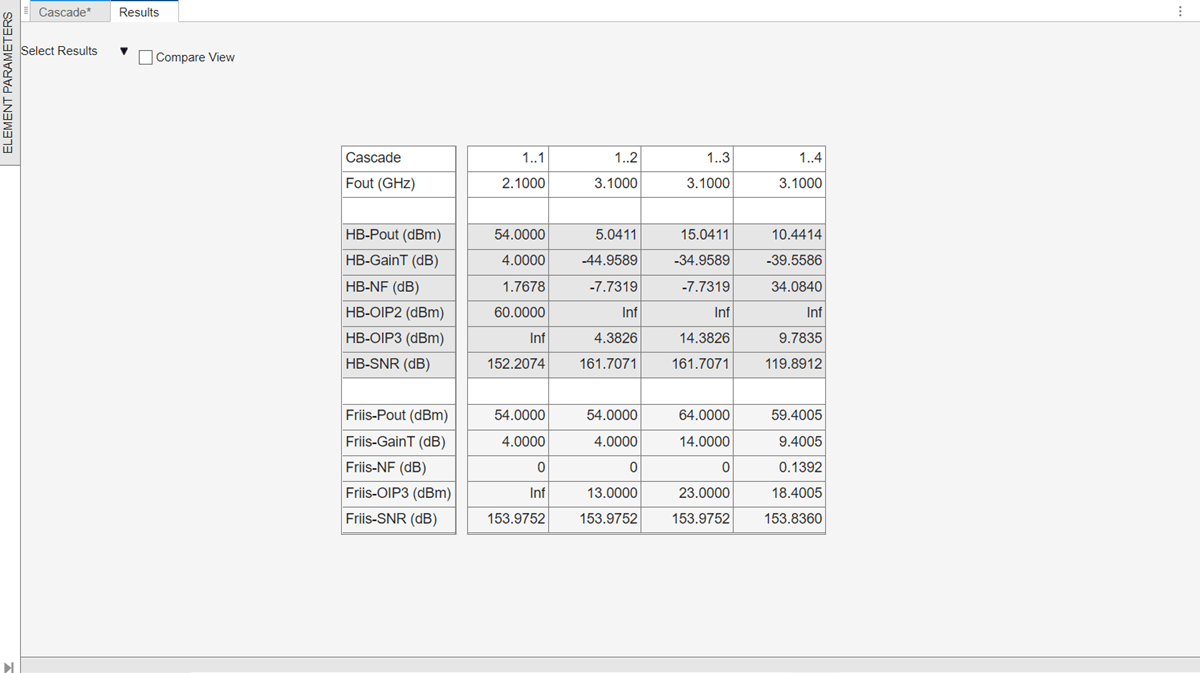
Set OIP2 value of Amplifier to 60 dBm using Elements Parameters pane and select Apply. In System Parameters section, set the Available Input Power to 50 dBm and run harmonic balance analysis using HB-Analyze button.
The results are displayed as shown below.
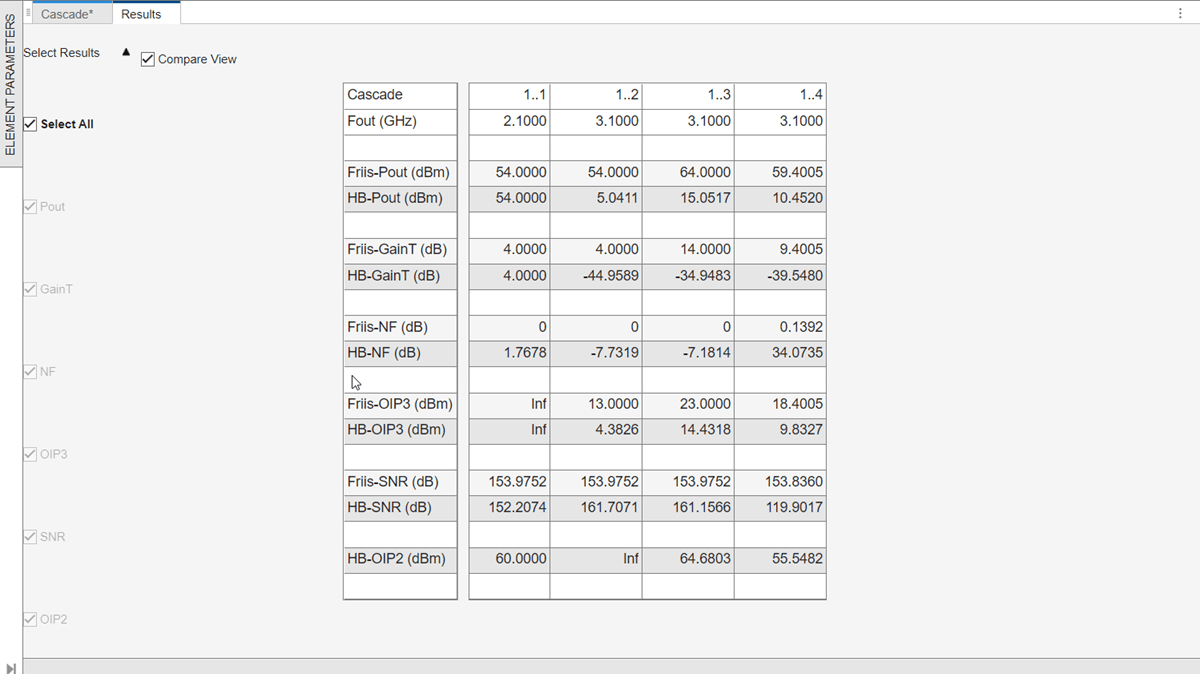
Select Auto-Analyze checkbox from the Harmonic Balance section to automatically recompute the harmonic balance analysis calculations.
Set OIP2 value of RFelement as 50 dBm using Elements Parameters pane and select Apply.
Select Compare View checkbox in the Results pane to compare the calculated Friis and harmonic balance solver results. You can use Select Results drop-down from the Results pane to filter the results and to compare between Friis and harmonic balance solver.
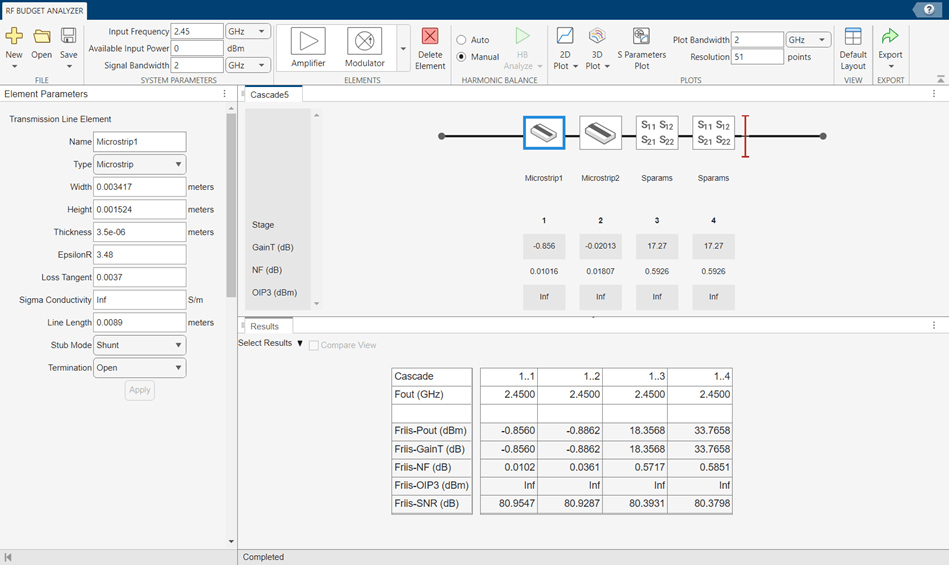
Design an input matching network for a two-stage amplifier using the Transmission Line element in the RF Budget Analyzer app.
Enter rfBudgetAnalyzer to open the app.
In System Parameters, specify the requirements:
Input Frequency —
2.45GHzAvailable Input Power —
0dBmSignal Bandwidth —
2GHz
Add two Transmission Line elements. In the Element Parameters pane, specify:
Name —
Microstrip1|Microstrip2Type —
Microstrip| MicrostripWidth —
0.0034173|0.0034173metersHeight —
0.001524|0.001524metersThickness —
3.5e-06|3.5e-06metersEpsilonR —
3.48|3.48LossTangent —
0.0037|0.0037metersSigmaCond —
Inf|InfS/mLineLength —
0.0089|0.0147metersStubMode —
Shunt|NotAStubTermination —
OpenSelect Apply.
Add two S-Parameters elements. In the Element Parameters pane, specify:
Name —
Sparams1|Sparams2
Load the Touchstone® file (f551432p.s2p) to the S-Parameters elements provided in this example and select Apply.
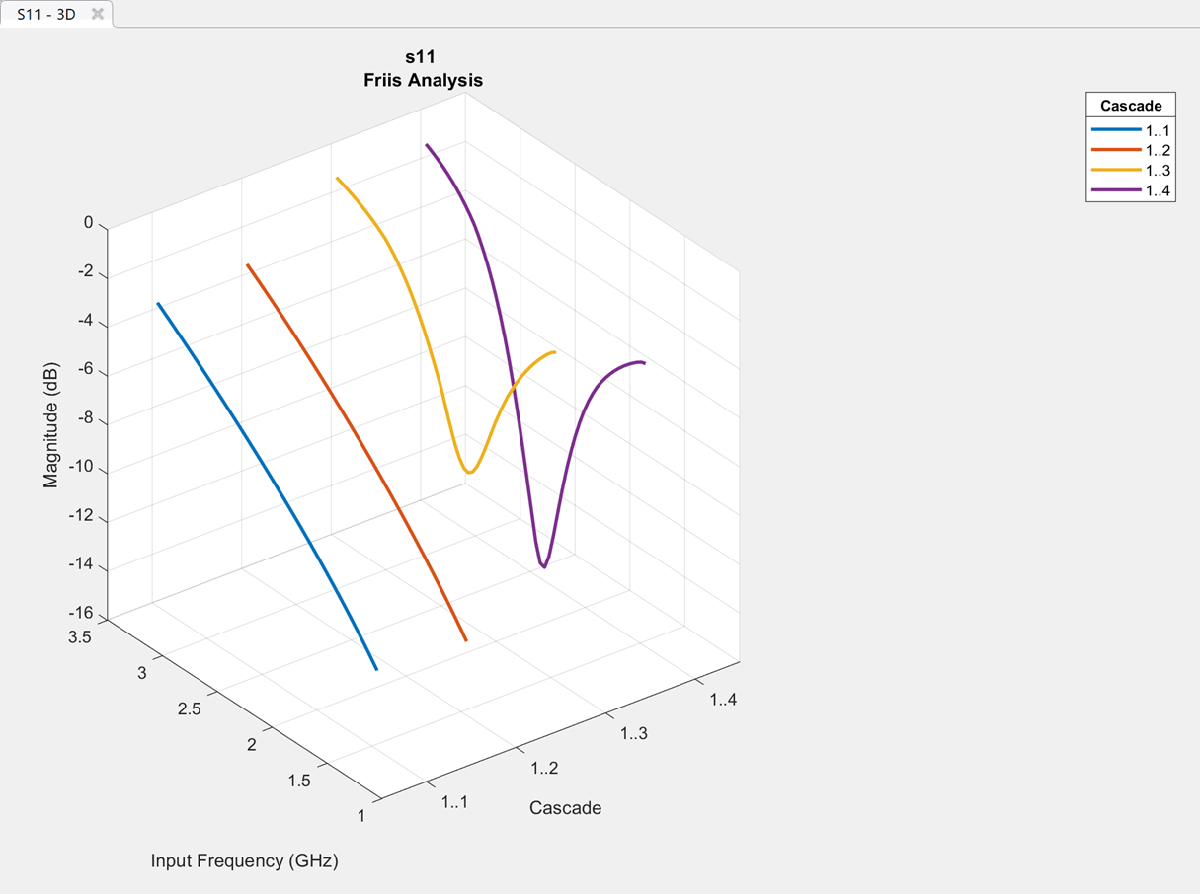
Plot the input reflection coefficient of the system using the 3D Plot button. Select the 3D Plot button, choose S-Parameters and select S11.
Design an RF system and plot S-parameters, output power, and transducer gain using RF Budget Analyzer app.
Enter rfBudgetAnalyzer to open the app.
In System Parameters, specify the requirements:
Input Frequency —
2.1GHzAvailable Input Power —
-30dBmSignal Bandwidth —
45MHz
Add a S-Parameters element. In the Element Parameters, specify:
Name —
RFBandpassFilter
Load the Touchstone file (RFBudget_RF.s2p) to the S-Parameters element provided in this example and select Apply.
Add an Amplifier element. In the Element Parameters, specify:
Name —
RFAmplifierAvailable Power Gain —
11.53dBNF —
1.53dBOIP3 —
35dBmSelect Apply.
Add the Demodulator element. In the Element Parameters, specify:
Name —
DemodulatorAvailable Power Gain —
-6dBNF —
4dBOIP3 —
50dBmLO Frequency —
2.03GHzConverter Type —
DownSelect Apply.
Add another S-Parameters element. In the Element Parameters, specify:
Name —
IFBandpassFilter
Load the Touchstone file (RFBudget_IF.s2p) to the S-Parameters element provided in this example and select Apply.
Add another Amplifier element. In the Element Parameters, specify:
Name —
IFAmplifierAvailable Power Gain —
30dBNF —
8dBOIP3 —
37dBmSelect Apply.
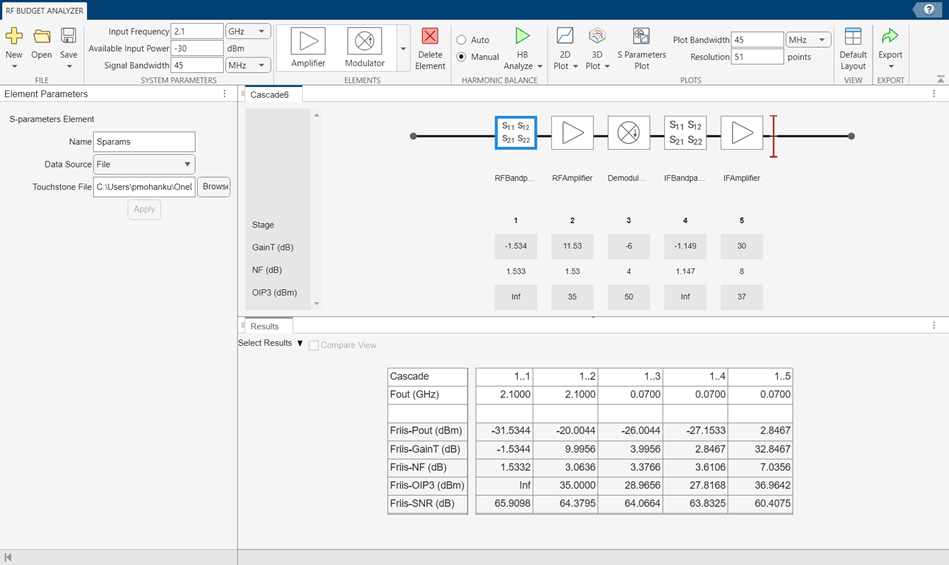
Save the system. The app saves the system in a MAT file.
Select S-Parameters Plot button. This allows you to plot Smith® chart, polar plot, magnitude, phase and real, and imaginary parts of S-parameters of the RF System and over stages.
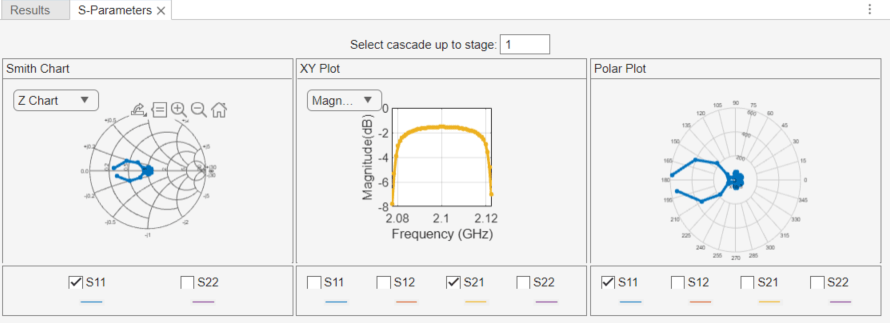
Set the Plot Bandwidth to 75 and Resolution to 250 under Plots section.
The S-parameters data is displayed as follows.
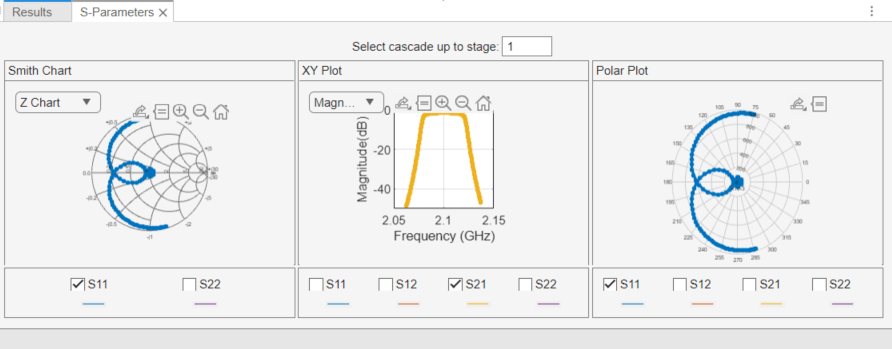
Select Phase (deg) from the drop-down menu of XY Plot in S-Parameters pane to plot the phase of the S21.
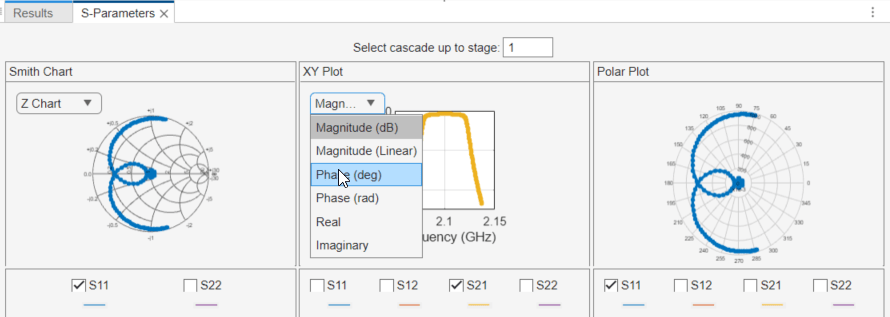
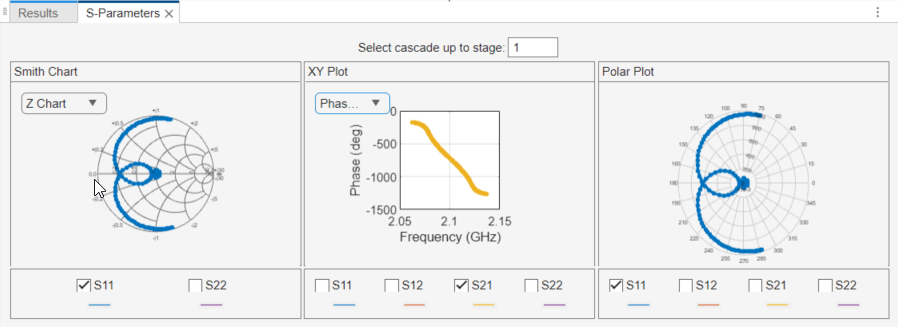
The phase plot is displayed as shown.
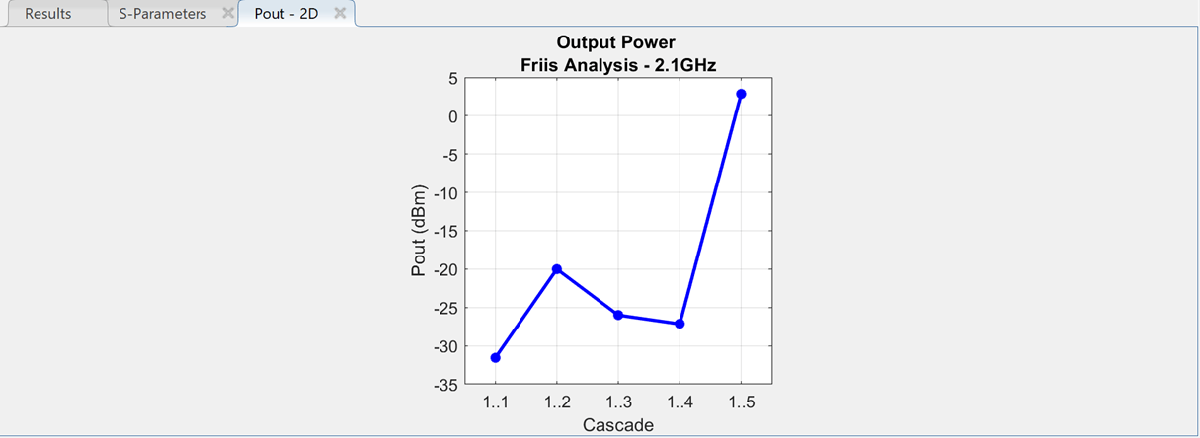
Plot the output power of the RF system using the 2D Plot button. Select 2D Plot button and choose Output Power - Pout. 2-D output power is displayed.
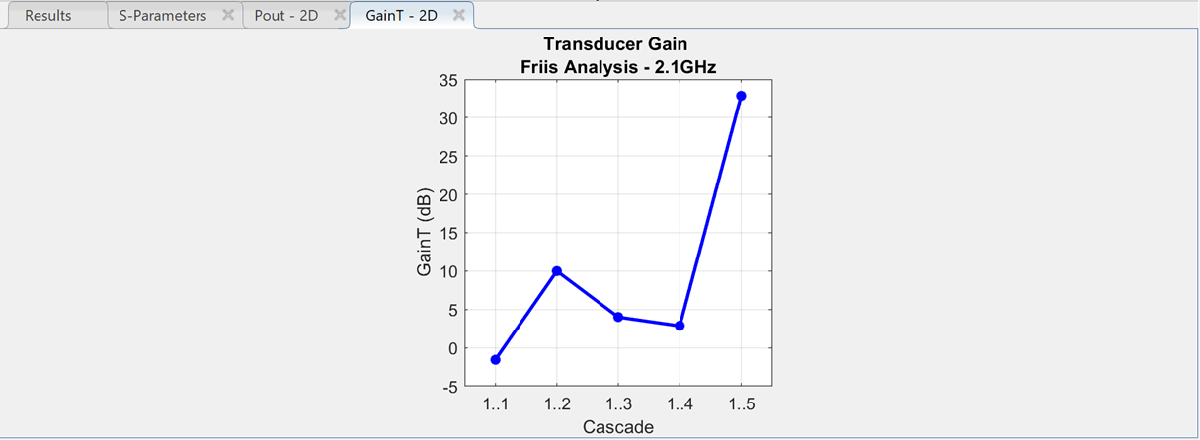
Plot the transducer gain of the RF system using the 2D Plot button. Select 2D Plot button and choose Transducer Gain - GainT.
Design an RF receiver using the rfsystem System object. View the object in the RF Budget Analyzer app to perform harmonic balance (HB) analysis.
Create fifth- and seventh-order bandpass RF filters.
f1 = rffilter(ResponseType="Bandpass",FilterOrder=5, ...
        PassbandFrequency=[4.85 5.15]*1e9);
f2 = rffilter(ResponseType="Bandpass",FilterOrder=7, ...
        PassbandFrequency=[10 130]*1e6);
Create two amplifier objects with 3 dB and 5 dB gain, respectively.
a1 = amplifier(Gain=3,NF=1.53,OIP3=35);
a2 = amplifier(Gain=5,NF=8,OIP3=37);
Create a modulator with a local frequency of 4.93 GHz.
d = modulator(Gain=0,NF=4,OIP3=50,LO=4.93e9, ...
        ConverterType="Down");
Design an RF receiver with the budget elements at an input frequency of 5 GHz, an available input power of – 30 dBm, and a bandwidth of 10 MHz.
rfb = rfbudget([f1 a1 d f2 a2],5e9,-30,10e6);
Create an RF system for the RF receiver using the rfbudget object.
rfs = rfsystem(rfb);
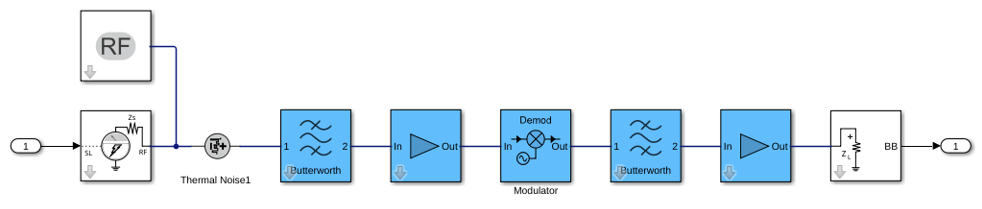
Open an RF Blockset model of the designed RF system using the open_system function.
open_system(rfs)
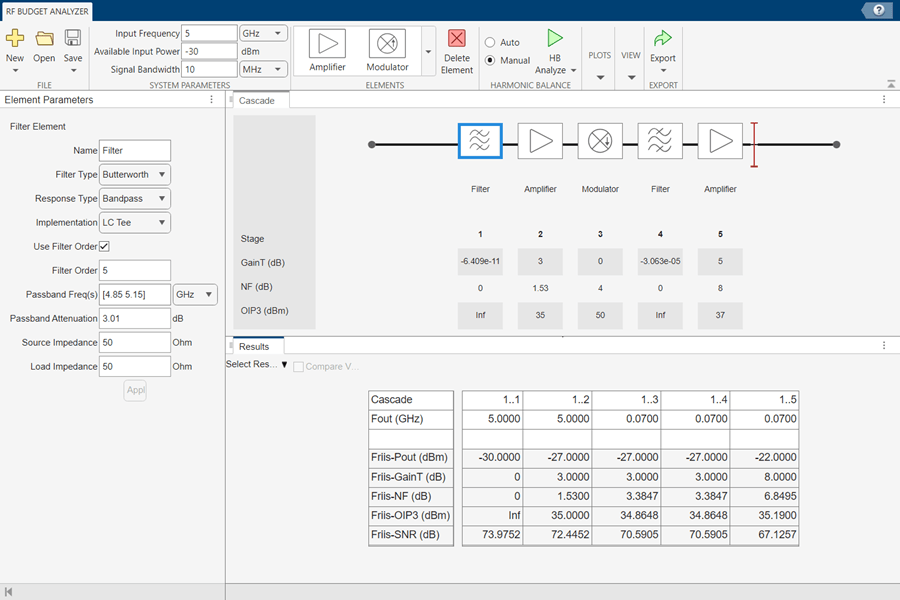
Type rfBudgetAnalyzer(rfs) command at the MATLAB® command line to open this RF system in the RF Budget Analyzer app.
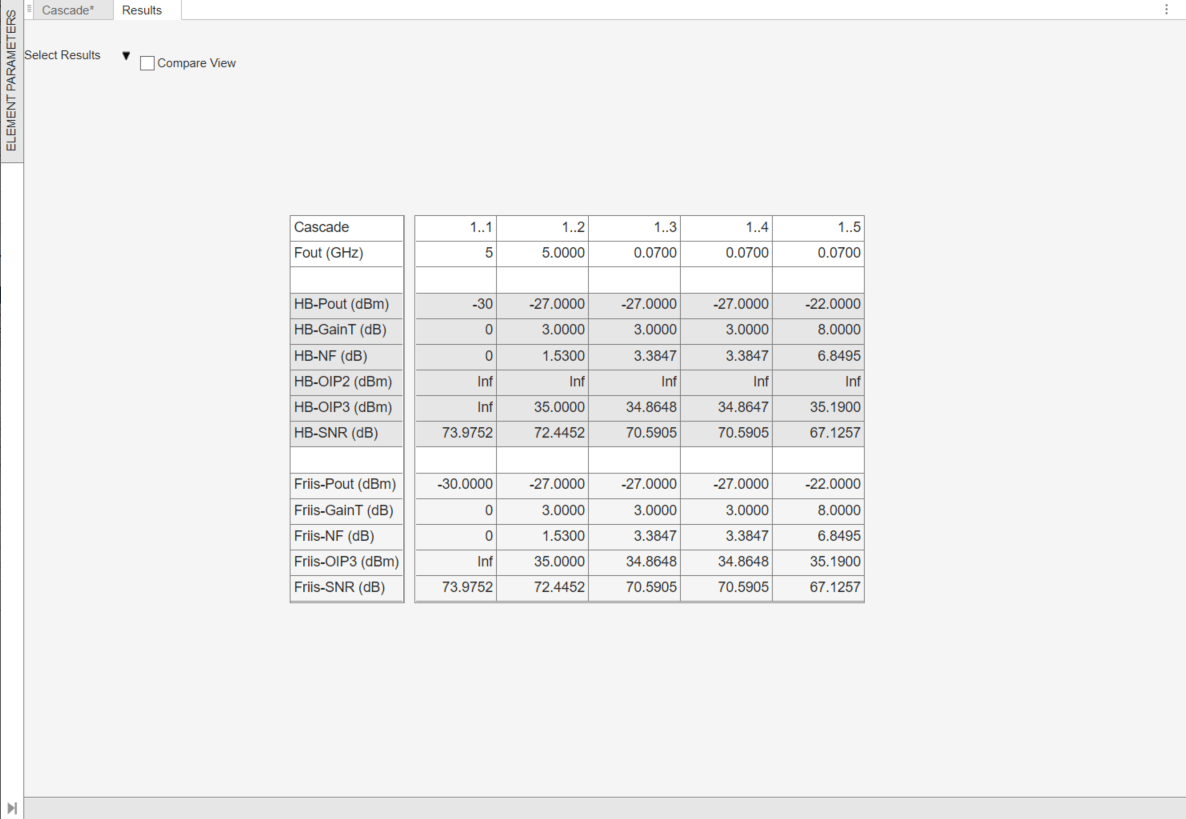
To conduct HB analysis in the app, click the HB-Analyze button.
Since R2026b
Open the RF Budget Analyzer app.
rfBudgetAnalyzer
In the RF Budget Analyzer canvas, select an amplifier element. Click the Browse RF Parts Catalog button to open the RF Part Catalog app.
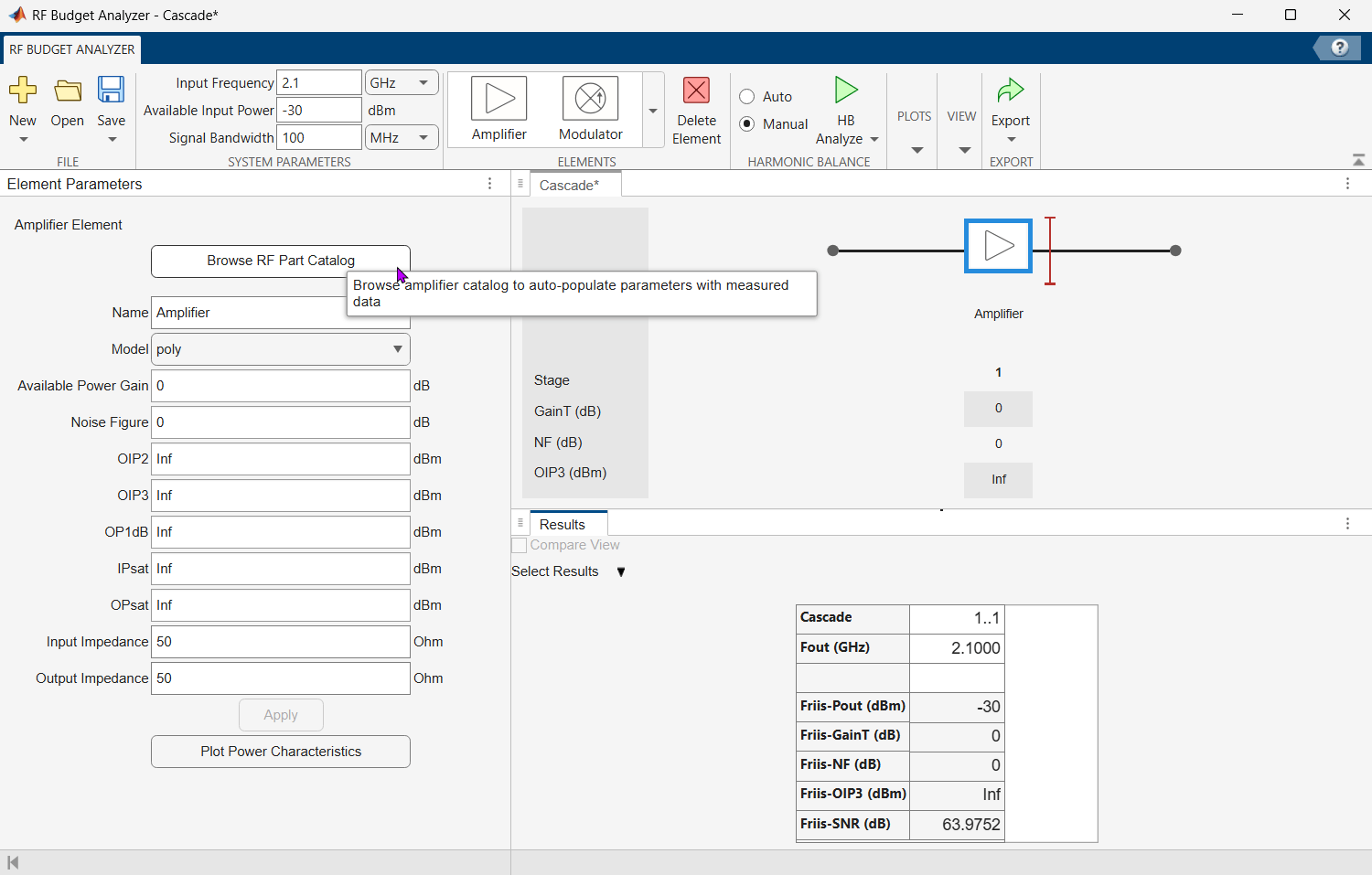
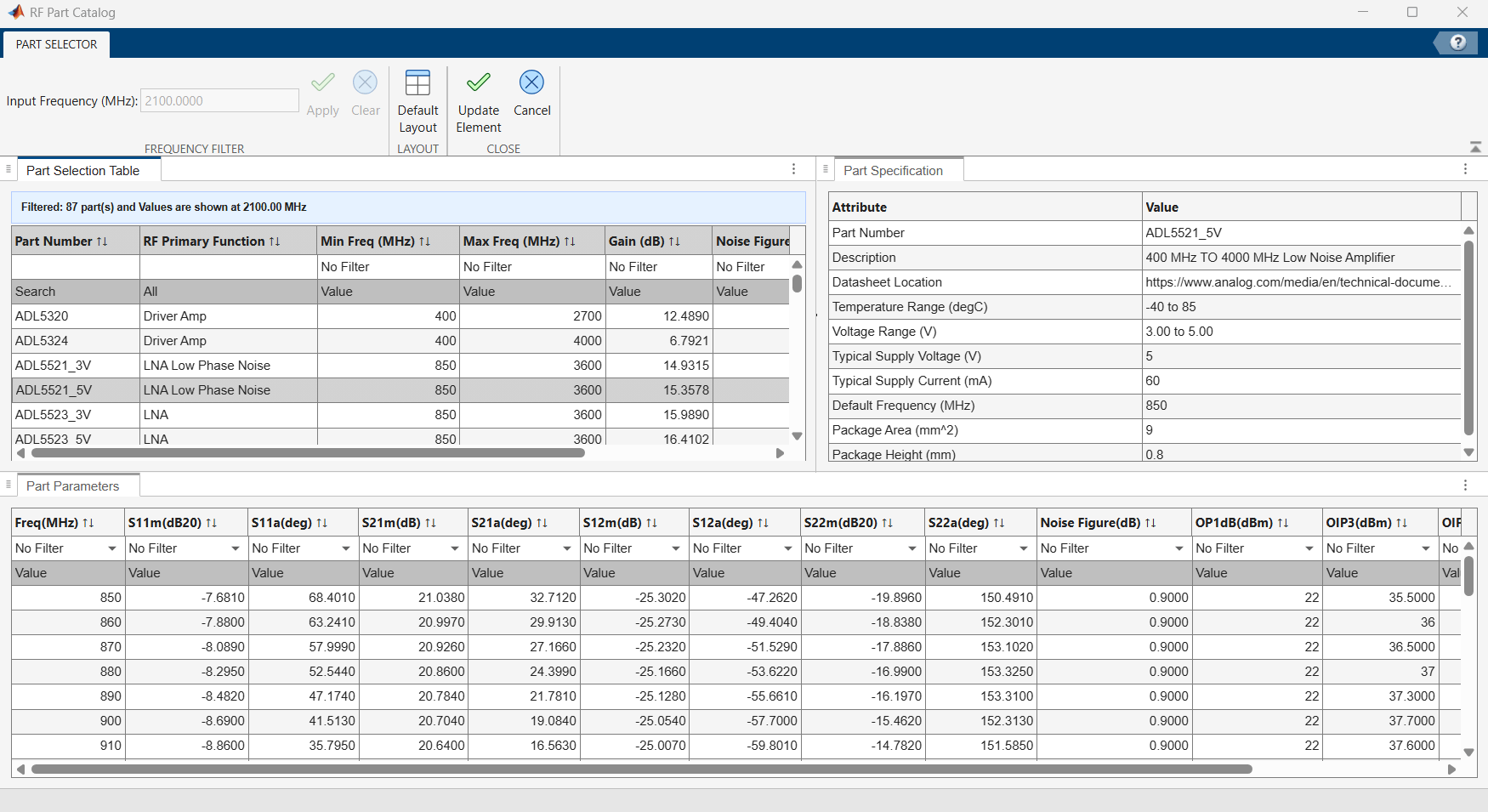
The app displays available Analog Devices amplifier components with their specifications.
In the RF Part Catalog app, browse or filter the available amplifiers. For this example, select the ADL5521_5V amplifier component from the Part Selection Table.
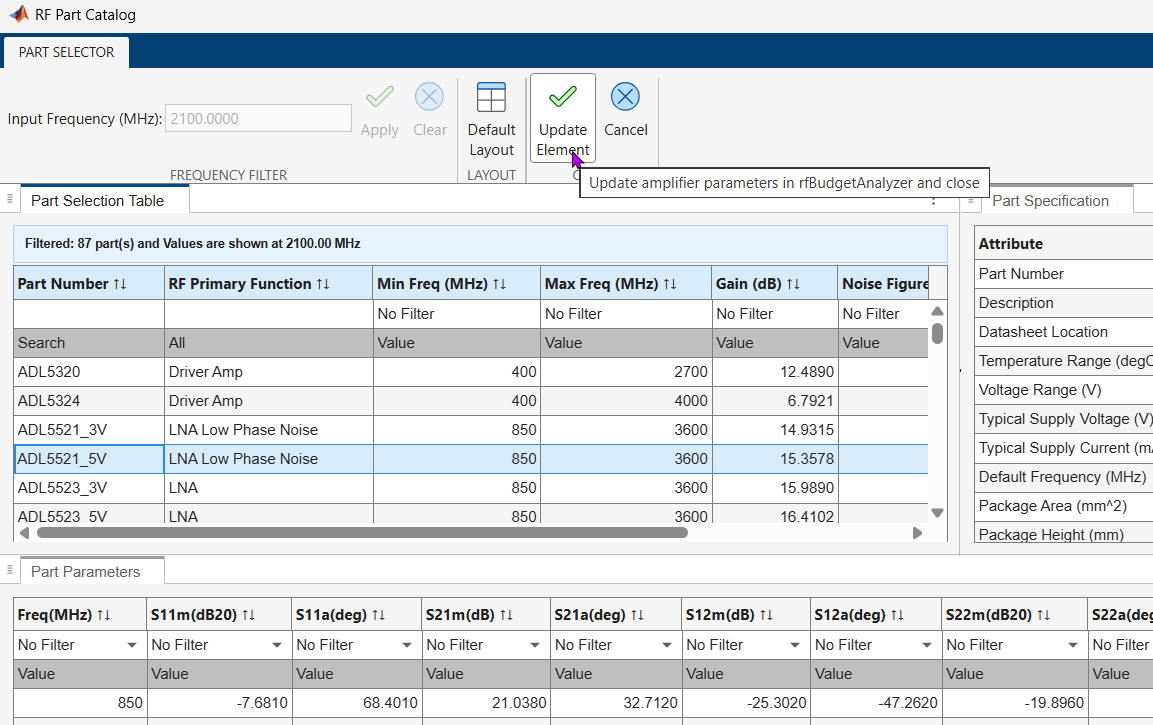
Click the Update Element button in the RF Part Catalog app.
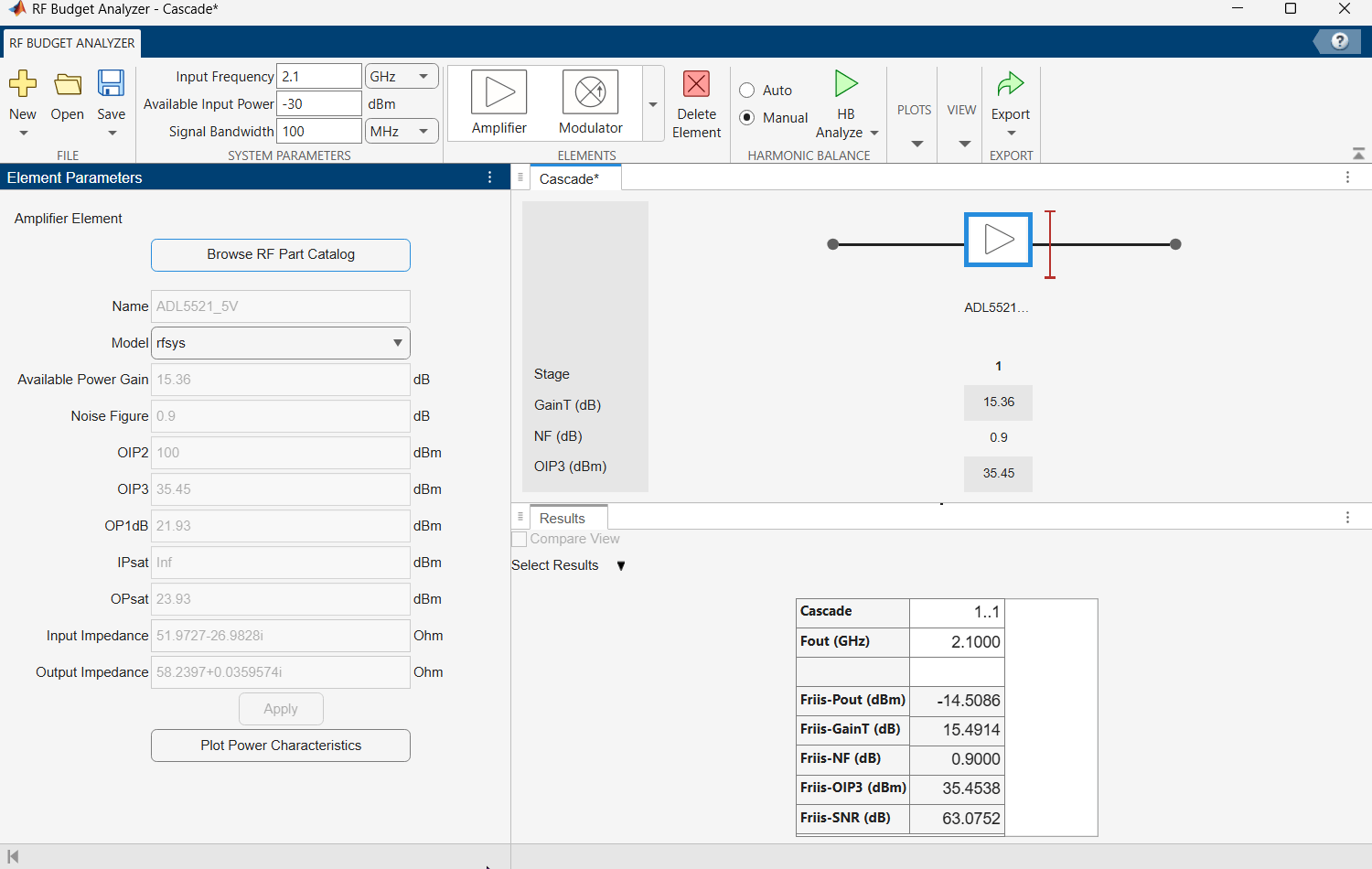
The amplifier element in the RF Budget Analyzer canvas updates with the properties of the selected ADL5521_5V component from the catalog, including gain, noise figure, and output power characteristics.
Similarly, you can select modulator and mixer IMT components in the RF Parts Catalog app and import them into the RF Budget Analyzer app for budget analysis.
Related Examples
Programmatic Use
Tips
The RF Budget Analyzer app accepts
0Hz as Input Frequency for a system. You can set the Input Frequency in the System Parameters section.The RF Budget Analyzer app does not accept
0Hz as LO Frequency. This is applicable to Modulator and Demodulator elements.The output frequencies from the RF Budget Analyzer app are always positive.
The Filter element allows you to use only the
'Transfer
                        function'
implementation when you set the Filter Type to'InverseChebyshev'in the Element Parameters pane.To design an antenna element using the RF Budget Analyzer app, in the Antenna Element pane, set Antenna Source to
Isotropic radiator.You can also design an antenna element using the Antenna Designer app or an antenna object. To use the Antenna Designer app or the antenna object, you need Antenna Toolbox™ license.Antenna elements designed using a default antenna object require larger memory. To speed up the simulation, design your antenna element at a high frequency,
2GHz or more.
References
[1] Pozar, David M. Microwave Engineering. 4th ed. Hoboken, NJ: Wiley, 2012.

