clutterVolumeRCS
Radar cross-section of volume clutter
Description
Examples
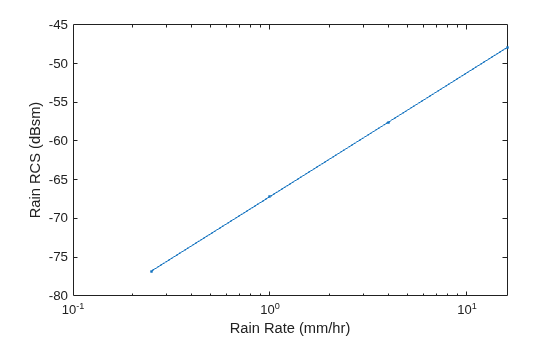
Estimate the radar cross-section of rain for a side-looking airborne SAR operating in the L band at 1.5 GHz. The rain is specified by a range resolution of 15 m, an azimuth resolution of 18 m, and a rain elevation cell resolution of 20 m. The rain rates are 0.25 mm/hr, 1 mm/hr, 4 mm/hr, and 16 mm/hr.
f = 1.5e9; rngres = 15; azres = 18; elres = 20; res = [rngres azres elres]; rr = [0.25 1 4 16];
Compute the rain radar cross-section. Use rainreflectivity to compute the volume reflectivity of the scattering particles.
volref = rainreflectivity(f,rr); rcs = clutterVolumeRCS(volref,res);
Plot the rain radar cross-section as a function of the rain rate. Express the cross-section in dB.
semilogx(rr,pow2db(rcs),'.-') xlabel('Rain Rate (mm/hr)') ylabel('Rain RCS (dBsm)')
Input Arguments
Volume reflectivity of scattering particles in square meters per cubic meter, specified as a scalar or a vector.
Data Types: double
Clutter extent, specified as a positive real scalar or a 1-by-3 row vector.
If specified as a positive real scalar,
volrepresents the volume of the clutter in cubic meters.If specified as a 1-by-3 row vector:
The first element of
volis a positive real scalar that represents the clutter within the range resolution in meters of the radar.The second element of
volis a positive real scalar that represents the clutter within the azimuth (or cross-range) resolution in meters of the radar.The third element of
volis a positive real scalar that represents the clutter within the elevation resolution in meters of the radar.
Data Types: double
Output Arguments
Radar cross-section of volume clutter in square meters, returned as a scalar or a
vector. rcs has the same dimensions as
volrefl.
Extended Capabilities
C/C++ Code Generation
Generate C and C++ code using MATLAB® Coder™.
Version History
Introduced in R2021a
See Also
MATLAB Command
You clicked a link that corresponds to this MATLAB command:
Run the command by entering it in the MATLAB Command Window. Web browsers do not support MATLAB commands.
Website auswählen
Wählen Sie eine Website aus, um übersetzte Inhalte (sofern verfügbar) sowie lokale Veranstaltungen und Angebote anzuzeigen. Auf der Grundlage Ihres Standorts empfehlen wir Ihnen die folgende Auswahl: .
Sie können auch eine Website aus der folgenden Liste auswählen:
So erhalten Sie die bestmögliche Leistung auf der Website
Wählen Sie für die bestmögliche Website-Leistung die Website für China (auf Chinesisch oder Englisch). Andere landesspezifische Websites von MathWorks sind für Besuche von Ihrem Standort aus nicht optimiert.
Amerika
- América Latina (Español)
- Canada (English)
- United States (English)
Europa
- Belgium (English)
- Denmark (English)
- Deutschland (Deutsch)
- España (Español)
- Finland (English)
- France (Français)
- Ireland (English)
- Italia (Italiano)
- Luxembourg (English)
- Netherlands (English)
- Norway (English)
- Österreich (Deutsch)
- Portugal (English)
- Sweden (English)
- Switzerland
- United Kingdom (English)