nearestEdge
R2026bFind edges nearest to specified point
Description
Examples
Find edges of a block nearest to the specified points.
Create a block geometry.
gm = multicuboid(3,2,1)
gm =
  DiscreteGeometry with properties:

       NumCells: 1
       NumFaces: 6
       NumEdges: 12
    NumVertices: 8
       Vertices: [8×3 double]
Plot the geometry with the edge labels. Add the points with the coordinates (0 0 0), (1 0.9 1), and (1.5 -1 0) to the plot.
pdegplot(gm,EdgeLabels="on",FaceAlpha=0.2)
hold on
scatter3([0 1 1.5],[0 0.9 -1],[0 1 0],"filled",MarkerFaceColor="g")
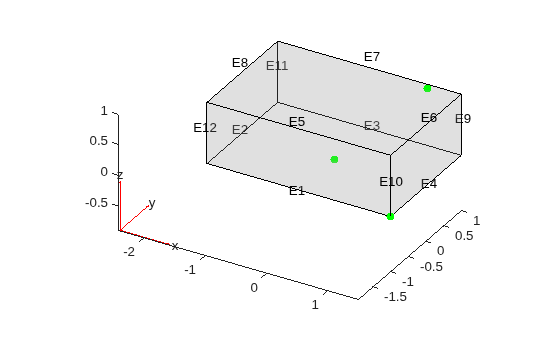
Find edges closest to the points with the coordinates (0 0 0), (1 0.9 1), and (1.5 -1 0). If several edges are equally close (within the tolerance) to the point, nearestEdge returns the ID of one of the edges.
edgeIDs = nearestEdge(gm,[0 0 0; 1 0.9 1; 1.5 -1 0])
edgeIDs = 1×3

     1     7     1
Find edges of the L-shaped membrane nearest to the specified points.
Create a geometry of the L-shaped membrane by using lshapeg.
gm = fegeometry(@lshapeg)
gm =
  fegeometry with properties:

        NumCells: 0
        NumFaces: 3
        NumEdges: 10
     NumVertices: 8
        Vertices: [8×2 double]
    FeatureAngle: []
            Mesh: []
Plot the geometry with the edge labels. Add the points with the coordinates (0 0), (0.1 0.2), and (-0.5 0.5) to the plot.
pdegplot(gm,EdgeLabels="on")
hold on
scatter([0 0.1 -0.5],[0 0.2 0.5],"filled")
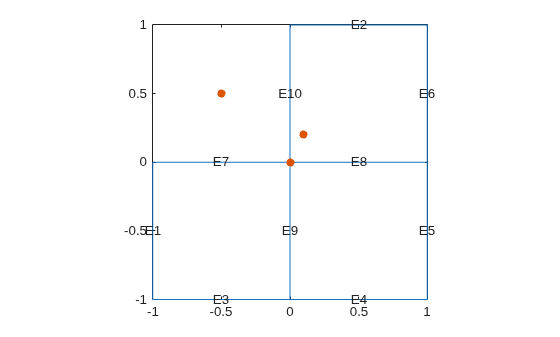
Find edges closest to the points with the coordinates (0 0), (0.1 0.2), and (-0.5 0.5). If several edges are equally close (within the tolerance) to the point, nearestEdge returns the ID of one of the edges.
edgeIDs = nearestEdge(gm,[0 0; 0.1 0.2; -0.5 0.5])
edgeIDs = 1×3

     7    10    10

