opengl
R2026b(Removed) Control OpenGL rendering
opengl has been removed. For more information, see Version History.
Syntax
Description
opengl uses a software version of
OpenGL to render subsequent graphics for the current MATLAB session. This command works only on Windows® systems.software
opengl uses a hardware-accelerated
version of OpenGL to render subsequent graphics. If your graphics hardware does not support
hardware-accelerated OpenGL, then MATLAB uses a software version instead.hardware
opengl uses a
hardware-accelerated version of OpenGL, but disables some advanced graphics features that are unstable with certain
graphics drivers. If your graphics hardware does not support hardware-accelerated
OpenGL, then MATLAB uses a software version instead.hardwarebasic
opengl('save', sets your preferences so
that future sessions of MATLAB on this computer use the preferred version of OpenGL. Specify pref)pref as 'software',
'hardware', 'hardwarebasic', or
'none'. This command does not affect the current session.
Examples
Input Arguments
More About
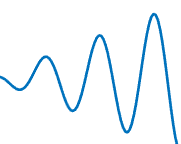
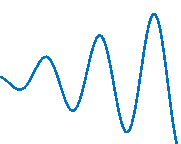
Graphics smoothing is a technique to improve the appearance of plots by reducing the appearance of jagged lines. By default, this feature is enabled if your system supports it.
This table shows the difference when the feature is enabled or disabled. To turn off
this feature for a particular figure, set the GraphisSmoothing property
of the figure to 'off'.
| When Supported and Enabled | When Not Supported or Disabled |
|---|---|
|
|
(Zoomed-in view)
| (Zoomed-in view)
|


Depth peel transparency is a feature for correctly drawing transparent 3-D objects or complex plots that contain intersecting transparent objects. In the table, the left image shows the result of using transparency on a sphere when the depth peel transparency feature is supported. The right image shows the same sphere with unexpected shaded areas that occur when the feature is not supported.
| When Supported | When Not Supported |
|---|---|
|
|


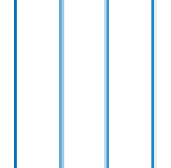
Align vertex centers is a feature for sharp vertical and horizontal
lines. If graphics smoothing is enabled, it can cause horizontal and vertical lines to
appear uneven in thickness or color. The align vertex centers feature eliminates the uneven
appearance. By default, the align vertex centers feature is not enabled. However, if your
system supports this feature, then you can turn it on for objects that have an
AlignVertexCenters property by setting the property to
'on'.
This table shows the difference when the feature is enabled or disabled.
| When Supported and Enabled | When Not Supported or Disabled |
|---|---|
|
|

Hardware-accelerated markers take advantage of your graphics hardware for improved performance and quality. This table shows the difference when the feature is supported or not supported.
| When Supported | When Not Supported |
|---|---|
|
|


Tips
Before R2025a, Painters is an alternate rendering method for screen display and printing. For more information, see the figure’s
Rendererproperty.Before R2025a, by default, MATLAB uses hardware-accelerated OpenGL if your graphics hardware supports it. However, in some cases, MATLAB automatically switches to software OpenGL, for example, if it detects:
You are using a graphics driver with known issues or graphics virtualization.
A previous MATLAB session crashed due to a graphics issue. If the previous session was using software OpenGL and crashed, then subsequent sessions use a more stable version of software OpenGL that has fewer capabilities.
You do not have graphics hardware or your graphics hardware does not support hardware OpenGL.

