QSPI Peripheral
R2026bQSPI Peripheral block

To add a block to a model, double-click the canvas and start typing the block name. Then, select the block from the list.
Libraries:
Embedded Coder Support Package for Infineon AURIX TC3x Microcontrollers /
AURIX TC3x
Description
Add-On Required: This feature requires the Embedded Coder Support Package for Infineon AURIX TC3x Microcontrollers add-on.
Write data to and read data from an SPI controller device.
The Queued Synchronous Peripheral Interface (QSPI) Peripheral block accepts 1-D array of
data type int8, uint8, int16,
uint16, int32, and
uint32.
The QSPI Controller block or any external controller generates and configures the clock and chip select signals for this block.
Examples
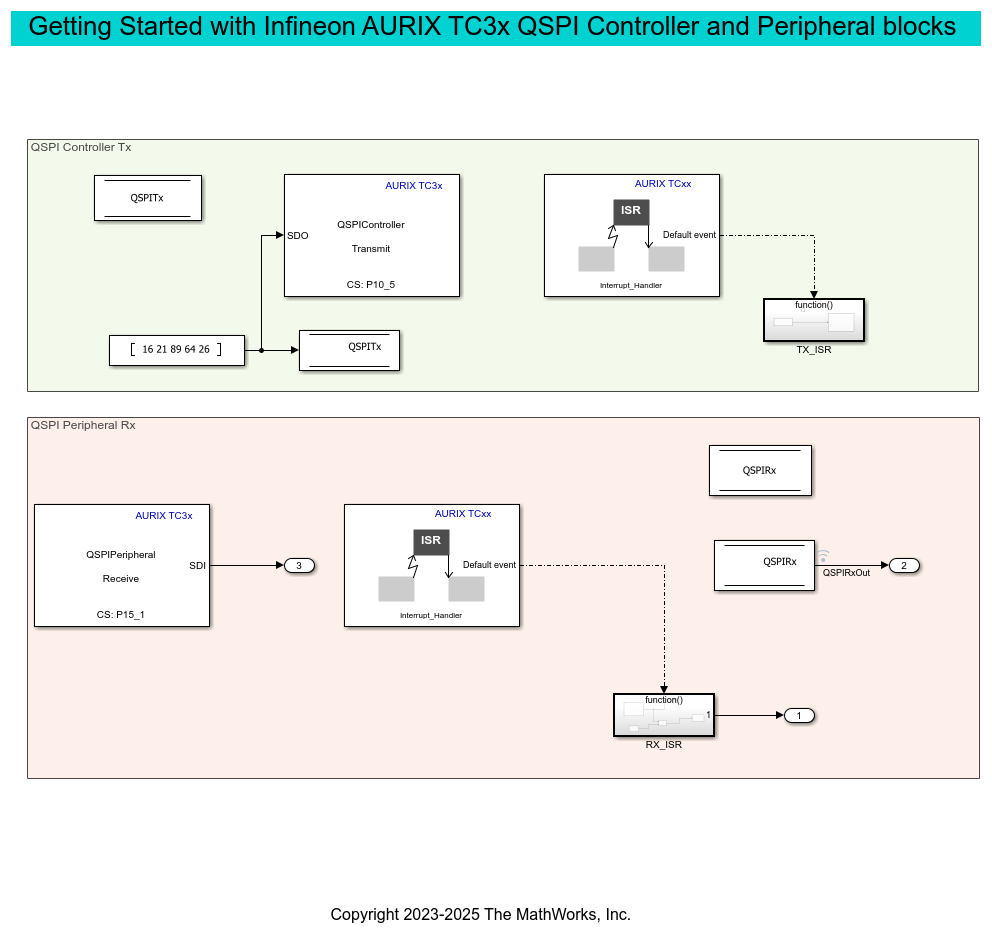
Getting Started with QSPI Communication for Infineon AURIX TC3x Microcontrollers
The use the QSPI Controller and QSPI Peripheral blocks from Embedded Coder® Support Package for Infineon® AURIX™ TC3x Microcontrollers to handle data through interrupts.
Ports
Input
This port accepts the data to be transmitted to the peripheral device, with the data type defined by the Data bits and Output data type parameters.
Dependencies
To enable this port, set the Transfer mode parameter
to SPI Transmit.
Data Types: int8 | uint8 | int16 | uint16 | int32 | uint32
If you set the Transfer mode parameter to
SPI Receive, the QSPI block converts the SoC
message SDImsg into output data at the
SDI output port during simulation.
Dependencies
To enable this port, select the Enable simulation port parameter and set the port type as SoC Data (Message based).
If you set the Transfer modeparameter to
SPI Receive, this input port acts as pass-through
with the SDI output of QSPI block during
simulation.
Dependencies
To enable this port, select the Enable simulation port parameter and set the port type as Signal.
Output
This port outputs the data received from the peripheral device, with the size and type defined by the Output data length and Output data type parameters.
Dependencies
To enable this port, set the Transfer mode parameter
to SPI Receive.
Data Types: int8 | uint8 | int16 | uint16 | int32 | uint32
The block outputs the status of the received data or any errors that
occurred during the data transmission and reception as a
unit16 scalar value.
| Bit | Status |
Bit 0 | Transaction successful |
Bit 1 | Busy |
Bit 2 | Parity error |
Bit 3 | Configuration error |
Bit 4 | Baud rate error |
Bit 5 | Transmit buffer (Tx FIFO) overflow error |
Bit 6 | Tx FIFO underflow error |
Bit 7 | Receive buffer (Rx FIFO) overflow error |
Bit 8 | Rx FIFO underflow error |
Bit 9 | Timeout error |
Bit 10 | SLSI misplaced inactivation |
For example, the status of 17 (sets 4th and 0th bit) represents successful transaction with baud rate error.
Dependencies
To enable this port, select the Enable status port parameter.
Data Types: uint16
If you set the Transfer modeparameter to
SPI Transmit, this port outputs the data received
at SDO port in message form during simulation.
Dependencies
To enable this port, select the Enable simulation port parameter and set the Port Type as SoC Data (Message based).
If you set the Transfer mode parameter to
SPI Transmit, this port outputs the data received
at SDO port during simulation.
Dependencies
To enable this port, select the Enable simulation port parameter and set the Port Type as Signal.
Parameters
Basic
Select one of these operation modes:
SPI Transmit— In this mode, the block transmits data to the peripheral device. When you select this transfer mode, the block configures an input port,SDO.SPI Receive— In this transfer mode, the block receives data from peripheral device. When you select this transfer mode, the block enables an output port,SDI.
This parameter specifies the frame length of each data element used in QSPI communication. The selected frame length determines the valid data type for the SDO and SDI ports.
For frame length
2to8, the valid data types areint8orunit8.For frame length
9to16, the valid data types areint16orunit16.For frame length
17to32, the valid data types areint32orunit32.
Select this parameter to output status of data transfer.
When you select this parameter, the block enables the status port.
Specify in seconds how often the block should read the input data.
When you specify this parameter as -1, Simulink® determines the best sample time for the block based on the block
context within the model.
Dependencies
To enable this parameter, set the Transfer mode to
SPI Receive.
Select this parameter to enable peripheral simulation capability.
Select this parameter to configure either the SoC compatible or the Simulink signal based simulation ports to enable peripheral simulation capability.
Dependencies
To view this parameter, select the Enable simulation port parameter.
Advanced
Specify the data length to be received from the controller device.
Note
The data length specified must match the data transmitted using QSPI controller block.
Dependencies
To enable this parameter, set the Transfer
mode to SPI
Receive.
Select the supported data types based on the data bits selected.
Dependencies
To enable this parameter, set the Transfer mode to
SPI Receive.
Version History
Introduced in R2024a
MATLAB Command
You clicked a link that corresponds to this MATLAB command:
Run the command by entering it in the MATLAB Command Window. Web browsers do not support MATLAB commands.
Website auswählen
Wählen Sie eine Website aus, um übersetzte Inhalte (sofern verfügbar) sowie lokale Veranstaltungen und Angebote anzuzeigen. Auf der Grundlage Ihres Standorts empfehlen wir Ihnen die folgende Auswahl: .
Sie können auch eine Website aus der folgenden Liste auswählen:
So erhalten Sie die bestmögliche Leistung auf der Website
Wählen Sie für die bestmögliche Website-Leistung die Website für China (auf Chinesisch oder Englisch). Andere landesspezifische Websites von MathWorks sind für Besuche von Ihrem Standort aus nicht optimiert.
Amerika
- América Latina (Español)
- Canada (English)
- United States (English)
Europa
- Belgium (English)
- Denmark (English)
- Deutschland (Deutsch)
- España (Español)
- Finland (English)
- France (Français)
- Ireland (English)
- Italia (Italiano)
- Luxembourg (English)
- Netherlands (English)
- Norway (English)
- Österreich (Deutsch)
- Portugal (English)
- Sweden (English)
- Switzerland
- United Kingdom (English)
