Cuboid Using Prelookup
R2026bUse previously calculated index and fraction values to accelerate approximation of three-dimensional function
Since R2026b
Cuboid Using Prelookup block
To add a block to a model, double-click the canvas and start typing the block name. Then, select the block from the list.
Libraries:
AUTOSAR Blockset /
Classic Platform /
Library Routines /
Interpolation
Description
The Cuboid Using Prelookup block uses the calculated index and fraction values from Prelookup blocks to interpolate a three-dimensional (3-D) lookup table that represents sampled values of an approximated function. The output of the block is the result of the approximated function using the current inputs.
If you select the AUTOSAR 4.x code replacement library (CRL) for your AUTOSAR model, code generated from this block is replaced with the AUTOSAR library routine that you configure in the Block Parameters dialog box.
Examples
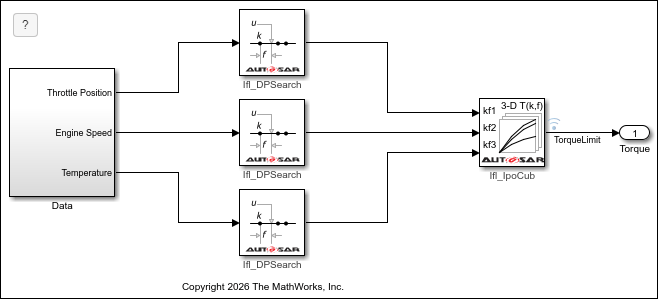
Generate AUTOSAR Cuboid Interpolation Routines
Configure, simulate, and generate code for a model that interpolates a three-dimensional (3-D) lookup table that is compliant with IFL (floating-point) routines as defined by the AUTOSAR standard.
Ports
Input
Output
Parameters
To edit block parameters interactively, use the Property Inspector. From the Simulink® Toolstrip, on the Simulation tab, in the Prepare gallery, select Property Inspector.
If you select the AUTOSAR 4.x code replacement library (CRL) for your model, code generated from this block is replaced from the selected AUTOSAR routine library. This parameter enables you to choose either fixed-point (IFX) or floating-point (IFL) code replacement and validation checks.
Programmatic Use
Block Parameter:
TargetRoutineLibrary |
| Type: character vector | string |
Values:'IFL (floating-point)' | 'IFX
(fixed-point)' |
This parameter is read-only.
This parameter reflects the name of the AUTOSAR code replacement library (CRL) routine used to replace the code generated by this block. The naming convention includes the targeted routine library and interpolation method.
Dependencies
The parameter has these data types:
Ifl_IpoCub, when Targeted Routine Library is set toIFL (floating-point)Ifx_IpoCub, when Targeted Routine Library is set toIFX (fixed-point)
Programmatic Use
Block Parameter:
TargetedRoutine |
| Type: character vector | string |
Values:'Ifl_IpoCub' |
'Ifx_IpoCub' |
Table Specification
Specify whether to enter table data directly or use a
Simulink.LookupTable object. If you set this parameter to:
Explicit values— Enter table data directly in the Block Parameters dialog box.Lookup table object— Specify aSimulink.LookupTableobject with the table data.
Programmatic Use
Block Parameter:
TableSpecification |
| Type: character vector | string |
Values:
"Explicit values" | "Lookup table object" |
Default:
"Explicit values" |
Name of a Simulink.LookupTable object. The
Simulink.LookupTable object references the
Simulink.Breakpoint objects specified in the
Prelookup blocks. If a Simulink.LookupTable object
does not exist click the action button  and select Create. The
corresponding parameters of the new
and select Create. The
corresponding parameters of the new Simulink.LookupTable object are
populated with the block information.
Dependencies
To enable this parameter, set Data Specification to
Lookup table object.
Programmatic Use
Block Parameter:
LookupTableObject |
| Type: character vector |
Value:
Simulink.LookupTable object |
Default:
'[]' |
Table of output values, specified as a three-dimensional matrix. The dimensions of the specified lookup table object or table data, must be consistent with the breakpoint objects or data sets specified in the Prelookup blocks used by the Cuboid Using Prelookup block.
During simulation, the matrix must be three-dimensional. However, during block
diagram editing, you can enter an empty matrix (specified as []) or
an undefined workspace variable. This technique lets you postpone specifying a
correctly dimensioned matrix for the table data and continue editing the block
diagram.
Dependencies
To enable this parameter, set Data specification to
Explicit values.
Programmatic Use
Block Parameter:
Table |
| Type: character vector |
| Values: matrix of table values |
Default:
reshape(repmat([4 5 6;16 19 20;10 18 23],1,2),[3,3,2]) |
Click this button to open the Lookup Table Editor.
Data Types
To enable this tab, on the Table Specification tab, set
Data Specification to Explicit
values.
Specify the table data type. The block validates that the selected types are compatible with the specification of the targeted routine.
When Targeted Routine Library is set to IFL
(floating-point), the only valid data type is
single.
When Targeted Routine Library is set to IFX
(fixed-point), you can set the data type to:
Rules that inherit a data type —
Inherit: Same as outputorInherit: Inherit from 'Table data'.One of these built-in data types —
int8,uint8,int16, oruint16.The name of a data type object, for example, a
Simulink.NumericTypeobject.An expression that evaluates to a data type. For example, the software provides these common fixed-point data type expressions:
fixdt(1,16),fixdt(1,16,0), orfixdt(1,16,2^0,0).
Click the show data type assistant button
 to display the Data Type Assistant,
which helps you set the data type attributes. For more information, see Specify Data Types Using Data Type Assistant.
to display the Data Type Assistant,
which helps you set the data type attributes. For more information, see Specify Data Types Using Data Type Assistant.
Programmatic Use
Block Parameter:
TableDataTypeStr |
| Type: character vector | string |
Values:
"Inherit: Inherit from 'Table data'" | "Inherit: Same as output" |
                    "single" | "int8" | "uint8" | "int16" | "uint16" | "fixdt(1,16)" |
                    "fixdt(1,16,0)" | "fixdt(1,16,2^0,0)" | "<data type
expression>" |
Default:
"Inherit: Same as output" |
Extended Capabilities
Version History
Introduced in R2026b

