
OrthoView

GUI for interactive viewing of 3D volumes.

Sie verfolgen jetzt diese Einreichung

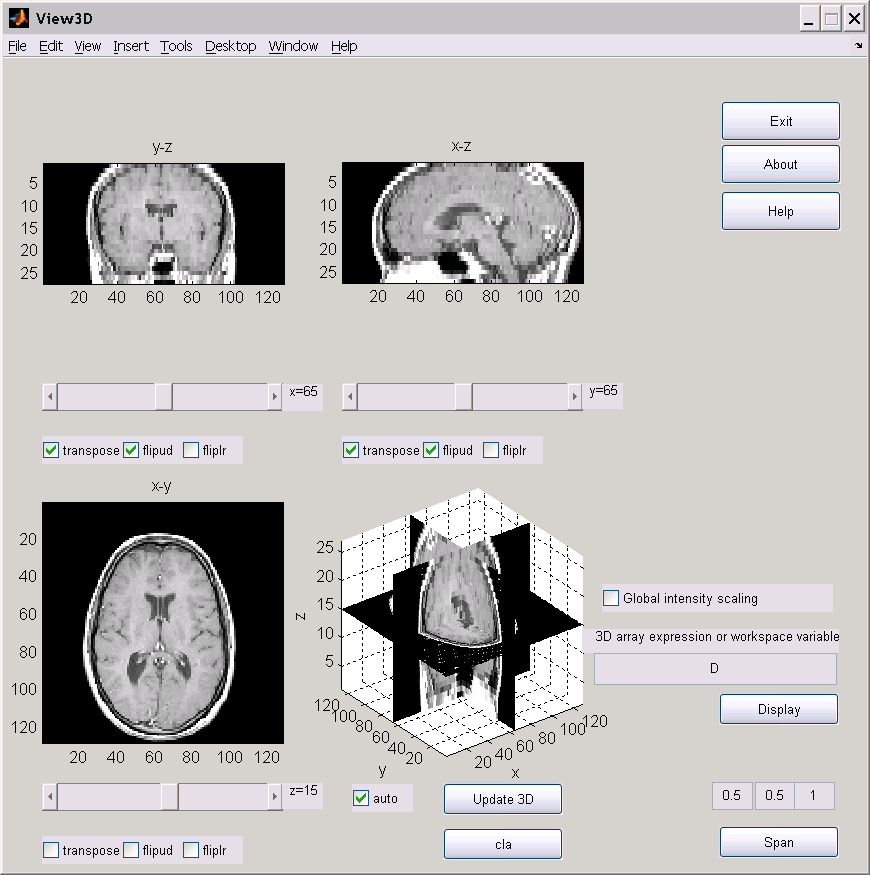
ORTHOVIEW is used to view orthographic slices of 3D volumes.

Download the m file to a folder and add it to your path.

From matlab run 'view3d' to open the GUI.

In the appropriate edit box, type in an expression that generates a 3D array then press the Load button.

3D expressions such as: rand(50,40,30) or the name or a 3D array variable in the workspace, for example, run load mri; D=squeeze(D); then enter D.


The 3 views (all except the lower right one) display orthographic projections.

Use the scroll bars to change the number of the slice viewed.

Use the transpose, flipud, or fliplr to transpose the view, flip it vertically, or horizontally.

Use update 3d to view the slices in a 3D view.

Check auto to obtain an automatic update of the 3D view of the slices (Note: this may affect performance).

Use cla to clear the 3D view this may improve performance.

Change the span values to the volume''s physical dimensions so the aspect ratio is displayed properly (note: you can use relative values for example use 1,3,2 instead of 0.5,1.5,1.0.

Global intensity scaling can now be enabled or disabled.

Press Apply to apply changes in span and intensity windowing.

See also: SLICE, MONTAGE, ISOSURFACE

Ghassan Hamarneh
hamarneh@gmail.com
Download latest software from:
http://www.cs.sfu.ca/~hamarneh

Zitieren als

Ghassan Hamarneh (2026). OrthoView (https://de.mathworks.com/matlabcentral/fileexchange/2256-orthoview), MATLAB Central File Exchange. Abgerufen .

Quellenangaben

Inspiriert: OrthoView3D, 3D Volume Visualization

Kategorien

Mehr zu Image Processing Toolbox finden Sie in Help Center und MATLAB Answers

Allgemeine Informationen

Kompatibilität der MATLAB-Version

  • Kompatibel mit allen Versionen

Plattform-Kompatibilität

  • Windows
  • macOS
  • Linux
Version Veröffentlicht Versionshinweise Action
1.0.0.0

- support for matlab 7
- global intensity scaling.