


Hauptinhalt

Ergebnisse für

Have there been some changes made to the ThinkSpeak graphs? I am unable to change the number of days displayed, nor the number of data points to display. I did have them display 5 days, but now they are showing 14 days even though the setting is 5. I tried logging out and back in, but to no avail. Thanks.
Christian Schröder
Christian Schröder
Letzte Aktivität am 3 Jun. 2026 um 14:21

It used to be possible to flag solutions, e.g. as "hack/cheat", "needs rescoring", and so on. Ever since the update to Cody's design, this has been missing. Are there any plans to bring it back?
Rachel
Rachel
Letzte Aktivität am 1 Jun. 2026 um 13:46

Rachel
Rachel
Letzte Aktivität am 1 Jun. 2026 um 0:32

Is there anywhere to get help for the Cody problems? I am having trouble solving some of them, and I wish we could get hints. If not, is that a feature that could be added?
Have been using Thingspeak for a few years, suddenly I get this message relating to one of my Matlab analysis scripts, which has run for years:
Error Message:
Unrecognized function or variable 'cusum'. cusum requires Signal Processing Toolbox.
What has changed to cause this error - I've done nothing!
Generate a 3D visualization of carnation flowers
with sepals and stems for celebrating Mother's Day 2026.
function carnation
% CARNATION Generate a 3D visualization of carnation flowers with sepals and stems.
% This code is authored by Zhaoxu Liu / slandarer
% for the purpose of celebrating Mother's Day 2026.
% =========================================================================
% Zhaoxu Liu / slandarer (2026). carnation for Mother's Day
% (https://www.mathworks.com/matlabcentral/fileexchange/183838-carnation-for-mother-s-day),
% MATLAB Central File Exchange. Retrieved May 9, 2026.
% Create figure and axes / 创建图窗及坐标区域
fig = figure('Units','normalized', 'Position',[.3,.1,.4,.8],'Color',[244,234,225]./255);
axes('Parent',fig, 'NextPlot','add', 'DataAspectRatio',[1,1,1],...
'View',[-64, 5.5], 'Position',[0,-.15,1,1], 'Color',[244,234,225]./255, ...
'XColor','none', 'YColor','none', 'ZColor','none');
annotation("textbox", [.05, .8, .9, .2], "String", {"Happy"; "Mother's Day"}, ...
'FontName','Segoe Script', 'FontSize',52, 'FontWeight','bold', 'EdgeColor','none', ...
'HorizontalAlignment','center', 'VerticalAlignment','middle', 'Color',[97,40,20]./255);
xx = linspace(0, 1, 100);
tt = linspace(0, 1, 1e4);
[X, P] = meshgrid(xx, tt);
T1 = P*20*pi;
C1 = 1 - (1 - mod(3.6*T1/pi, 2)).^4./2; % Petal profile / 花瓣形状
S1 = (sin(50*T1)/150 + sin(10*T1)/30).*min(1, max(0, (X - .85)/.1)); % Edge serration / 边缘褶皱和锯齿
Y1 = (- (X.*1.2 - .5).^5.*32 - 1)./15.*P; % Petal curvature / 花瓣弧度
% Petal shape and serration modeling + rotating the planar petal to tilt it
% 花瓣形状和锯齿塑造 + 转动平躺的花瓣令其倾斜
R1 = (C1 + S1).*(X.*sin(P) - Y1.*cos(P))./(P + .5);
H1 = (C1 + S1).*(X.*cos(P) + Y1.*sin(P));
% Convert radius to Cartesian coordinates / 将半径映射为X,Y坐标
X1 = R1.*cos(T1);
Y1 = R1.*sin(T1);
% Colormap for carnation petals / 康乃馨配色
CList1 = [208, 62, 23; 221,146,121; 229,201,202; 233,219,222; 237,223,225]./255;
CMat1 = zeros(1e4, 100, 3);
CMat1(:, :, 1) = repmat(interp1(linspace(0, 1, size(CList1, 1)), CList1(:, 1), linspace(0, 1, 100)), [1e4, 1]);
CMat1(:, :, 2) = repmat(interp1(linspace(0, 1, size(CList1, 1)), CList1(:, 2), linspace(0, 1, 100)), [1e4, 1]);
CMat1(:, :, 3) = repmat(interp1(linspace(0, 1, size(CList1, 1)), CList1(:, 3), linspace(0, 1, 100)), [1e4, 1]);
% Darken edges / 边缘的深色
for i = 1:1e4
tNum = randi([98, 100]);
CMat1(i, tNum:end, 1) = 212./255;
CMat1(i, tNum:end, 2) = 87./255;
CMat1(i, tNum:end, 3) = 113./255;
end
% Rotation matrices / 旋转矩阵
Rx = @(rx) [1, 0, 0; 0, cos(rx), -sin(rx); 0, sin(rx), cos(rx)];
Rz = @(yz) [cos(yz), - sin(yz), 0; sin(yz), cos(yz), 0; 0, 0, 1];
Rx1 = Rx(pi/6); Rz1 = Rz(0);
% Render flower / 绘制康乃馨
surface(X1, Y1, H1 + .3, 'CData',CMat1, 'EdgeAlpha',0.1, 'EdgeColor',[224,39,39]./255, 'FaceColor','interp')
[U1, V1, W1] = matRotate(X1, Y1, H1 + .3, Rx1);
surface(U1 + .7, V1 - .7, W1 - .6, 'CData',CMat1, 'EdgeAlpha',0.1, 'EdgeColor',[224,39,39]./255, 'FaceColor','interp')
% Following the same method as before,
% the profile is designed with four serrated cycles to simulate the four sepals.
% 还是之前的方法,不过让轮廓有4个锯齿状周期来模拟四片花萼
% Sepals generation with 4-lobed pattern / 生成四片花萼(带4个锯齿状周期)
[X, T] = meshgrid(linspace(0, 1, 100), linspace(0, 1, 100).*2*pi);
P2 = T.*0 + pi/8;
C2 = .5 + (.5 - abs(mod(T, pi/2)/pi*2 - .5))*.4;
Y2 = (- (X.*1 - .5).^7.*128 - 1)./15 - .1;
R2 = C2.*(X.*sin(P2) - Y2.*cos(P2));
H2 = C2.*(X.*cos(P2) + Y2.*sin(P2));
X2 = R2.*cos(T);
Y2 = R2.*sin(T);
% Rotate by 90 degrees around the z-axis
% and reduce the size to render the four smaller sepals.
% 绕z轴旋转90度且减小其大小,绘制四片小花萼
% Smaller sepal layer / 绘制四片小花萼(第二层)
P3 = T.*0 + pi/10;
C3 = .3 + (.5 - abs(mod(T + pi/4, pi/2)/pi*2 - .5))*.7;
Y3 = (- (X.*.7 - .5).^7.*128 - 1)./15 - .1;
R3 = C3.*(X.*sin(P3) - Y3.*cos(P3));
H3 = C3.*(X.*cos(P3) + Y3.*sin(P3));
X3 = R3.*cos(T);
Y3 = R3.*sin(T);
% Colormap for sepals / 花托配色
CList2 = [178,173,113; 151,135, 73; 117,123, 50; 86, 89, 29; 75, 65, 17]./255;
CMat2 = zeros(100, 100, 3);
CMat2(:, :, 1) = repmat(interp1(linspace(0, 1, size(CList2, 1)), CList2(:, 1), linspace(0, 1, 100)), [100, 1]);
CMat2(:, :, 2) = repmat(interp1(linspace(0, 1, size(CList2, 1)), CList2(:, 2), linspace(0, 1, 100)), [100, 1]);
CMat2(:, :, 3) = repmat(interp1(linspace(0, 1, size(CList2, 1)), CList2(:, 3), linspace(0, 1, 100)), [100, 1]);
% Render sepals / 绘制花托
surf(X2, Y2, H2.*.8 + .12, 'CData',CMat2, 'EdgeAlpha',0.1, 'EdgeColor',CList2(end,:), 'FaceColor','interp')
surf(X3.*.93, Y3.*.92, H3.*.5 + .02, 'FaceColor',[ 84, 85, 54]./255, 'EdgeAlpha',0.1, 'EdgeColor','k')
[U2, V2, W2] = matRotate(X2, Y2, H2.*.8 + .12, Rx1);
[U3, V3, W3] = matRotate(X3.*.93, Y3.*.92, H3.*.5 + .02, Rx1);
surf(U2 + .7, V2 - .7, W2 - .6, 'CData',CMat2, 'EdgeAlpha',0.1, 'EdgeColor',CList2(end,:), 'FaceColor','interp')
surf(U3 + .7, V3 - .7, W3 - .6, 'FaceColor',[ 84, 85, 54]./255, 'EdgeAlpha',0.1, 'EdgeColor','k')
% A pulse function with two periods is applied
% to the contour to simulate the leaves.
% 让轮廓有2个周期且是脉冲函数,来模拟叶片
P4 = T.*0 + pi/16;
C4 = - abs(mod(T, pi)/pi - .5) + .11;
C4(C4 < 0) = 0; C4 = C4.*10; C4(51:100, :) = C4(51:100, :).*.7;
Y4 = (- (X.*1.01 - .5).^7.*128 - 1)./15 - .03;
R4 = C4.*(X.*sin(P4) - Y4.*cos(P4));
H4 = C4.*(X.*cos(P4) + Y4.*sin(P4));
X4 = R4.*cos(T);
Y4 = R4.*sin(T);
surf(X4 - .1, Y4 + .05, H4 - 2.2, 'FaceColor',[ 84, 85, 54]./255, 'EdgeAlpha',0.1, 'EdgeColor','k')
[U4, V4, W4] = matRotate(X4 - .1, Y4 - .1, H4 + .1, Rz1);
[U4, V4, W4] = matRotate(U4, V4, W4, Rx1);
surf(U4 + .7, V4 - .7 + 1, W4 - .6 - 1.2, 'FaceColor',[ 84, 85, 54]./255, 'EdgeAlpha',0.1, 'EdgeColor','k')
P5 = T.*0 + pi/8;
C5 = - abs(mod(T + pi/6, pi)/pi - .5) + .11;
C5(C5 < 0) = 0; C5 = C5.*5;
Y5 = (- (X.*1.01 - .5).^7.*128 - 1)./15 - .1;
R5 = C5.*(X.*sin(P5) - Y5.*cos(P5));
H5 = C5.*(X.*cos(P5) + Y5.*sin(P5));
X5 = R5.*cos(T);
Y5 = R5.*sin(T);
surf(X5, Y5, H5 - .3, 'FaceColor',[ 84, 85, 54]./255, 'EdgeAlpha',0.1, 'EdgeColor','k')
[U5, V5, W5] = matRotate(X5, Y5, H5+.1, Rx1);
surf(U5 + .7, V5 - .7 + 1/4, W5 - .6 - 1.7/4, 'FaceColor',[ 84, 85, 54]./255, 'EdgeAlpha',0.1, 'EdgeColor','k')
% Render stems / 绘制花杆
P1_1 = [mean(X3(:).*.93), mean(Y3(:).*.92), mean(H3(:).*.5 + .02)];
P1_2 = [mean(X5(:)), mean(Y5(:)), mean(H5(:) - .3)];
P1_3 = [mean(X4(:) - .1), mean(Y4(:) + .05), mean(H4(:) - 2.2)];
P1_3 = (P1_3 - P1_2).*1.4 + P1_2;
[XX1, YY1, ZZ1] = cylinderXYZ(P1_1, P1_2, .05);
[XX2, YY2, ZZ2] = cylinderXYZ(P1_2, P1_3, .04);
surf(XX1, YY1, ZZ1, 'FaceColor',[ 84, 85, 54]./255, 'EdgeAlpha',0.1, 'EdgeColor','k')
surf(XX2, YY2, ZZ2, 'FaceColor',[ 84, 85, 54]./255, 'EdgeAlpha',0.1, 'EdgeColor','k')
P1_1 = [mean(U3(:) + .7), mean(V3(:) - .7), mean(W3(:) - .6)];
P1_2 = [mean(U5(:) + .7), mean(V5(:) - .7 + 1/4), mean(W5(:) - .6 - 1.7/4)];
P1_3 = [mean(U4(:) + .7), mean(V4(:) - .7 + 1), mean(W4(:) - .6 - 1.2)];
P1_3 = (P1_3 - P1_2).*2.4 + P1_2;
[XX1, YY1, ZZ1] = cylinderXYZ(P1_1, P1_2, .05);
[XX2, YY2, ZZ2] = cylinderXYZ(P1_2, P1_3, .04);
surf(XX1, YY1, ZZ1, 'FaceColor',[ 84, 85, 54]./255, 'EdgeAlpha',0.1, 'EdgeColor','k')
surf(XX2, YY2, ZZ2, 'FaceColor',[ 84, 85, 54]./255, 'EdgeAlpha',0.1, 'EdgeColor','k')
% 在任意两点间构建圆柱
function [XX, YY, ZZ] = cylinderXYZ(P1, P2, r)
% CYLINDERXYZ Create a cylinder connecting two 3D points
% [XX, YY, ZZ] = cylinderXYZ(P1, P2, r) generates a cylinder
% of radius r between points P1 and P2.
v = P2 - P1; l = norm(v);
if l < eps, return; end
[XX, YY, ZZ] = cylinder(r, 30); ZZ = ZZ * l;
ddir = [0, 0, 1]; tdir = v / l;
if dot(ddir, tdir) > 0.9999
R = eye(3);
elseif dot(ddir, tdir) < -0.9999
R = [1, 0, 0; 0, -1, 0; 0, 0, -1];
else
av = cross(ddir, tdir); av = av / norm(av);
R = axisRotate(av, acos(dot(ddir, tdir)));
end
for ii = 1:size(XX, 1)
for jj = 1:size(XX, 2)
p = R * [XX(ii, jj); YY(ii, jj); ZZ(ii, jj)];
XX(ii, jj) = p(1) + P1(1);
YY(ii, jj) = p(2) + P1(2);
ZZ(ii, jj) = p(3) + P1(3);
end
end
end
% 通过矩阵旋转数据
function [U, V, W] = matRotate(X, Y, Z, R)
% MATROTATE Apply 3x3 rotation matrix to a set of 3D points
% [U,V,W] = matRotate(X,Y,Z,R) rotates points (X,Y,Z)
% using rotation matrix R.
U = X; V = Y; W = Z;
for ii = 1:numel(X)
v = [X(ii); Y(ii); Z(ii)];
n = R*v; U(ii) = n(1); V(ii) = n(2); W(ii) = n(3);
end
end
% 根据轴-角参数生成旋转矩阵
function R = axisRotate(axis, angle)
% AXISROTATE Compute rotation matrix from axis-angle representation
% R = axisRotate(axis, angle) returns a 3x3 rotation matrix
% for rotating by angle (radians) around the given axis vector.
% Implementation based on Rodrigues' rotation formula.
u = axis(1); v = axis(2); w = axis(3);
c = cos(angle); s = sin(angle);
R = [u^2 + (1-u^2)*c, u*v*(1-c) - w*s, u*w*(1-c) + v*s;
u*v*(1-c) + w*s, v^2 + (1-v^2)*c, v*w*(1-c) - u*s;
u*w*(1-c) - v*s, v*w*(1-c) + u*s, w^2 + (1-w^2)*c];
end
end
Hi,
I am trying to use an esp32 board with quectal ec200u LTE Modem to send sensor data to thingspeak. The board can process the sensor data however I am unable to send the data to thingspeak. I have used the same process earlier too however with a different modem from Simcom.
Can someone help me with specific commands for achieving this? I can share the code which i am trying to use.
Regards
Aditya
Julio
Julio
Letzte Aktivität am 20 Apr. 2026

Good morning everyone. I’m having a problem with ThingSpeak. I’m sending data from an ESP LoRa with the RTC set to the Brasília time zone (GMT-3).
Previously, when I exported the data to CSV, it used the ThingSpeak time, which appeared 3 hours ahead. Now that I’m sending the timestamp from the ESP, the graphs are showing the data 3 hours behind. Is there a way to align the graph times while keeping the Brazilian time zone?
I coded this app to solve the 20 or so test cases included with the Cody problem 'visually' and step-by-step. For extra fun, it can also be used to play the game... Any comments or suggestions welcome!
Hello All,
This is my first post here so I hope its in the right place,
I have built myself a GW consisting of a RAK2245 concentrator and a Raspberry Pi, Also an Arduino end device from this link https://tum-gis-sensor-nodes.readthedocs.io/en/latest/dragino_lora_arduino_shield/README.html
Both projects work fine and connect to TTN whereby packets of data from the end device can be seen in the TTN console.
I now want to create a Webhook in TTN for Thingspeak which would hopefull allow me to see Temperature , Humidity etc in graphical form.
My question, does thingspeak support homebuilt devices or is it focused on comercially built devices ?
I have spent many hours trying to find data hosting site that is comepletely free for a few devices and not to complicated to setup as some seem to be a nightmare. Thanks for any support .
How can I found my license I'd and password, so please provide me my id
Chen Lin
Chen Lin
Letzte Aktivität am 28 Jan. 2026

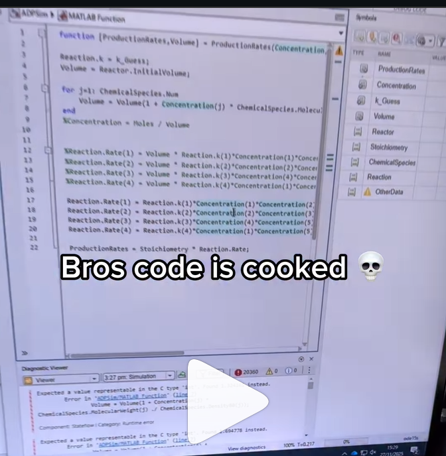
A coworker shared with me a hilarious Instagram post today. A brave bro posted a short video showing his MATLAB code… casually throwing 49,000 errors!
Surprisingly, the video went virial and recieved 250,000+ likes and 800+ comments. You really never know what the Instagram algorithm is thinking, but apparently “my code is absolutely cooked” is a universal developer experience 😂
Last note: Can someone please help this Bro fix his code?
Robert
Robert
Letzte Aktivität am 20 Jan. 2026

Is it possible to display a variable value within the ThingSpeak plot area?
In the sequence of previous suggestion in Meta Cody comment for the 'My Problems' page, I also suggest to add a red alert for new comments in 'My Groups' page.
Thank you in advance.
Luis
Luis
Letzte Aktivität am 29 Dez. 2025

I’m currently developing a multi-platform viewer using Flutter to eliminate the hassle of manual channel setup. Instead of adding IDs one by one, the app uses your User API Key to automatically discover and list all your ThingSpeak channels instantly.
Key Highlights (Work in Progress):
  • Automatic Sync: All your channels appear in seconds.
  • Multi-platform: Built for Web, Android, Windows, and Linux.
  • Privacy-Focused: Secure local storage for your API keys.
Walter Roberson
Walter Roberson
Letzte Aktivität am 2 Jun. 2026 um 15:30

I can't believe someone put time into this ;-)
Hi everyone
I've been using ThingSpeak for several years now without an issue until last Thursday.
I have four ThingSpeak channels which are used by three Arduino devices (in two locations/on two distinct networks) all running the same code.
All three devices stopped being able to write data to my ThingSpeak channels around 17:00 CET on 4 Dec and are still unable to.
Nothing changed on this side, let alone something that would explain the problem.
I would note that data can still be written to all the channels via a browser so there is no fundamental problem with the channels (such as being full).
Since the above date and time, any HTTP/1.1 'update' (write) requests via the REST API (using both simple one-write GET requests or bulk JSON POST requests) are timing out after 5 seconds and no data is being written. The 5 second timeout is my Arduino code's default, but even increasing it to 30 seconds makes no difference. Before all this, responses from ThingSpeak were sub-second.
I have recompiled the Arduino code using the latest libraries and that didn't help.
I have tested the same code again another random api (api.ipify.org) and that works just fine.
Curl works just fine too, also usng HTTP/1.1
So the issue appears to be something particular to the combination of my Arduino code *and* the ThingSpeak environment, where something changed on the ThingSpeak end at the above date and time.
If anyone in the community has any suggestions as to what might be going on, I would greatly appreciate the help.
Peter
The first round of the the Cody Contest 2025 is drawing to an end, and those who have tried to tackle Problem 61069. Clueless - Lord Ned in the Game Room with the Technical Computing Language probably didn’t think, like me initially, that a vectorized solution was feasible.
Indeed, the problem is difficult enough, so that the first solution is more easily drafted using lots of for loops and conditionals.
Yet studying in depth how to vectorize the solution and get rid of redundancies helped me uncover the deeper mechanics of the algorithm and see the problem in a new light, making it progressively appear simpler than on its first encounter.
Obstacles to overcome
Vectorization depends highly on the properties of the knowledge matrix, a 3D-matrix of size [n, 3, m] storing our current knowledge about the status for each card of each category for all players.
I remember that initially, I was intent on keeping close together these two operations: assigning a YES to a player for a given card and category, and consequently assigning NOs to all other players.
I did not want to set them apart. My fear was that, if you did not keep track and updated the knowledge matrix consistently, you might end up with a whole mess making it impossible to guess what’s in the envelope!
That seemed important because, as one gradually retrieves information from the turns and revisits them, one assigns more and more YESs and narrows down the possible candidates for the cards hidden in the envelope.
For example, @JKMSMKJ had successifully managed to combined those two instructions in one line (Solution 14889208), like this (here 0 encodes NO and 1 encodes YES):
allplayers = 1:(m+1);
K(card, category,:) = allplayers == player;
For some time, I thought that was the nicest way to express it, even though you had to handle the indivual card, category and player with lots of loops and conditionals.
Watching @JKMSMKJ’s repeated efforts to rewrite and improve his code showed me differents ways to arrange the same instructions. It appeared to me that there was indeed a way to vectorize the solution, if only we accept to separate the two distinct operations of assigning a value of YES and updating the knowledge matrix for consistency.
So let’s see how this can be done. We will use the following convention introduced by @Stefan Abendroth: NO = 0, MAYBE= 1, YES = values > 1. The reason for that choice is that it will greatly simplify computations, as it will become apparent later.
Initialisation
First, initialising a matrix of MAYBEs and adding in the information from our own cards is pretty straightforward:
K = ones(m,3,n);
K(:,:,pnum) = 0;
allcategories = 1:3;
for category = allcategories
K(yourcards{deck},deck,pnum) = 2; % = YES
end
The same thing can be done for the common cards considered as the (m+1)th player.
Next, we’d like to retrieve information for the turns and insert it into the matrix.
The 1rst column of the turn matrix gives us a vector of the players.
The 2nd to 4th columns conveniently give us a 3 column matrix of the values of the cards asked.
players = turns(:,1);
cards = turns(:,2:4);
result = turns(:,5);
Now suppose we have similar 3-column matrices of the exactsame size for the players and for the categories, such as:
categories =
1 2 3
1 2 3
1 2 3
1 2 3
1 2 3
1 2 3
1 ...
players =
5 5 5
6 6 6
1 1 1
2 2 2
6 6 6
4 ...
It would then be nice to be able to write something like:
K(cards, categories, players) = 0; % or 1 or 2 depending on the desired assignment according to result
Unfortunately that is not possible when we have multiple indexes that are not scalars.
A workaround is to use what is called linear indices, which are the indices of the matrix when considering a matrix as a very long 1-column vector, and which can be computed with the function sub2ind:
[categories, players] = meshgrid(1:3, turns(:,1));
sz = [n, 3, m];
ind = sub2ind(sz, cards, categories, players);
K(ind) = 0; % or 1 or 2 depending on the desired assignment according to result
Ensuring everybody else has a NO
Next, let’s see how to update the matrix. We now suppose the YESs have been correctly assigned into the matrix.
Wherever we’ve identified the location of a card (”a YES”), all other players must be assigned a NO. For each card, there can be only one YES across all players.
Because of that, that YES is the maximum value across all layers of the matrix K. Using the function max on K along it’s third dimension reduces the 3rd dimension to 1, yielding a 2d matrix. To locate it, we can then compare the value of that 2d matrix with all the layers of K.
maxcard = max(K,[],3); % returns a n-by-3 matrix
is_a_yes = K == maxcard;
K == maxcard compares maxcard with each layer of K, yielding a 3d matrix of logicals of the same size as K, where 1 indicates a YES and 0 indicates “not a YES”.
Ten years ago, we’d have needed to use the function bsxfun to perform that operation, but since then, Matrix Size Array Compatibility has been extended in MATLAB. Isn’t it nice?
Now, to transform any “MAYBE” (a 1) into a NO (a 0), while keeping the existing YESs, MAYBEs, and NOs unmodified, we need only need only multiply that matrix element-by-element with K !
%% Update knowledge matrix: if someone has a >1 ("YES"), everyone else must have a 0 ("NO")
maxcard = max(ans,[],3);
K = K .* (K == maxcard);
That expression can be read as “keep the value of K wherever K is equal to its max, but set 0 elsewhere”. If the maximum is a MAYBE, it will stay a MAYBE.
Getting one’s head around such an expression may take some getting used to. But such a one-liner is immensely powerful. Imagine that one day, the rules of the game change, or that this requirement is not useful any more (that happens all the time in real life), then we can very easily just comment out just that one line without impacting the rest of the program.
Confirming a player’s card hand when we determined (3n - ncards) they don’t have
After information was retrieved from the turns, we can examine each player’s hand and if we have narrowed a player’s cards to ncard possible candidates, excluding all others, then these must the cards that they hold. That means that their MAYBE cards becomes YESs.
Locating a player’s hand amounts to locating all the strictly positive values in the matrix:
playerhand = K(:,:,p);
player_complete = sum(playerhand(:)>0)) == ncards;
That operation can actually be vectorized along all players. Summing the matrix of logicals (K>0) along the first two dimensions yields a 1-by-1-by-(m+1) matrix, akin to a vector containing the number of card candidates for each player, which we can compare to ncards.
player_complete = sum(K>0, 1:2) == ncards;
We need to transform into YESs the MAYBEs of the players for which we have successfully deduced ncards, which can be written as a simple multiplication by 2:
K(:,:,player_complete) = 2 * K(:,:,player_complete)
The 0s (NOs) will remain 0s, the MAYBEs will become 2s, and the YESs will be multiplied too, but still stay YESs (>1).
But since 2 .^ 0 = 1 and 2 .^ 1 = 2, there’s an even nicer way to write that calculation:
K = K .* 2 .^ player_complete;
which reads like “we multiply K by 2 wherever a player’s hand is complete”. All thanks to Array Size Compatibility!
That expression is nicer because we need not explicitly assign the operation to the 3rd dimension of K. Suppose that one day, for whatever reason (performance optimisation or change of requirements), information about the players is not stored along the 3rd dimension any more, that code would NOT need to change, whereas K(:,:,player_complete) would need to be ajusted.
That’s how elegant MATLAB can be!
Checking whether a player’s hand is complete
What we checked previously is equivalent to checking that the number of NOs (the number of cards a player has not) was equal to 3*n - ncards.
What we didn’t do is check whether the sum of YESs if equal to ncards and then transform all MAYBEs for that player into NOs.
That will not be necessary because of the implementation of the next rule.
Because the information provided to play the game is assumed to be sufficient to guess the missing cards, it means that the YESs and NOs will gradually populate the matrix, so that any remaining MAYBE will be determined.
Identifying each category's missing card when (n-1) cards are known
Each category only has n cards, which means that once (n-1) cards are correctly located, the remaining card can only be a NO for everyone.
Because a card can only be in only one player’s hand, we can reuse the maximum of K across all players that we previously computed. It is a n-by-3 2d matrix where the values > 1 are the YESs. Using the function sum adds up all the YESs found for each category, yielding a vector of 3 values, containing the number of cards correctly located.
maxcard = max(K,[],3);
category_complete = sum(maxcard > 1) == n-1;
When a category is complete, the last remaining MAYBE should become a NO, without modifying the YESs. A clever way is to multiply the value by itself minus one:
K(:,category_complete,:) = K(:,category_complete,:) .* (K(:,category_complete,:) - 1)
which, using the same exponentiation technique as previously, can be nicely and compactly rewritten as:
K = K .* (K-1) .^ category_complete;
Because the YESs are > 1, we can even compute that more simply like this (as Stefan Abendforth put it in Solution 14900340):
K = K .* (category_complete < K);
Extracting the index of the missing cards
After looping several times to extract all possible information, the last thing that remains to be done is computing the values of the missings cards. They are the only NOs left in the knowledge matrix, and in the 2d matrix maxcard as well:
maxcard = max(K,[],3);
[sol,~] = find(maxcard == 0);
Conclusion
I previously mentioned being bothered by matrix indexing such as K(:,:,player) because it is code that seems fragile in case of change in the organisation of the matrix. Such an instruction would benefit from being "encapsulated" if the need arises.
One of my main concerns has always been writing maintainable MATLAB code, having worked in organisations where code piled up almost everyday, making it gradually more difficult and time-consuming to add and enhance functionalities if not properly managed.
On the one hand, elegant vectorization leads us to group things together and handle them uniformly and efficiently, “in batches”. On the other hand, “separation of concerns”, one of Software Development’s principles and good practices, would advise us to keep parts small and modular and that can take care of themselves on their own if possible, achieving higher abstraction.
How do we keep different requirements independent, so that they do not impact each other if any one of them needs to change? But how do we exploit vectorization extensively for performance? These two opposing forces is what makes developing modular and efficient MATLAB code a challenge that no other language faces in the same way, in my opinion.
Seeing the rules of the game as a sequence of multiplications applied to the matrix K simultaneously reduces code size and reveals a deeper aspect of the algorithm: because multiplication is commutative and associative, we can apply them in any order, and we could also see them as independant “operators” that we could apply elsewhere.
---
I hope those explanations can help you better appreciate the beauty of vectorization and make it seem less daunting.
There are many other strokes of inspiration that emerged from different solvers solving Problem 61069. Clueless - Lord Ned in the Game Room with the Technical Computing Language, and I am the first one to be amazed by them.
I wish to see more of such cooperative brilliance and sound emulation everywhere! Thanks so much to Cody Contest team for setting up such a fun and rewarding experience.

Building Transition Matrices for the Royal Game of Err

King Neduchadneddar the Procrastinator has devised yet another scheme to occupy his court's time, and this one is particularly devious. The Royal Game of Err involves moving pawns along a path of n squares by rolling an m-sided die, with forbidden squares thrown in just to keep things interesting. Your mission, should you choose to accept it, is to construct a transition matrix that captures all the probabilistic mischief of this game. But here's the secret: you don't need nested loops or brute force. With the right MATLAB techniques, you can build this matrix with the elegance befitting a Chief Royal Mage of Matrix Computations.

The heart of this problem lies in recognizing that the transition matrix is dominated by a beautiful superdiagonal pattern. When you're on square j and roll the die, you have a 1/m chance of moving to each of squares j+1, j+2, up to j+m, assuming none are forbidden and you don't overshoot. This screams for vectorized construction rather than element-by-element assignment. The key weapon in your arsenal is MATLAB's ability to construct multiple diagonals simultaneously using either repeated calls to diag with offset parameters, or the more powerful spdiags function for those comfortable with advanced matrix construction.

Consider this approach: start with a zero matrix and systematically add 1/m to each of the m superdiagonals. For a die with m sides, you're essentially saying "from square j, there's a 1/m probability of landing on j+k for k = 1 to m." This can be accomplished with a simple loop over k, using T = T + diag(ones(1,n-k)*(1/m), k) for each offset k from 1 to m. The beauty here is that you're working with entire diagonals at once, not individual elements. This vectorized approach is not only more elegant but also more efficient and less error-prone than tracking indices manually.

Figure 1: Basic transition matrix structure for n=8, m=3, no forbidden squares. Notice the three superdiagonals carrying probability 1/3 each.

Now comes the interesting part: handling forbidden squares. When square j is forbidden, two things must happen simultaneously. First, you cannot land ON square j from anywhere, which means column j should be entirely zeros. Second, you cannot move FROM square j to anywhere, which means row j should be entirely zeros. The naive approach would involve checking each forbidden square and carefully adjusting individual elements. The elegant approach recognizes that MATLAB's logical indexing was practically designed for this scenario.

Here's the trick: once you've built your basic superdiagonal structure, handle all forbidden squares in just two lines: T(nogo, :) = 0 to eliminate all moves FROM forbidden squares, and T(:, nogo) = 0 to eliminate all moves TO forbidden squares. But wait, there's more. When you zero out these entries, the probabilities that would have gone to those squares need to be redistributed. This is where the "stay put" mechanism comes in. If rolling a 3 would land you on a forbidden square, you stay where you are instead. This means adding those lost probabilities back to the main diagonal.

The sophisticated approach uses logical indexing to identify which transitions would have violated the forbidden square rule, then redirects those probabilities to the diagonal. You can check if a move from square j to square k would hit a forbidden square using ismember(k, nogo), and if so, add that 1/m probability to T(j,j) instead. This "probability conservation" ensures that each row still sums to 1, maintaining the stochastic property of your transition matrix.

Figure 2: Transition matrix with forbidden squares marked. Left: before adjustment. Right: after forbidden square handling showing probability redistribution. Compare the diagonal elements.

The final square presents its own challenge. Once you reach square n, the game is over, which in Markov chain terminology means it's an "absorbing state." This is elegantly represented by setting T(n,n) = 1 and ensuring T(n, j) = 0 for all j not equal to n. But there's another boundary condition that's equally important: what happens when you're on square j and rolling the die would take you beyond square n?

The algorithm description provides a clever solution: you stay put. If you're on square n-2 and roll a 4 on a 6-sided die, you don't move. This means that for squares near the end, the diagonal element T(j,j) needs to accumulate probability from all those "overshooting" scenarios. Mathematically, if you're on square j and rolling k where j+k exceeds n, that 1/m probability needs to be added to T(j,j). A clean way to implement this is to first build the full superdiagonal structure as if the board were infinite, then add (1:m)/m to the last m elements of the diagonal to account for staying put.

There's an even more elegant approach: build your superdiagonals only up to where they're valid, then explicitly calculate how much probability should stay on the diagonal for each square. For square j, count how many die outcomes would either overshoot n or hit forbidden squares, multiply by 1/m, and add to T(j,j). This direct calculation ensures you've accounted for every possible outcome and maintains the row-sum property.

Figure 3: Heat map showing probability distributions from different starting squares. Notice how probabilities "pile up" at the diagonal for squares near the boundary.

Now that you understand the three key components, the construction strategy becomes clear. Initialize your n-by-n zero matrix. Build the basic superdiagonal structure to represent normal movement. Identify and handle forbidden squares by zeroing rows and columns, then redistributing lost probability to the diagonal. Finally, ensure boundary conditions are met by setting the final square as absorbing and handling the "stay put" cases for near-boundary squares.

The order matters here. If you handle forbidden squares first and then build diagonals, you might overwrite your forbidden square adjustments. The cleanest approach is to build all m superdiagonals first, then make a single pass to handle both forbidden squares and boundary conditions simultaneously. This can be done efficiently with a vectorized check: for each square j, count valid moves, calculate stay-put probability, and update T(j,j) accordingly.

Figure 4: Complete transition matrix for a test case with n=7, m=4, nogo=[2 5]. Spy plot showing the sparse structure alongside a color-coded heat map. Notice the complex pattern of probabilities.

Before declaring victory over King Neduchadneddar, verify your matrix satisfies the fundamental properties of a transition matrix. First, every element should be between 0 and 1 (probabilities, after all). Second, each row should sum to exactly 1, representing the fact that from any square, you must end up somewhere (even if it's staying put). You can check this with all(abs(sum(T,2) - 1) < 1e-10) to account for floating-point arithmetic.

The provided test cases offer another validation opportunity. Start with the simplest cases where patterns are obvious, like n=8, m=3 with no forbidden squares. You should see a clean superdiagonal structure. Then progress to cases with forbidden squares and verify that columns and rows are properly zeroed. The algorithm description even provides example matrices for you to compare against. Pay special attention to the diagonal elements, as they're where most of the complexity hides.

Figure 5: Validation dashboard showing row sums (should all be 1), matrix properties, and comparison with expected structure for a simple test case.

For those seeking to optimize their solution, consider that for large n, explicitly storing an n-by-n dense matrix becomes memory-intensive. Since most elements are zero, MATLAB's sparse matrix format is ideal. Replace zeros(n) with sparse(n,n) at initialization. The same indexing and diagonal operations work seamlessly with sparse matrices, but you'll save considerable memory for large problems.

Another sophistication involves recognizing that the transition matrix construction is fundamentally about populating a banded matrix with some modifications. The spdiags function was designed for exactly this scenario. You can construct all m superdiagonals in a single call by preparing a matrix where each column represents one diagonal's values. While the syntax takes some getting used to, the resulting code is remarkably compact and efficient.

For debugging purposes, visualizing your matrix at each construction stage helps immensely. Use imagesc(T) with a colorbar to see the probability distribution, or spy(T) to see the non-zero structure. If you're not seeing the expected patterns, these visualizations immediately reveal whether your diagonals are in the right positions or if forbidden squares are properly handled.

Figure 6: Performance comparison showing construction time and memory usage for dense vs sparse implementations as n increases.

King Neduchadneddar may have thought he was creating an impossible puzzle, but armed with MATLAB's matrix manipulation prowess, you've seen that elegant solutions exist. The key insights are recognizing the superdiagonal structure, handling forbidden squares through logical indexing rather than explicit loops, and carefully managing boundary conditions to ensure probability conservation. The transition matrix you've constructed doesn't just solve a Cody problem; it represents a complete probabilistic model of the game that could be used for further analysis, such as computing expected game lengths or steady-state probabilities.

The beauty of this approach lies not in clever tricks but in thinking about the problem at the right level of abstraction. Rather than considering each element individually, you've worked with entire diagonals, rows, and columns. Rather than writing conditional logic for every special case, you've used vectorized operations that handle all cases simultaneously. This is the essence of MATLAB mastery: letting the language's strengths work for you rather than against you.

As Vasilis Bellos demonstrated with the Bridges of Nedsburg , sometimes the most satisfying part of a Cody problem isn't just getting the tests to pass, but understanding the mathematical structure deeply enough to implement it elegantly. King Neduchadneddar would surely be impressed by your matrix manipulation skills, though he'd probably never admit it. Now go forth and construct those transition matrices with the confidence of a true Chief Royal Mage of Matrix Computations. The court awaits your solution.

Note: This article provides strategic insights and techniques for solving Problem 61067 without revealing the complete solution. The figures reference MATLAB Mobile script created by me that demonstrate key concepts. For the full Cody Contest 2025 experience and to test your implementation, visit the problem page and may your matrices always be stochastic.

I believe that it is very useful and important to know when we have new comments of our own problems. Although I had chosen to receive notifications about my own problems, I only receive them when I am mentioned by @.
Is it possible to add a 'New comment' alert in front of each problem on the 'My Problems' page?