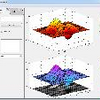
How do i expand this figure so all graphs fit perfect
Ältere Kommentare anzeigen

Akzeptierte Antwort

Chad Greene
am 12 Nov. 2014
Instead of using subplot(2,2,1), try this
figure
axes('position',[0 .5 .5 .5])
plot(1:10,1:10,'b')
axes('position',[.5 .5 .5 .5])
plot(1:10,1:10,'r')
axes('position',[0 0 .5 .5])
plot(1:10,1:10,'k')
axes('position',[.5 0 .5 .5])
plot(1:10,1:10,'m')
3 Kommentare

jason
am 12 Nov. 2014
Chad Greene
am 12 Nov. 2014
Bearbeitet: Chad Greene
am 12 Nov. 2014
Replace my plot lines with your imshow lines. And change your title lines to
title('my title','vert','top','backgroundcolor','white')
jason
am 12 Nov. 2014
Weitere Antworten (1)
Robert Cumming
am 12 Nov. 2014
0 Stimmen
Kategorien
Mehr zu Subplots finden Sie in Hilfe-Center und File Exchange
Community Treasure Hunt
Find the treasures in MATLAB Central and discover how the community can help you!
Start Hunting!
Translated by 

