uavMission
R2026bDescription
A uavMission object stores UAV mission data. Use the object
functions to add and remove mission items, such as takeoff, waypoints, hover, loiter, and
land.
To parse the mission data to fixed-wing and multirotor trajectories, use the fixedwingMissionParser
and multirotorMissionParser objects, respectively.
Creation
Description
M = uavMission
M = uavMission(PlanFile=file).plan) or MAVLink waypoints file
(.waypoints)
M = uavMission(___,Name=Value)HomeLocation, InitialYaw, Speed, and Frame properties using one or more name-value arguments. For
example, uavMission(InitialYaw=30) creates a UAV mission with an
initial yaw angle of 30 degrees.
Input Arguments
Properties
Object Functions
addChangeSpeed | Add change speed mission item |
addHover | Add hover mission item |
addLand | Add landing mission item |
addLoiter | Add loiter mission item |
addTakeoff | Add takeoff mission item |
addWaypoint | Add waypoint mission item |
copy | Copy UAV Mission |
removeItem | Remove mission items at specified indices |
show | Visualize UAV mission |
showdetails | UAV mission data table |
Examples
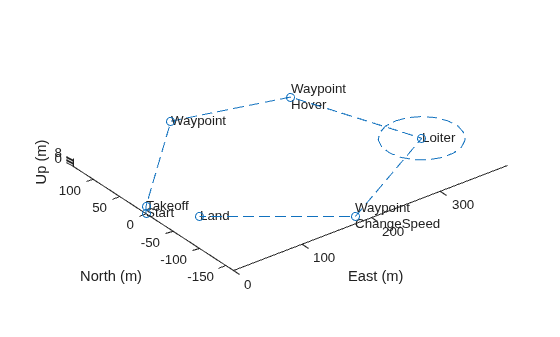
Create a UAV mission by using the flight plan stored in a .plan file and show the mission.
mission = uavMission(PlanFile="flight.plan");
show(mission);
axis equal
Create parsers for a multirotor UAV and a fixed-wing UAV.
mrmParser = multirotorMissionParser(TransitionRadius=2,TakeoffSpeed=2);
fwmParser = fixedwingMissionParser(TransitionRadius=15,TakeoffPitch=10);
Generate one flight trajectory using each parser.
mrmTraj = parse(mrmParser,mission);
fwmTraj = parse(fwmParser,mission);
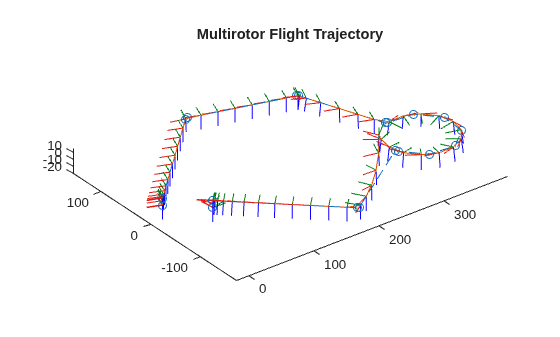
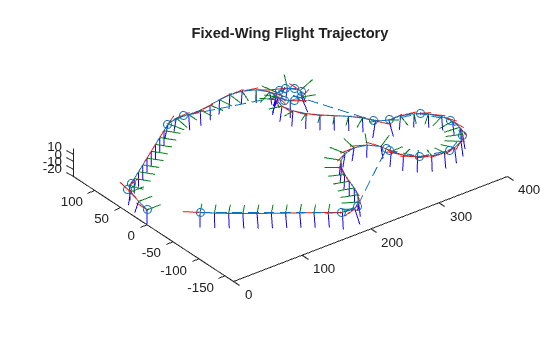
Visualize the waypoints, flight trajectory and body frames for each UAV.
figure
show(mrmTraj,FrameSize=20,NumSamples=75);
title("Multirotor Flight Trajectory")
axis equal
figure
show(fwmTraj,FrameSize=20,NumSamples=75);
title("Fixed-Wing Flight Trajectory")
axis equal
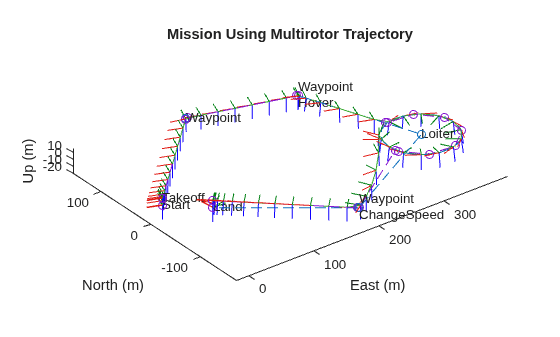
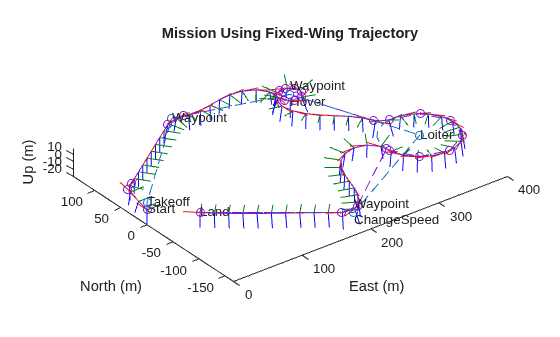
Plot the mission, waypoints, flight trajectory and UAV body frames in the same plot for each UAV.
figure
show(mission);
hold on
show(mrmTraj,FrameSize=20,NumSamples=75);
hold off
title("Mission Using Multirotor Trajectory")
axis equal
show(mission);
hold on
show(fwmTraj,FrameSize=20,NumSamples=75);
hold off
title("Mission Using Fixed-Wing Trajectory")
axis equal
Create a UAV mission object with a home location at the origin of the local ENU coordinate frame and an initial speed of 5 meters per second.
m = uavMission(Frame="LocalENU",HomeLocation=[0 0 0],Speed=5)m =
uavMission with properties:
HomeLocation: [0 0 0]
InitialYaw: 0
Frame: "LocalENU"
Speed: 5
NumMissionItems: 0
Add a takeoff mission item to the mission with an altitude of 25 meters, pitch of 15 degrees, and yaw of 0 degrees.
addTakeoff(m,20,Pitch=15,Yaw=0);
Add two waypoint mission items to the mission. Between the two waypoints, increase the speed of the UAV to 20 meters per second. After the second waypoint, reduce the speed of the UAV back to 5 meters per second.
addWaypoint(m,[10 0 30]);
addChangeSpeed(m,20)
addWaypoint(m,[20 0 40]);
addChangeSpeed(m,5)
addWaypoint(m,[30 0 50])
Add loiter and hover mission items to the mission, specifying for the UAV to loiter and hover around the second waypoint at a radius of 50 meters for 20 seconds each.
addLoiter(m,[40 0 60],10,20);
addHover(m,[50 0 70],10,20);
Add a landing mission item to the mission to land the UAV.
addLand(m,[70 0 0],Yaw=0);
Show the mission item data table.
showdetails(m)
ans = 9×17 table
    Idx    Timestamp     MissionType     ParameterName1    ParameterValue1    ParameterName2    ParameterValue2    ParameterName3    ParameterValue3    ParameterName4    ParameterValue4      ParameterName5      ParameterValue5    ParameterName6    ParameterValue6    ParameterName7    ParameterValue7
    ___    _________    _____________    ______________    _______________    ______________    _______________    ______________    _______________    ______________    _______________    __________________    _______________    ______________    _______________    ______________    _______________

     1        NaN       "Takeoff"          "Altitude"            20              "Pitch"               15              "Yaw"                 0             ""                   NaN          ""                          NaN                ""                NaN                ""                NaN
     2        NaN       "Waypoint"         "X"                   10              "Y"                    0              "Z"                  30             "Yaw"                NaN          "AcceptanceRadius"          NaN                ""                NaN                ""                NaN
     3        NaN       "ChangeSpeed"      "Speed"               20              ""                   NaN              ""                  NaN             ""                   NaN          ""                          NaN                ""                NaN                ""                NaN
     4        NaN       "Waypoint"         "X"                   20              "Y"                    0              "Z"                  40             "Yaw"                NaN          "AcceptanceRadius"          NaN                ""                NaN                ""                NaN
     5        NaN       "ChangeSpeed"      "Speed"                5              ""                   NaN              ""                  NaN             ""                   NaN          ""                          NaN                ""                NaN                ""                NaN
     6        NaN       "Waypoint"         "X"                   30              "Y"                    0              "Z"                  50             "Yaw"                NaN          "AcceptanceRadius"          NaN                ""                NaN                ""                NaN
     7        NaN       "Loiter"           "X"                   40              "Y"                    0              "Z"                  60             "Radius"              10          "Duration"                   20                ""                NaN                ""                NaN
     8        NaN       "Hover"            "X"                   50              "Y"                    0              "Z"                  70             "Radius"              10          "Duration"                   20                ""                NaN                ""                NaN
     9        NaN       "Land"             "X"                   70              "Y"                    0              "Z"                   0             "Yaw"                  0          ""                          NaN                ""                NaN                ""                NaN
Remove the hover action at index 7, and then add another waypoint at index 8 after the hover item moves to index 7. Show the mission details table again to see the changes.
removeItem(m,7);
addWaypoint(m,[65 0 70],InsertAtRow=8);
showdetails(m)
ans = 9×17 table
    Idx    Timestamp     MissionType     ParameterName1    ParameterValue1    ParameterName2    ParameterValue2    ParameterName3    ParameterValue3    ParameterName4    ParameterValue4      ParameterName5      ParameterValue5    ParameterName6    ParameterValue6    ParameterName7    ParameterValue7
    ___    _________    _____________    ______________    _______________    ______________    _______________    ______________    _______________    ______________    _______________    __________________    _______________    ______________    _______________    ______________    _______________

     1        NaN       "Takeoff"          "Altitude"            20              "Pitch"               15              "Yaw"                 0             ""                   NaN          ""                          NaN                ""                NaN                ""                NaN
     2        NaN       "Waypoint"         "X"                   10              "Y"                    0              "Z"                  30             "Yaw"                NaN          "AcceptanceRadius"          NaN                ""                NaN                ""                NaN
     3        NaN       "ChangeSpeed"      "Speed"               20              ""                   NaN              ""                  NaN             ""                   NaN          ""                          NaN                ""                NaN                ""                NaN
     4        NaN       "Waypoint"         "X"                   20              "Y"                    0              "Z"                  40             "Yaw"                NaN          "AcceptanceRadius"          NaN                ""                NaN                ""                NaN
     5        NaN       "ChangeSpeed"      "Speed"                5              ""                   NaN              ""                  NaN             ""                   NaN          ""                          NaN                ""                NaN                ""                NaN
     6        NaN       "Waypoint"         "X"                   30              "Y"                    0              "Z"                  50             "Yaw"                NaN          "AcceptanceRadius"          NaN                ""                NaN                ""                NaN
     7        NaN       "Hover"            "X"                   50              "Y"                    0              "Z"                  70             "Radius"              10          "Duration"                   20                ""                NaN                ""                NaN
     8        NaN       "Waypoint"         "X"                   65              "Y"                    0              "Z"                  70             "Yaw"                NaN          "AcceptanceRadius"          NaN                ""                NaN                ""                NaN
     9        NaN       "Land"             "X"                   70              "Y"                    0              "Z"                   0             "Yaw"                  0          ""                          NaN                ""                NaN                ""                NaN
Visualize the mission.
show(m);
axis equal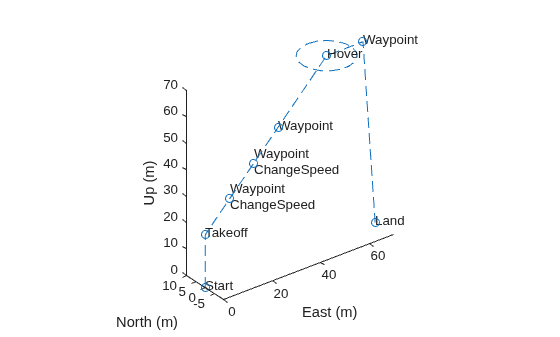
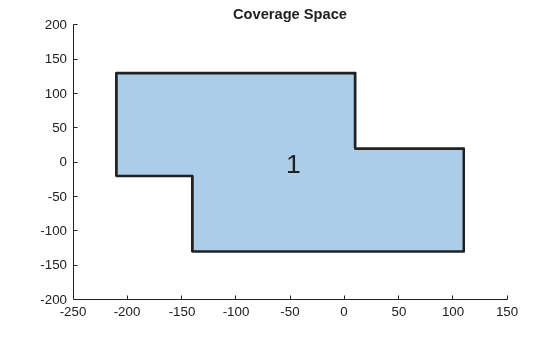
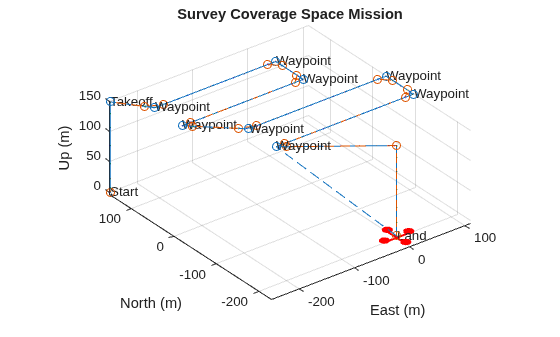
Initialize the settings to use for the coverage planner, coverage space, and mission. Set a coverage width to 65 meters, the region as polygon vertices, takeoff and landing locations, the UAV elevation during flight to 150 meters, and a geocenter.
coverageWidth = 65;
region = [-210 130; 10 130; 10 20; 110 20;
          110 -130; -140 -130; -140 -20; -210 -20];
takeoff = [-250 150 0];
landing = [0 -200 0];
uavElevation = 150;
geocenter = [-45 71 0];
Create the coverage space with those UAV coverage space settings.
cs = uavCoverageSpace(Polygons=region, ...
                      UnitWidth=coverageWidth, ...
                      ReferenceHeight=uavElevation, ...
                      ReferenceLocation=geocenter);

cs.show;
title("Coverage Space")
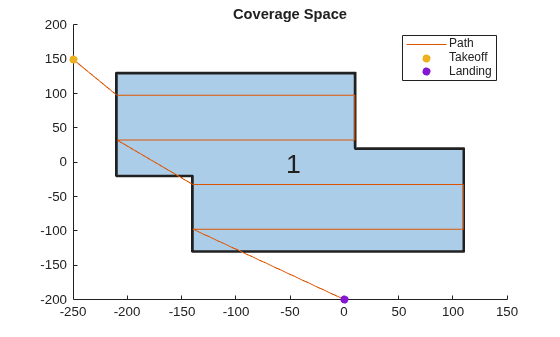
Create a coverage planner for the coverage space and plan the coverage path with the specified takeoff and landing locations.
cp = uavCoveragePlanner(cs);
[waypoints,solnInfo] = cp.plan(takeoff,landing);
Plot the waypoints, and the takeoff and landing locations on the coverage space.
hold on
plot(waypoints(:,1),waypoints(:,2))
scatter(takeoff(1),takeoff(2),"filled")
scatter(landing(1),landing(2),"filled")
legend("","Path","Takeoff","Landing")
hold off
Export the waypoints to a waypoints file and create a UAV mission from that file with a speed of 10 meters per second and an initial yaw of 90 degrees.
exportWaypointsPlan(cp,solnInfo,"customCoverage.waypoints");
mission = uavMission(PlanFile="customCoverage.waypoints",Speed=10,InitialYaw=90);
Use the exampleHelperSimulateUAVMission helper function to visualize the UAV mission with a simulation time of 60 seconds.
exampleHelperSimulateUAVMission(mission,geocenter)
Version History
Introduced in R2022b

