exportWaypointsPlan
R2026bDescription
Examples
This example shows how to plan a coverage path for a region in local coordinates and compares the results of using the exhaustive solver with the results of using the minimum traversal solver.
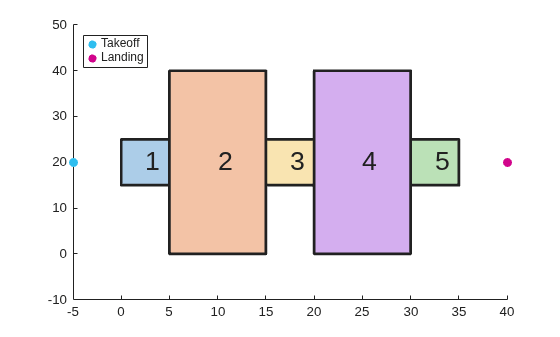
Define the vertices for a coverage space. This cross-shaped region creates multiple sub-regions that the solvers must visit in sequence.
area = [5 0; 5 15; 0 15; 0 25; 5 25; 5 40; 15 40; 15 25; 20 25; 20 40; ...
30 40; 30 25; 35 25; 35 15; 30 15; 30 0; 20 0; 20 15; 15 15; 15 0];Because the vertices define a concave polygon and the coverage planner requires convex polygons, decompose the polygon into convex polygons. Then, create a coverage space with the polygons from the decomposition.
polygons = coverageDecomposition(area); centroids = cellfun(@(p) mean(p(:,1)),polygons); [~,sortIdx] = sort(centroids); polygons = polygons(sortIdx); cs = uavCoverageSpace(Polygons=polygons);
Define the takeoff and landing positions. Then, show the coverage space and plot the takeoff and landing positions.
takeoff = [-5 20 0]; landing = [40 20 0]; show(cs); exampleHelperPlotTakeoffLandingLegend(takeoff,landing)
Create a coverage planner with the exhaustive solver algorithm and another coverage planner with a minimum traversal solver algorithm.
The exhaustive solver iterates through all permutations of sweep options to minimize the connection distance between regions. This makes it better suited for smaller or separated regions. The minimum traversal solver uses a recursive traversal through a graph of adjacent polygons, making it faster and better suited for interconnected regions.
cpeExh = uavCoveragePlanner(cs,Solver="Exhaustive"); cpMin = uavCoveragePlanner(cs,Solver="MinTraversal");
Plan with both solver algorithms using the same takeoff and landing positions.
[wptsExh,solnExh] = plan(cpeExh,takeoff,landing); [wptsMin,solnMin] = plan(cpMin,takeoff,landing);
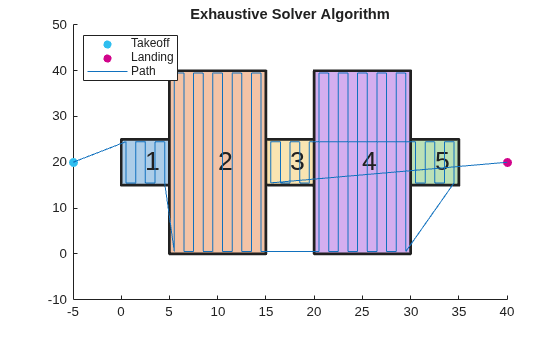
Show the planned path for both the exhaustive and the minimum traversal algorithms.
figure
show(cs);
title("Exhaustive Solver Algorithm")
exampleHelperPlotTakeoffLandingLegend(takeoff,landing,wptsExh)
figure
show(cs);
title("Minimum Traversal Solver Algorithm")
exampleHelperPlotTakeoffLandingLegend(takeoff,landing,wptsMin)
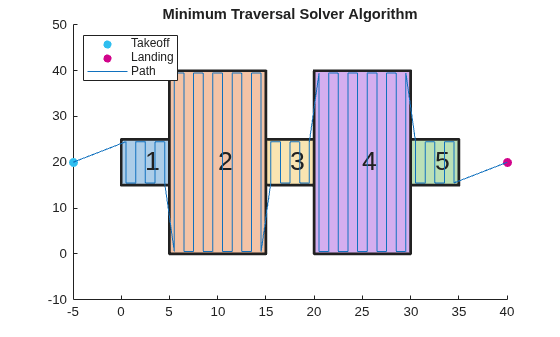
Compare the visiting sequences chosen by each solver. The exhaustive solver finds the globally optimal ordering by evaluating all permutations, while the minimum traversal solver prioritizes traversing adjacent polygons and flies to the nearest unvisited polygon when no adjacent ones remain.
disp("Exhaustive visiting sequence: " + mat2str(solnExh.VisitingSequence))Exhaustive visiting sequence: [1 2 4 5 3]
disp("MinTraversal visiting sequence: " + mat2str(solnMin.VisitingSequence))MinTraversal visiting sequence: [1 2 3 4 5]
Export the waypoints from the exhaustive solver to a .waypoints file with the reference frame set to north-east-down.
exportWaypointsPlan(cpeExh,solnExh,"coveragepath.waypoints",ReferenceFrame="NED")
Input Arguments
Coverage path planner, specified as a uavCoveragePlanner object.
Solution plan, specified as a structure containing these fields:
VisitingSequence— N-element row vector denoting the order of visitation of polygons, where N is the total number of polygons in the coverage space. For example,[2 1 3]specifies that the UAV should visit polygon 2 first, polygon 1 second, and polygon 3 last.SweepPattern— N-element row vector of integers denoting the sweep pattern for each polygon, where N is the total number of polygons in the coverage space. Each element is an integer in the range [1, 4] that indicates a sweep pattern:1— Forward sweep pattern2— Counter-clockwise sweep pattern3— Reverse sweep pattern4— Reverse counter-clockwise sweep pattern
For example,
[3 1 2]specifies that the UAV should use the reverse sweep pattern for polygon 1, the forward sweep pattern for polygon 2, and the counter-clockwise sweep pattern for polygon 3.TransitionCost— Euclidean distance cost for transitioning between polygons including takeoff and landing distance.Takeoff— Takeoff location, specified as a three-element row vector in LLA format.Landing— Landing location, specified as a three-element row vector in LLA format.
Use the plan function
to get this structure.
File name to export information to, specified as a character vector or string
scalar. Specify the format of the file by ending the character vector or string scalar
with either ".txt" or ".waypoints". For more
information, see MAVLink File
Formats.
Example: "waypointfile.txt"
Data Types: char | string
Reference frame to export waypoints to, specified as either "ENU"
for east-north-up or "NED" for north-east-down.
Data Types: char | string
Extended Capabilities
Generating code containing the exportWaypointsPlan requires you to enable dynamic
memory allocation. For more information about enabling dynamic memory
allocation, see Control Dynamic Memory Allocation in Generated Code (MATLAB Coder).
Deploying to embedded real time (ERT) targets is not supported.
Version History
Introduced in R2023aexportWaypointsPlan now supports code generation with dynamic memory allocation
enabled. For more information about enabling dynamic memory allocation, see Control Dynamic Memory Allocation in Generated Code (MATLAB Coder).
Deploying to embedded real time (ERT) targets is not supported.
MATLAB Command
You clicked a link that corresponds to this MATLAB command:
Run the command by entering it in the MATLAB Command Window. Web browsers do not support MATLAB commands.
Website auswählen
Wählen Sie eine Website aus, um übersetzte Inhalte (sofern verfügbar) sowie lokale Veranstaltungen und Angebote anzuzeigen. Auf der Grundlage Ihres Standorts empfehlen wir Ihnen die folgende Auswahl: .
Sie können auch eine Website aus der folgenden Liste auswählen:
So erhalten Sie die bestmögliche Leistung auf der Website
Wählen Sie für die bestmögliche Website-Leistung die Website für China (auf Chinesisch oder Englisch). Andere landesspezifische Websites von MathWorks sind für Besuche von Ihrem Standort aus nicht optimiert.
Amerika
- América Latina (Español)
- Canada (English)
- United States (English)
Europa
- Belgium (English)
- Denmark (English)
- Deutschland (Deutsch)
- España (Español)
- Finland (English)
- France (Français)
- Ireland (English)
- Italia (Italiano)
- Luxembourg (English)
- Netherlands (English)
- Norway (English)
- Österreich (Deutsch)
- Portugal (English)
- Sweden (English)
- Switzerland
- United Kingdom (English)