Hauptinhalt

I2C Controller Write

R2026b

Write data to I2C peripheral device or device register

Since R2026b

  • I2C Controller Write Block

Libraries:
UAV Toolbox Support Package for ArduPilot Autopilots / Peripheral Blocks

Description

Add-On Required: This feature requires the UAV Toolbox Support Package for ArduPilot Autopilots add-on.

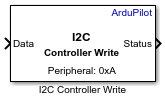
The I2C Controller Write block writes data to an I2C peripheral device connected to the board.

Use this block to:

  • Send data to I2C peripheral devices on ArduPilot autopilot hardware.

  • Write data to specific registers on I2C peripheral devices. To write to a specific register, enable the Enable register access parameter.

To view the mapping between the bus numbers and the port labels on hardware board, click View I2C Bus map.

Simulation Behavior:

  • Normal mode simulation — The block does not perform any write operations.

  • Connected I/O simulation — The block writes data to the peripheral devices connected to the hardware.

Ports

Input

expand all

Data to write to the peripheral device, specified as a column vector (N-by-1) or row vector (1-by-N). The data type determines how the block formats the received data before transmission over the I2C bus. The block writes multi-byte data according to the byte order specified in the Peripheral byte order parameter.

Data to write to the I2C peripheral device, specified as a row vector (1-by-N) or column vector (N-by-1). The block writes the specified data to the target peripheral device or peripheral register.

The data type determines how the block formats data before transmission on the I2C bus. For multi-byte data types, the block transmits bytes according to the setting of the Peripheral byte order parameter.

Data Types: int8 | uint8 | int16 | uint16 | int32 | uint32 | single | double

Output

expand all

The port outputs one of these values:

  • 0 — Successful write operation

  • 1 — Failure in opening the bus

  • 2 — Failure in write operation

Dependencies

To enable this parameter, select the Output error status parameter.

Data Types: uint8

Parameters

expand all

Specify the I2C bus on the hardware board to which the peripheral device is connected. To view the mapping between the bus number and the port label on your hardware board, click View I2C Bus map.

Programmatic Use

To set the block parameter value programmatically, use the set_param (Simulink) function.

To get the block parameter value programmatically, use the get_param (Simulink) function.

Parameter: I2CModule
Values: 1 (default) | positive integer
Data Types: unit8

Specify the I2C peripheral address to write the data to. The I2C peripheral device address is a 7-bit address. You can specify this address in decimal format or in hexadecimal format. For example, hex2dec('20') for address 0x20.

Programmatic Use

To set the block parameter value programmatically, use the set_param (Simulink) function.

To get the block parameter value programmatically, use the get_param (Simulink) function.

Parameter: SlaveAddress
Values: integer
Data Types: numeric

Specify the byte ordering used when interpreting multi-byte data:

  • BigEndian — The most significant byte is sent first over the I2C bus.

  • LittleEndian — The least significant byte is sent first over the I2C bus.

Programmatic Use

To set the block parameter value programmatically, use the set_param (Simulink) function.

To get the block parameter value programmatically, use the get_param (Simulink) function.

Parameter: SlaveByteOrder
Values: BigEndian | LittleEndian
Data Types: char | string

Select this parameter to enable writing data to a specific register in the peripheral device. When enabled, the Peripheral register address parameter becomes available.

Programmatic Use

To set the block parameter value programmatically, use the set_param (Simulink) function.

To get the block parameter value programmatically, use the get_param (Simulink) function.

Parameter: RegisterAddressMode
Values: on | off
Data Types: logical

Specify the I2C peripheral register address to write the data. Specify this address as an integer or in hexadecimal format. For example, hex2dec('20') for address 0x20

Dependencies

To enable this parameter, select the Enable register access parameter.

Programmatic Use

To set the block parameter value programmatically, use the set_param (Simulink) function.

To get the block parameter value programmatically, use the get_param (Simulink) function.

Parameter: RegisterAddress
Values: uint8 scalar
Data Types: uint8

Select this parameter to enable the Status output port.

Programmatic Use

To set the block parameter value programmatically, use the set_param (Simulink) function.

To get the block parameter value programmatically, use the get_param (Simulink) function.

Parameter: OutputStatus
Values: on | off
Data Types: logical

Version History

Introduced in R2026b

See Also

Blocks