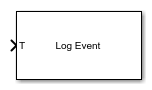
Log Event
Log an execution profiling event
Libraries:
Simulink Real-Time /
Profiling
Description
The Log Event block inserts a user-defined event into the execution profiling event stream when triggered. The user-defined event includes a channel ID, a code number, and a value number.
Examples
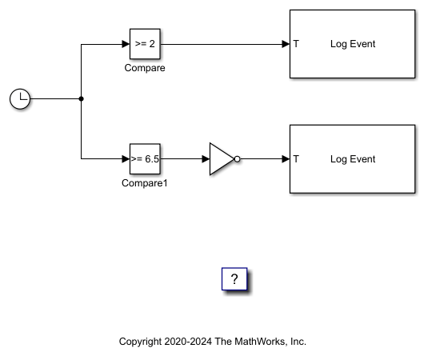
Insert Event into Execution Profiling Stream
Use the Log Event block to insert a user-defined event into the execution profiling event stream.
Ports
Input
When the T (trigger input) changes from 0 to 1 (Rising) or from 1 to 0 (Falling), the block inserts a user-defined simple event defined by the parameters Channel, Code, and Value into the execution profiling event stream.
Parameters
To edit block parameters interactively, use the Property Inspector. From the Simulink® Toolstrip, on the Simulation tab, in the Prepare gallery, select Property Inspector.
Specify the event channel ID. The channel ID ranges from 0 to 1023.
Programmatic Use
To set the block parameter value programmatically, use
the set_param function.
To get the block parameter value
programmatically, use the get_param function.
| Parameter: | channel |
| Values: | 0 (default) | int |
Example: set_param(gcb,'channel','500')
Select the type of signal change that triggers the block. When the input T changes from 0 to 1 (Rising) or from 1 to 9 (Falling), the block inserts a user-defined simple event defined by the parameters Channel, Code, and Value into the execution profiling event stream.
Programmatic Use
To set the block parameter value programmatically, use
the set_param function.
To get the block parameter value
programmatically, use the get_param function.
| Parameter: | trigger |
| Values: | Rising edge (default) | Falling edge | Either edge |
Example: set_param(gcb,'trigger','Falling
edge')
Extended Capabilities
C/C++ Code Generation
Generate C and C++ code using Simulink® Coder™.
Version History
Introduced in R2020b
MATLAB Command
You clicked a link that corresponds to this MATLAB command:
Run the command by entering it in the MATLAB Command Window. Web browsers do not support MATLAB commands.
Website auswählen
Wählen Sie eine Website aus, um übersetzte Inhalte (sofern verfügbar) sowie lokale Veranstaltungen und Angebote anzuzeigen. Auf der Grundlage Ihres Standorts empfehlen wir Ihnen die folgende Auswahl: .
Sie können auch eine Website aus der folgenden Liste auswählen:
So erhalten Sie die bestmögliche Leistung auf der Website
Wählen Sie für die bestmögliche Website-Leistung die Website für China (auf Chinesisch oder Englisch). Andere landesspezifische Websites von MathWorks sind für Besuche von Ihrem Standort aus nicht optimiert.
Amerika
- América Latina (Español)
- Canada (English)
- United States (English)
Europa
- Belgium (English)
- Denmark (English)
- Deutschland (Deutsch)
- España (Español)
- Finland (English)
- France (Français)
- Ireland (English)
- Italia (Italiano)
- Luxembourg (English)
- Netherlands (English)
- Norway (English)
- Österreich (Deutsch)
- Portugal (English)
- Sweden (English)
- Switzerland
- United Kingdom (English)