metric.threshold.Classification
R2026bDescription
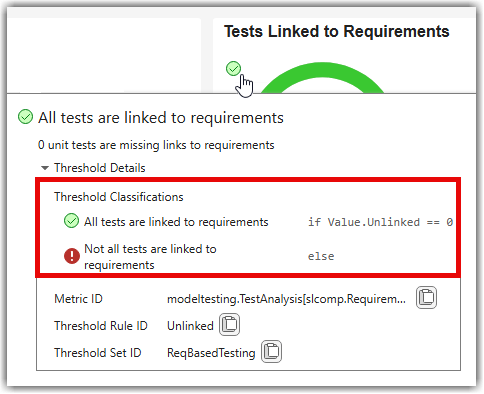
A metric.threshold.Classification object represents a single
compliance classification in a threshold rule. Threshold rules use classifications to
categorize the metric results in the Model Testing, SIL Code Testing, and PIL Code Testing
dashboards, as shown in Adjust Dashboard Thresholds to Match Your Testing Criteria.
Each classification specifies a:
Category— A compliance status, either:CompliantNonCompliantWarningUncategorized
Statement— A comparison statement that determines when this classification applies.Summary— A description of what the classification means for the metric result.
Creation
You do not create metric.threshold.Classification objects directly.
Instead, access classification objects from the Classifications
property of a metric.threshold.ThresholdRule object.
Properties
Compliance category of the classification, specified as one of these values:
Compliant— The metric result meets the threshold criteria.
NonCompliant— The metric result does not meet the threshold criteria.
Warning— The metric result needs review.
Uncategorized— The metric result does not match any defined classification criteria.
Comparison statement that determines when this classification applies, specified as
a string. The statement can use relational operators (==,
~=, >, <,
>=, <=), logical operators
(&&, ||, ~), and
arithmetic operators to compare metric result field values against expected values.
Function calls are not supported.
The classifications in a threshold rule evaluate in order. Each classification with
a nonempty Statement acts like an if or
else-if condition. The first classification whose statement
evaluates to true determines the compliance category. A
classification with an empty string ("") for the
Statement acts as the default else case and
must be the last classification in the threshold rule.
Example: "Value.Condition == 100"
Description of the classification outcome, specified as a string. The summary provides a human-readable explanation of what the classification means for the metric result.
Example: "No missing requirements-based condition
coverage"
Examples
Version History
Introduced in R2026b

