metric.threshold.ThresholdSet
R2026bDescription
A metric.threshold.ThresholdSet object represents a named
collection of threshold rules that define compliance overlays for metrics in the Model
Testing, SIL Code Testing, and PIL Code Testing dashboards. Threshold sets appear in the
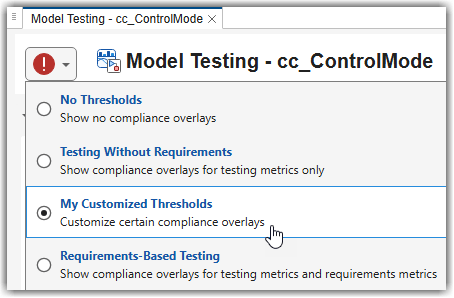
threshold settings in the top-left corner of the dashboards, where you can switch between them
to view compliance results under different criteria. To make custom thresholds appear in the
Model Testing, SIL Code Testing, and PIL Code Testing dashboards, copy and modify a shipping
threshold set, then save and register the configuration. For more information, see Adjust Dashboard Thresholds to Match Your Testing Criteria.
Creation
You do not create metric.threshold.ThresholdSet objects directly.
Instead, you can get a threshold set object by using one of these approaches:
Use the
getThresholdSetsfunction on ametric.Engineobject to get all threshold sets configured in the project.Access the ThresholdSets property of a
metric.config.Configurationobject.Use the
getThresholdSetmetric.config.Configurationobject to get a specific threshold set by ID.
Properties
Threshold set identifier, specified as a string. Use this identifier to reference
the threshold set when calling functions such as getThresholdSet or
when specifying the ThresholdSetId argument in getMetrics.
Example: "MyTestingThresholds"
Display name of the threshold set in the dashboards, specified as a string.
When you open the threshold settings from the top-left corner of the dashboard, the threshold set name appears as the selectable threshold set title.
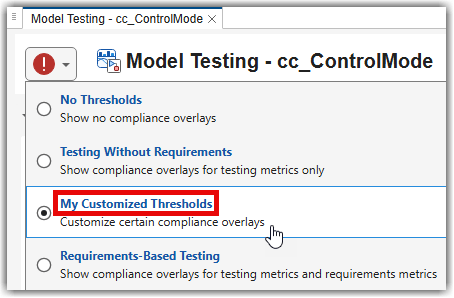
Example: "My Customized Thresholds"
Description of the threshold set, specified as a string.
When you open the threshold settings from the top-left corner of the dashboard, the threshold set description appears below the threshold set name.
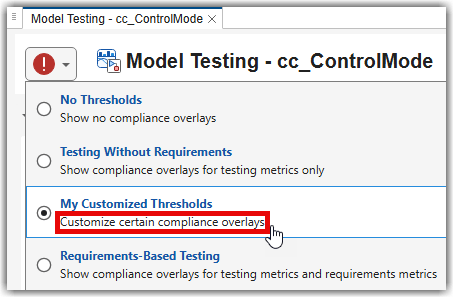
Example: "Customize certain compliance overlays"
Priority of the threshold set, specified as a numeric scalar. The priority determines the order in which threshold sets appear in the dashboards. Higher values indicate higher priority.
Example: 100
Examples
Version History
Introduced in R2026b

