Port and parameter mismatch
R2026b(To be removed) Diagnostic action to take when port or parameter does not match between Model block and referenced model
Model Configuration Pane: Diagnostics / Model Referencing
The Port and parameter mismatch configuration parameter will be removed in a future release. When the parameter is removed, Model block refreshes will not trigger diagnostics. For information on updating your code, see Version History.
Description
The Port and parameter mismatch configuration parameter determines the diagnostic action to take when loading or updating this model when a port or parameter does not match between a Model block and its referenced model.
Port mismatches occur when the input and output ports of a Model block do not match the root-level input and output ports of the model it references.
Parameter mismatches occur when the parameter arguments recognized by the Model block do not match the parameter arguments declared by the referenced model.
Set Configuration Parameter for Referenced Models
In a model reference hierarchy, whether you edit the parameter in the top model or the current referenced model depends on how you access the Configuration Parameters dialog box.
Top model in the current model hierarchy — In the Simulink® Toolstrip, on the Modeling tab, click Model Settings.
Current referenced model — In the Simulink Toolstrip, on the Modeling tab, click the Model Settings button arrow. Then, in the Referenced Model section, select Model Settings.
Alternatively, open the referenced model as a top model. Then, in the Simulink Toolstrip, on the Modeling tab, click Model Settings.
Settings
none (default) | warning | errornoneThe software refreshes the Model block.
warningThe software displays a warning and refreshes the Model block.
errorThe software displays an error message and does not refresh the Model block.
When you receive an error related to a Model block port or parameter mismatch, you can manually refresh the Model block. Select the Model block. Then, on the Model Block tab, select Refresh. Alternatively, use the
Simulink.ModelReference.refreshfunction.
Tips
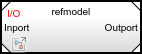
Model block icons can display text that indicates a port or parameter mismatch. To enable this feature, from the parent model, on the Debug tab, select Information Overlays > Ref Model I/O Mismatch.
Recommended Settings
| Application | Setting |
|---|---|
| Debugging | No impact |
| Traceability | No impact |
| Efficiency | No impact |
| Safety precaution | error |
Programmatic Use
Parameter:
ModelReferenceIOMismatchMessage |
Value:
'none' | 'warning' |
'error' |
Default:
'none' |

