strips
R2026bStrip plot
Description
Examples
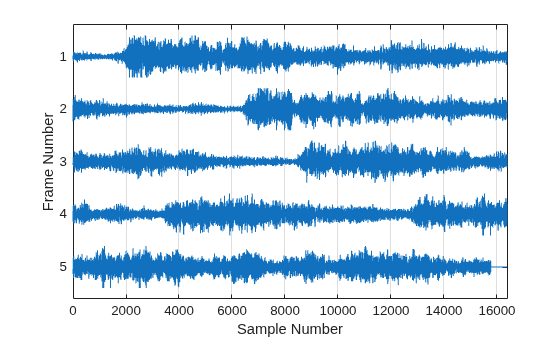
Partition a signal into frames. Strip plot all signal frames.
Load a data file with a 73113-sample signal y. Partition a signal into 16384-sample frames with a 2048-sample overlap and padding the last frame with zeros. Show all the frames in a strip plot.
load handel yfs = framesig(y,16384,OverlapLength=2048, ... IncompleteFrameRule="zeropad"); ns = size(yfs,2); strips(yfs) grid xlabel("Sample Number") ylabel("Frame Number") yticklabels(ns:-1:1)
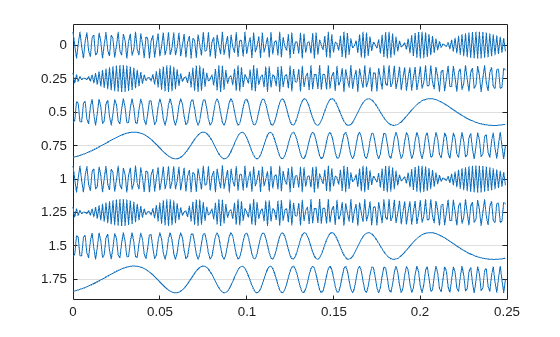
Plot two seconds of a frequency-modulated sinusoid in 0.25-second strips. Specify a sample rate of 1 kHz.
fs = 1000; t = 0:1/fs:2; x = vco(sin(2*pi*t),[10 490],fs); strips(x,0.25,fs)
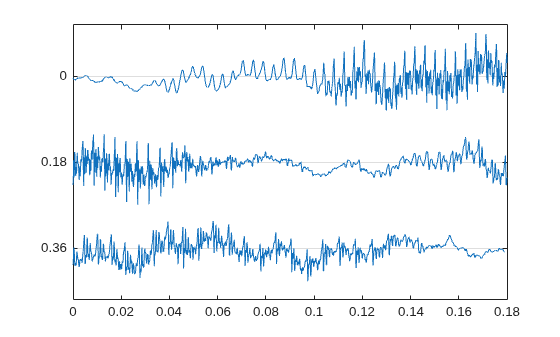
Load a speech signal sampled at . The file contains the recording of a female voice saying the word "MATLAB®."
load mtlbPlot the signal in 0.18-second long strips. Scale the vertical axes to 125%.
strips(mtlb,0.18,Fs,1.25)
Input Arguments
Input signal, specified as a vector or matrix.
If
xis an M-by-N matrix and you do not specify additional input arguments:The
stripsfunction plots each column ofxon a separate horizontal strip.The
stripsfunction labels the y-axis ticks as 0, M, ⋯, (N–1)M.
If
xis an M-by-N matrix and you specify additional input arguments, either by using thestrips(x,n)orstrips(x,sd,Fs)syntaxes:The
stripsfunction divides each column ofxinto L-sample segments, where L is eithernorceil(sd*Fs)samples. If L does not exactly divide M, then thestripsfunction assumes the remaining samples as part of the final strip.The
stripsfunction plots each segment ofxon a separate horizontal strip, overlaying all columns on the same strip.The
stripsfunction labels the y-axis ticks as 0, L, ⋯, (⌈M/L⌉–1)L.
Note
The function ignores the imaginary part of complex-valued
x.
Data Types: single | double
Complex Number Support: Yes
Length of strips, specified as a real positive scalar.
Sample rate in hertz, specified as a positive scalar.
Scale factor, specified as a scalar. The strips function
ignores the imaginary part of complex-valued scale.
Data Types: single | double
Complex Number Support: Yes
Version History
Introduced before R2006a
MATLAB Command
You clicked a link that corresponds to this MATLAB command:
Run the command by entering it in the MATLAB Command Window. Web browsers do not support MATLAB commands.
Website auswählen
Wählen Sie eine Website aus, um übersetzte Inhalte (sofern verfügbar) sowie lokale Veranstaltungen und Angebote anzuzeigen. Auf der Grundlage Ihres Standorts empfehlen wir Ihnen die folgende Auswahl: .
Sie können auch eine Website aus der folgenden Liste auswählen:
So erhalten Sie die bestmögliche Leistung auf der Website
Wählen Sie für die bestmögliche Website-Leistung die Website für China (auf Chinesisch oder Englisch). Andere landesspezifische Websites von MathWorks sind für Besuche von Ihrem Standort aus nicht optimiert.
Amerika
- América Latina (Español)
- Canada (English)
- United States (English)
Europa
- Belgium (English)
- Denmark (English)
- Deutschland (Deutsch)
- España (Español)
- Finland (English)
- France (Français)
- Ireland (English)
- Italia (Italiano)
- Luxembourg (English)
- Netherlands (English)
- Norway (English)
- Österreich (Deutsch)
- Portugal (English)
- Sweden (English)
- Switzerland
- United Kingdom (English)