Call Generated Code Using C Caller Blocks
R2026bThis example shows how to incorporate the generated C code by using MATLAB® Coder™ into a Simulink® model and then call the code from the Simulink model by using a C Caller block.
Generate C Code in MATLAB using MATLAB Coder
squeezenet_predict Entry-Point Function
The squeezenet_predict function uses the imagePretrainedNetwork (Deep Learning Toolbox) function to load a pretrained SqueezeNet network into a persistent dlnetwork object. On subsequent calls, the function reuses the object. The entry-point function creates a dlarray object. The input and output of the function are both single data type. For more information, see Code Generation for dlarray.
type squeezenet_predict.mfunction out = squeezenet_predict(in)
%#codegen
% Copyright 2025-2026 The MathWorks, Inc.
dlIn = dlarray(in,'SSC');
persistent dlnet;
if isempty(dlnet)
dlnet = imagePretrainedNetwork('squeezenet');
end
dlOut = predict(dlnet, dlIn);
out = extractdata(dlOut);
end
Create Code Configuration Object
Create a code configuration object, cfg, for a standalone executable. Set the target language to C and use the GenCodeOnly property to specify that the code generator only produces source code. This examples assumes an X86 processor architecture with AVX2 capabilities. Therefore, the InstructionSetExtension property is set to AVX2 to leverage vectorized instructions. This example generates multi-threaded code using the OpenMP library. Since non-finite inputs are not expected, disable non-finite numbers support, which can improve the performance of the generated code.
cfg = coder.config('exe');
cfg.TargetLang = 'C';
cfg.EnableOpenMP = true;
cfg.GenCodeOnly = true;
cfg.InstructionSetExtensions = 'AVX2';
cfg.SupportNonFinite = false;
Generate the C code
Generate C code for the squeezenet_predict function.
codegenDir = fullfile(pwd,'codegen_squeezenet');
codegen('squeezenet_predict', '-config', cfg, '-args', ones(227,227,3,1,'single'), '-d', codegenDir);
Code generation successful.
Call Generated Code From Simulink Model
Open the CallGeneratedCode model.
modelName = 'CallGeneratedCode';
open_system(modelName);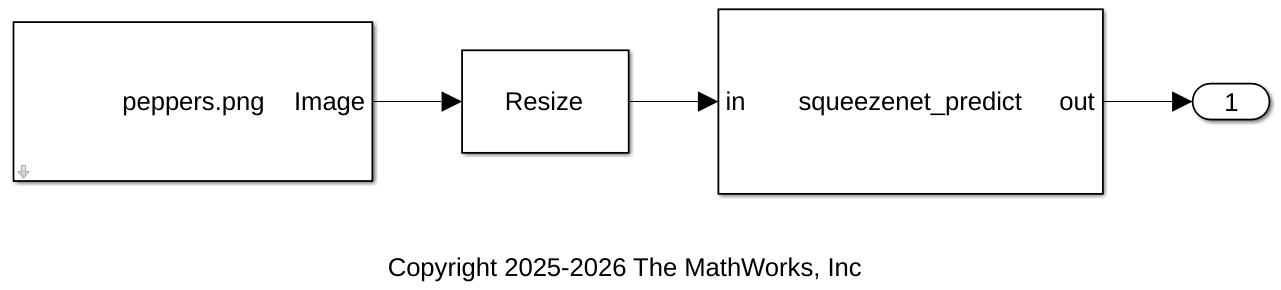
This model reads an input image by using the Image From File (Computer Vision Toolbox) block with the File name parameter set to peppers.png image and the Output data type parameter set to single. The model resizes the input image by using the Resize (Computer Vision Toolbox) block with these parameters:
Specify —
Number of output rows and columnsNumber of output rows and columns —
[227 227]Interpolation method —
Nearest neighbor
The model then calls the function squeezenet_predict using a C Caller block with the following parameters:
Function name —
squeezenet_predictDimension of
inport —[227 227 3]Scope of
outport —Output
Configure Model for Simulation
Specify source and header files to be imported to Simulink
Specify the required files and folders for compilation. The file paths are wrapped in quotation marks so that spaces are allowed in the specified paths.
function filePaths = getFilePaths(name)
listing = dir(name);
filePaths = join('"'+ string(fullfile({listing.folder}, {listing.name})) + '"', ' ');
end
Specify the header files.
headerFilePaths = getFilePaths(fullfile(codegenDir,'*.h'));
set_param(modelName, 'SimCustomHeaderCode', headerFilePaths);
Specify the source files.
sourceFilePaths = getFilePaths(fullfile(codegenDir,'*.c'));
set_param(modelName, 'SimUserSources', sourceFilePaths);
Set the include directory as the code generation folder.
set_param(modelName, 'SimUserIncludeDirs', '"' + string(codegenDir) + '"');
Specify the compiler and linker flags
Specify the compiler and linker flags to support the AVX2 instructions set and OpenMP depending on the platform.
function [compilerFlags, linkerFlags] = getCompilerAndLinkerFlags()
if ispc
    compilerFlags = '/arch:AVX2 /openmp';
    linkerFlags = '';
else
    compilerFlags = '-mavx2 -fopenmp';
    linkerFlags = '-fopenmp';
end
end
Set the compiler flags for the Simulink model
[compilerFlags, linkerFlags] = getCompilerAndLinkerFlags();
set_param(modelName, 'SimCustomCompilerFlags', compilerFlags);
set_param(modelName, 'SimCustomLinkerFlags', linkerFlags);
Simulate the model
Simulate the model using the sim command or by clicking the Run button.
out = sim(modelName);
See Also
C Caller | coder.config | coder.CodeConfig | coder.EmbeddedCodeConfig

