Hauptinhalt

slwebview

R2026b

Export Simulink model to web view

Description

slwebview opens the Web View dialog box in the Report Explorer.

filename = slwebview(sysname) exports the subsystem system_name and its child systems to the file filename. The model that contains the subsystem must be open.

example

filename = slwebview(folder) exports all models in the specified folder. See RecurseFolder to include models in subfolders.

filename = slwebview(sysname,Name=Value) provides additional options specified by one or more name-value arguments.

example

Examples

collapse all

Open the sldemo_fuelsys model.

openExample("sldemo_fuelsys")

Export the Engine Gas Dynamics subsystem and the system that contains it to a web view. Do not export the subsystems that it contains.

fuelsys_web_view = slwebview("sldemo_fuelsys/Engine Gas Dynamics", ...
    SearchScope="CurrentAndAbove")

Navigate to the Engine_Gas_Dynamics folder and open webview.html.
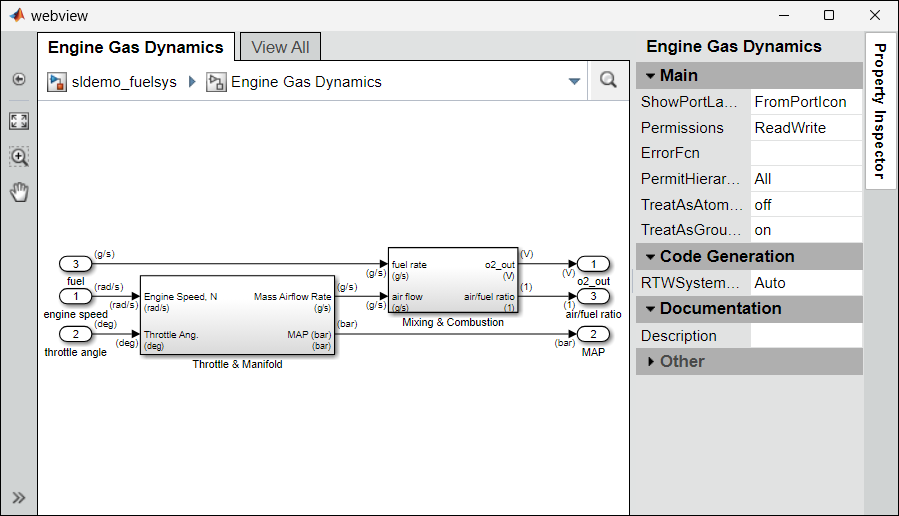
Web view showing the Engine Gas Dynamics subsystem.

For more information, see Display and Navigate Through Web Views.

Open the sldemo_fuelsys model.

openExample("sldemo_fuelsys")

Export the model to a web view. Include the model references in the export.

fuelsys_web_view = slwebview("sldemo_fuelsys", ...
    FollowModelReference=true)

Navigate to the sldemo_fuelsys folder and open webview.html. For more information, see Display and Navigate Through Web Views.

Click the fuel_rate_control block to see the block properties. Double-click the block to display the referenced model.
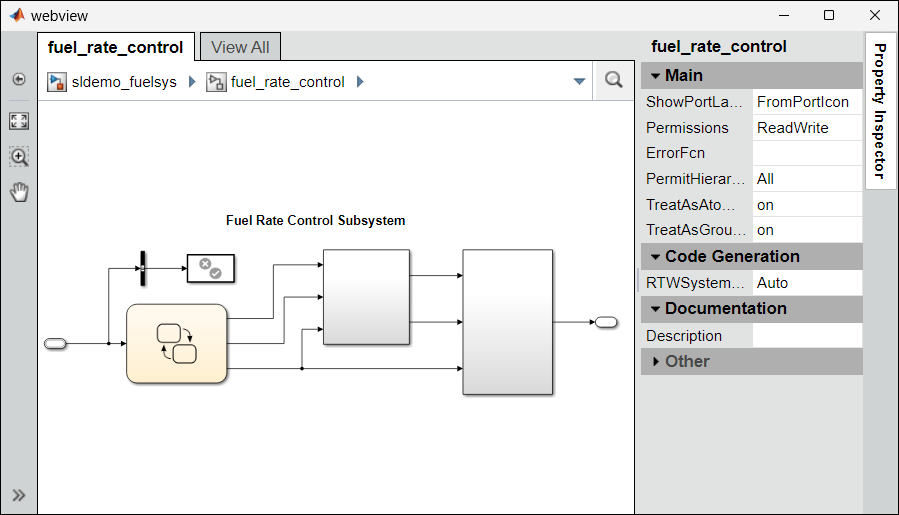
Web view showing the sldemo_fuelsys model.

Input Arguments

collapse all

System to export to the web view file, specified as a character vector or string scalar that contains the path to the system or a handle to a subsystem, block diagram, chart, or subchart. By default, the function also exports the child systems of the sysname system. Use the SearchScope name-value argument to specify which other systems to export relative to sysname.

Example: "sysname"

Path to the file folder that contains one or more models file, specified as a character vector or string scalar. The function exports all the models in the folder.

Data Types: char | string

Name-Value Arguments

collapse all

Specify optional pairs of arguments as Name1=Value1,...,NameN=ValueN, where Name is the argument name and Value is the corresponding value. Name-value arguments must appear after other arguments, but the order of the pairs does not matter.

Before R2021a, use commas to separate each name and value, and enclose Name in quotes.

Example: htmlFileName = slwebview(gcs,LookUnderMasks="all",... FollowLinks=true) Exports all layers of the model hierarchy that contain the current system to a web view, including masked block contents and library links.

Systems to export relative to the sysname system, specified as one of these values:

  • "CurrentAndBelow" — Exports the Simulink® system or the Stateflow® chart specified by sysname and the systems or charts that it contains.

  • "Current" — Exports only the Simulink system or the Stateflow chart specified by sysname.

  • "CurrentAndAbove" — Exports the Simulink system or the Stateflow chart specified by the sysname and the systems or charts that contain it.

  • "All" — Exports all Simulink systems or Stateflow charts in the model that contains the system or chart specified by sysname.

Data Types: char | string

Since R2026b

Whether to treat the specified system as the top-level root in the exported web view, specified as true (1) or false (0). You can also specify "on" (equivalent to true) or "off" (equivalent to false). When you specify:

  • true — The function treats the specified system as the top-level root. The generated web view does not include the ancestor subsystems or placeholders for the systems that were not exported.

  • false — The function includes ancestor systems in the web view.

To use this argument, set SearchScope to "CurrentAndBelow".

Data Types: logical

Whether to export masked blocks, specified as one of these values:

  • "none" — The function does not export masked blocks to the web view. The web view includes the masked blocks in the exported subsystems, but does not include the contents of the masked blocks.

  • "all" — The function exports the contents of all masked blocks.

Data Types: char | string

Whether to export referenced models, specified as true (1) or false (0). You can also specify "on" (equivalent to true) or "off" (equivalent to false). When you specify:

  • true — The function exports referenced models to the web view.

  • false — The function does not export the referenced models to the web view. The exported systems include the model reference block, but you cannot open the referenced model.

Data Types: logical

Since R2024b

Whether to export referenced subsystems, specified as true (1) or false (0). You can also specify "on" (equivalent to true) or "off" (equivalent to false). When you specify:

  • true — The function exports the referenced subsystems to the web view.

  • false — The function does not export referenced subsystems to the web view.

Data Types: logical

Whether to export models in subfolders, specified as true (1) or false (0). You can also specify "on" (equivalent to true) or "off" (equivalent to false). When you specify:

  • true — The function exports models in the top-level folder and subfolders.

  • false — The function exports models only in the top-level folder.

This argument applies only if you specify folder as an input argument.

Data Types: logical

Whether to include behavior components defined in architecture models, specified as true (1) or false (0). You can also specify "on" (equivalent to true) or "off" (equivalent to false). When you specify:

  • true — The generated web view contains behavior components.

  • false — The generated web view does not contain behavior components.

Data Types: logical

Whether to include user notes, specified as true (1) or false (0). You can also specify "on" (equivalent to true) or "off" (equivalent to false). When you specify:

  • true — The generated web view includes user notes.

  • false — The generated web view does not include user notes.

Data Types: logical

Whether to export the MATLAB functions in MATLAB Function blocks or Stateflow charts, specified as true (1) or false (0). You can also specify "on" (equivalent to true) or "off" (equivalent to false). When you specify:

  • true — The function exports supporting MATLAB functions and Stateflow charts to the web view.

  • false — The function does not export supporting MATLAB functions and Stateflow charts to the web view.

Data Types: logical

Since R2026a

Variant subsystems to export to the web view, specified as one of these values:

ValueDescription
"All"The function exports subsystems in all variants
"Active"The function exports subsystems in active variants
"ActivePlusCode"

The function exports subsystems in:

  • Active variants

  • Code variants

  • variants with a startup activation time (since R2026b)

Data Types: char | string

Since R2026b

Whether to include the View All navigation tab with diagram thumbnails, specified as true (1) or false (0). You can also specify "on" (equivalent to true) or "off" (equivalent to false). When you specify:

  • true — The generated web view includes the View All tab and diagram thumbnails.

  • false — The generated web view does not include the View All tab or diagram thumbnails.

Data Types: logical

Since R2026b

Whether to include the Property Inspector in the web view, specified as true (1) or false (0). You can also specify "on" (equivalent to true) or "off" (equivalent to false). When you specify:

  • true — The generated web view includes the Property Inspector.

  • false — The generated web view does not include the Property Inspector.

Data Types: logical

Optional views to include in the web view, specified as a cell array that contains one or both of these values:

  • "requirements"

  • "coverage"

When you include the "requirements" option, the web view includes requirements and link data for the links in the model. You can then highlight model elements that have requirement links.

See Include Model Requirements and Coverage Data in Web Views.

Data Types: cell

Name of the web view output package, specified as a character vector or string scalar. The default value of PackageName is the model name.

Data Types: char | string

Path in which to export the web view package, specified as a character vector or string scalar. To save the generated web view package in the same folder as the model, set PackageFolder to $model. The default value of PackageFolder is the current working folder.

Data Types: char | string

File type of the web view package, specified as one of these values. All three values produce output with the same content:

  • "both" — The function creates both a ZIP file with a .zip extension and a folder of unzipped files.

  • "zipped" — The function creates a ZIP file with a .zip extension.

  • "unzipped" — The function creates a folder of files.

Data Types: char | string

Whether to display the web view in a web browser after you export the web view, specified as true (1) or false (0). You can also specify "on" (equivalent to true) or "off" (equivalent to false). When you specify:

  • true — The function displays the web view in a web browser when you export the web view.

  • false — The function does not display the web view in a web browser when you export the web view.

Data Types: logical

Whether to export the model incrementally, specified as true (1) or false (0). You can also specify "on" (equivalent to true) or "off" (equivalent to false). When you specify:

  • true — The function reuses cached web views for the top-level model that have no changes since the last usage of slwebview.

    If FollowModelReference or FollowSubsystemReference is also set to true, the function also reuses cached web views for referenced models or subsystems that have no changes since the last usage of slwebview.

  • false — The function generates the web view when you run the function.

The function only regenerates web views when the model has unsaved structural changes. For example, the function regenerates the web view if you rename a block or change a block parameter, but not if you modify a tunable variable in the base workspace. To force a web view to regenerate, set this name-value argument to false or delete the simulation cache file of the model in the current simulation cache folder.

Tip

slwebview caches web views in the current simulation cache folder. To reuse existing web views, specify a simulation cache folder for web view export. For details on setting the simulation cache folder, see Control Location of Simulation Targets.

Data Types: logical

Since R2026b

Whether to display a graphical progress bar during export, specified as true (1) or false (0). You can also specify "on" (equivalent to true) or "off" (equivalent to false). When you specify:

  • true — The function displays a graphical progress bar during export.

  • false — The function does not display a graphical progress bar during export.

Data Types: logical

Since R2026b

Whether to display progress messages during export, specified as one of these values:

  • true — The function displays progress messages during export. The Verbosity name-value argument determines the level of detail in the messages.

  • false — The function does not display progress messages during export, regardless of the Verbosity setting.

Data Types: logical

Since R2026b

Level of output detail during export, specified as one of these values:

  • "silent" — The function does not display any progress messages during export.

  • "normal" — The function displays information about the export phases.

  • "detailed" — The function outputs information about export phases and diagram names during the export process.

  • "debug" — The function outputs information about the export phases, diagram names, and internal diagnostics during the export process.

Note

The Verbosity setting has no effect when you set Verbose to false.

Data Types: char | string

Output Arguments

collapse all

Name of the web view file, returned as a character vector or string scalar. For a ZIP output, filename is the path to the .zip file. For an unzipped folder, filename is the path to the webview.html entry-point file.

Tips

  • A web view is an interactive rendition of a model that you can view in a web browser. You can navigate a web view hierarchically to examine specific subsystems and to see properties of blocks and signals. You can use web views to share models with people who do not have Simulink installed. For more information, see Create and Use Web Views of Models.

  • To generate a web view when running MATLAB with the -batch startup option on Linux® machines:

    1. Create a Linux shell file.

    2. In the shell file, store the commands that open the model and generate the web view in a variable. You can enter multiple semicolon-separated commands.

    3. In the shell file, use xvfb-run to run MATLAB with the -batch startup option and execute the commands. For more information about xvfb-run, see xvfb-run on the Ubuntu website.

    4. Save the shell file to a folder on the MATLAB path.

    5. In a Linux terminal, navigate to the folder that contains the shell file.

    6. Execute the shell file.

    This example code defines a Linux Bash shell that executes slwebview for the model myModel.

    #!/bin/bash
    
    MATLAB_COMMANDS="open_system("myModel.slx"); 
    slwebview("myModel.slx");"
    xvfb-run matlab -batch "$MATLAB_COMMANDS exit;"

  • To create a web view that lists all requirements and links data in a separate pane, use the slwebview_req (Requirements Toolbox) function.

Version History

Introduced in R2006a

expand all