pattern
R2026bSyntax
Description
pattern(
plots the 3-D array directivity pattern (in dBi) for the array specified in
arraymanifold,FREQ)arraymanifold. The operating frequency is specified in
FREQ. You can use this function to display the patterns of arrays that
support polarization.
pattern(
plots the array directivity pattern at the specified azimuth angle.arraymanifold,FREQ,AZ)
pattern(
plots the array directivity pattern at specified azimuth and elevation angles.arraymanifold,FREQ,AZ,EL)
pattern(___, plots the
array pattern with additional options specified by one or more Name=Value)Name=Value
pair arguments.
[
returns the array pattern in PAT,AZ_ANG,EL_ANG] = pattern(___)PAT. The AZ_ANG output
contains the coordinate values corresponding to the rows of PAT. The
EL_ANG output contains the coordinate values corresponding to the columns
of PAT. If the CoordinateSystem parameter is set to
"uv", then AZ_ANG contains the U
coordinates of the pattern and EL_ANG contains the V
coordinates of the pattern. UV units are dimensionless. Otherwise, they are
in angular units in degrees.
Examples
Create a phased.ArrayManifold System object™ and evaluate the manifold values in multiple directions.
First, set up the azimuth angle, elevation angle, and frequency grids.
az = -180:10:180; el = -90:10:90; fc = [0 1e9 2e9]; manval = complex(ones(numel(az),numel(el),numel(fc),8));
Create the array manifold.
man1 = phased.ArrayManifold(manval,az,el,fc);
Evaluate the manifold at two frequencies and two directions.
M1 = man1([0 1e9],[30 40; 0 10])
M1 =
M1(:,:,1) =
1 1
1 1
1 1
1 1
1 1
1 1
1 1
1 1
M1(:,:,2) =
1 1
1 1
1 1
1 1
1 1
1 1
1 1
1 1
Create a second frequency-invariant manifold.
man2 = phased.ArrayManifold( ...
manval(:,:,1,:),az,el,[]);Frequency query values are ignored for frequency-invariant data.
M2 = man2([0 1e9 2e9],[0;0]);
Use the directivity object function to compute the directivity of the second manifold at az=-90 degrees and el=10 degrees.
[az(10),el(11)]
ans = 1×2
-90 10
directivity(man2,fc(2),[az(10);el(11)])
ans = 1.1025e-04
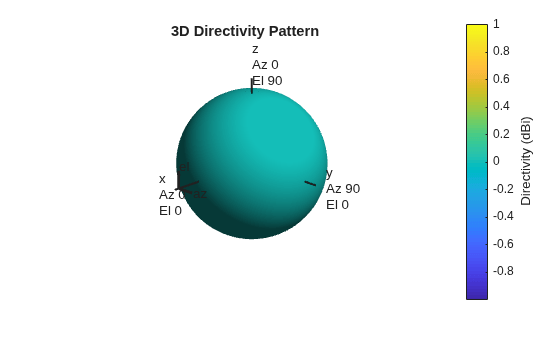
Using the pattern object function, plot the directivity pattern of the array manifold.
pattern(man2,fc(2))
Input Arguments
Phased array manifold, specified as a phased.ArrayManifold
System object.
Frequencies for computing directivity and patterns, specified as a positive scalar or 1-by-L real-valued row vector. Frequency units are in Hz.
Example: [1e8 2e6]
Data Types: double
Azimuth angles for computing directivity and pattern, specified as a 1-by-N real-valued row vector where N is the number of azimuth angles. Angle units are in degrees. Azimuth angles must lie between –180° and 180°.
The azimuth angle is the angle between the x-axis and the projection of the direction vector onto the xy plane. When measured from the x-axis toward the y-axis, this angle is positive.
Example: [-45:2:45]
Data Types: double
Elevation angles for computing directivity and pattern, specified as a 1-by-M real-valued row vector where M is the number of desired elevation directions. Angle units are in degrees. The elevation angle must lie between –90° and 90°.
The elevation angle is the angle between the direction vector and xy-plane. The elevation angle is positive when measured towards the z-axis.
Example: [-75:1:70]
Data Types: double
Name-Value Arguments
Specify optional pairs of arguments as
Name1=Value1,...,NameN=ValueN, where Name is
the argument name and Value is the corresponding value.
Name-value arguments must appear after other arguments, but the order of the
pairs does not matter.
Example: CoordinateSystem="polar",Type="directivity"
Plotting coordinate system of the pattern, specified as the equal sign separated pair
consisting of CoordinateSystem and one of "polar",
"rectangular", or "uv". When
CoordinateSystem is set to "polar" or
"rectangular", the AZ and
EL arguments specify the pattern azimuth and elevation,
respectively. AZ values must lie between –180° and 180°.
EL values must lie between –90° and 90°. If
CoordinateSystem is set to "uv",
AZ and EL then specify
U and V coordinates, respectively.
AZ and EL must lie between -1 and
1.
Example: "uv"
Data Types: char
Displayed pattern type, specified as the equal-sign-separated pair consisting of
Type and one of
"directivity"— directivity pattern measured in dBi."efield"— field pattern of the sensor or array. For acoustic sensors, the displayed pattern is for the scalar sound field."power"— power pattern of the sensor or array defined as the square of the field pattern."powerdb"— power pattern converted to dB.
Example: "powerdb"
Data Types: char
Display normalized pattern, specified as the equal sign separated pair consisting of
Normalize and a Boolean. Set this parameter to
true to display a normalized pattern. This parameter does not
apply when you set Type to "directivity".
Directivity patterns are already normalized.
Data Types: logical
Array weights, specified as the equal sign separated pair consisting of
"Weights" and an N-by-1 complex-valued column
vector or N-by-L complex-valued matrix. Array
weights are applied to the elements of the array to produce array steering, tapering, or
both. The dimension N is the number of elements in the array. The
dimension L is the number of frequencies specified by
FREQ.
| Weights Dimension | FREQ Dimension | Purpose |
|---|---|---|
| N-by-1 complex-valued column vector | Scalar or 1-by-L row vector | Applies a set of weights for the single frequency or for all L frequencies. |
| N-by-L complex-valued matrix | 1-by-L row vector | Applies each of the L columns of "Weights" for the
corresponding frequency in FREQ. |
Note
Use complex weights to steer the array response toward different
directions. You can create weights using the phased.SteeringVector System object or
you can compute your own weights. In general, you apply Hermitian
conjugation before using weights in any Phased Array System Toolbox™ function
or System object such as phased.Radiator or phased.Collector. However, for the directivity, pattern, patternAzimuth,
and patternElevation methods of any array System object use
the steering vector without conjugation.
Example: Weights=ones(N,M)
Data Types: double
Complex Number Support: Yes
Output Arguments
More About
Directivity describes the directionality of the radiation pattern of a sensor element or array of sensor elements.
Higher directivity is desired when you want to transmit more radiation in a specific direction. Directivity is the ratio of the transmitted radiant intensity in a specified direction to the radiant intensity transmitted by an isotropic radiator with the same total transmitted power
where Urad(θ,φ) is the radiant intensity of a transmitter in the direction (θ,φ) and Ptotal is the total power transmitted by an isotropic radiator. For a receiving element or array, directivity measures the sensitivity toward radiation arriving from a specific direction. The principle of reciprocity shows that the directivity of an element or array used for reception equals the directivity of the same element or array used for transmission. When converted to decibels, the directivity is denoted as dBi. For information on directivity, read the notes on Element Directivity and Array Directivity.
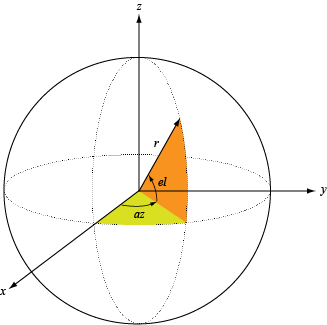
Define the azimuth and elevation conventions used in the toolbox.
The azimuth angle of a vector is the angle between the x-axis and its orthogonal projection onto the xy-plane. The angle is positive when going from the x-axis toward the y-axis. Azimuth angles lie between –180° and 180° degrees, inclusive. The elevation angle is the angle between the vector and its orthogonal projection onto the xy-plane. The angle is positive when going toward the positive z-axis from the xy-plane. Elevation angles lie between –90° and 90° degrees, inclusive.
Version History
Introduced in R2026b
MATLAB Command
You clicked a link that corresponds to this MATLAB command:
Run the command by entering it in the MATLAB Command Window. Web browsers do not support MATLAB commands.
Website auswählen
Wählen Sie eine Website aus, um übersetzte Inhalte (sofern verfügbar) sowie lokale Veranstaltungen und Angebote anzuzeigen. Auf der Grundlage Ihres Standorts empfehlen wir Ihnen die folgende Auswahl: .
Sie können auch eine Website aus der folgenden Liste auswählen:
So erhalten Sie die bestmögliche Leistung auf der Website
Wählen Sie für die bestmögliche Website-Leistung die Website für China (auf Chinesisch oder Englisch). Andere landesspezifische Websites von MathWorks sind für Besuche von Ihrem Standort aus nicht optimiert.
Amerika
- América Latina (Español)
- Canada (English)
- United States (English)
Europa
- Belgium (English)
- Denmark (English)
- Deutschland (Deutsch)
- España (Español)
- Finland (English)
- France (Français)
- Ireland (English)
- Italia (Italiano)
- Luxembourg (English)
- Netherlands (English)
- Norway (English)
- Österreich (Deutsch)
- Portugal (English)
- Sweden (English)
- Switzerland
- United Kingdom (English)