findThermalProperties
(To be removed) Find thermal material properties assigned to a geometric region
findThermalProperties will be removed. Use the MaterialProperties property of femodel
instead. (since R2023a) For more information on updating your code, see Version History.
Description
returns thermal material properties tmpa = findThermalProperties(materialProperties,RegionType,RegionID)tmpa assigned to the
specified region.
Examples
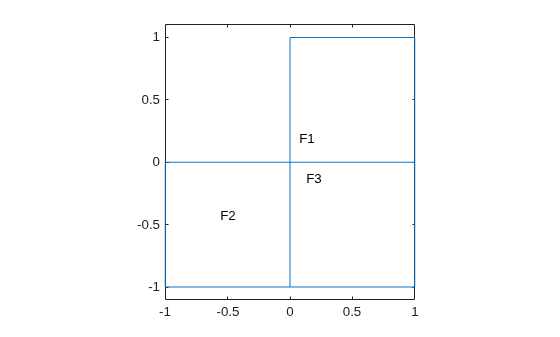
Create a transient thermal model that has three faces.
thermalmodel = createpde("thermal","transient"); geometryFromEdges(thermalmodel,@lshapeg); pdegplot(thermalmodel,"FaceLabels","on") ylim([-1.1,1.1]) axis equal

For face 1, specify the following thermal properties:
Thermal conductivity is
Mass density is
Specific heat is
thermalProperties(thermalmodel,"ThermalConductivity",10,... "MassDensity",1,... "SpecificHeat",0.1,... "Face",1);
For face 2, specify the following thermal properties:
Thermal conductivity is
Mass density is
Specific heat is
thermalProperties(thermalmodel,"ThermalConductivity",20,... "MassDensity",2,... "SpecificHeat",0.2,... "Face",2);
For face 3, specify the following thermal properties:
Thermal conductivity is )
Mass density is
Specific heat is
thermalProperties(thermalmodel,"ThermalConductivity",30,... "MassDensity",3,... "SpecificHeat",0.3,... "Face",3);
Check the material properties specification for face 1.
mpaFace1 = findThermalProperties(thermalmodel.MaterialProperties, ... "Face",1)
mpaFace1 =
ThermalMaterialAssignment with properties:
RegionType: 'face'
RegionID: 1
ThermalConductivity: 10
MassDensity: 1
SpecificHeat: 0.1000
Check the heat source specification for faces 2 and 3.
mpa = findThermalProperties(thermalmodel.MaterialProperties, ... "Face",[2,3]); mpaFace2 = mpa(1)
mpaFace2 =
ThermalMaterialAssignment with properties:
RegionType: 'face'
RegionID: 2
ThermalConductivity: 20
MassDensity: 2
SpecificHeat: 0.2000
mpaFace3 = mpa(2)
mpaFace3 =
ThermalMaterialAssignment with properties:
RegionType: 'face'
RegionID: 3
ThermalConductivity: 30
MassDensity: 3
SpecificHeat: 0.3000
Input Arguments
Material properties of the model, specified as the
MaterialProperties property of a thermal
model.
Example: thermalmodel.MaterialProperties
Geometric region type, specified as "Face" or
"Cell".
Example: findThermalProperties(thermalmodel.MaterialProperties,"Cell",1)
Data Types: char | string
Geometric region ID, specified as a vector of positive integers. Find the
region IDs by using pdegplot.
Example: findThermalProperties(thermalmodel.MaterialProperties,"Face",1:3)
Data Types: double
Output Arguments
Material properties assignment, returned as a
ThermalMaterialAssignment object. See ThermalMaterialAssignment Properties.
Version History
Introduced in R2017afindThermalProperties will be removed. Use the
MaterialProperties property of femodel
instead.
For example, you can check the material properties specification for the three faces of the 2-D geometry as follows.
model = femodel(AnalysisType="thermalTransient", ... Geometry=@lshapeg); model.MaterialProperties(1) = ... materialProperties(ThermalConductivity=10, ... MassDensity=1, ... SpecificHeat=0.1); model.MaterialProperties(2) = ... materialProperties(ThermalConductivity=20, ... MassDensity=2, ... SpecificHeat=0.2); model.MaterialProperties(3) = ... materialProperties(ThermalConductivity=30, ... MassDensity=3, ... SpecificHeat=0.3); model.MaterialProperties
The unified finite element model workflow defines the type of a problem and all of
its parameters as the properties of an femodel object. This
object enables you to specify physical parameters for structural, thermal, and
electromagnetic types of analyses. The solver in the unified workflow uses only the
parameters (properties) appropriate for the current analysis type while ignoring all
other properties. If you switch the analysis type by setting the
AnalysisType property of the model, the solver uses the
appropriate set of properties corresponding to the new analysis type.
For more help migrating your existing code that uses
ThermalModel to the unified finite element workflow, see
Migration from Domain-Specific to Unified Workflow.
MATLAB Command
You clicked a link that corresponds to this MATLAB command:
Run the command by entering it in the MATLAB Command Window. Web browsers do not support MATLAB commands.
Website auswählen
Wählen Sie eine Website aus, um übersetzte Inhalte (sofern verfügbar) sowie lokale Veranstaltungen und Angebote anzuzeigen. Auf der Grundlage Ihres Standorts empfehlen wir Ihnen die folgende Auswahl: .
Sie können auch eine Website aus der folgenden Liste auswählen:
So erhalten Sie die bestmögliche Leistung auf der Website
Wählen Sie für die bestmögliche Website-Leistung die Website für China (auf Chinesisch oder Englisch). Andere landesspezifische Websites von MathWorks sind für Besuche von Ihrem Standort aus nicht optimiert.
Amerika
- América Latina (Español)
- Canada (English)
- United States (English)
Europa
- Belgium (English)
- Denmark (English)
- Deutschland (Deutsch)
- España (Español)
- Finland (English)
- France (Français)
- Ireland (English)
- Italia (Italiano)
- Luxembourg (English)
- Netherlands (English)
- Norway (English)
- Österreich (Deutsch)
- Portugal (English)
- Sweden (English)
- Switzerland
- United Kingdom (English)