pointLocation
R2026bTriangle or tetrahedron enclosing point
Syntax
Description
Examples
Find the triangles of a triangulation that enclose a set of query points.
Define the points and connectivity of a triangulation.
TP = [2.5 8.0;
      6.5 8.0;
      2.5 5.0;
      6.5 5.0;
      1.0 6.5;
      8.0 6.5];
C = [5 3 1;
     3 2 1;
     3 4 2;
     4 6 2];
TR = triangulation(C,TP);
Define two query points.
P = [2.25 7; 6 6.5];
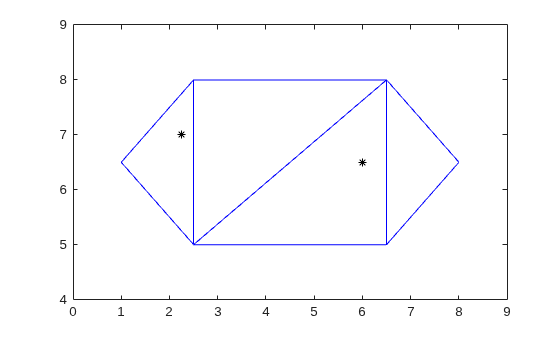
Plot the triangulation and the query points.
triplot(TR)
hold on
plot(P(:,1),P(:,2),"k*")
ylim([4 9])
xlim([0 9])
Determine the IDs of the triangles that enclose each query point.
ID = pointLocation(TR,P)
ID = 2×1

     1
     3
Highlight the triangles that enclose the query points in red.
triplot(TR.ConnectivityList(ID,:),TP(:,1),TP(:,2),"r")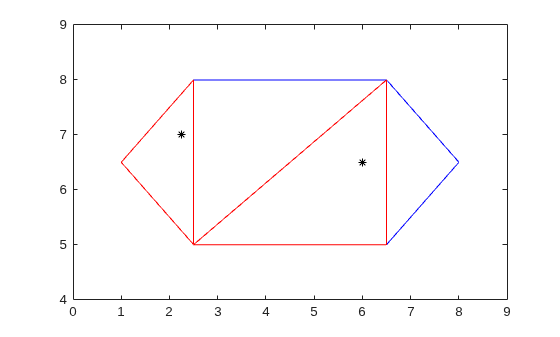
Find the tetrahedra of a 3-D triangulation that enclose a set of query points.
Create a Delaunay triangulation from a set of 3-D points.
rng default
x = rand([20 1]);
y = rand([20 1]);
z = rand([20 1]);
TR = delaunayTriangulation(x,y,z);
Find the IDs of the tetrahedra that enclose the query points, and compute the barycentric coordinates of the query points.
P = [0.7 0.6 0.3;
     0.5 0.5 0.5];
[ID,B] = pointLocation(TR,P)
ID = 2×1
9
8
B = 2×4

    0.2046    0.0893    0.5721    0.1340
    0.1900    0.1495    0.6422    0.0183
Determine which query points are located on edges and vertices of the triangles of a 2-D triangulation.
Define the points and connectivity of a triangulation.
TP = [2.5 8.0;
      6.5 8.0;
      2.5 5.0;
      6.5 5.0;
      1.0 6.5;
      8.0 6.5];
C = [5 3 1;
     3 2 1;
     3 4 2;
     4 6 2];
TR = triangulation(C,TP);
Define the query points.
P = [2.25 7;
    6 6.5;
    2.5 8.0;
    4.5 5.0;
    8 6.5
    7.5 7.5];
Find the barycentric coordinates of each query point with respect to its enclosing triangle. For points outside the triangulation, pointLocation returns NaN.
[~,B] = pointLocation(TR,P)
B = 6×3

    0.1667    0.2500    0.5833
    0.1250    0.3750    0.5000
         0         0    1.0000
    0.5000    0.5000         0
         0    1.0000         0
       NaN       NaN       NaN
Use the barycentric coordinates to determine if a query point lies on a vertex, on an edge, in a triangle, or outside the triangulation. If a query point is located on a vertex, one of its barycentric coordinates is 1 and the other coordinates are 0. If a query point is located on an edge but does not coincide with a vertex, one of its barycentric coordinates is 0 and none of the other coordinates is 1. For query points outside of the triangulation, the barycentric coordinates are NaN.
M = size(B,1);
loc = cell(M,2);
tol = 1e-10;

for i = 1:M
    b = B(i,:);
    loc{i,1} = P(i,1:2);
    if ismembertol(1,b,tol)
        loc{i,2} = "Vertex";
    elseif ismembertol(0,b,tol)
        loc{i,2} = "Edge";
    elseif isnan(B(i))
        loc{i,2} = "Outside";
    else
        loc{i,2} = "Triangle";
    end
end
loc
loc = 6×2 cell array
    {[     2.2500 7]}    {["Triangle"]}
    {[     6 6.5000]}    {["Triangle"]}
    {[     2.5000 8]}    {["Vertex"  ]}
    {[     4.5000 5]}    {["Edge"    ]}
    {[     8 6.5000]}    {["Vertex"  ]}
    {[7.5000 7.5000]}    {["Outside" ]}
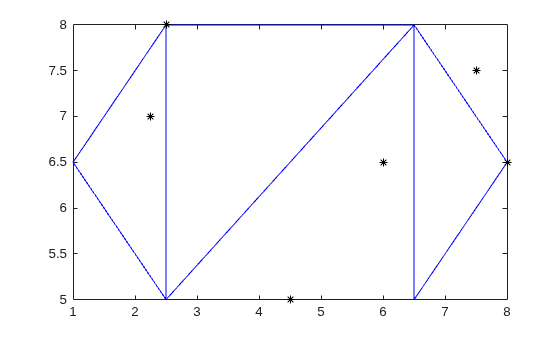
Plot the triangulation and the query points.
triplot(TR)
hold on
plot(P(:,1),P(:,2),'k*')