imextendedmax
R2026bExtended-maxima transform
Description
BW = imextendedmax(I,H)I, which
is the regional maxima of the H-maxima transform.
Regional maxima are connected components of pixels with a constant intensity value, and whose external boundary pixels all have a lower value. The H-maxima transform suppresses all regional maxima with a height less than or equal to
H.The extended-maxima transform, which is the regional maxima of the H-maxima transform, identifies regional maxima with a height greater than
H.
Use the extended-maxima transform to detect bright regions in an image while ignoring small intensity variations.
Examples
Read an image into the workspace.
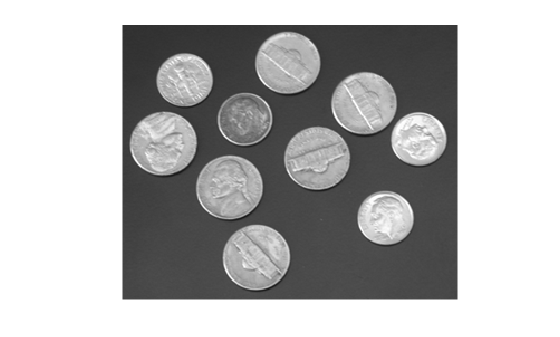
I = imread("coins.png");Visualize the image. Observe that the coins in the image represent regions that are significantly brighter than their surroundings.
figure
imshow(I)
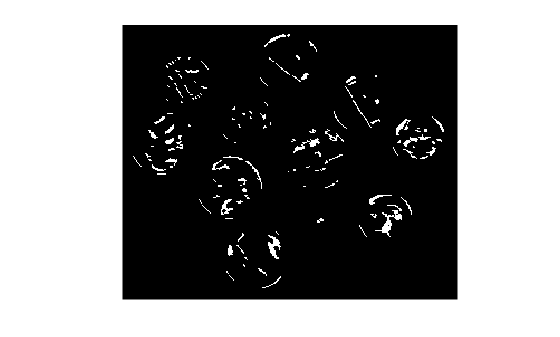
Calculate the extended-maxima transform with a low value for H, the value that indicates the minimum height of regional maxima.
H = 20;
BWlow = imextendedmax(I,H);
Visualize the transformed image. Observe that the transform detects insignificant variations because the specified minimum height of regional maxima is low.
figure
imshow(BWlow)
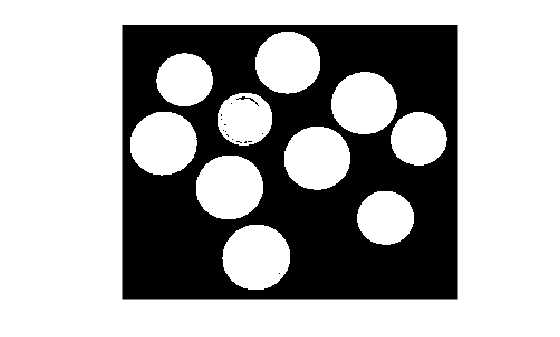
Calculate the extended-maxima transform with a high value for H.
H = 150;
BWhigh = imextendedmax(I,H);
Visualize the transformed image. Observe that the transform ignores small intensity variations and detects entire regions that are significantly brighter than their surroundings because the specified minimum height of regional maxima is high.
figure
imshow(BWhigh)
Input Arguments
Input image, specified as a numeric array of any dimension.
Data Types: single | double | int8 | int16 | int32 | int64 | uint8 | uint16 | uint32 | uint64
Minimum height of regional maxima, specified as a nonnegative scalar.
Specify a large value for H to identify only those
regions in the image that are significantly brighter than their
surroundings.
Example: 80
Data Types: single | double | int8 | int16 | int32 | int64 | uint8 | uint16 | uint32 | uint64
Pixel connectivity, specified as one of the values in this table. The
default connectivity is 8 for 2-D images, and
26 for 3-D images.
Value | Meaning | |
|---|---|---|
Two-Dimensional Connectivities | ||
| Pixels are connected if their edges touch. The neighborhood of a pixel are the adjacent pixels in the horizontal or vertical direction. |
Current pixel is shown in gray. |
| Pixels are connected if their edges or corners touch. The neighborhood of a pixel are the adjacent pixels in the horizontal, vertical, or diagonal direction. |
Current pixel is shown in gray. |
Three-Dimensional Connectivities | ||
| Pixels are connected if their faces touch. The neighborhood of a pixel are the adjacent pixels in:
|
Current pixel is shown in gray. |
| Pixels are connected if their faces or edges touch. The neighborhood of a pixel are the adjacent pixels in:
|
Current pixel is center of cube. |
| Pixels are connected if their faces, edges, or corners touch. The neighborhood of a pixel are the adjacent pixels in:
|
Current pixel is center of cube. |


For higher dimensions, imextendedmax uses the default
value conndef(ndims(I),"maximal")
Data Types: single | double | int8 | int16 | int32 | int64 | uint8 | uint16 | uint32 | uint64
Output Arguments
References
[1] Soille, P. Morphological Image Analysis: Principles and Applications. Springer-Verlag, 1999, pp. 170-171.
Extended Capabilities
Version History
Introduced before R2006a
See Also
conndef | imextendedmin | imhmax | imreconstruct | imregionalmax

